
 Felix Laurent

Qwen-Audio-3.1 is Alibaba Qwen's family of speech models for transcription, speech synthesis and live voice conversation. It is available only through the API on Qwen Cloud. To use Qwen-Audio-3.1, create a Qwen Cloud API key, pick the model ID for your task and send audio or text to its endpoint.
This guide covers all three jobs with working request examples. You will transcribe audio with the ASR models, generate speech with TTS Flash, Plus and Next, and build a realtime voice agent. Commands come from Qwen Cloud's documentation and model pages, checked on November 27, 2026.
What Qwen-Audio-3.1 is
Qwen launched the Qwen-Audio-3.1 family on September 23, 2026, with five models: ASR, ASR-Next, TTS, TTS-Next and Realtime. Four of them have public APIs. ASR-Next, which adds emotion and sound-event detection, was announced with "more APIs coming soon" and still has none.
There are no open weights. You will not find Qwen-Audio-3.1 on Hugging Face or GitHub, despite what search suggestions imply. Qwen's open-weight speech option is the older Qwen3 TTS, which we covered when it arrived on OpenRouter.
On November 26, Qwen widened language support across the family. Qwen counts 59 languages for recognition, 65 for speech synthesis and 53 for realtime conversation, with a strong focus on Chinese dialects. Our news story on the update covers the dialect results. The next step is choosing the right model ID.
Which Qwen-Audio-3.1 model to use
Each task has its own model ID, and the endpoint depends on the model. These are the IDs in Qwen Cloud's Singapore region:
- qwen-audio-3.1-asr-flash transcribes short audio up to 5 minutes in one request.
- qwen-audio-3.1-asr-flash-filetrans transcribes long files up to 12 hours as an asynchronous job.
- qwen-audio-3.1-asr-flash-streaming and -asr-flash-message handle live captions and voice messages over WebSocket.
- qwen-audio-3.1-tts-flash and -tts-plus turn text into speech with preset or cloned voices.
- qwen-audio-3.1-tts-next generates speech, dialogue, sound effects and background sound from one prompt.
- qwen-audio-3.1-realtime-flash and -realtime-plus hold full-duplex spoken conversations.
Every model needs the same thing first: an API key.
Step 1: get a Qwen Cloud API key
Qwen Cloud is Alibaba's model platform for international users. Its documentation and code samples for Qwen-Audio-3.1 all use Singapore endpoints.
- Sign up at qwencloud.com and add payment details. Qwen Cloud requires them to activate the free quota.
- In the console, keep the region set to Singapore in the upper-right corner.
- Open the API keys page at home.qwencloud.com/api-keys and click "Create API key".
- Copy the key right away, because the full key is shown only once.
Save the key as an environment variable, which every example below reads:
export DASHSCOPE_API_KEY="sk-ws-..."Keys are tied to their region. A Singapore key works only with the ap-southeast-1.maas.qwencloudapi.com endpoints used here. Alibaba Cloud Model Studio sells the same models with its own console, keys and hostnames, so do not mix the two. With the key in place, transcription is one request.
Step 2: transcribe audio with qwen-audio-3.1-asr-flash
ASR Flash takes one audio file per request, as a public URL or a Base64 data URI. It accepts common formats such as WAV, MP3, M4A, FLAC and MP4, up to 2 GB and 5 minutes:
curl https://ap-southeast-1.maas.qwencloudapi.com/api/v1/services/aigc/multimodal-generation/generation \
  -H "Authorization: Bearer $DASHSCOPE_API_KEY" \
  -H "Content-Type: application/json" \
  -H "X-DashScope-SSE: disable" \
  -d '{
    "model": "qwen-audio-3.1-asr-flash",
    "input": {"messages": [{"role": "user", "content": [
      {"type": "input_audio", "input_audio": {"data": "https://example.com/meeting.wav"}}
    ]}]},
    "parameters": {"format": "wav", "sample_rate": "16000"}
  }'
The transcript comes back in output.text. Word and sentence timestamps in milliseconds are always included. Set the X-DashScope-SSE header to enable to stream text as it is recognized.
The model detects the language by itself, but language_hints with up to four codes helps with mixed recordings. Speaker labels are switched on with speaker_diarization_enabled, and each sentence then carries a speaker_id. With diarization on, language hints are ignored and the audio must be mono.
Names and jargon can be boosted with a vocabulary of terms and weights from 1 to 5. Short context text, up to 400 characters per turn, also improves accuracy on rare words. Recordings longer than five minutes need a different model.
Transcribe long recordings with filetrans
For podcasts, lectures and call archives, use qwen-audio-3.1-asr-flash-filetrans. It accepts files up to 12 hours through a public URL and runs as a background job. Submit the job first:
curl https://ap-southeast-1.maas.qwencloudapi.com/api/v1/services/audio/asr/transcription \
  -H "Authorization: Bearer $DASHSCOPE_API_KEY" \
  -H "Content-Type: application/json" \
  -H "X-DashScope-Async: enable" \
  -d '{"model": "qwen-audio-3.1-asr-flash-filetrans",
       "input": {"file_urls": ["https://example.com/podcast.mp3"]}, "parameters": {}}'
The response returns a task_id. Poll the task until it finishes, then download the transcript:
import json, os, time, urllib.request

BASE = "https://ap-southeast-1.maas.qwencloudapi.com/api/v1"
HEADERS = {"Authorization": "Bearer " + os.environ["DASHSCOPE_API_KEY"]}
task_id = "your-task-id"

while True:
    req = urllib.request.Request(f"{BASE}/tasks/{task_id}", headers=HEADERS)
    out = json.load(urllib.request.urlopen(req))["output"]
    if out["task_status"] in ("SUCCEEDED", "FAILED", "CANCELED"):
        break
    time.sleep(5)

for r in out.get("results", []):
    if r["subtask_status"] == "SUCCEEDED":
        print(urllib.request.urlopen(r["transcription_url"]).read().decode())
Check subtask_status for each file, because a finished job can still contain a failed file. The transcription_url link expires after 24 hours. Diarization works here too with diarization_enabled and an optional speaker_count hint, but keep such files under two hours. Speech synthesis works the other way round.
Step 3: generate speech with qwen-audio-3.1-tts-flash
TTS Flash is the low-latency text-to-speech model. The simplest call is a single HTTP request that returns a link to the finished file:
import os, requests

URL = "https://ap-southeast-1.maas.qwencloudapi.com/api/v1/services/audio/tts/SpeechSynthesizer"
headers = {"Authorization": f"Bearer {os.environ['DASHSCOPE_API_KEY']}"}
body = {
    "model": "qwen-audio-3.1-tts-flash",
    "input": {
        "text": "Hello! Your order has shipped and will arrive on Friday.",
        "voice": "longanhuan_v3.1",
        "format": "wav",
        "sample_rate": 24000,
    },
}
r = requests.post(URL, headers=headers, json=body, timeout=120)
r.raise_for_status()
audio_url = r.json()["output"]["audio"]["url"]
open("hello.wav", "wb").write(requests.get(audio_url, timeout=60).content)
longanhuan_v3.1 is one of four multilingual voices that also speak Japanese, Korean, French, German and Chinese dialects such as Cantonese. The voice list adds premium English voices such as Emily_v3.1 and Brian_v3.1. A voice that does not match the model returns an InvalidParameter error.
Delivery can be steered in two ways. An instruction parameter takes a plain-language direction in the same language as the text. Inline tags such as [excited], [whispers] or [laughing] change the tone of one phrase. For voice agents, a WebSocket mode streams audio back while text is still arriving. Two other TTS models cover different jobs.
TTS Plus and TTS Next
TTS Plus is the higher-quality tier of the same speech model. It uses the same request format and tags, with four flagship voices. It is billed by characters rather than tokens, at $0.30 per 10,000 characters.
TTS Next is a different kind of model, which Qwen calls unified audio generation. It writes speech, multi-speaker dialogue, sound effects and ambient sound from one text prompt. That suits podcasts, audiobooks, radio drama and game voiceover. It uses the same endpoint with a text_prompt field instead of text:
curl https://ap-southeast-1.maas.qwencloudapi.com/api/v1/services/audio/tts/SpeechSynthesizer \
  -H "Authorization: Bearer $DASHSCOPE_API_KEY" \
  -H "Content-Type: application/json" \
  --max-time 300 \
  -d '{"model": "qwen-audio-3.1-tts-next",
       "input": {"text_prompt": "Rain on a tin roof. A tired man sighs and says: We made it.",
                 "format": "wav", "sample_rate": 48000, "channels": 2}}'
TTS Next works in Chinese and English only. A prompt can hold up to 3,000 characters, and one request returns up to 120 seconds, or 240 seconds for podcasts. Up to three reference clips of 30 seconds each can set the voices. Qwen Cloud's model page shows Singapore pricing, but its TTS guide lists the model only for Beijing. Check the console before you build on it. The third model family adds conversation.
Step 4: build a realtime voice agent
Qwen-Audio-3.1-Realtime is a full-duplex model: it listens and speaks at the same time, and the user can interrupt it. Connect over WebSocket, configure the session, then stream 16 kHz, 16-bit mono PCM. Replies come back as 24 kHz PCM:
import asyncio, base64, json, os, websockets

URL = "wss://ap-southeast-1.maas.qwencloudapi.com/api-ws/v1/realtime?model=qwen-audio-3.1-realtime-flash"

async def main():
    headers = {"Authorization": f"Bearer {os.environ['DASHSCOPE_API_KEY']}"}
    async with websockets.connect(URL, additional_headers=headers) as ws:
        await ws.send(json.dumps({"type": "session.update", "session": {
            "modalities": ["text", "audio"],
            "voice": "longanqian_v3.1",
            "instructions": "You are a friendly support agent. Keep answers short.",
            "turn_detection": {"type": "server_vad", "threshold": 0.5, "silence_duration_ms": 800},
        }}))
        pcm = open("question.pcm", "rb").read() + bytes(32000)  # 16 kHz mono + 1 s of silence
        for i in range(0, len(pcm), 3200):  # 100 ms chunks
            chunk = base64.b64encode(pcm[i:i + 3200]).decode()
            await ws.send(json.dumps({"type": "input_audio_buffer.append", "audio": chunk}))
            await asyncio.sleep(0.1)
        reply = bytearray()
        async for message in ws:
            event = json.loads(message)
            if event["type"] == "response.audio.delta":
                reply += base64.b64decode(event["delta"])
            elif event["type"] == "response.audio_transcript.delta":
                print(event["delta"], end="", flush=True)
            elif event["type"] == "response.done":
                break
        open("reply.pcm", "wb").write(reply)

asyncio.run(main())
Qwen's own quickstart reads from a microphone instead of a file. With server voice detection, the model ends a turn after 800 ms of silence, so the file version pads one second of silence. For push-to-talk, set turn_detection to null and send input_audio_buffer.commit yourself. The smart_turn_v2 mode is recommended for natural pauses.
The session can do more than talk. Register functions in tools for actions such as order lookups, and send results back with function_call_output. Set enable_search to let the model search the web. It keeps up to 50 audio turns or 300 seconds of audio as context, and older history drops off. Qwen's paper shows how well this works.
How good is Qwen-Audio-3.1 Realtime?
Qwen tested the realtime model against its previous version, OpenAI's GPT-Realtime-2 and ByteDance's SeedDuplex. All numbers below come from Qwen's technical report.
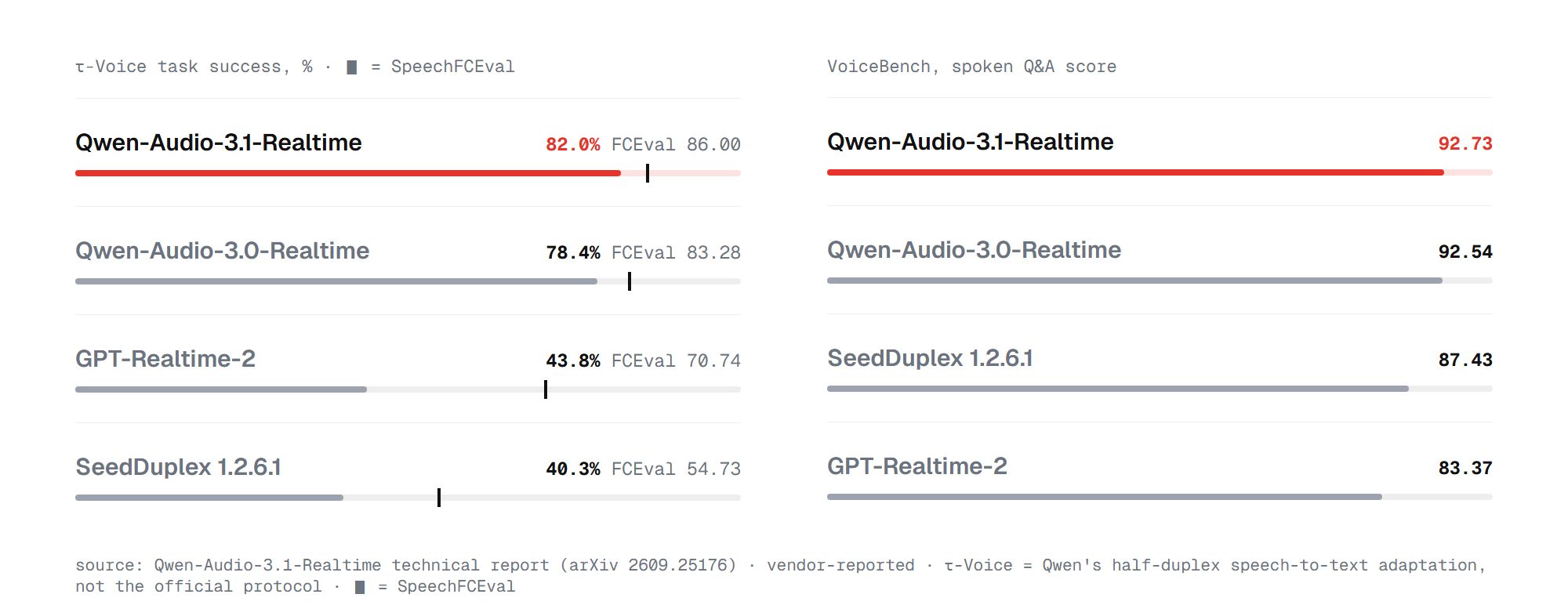
On Qwen's speech-to-text version of the τ-Voice agent benchmark, the model completed 82.0% of tasks. That is up from 78.4% for version 3.0 and nearly double GPT-Realtime-2. Qwen notes the numbers do not match the official full-duplex protocol, so treat the gap as indicative.
The bigger change is in turn-taking. The new model responded to background speech in 13% of test cases, down from 73%. In speech recognition, it reached a 3.98% word error rate on FLEURS, against 4.58% for Gemini 3.7 Flash. Not everything improved: average response latency in smooth turn-taking rose from 1.54 to 1.92 seconds. Price is the other half of the decision.
Qwen-Audio-3.1 prices and free quota
Qwen cut prices with the 3.1 launch, by about 85% for realtime, 70% for TTS and up to 95% for ASR. Current Singapore prices per million tokens are:
- ASR Flash and Filetrans: $0.15 input, $0.47 output.
- TTS Flash: $0.23 input, $1.87 output.
- TTS Plus: $0.30 per 10,000 characters.
- TTS Next: $0.93 input, $1.87 output.
- Realtime Flash: $0.93 for audio input, $1.87 for audio output.
- Realtime Plus: $6.40 for audio input, $24 for audio output.
For the realtime models, one second of audio equals 12.5 tokens. A minute of spoken reply therefore costs about $0.0014 on Flash and $0.018 on Plus. Conversation history is billed again as input on every turn, so long calls cost more than the sum of their minutes.
New accounts get a free quota, typically 1 million tokens per model, valid for 90 days. It applies only in the Singapore region. A few limits matter before you commit.
Limits to know
Qwen-Audio-3.1 is a hosted product, and that shapes what it can do.
- API only. There are no weights to download, so it cannot run offline or on your own server.
- Short context for voice. Realtime keeps at most 50 turns or 300 seconds of audio.
- Fixed audio formats in realtime. Input must be 16 kHz PCM and output is 24 kHz PCM.
- Region quirks. Keys and endpoints are regional, and some voices and TTS Next are documented mainly for Beijing.
- Vendor-only benchmarks. Independent tests of the 3.1 models are still scarce.
None of this blocks a typical voice app, but it rules out on-device use.
Should you use Qwen-Audio-3.1?
Yes, if you want cheap, capable speech APIs and can live with a hosted service. ASR Flash transcribes dozens of languages at $0.15 per million input tokens. Realtime Flash costs a fraction of a cent per minute of reply, and the realtime model led Qwen's agent tests by a wide margin.
Start with the ASR Flash and TTS Flash calls above to test quality on your own recordings. Move to Realtime Flash for voice agents, and to Plus only if Flash falls short. If you need weights you can run yourself, Qwen-Audio-3.1 is the wrong choice, and an open model such as Qwen3 TTS fits better.