
 Felix Laurent

Tripo has launched Tripo Studio MCP, a server that lets AI agents create 3D models inside a chat. The company announced it on November 27, 2026. It works with Claude Code, Codex, Cursor and Manus, and Tripo's launch post also names ChatGPT.
The pitch is simple: the agent handles the 3D workflow while the user gives creative direction. Setup uses a one-click OAuth sign-in instead of API keys, and every task runs on the user's existing Tripo Studio credits. Free accounts can use it too.
What Tripo Studio MCP does
MCP, or Model Context Protocol, is the standard way for AI assistants to call outside tools. Tripo's server exposes the main tools of Tripo Studio, its web app for AI 3D generation. An agent can call them in the middle of a conversation.
According to Tripo, an agent connected to the server can:
- Generate 3D models from a text prompt or reference images
- Refine them with texturing, retopology, splitting into parts and part completion
- Animate them with rigging and animation
- Export and download finished files
- Manage the user's asset library and track running jobs
Tripo suggests asking the agent to list the available tools after connecting, since it does not publish the full list on the page. The company also pitches chaining it with Blender MCP. In that setup, Tripo makes the assets and Blender places them into a scene, so an agent can build a whole scene from one request.
Getting the server into an agent takes a few steps, and they differ by client.
How to connect Tripo Studio MCP
All clients connect to the same hosted server and sign in through Tripo Studio. Each agent authorizes separately, and all of them draw on one account and credit pool.
- Claude Code: add the server with
claude mcp add --transport http --scope user --client-id studio-claude-code --callback-port 3000 tripo https://msapi.tripo3d.ai/mcp, then runclaude mcp login tripo - Codex: run
codex mcp add tripo --url https://msapi.tripo3d.ai/mcp --oauth-client-id studio-codex, thencodex mcp login tripo - Cursor: paste Tripo's configuration into
mcp.json, then sign in for tripo in the MCP settings - Manus: open Plugins, search for Tripo AI, click Add and authorize
Only personal Tripo Studio accounts are supported for now, and team accounts are not. To disconnect, the user removes the connector in the agent. Download links that were already issued keep working until they expire. The next question for most users is cost.
What Tripo Studio MCP costs
The server has no separate price. Each task costs the same credits as the matching job in the Tripo Studio web app. Free trial attempts and free retries do not apply through MCP, so agent jobs always spend credits.
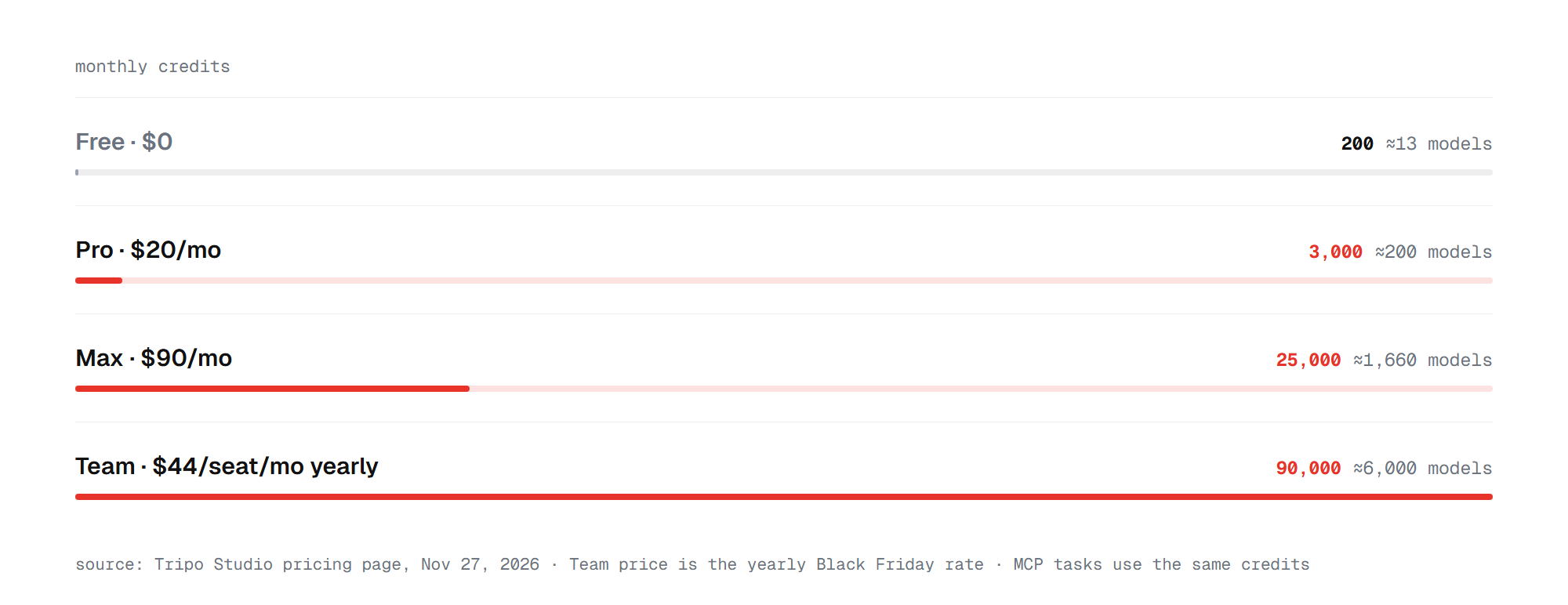
Tripo Studio plans, as listed on November 27:
- Free: 200 credits a month, enough for about 13 models, one task at a time, non-commercial use
- Pro: $20 a month, 3,000 credits or about 200 models, commercial use
- Max: $90 a month, 25,000 credits or about 1,660 models
- Team: $44 per seat a month on a yearly Black Friday deal, or $110 monthly, with 90,000 credits
Usage history on the Membership page does not separate MCP jobs from web jobs. That makes it harder to see how much an agent spends on its own. Early users found other gaps in the first hours.
What early users report
Most replies to the launch post were excited, but several users who tried it listed missing pieces:
- Models: users asked why the newest options, such as Ultra mesh quality and the H3.5 model, are not available through MCP. Tripo previewed H3.5 at Formnext on November 17 and has not released it yet.
- Topology: one user asked for native quad meshes from the P-series models instead of triangles
- Formats: the same user said the MCP export gave them only FBX, while another user did get a GLB file
- Animation: another said retargeting works, but the animated clip can't be downloaded, so the exported file lacks the motion
Developers also asked whether an agent chaining Tripo into Blender gets topology and UV data back. That data would let it decide whether a model needs cleanup. Tripo has not answered these questions publicly.
How Tripo fits the 3D agent race
Tripo is made by VAST, a Chinese AI company. Bloomberg reported in June that VAST raised nearly $200 million at a valuation above $1 billion and that Tripo serves 20 million users. Its model lineup now includes H3.1 for high-detail models and the P-series for clean, production-ready meshes. P2.0, released in September, added quad topology.
Tripo is not first to this idea. Meshy already offers its own MCP server for text-to-3D, texturing and rigging, and also recommends pairing it with Blender MCP. Community Blender MCP servers can call several 3D generators, Tripo included. Tripo's official server adds one-click sign-in and the full Studio toolset on top of that.
Is Tripo Studio MCP worth trying
For anyone who already uses Tripo Studio and works in Claude Code, Codex or Cursor, yes. Setup takes minutes, the free plan works, and the agent can run a full chain from prompt to rigged, exported model without switching apps. Paired with Blender MCP, it moves scene building toward a single request.
It is still a first version. The best models and some export options are missing, and agents can burn credits without free retries. Teams cannot use it yet. Studios that need GLB files, quad topology or animation exports should wait for the next update.
Sources
- Tripo post on X – November 27, 2026
- Tripo Studio MCP, Tripo – November 27, 2026
- Tripo Studio pricing, Tripo – November 2026
- Tripo AI previews H3.5 print-ready model at Formnext, 3DPrinting.com – November 2026
- Meshy MCP, Meshy