
 Addy Crezee

to write a good AI prompt, say what you want done, give the context the model can't guess, set the limits, describe the output format, and add an example when the format is unusual. then read the answer and fix the prompt, not the answer. we tested this on four everyday tasks, each with a one-line prompt and a full one, in Claude Opus 5.5 and GPT-6 Astra. on checklists we wrote before the runs, the full prompts scored 18 of 18 and 17 of 18; the one-liners scored about 10 and 13. below: the parts of a good prompt, the test with real answers, what OpenAI, Anthropic and Google recommend, prompt types, templates you can copy, and how context engineering differs from prompt engineering.
what makes a good ai prompt
a prompt is everything the model reads before it answers. most weak prompts are missing the same things, so it helps to think of a prompt as five parts:
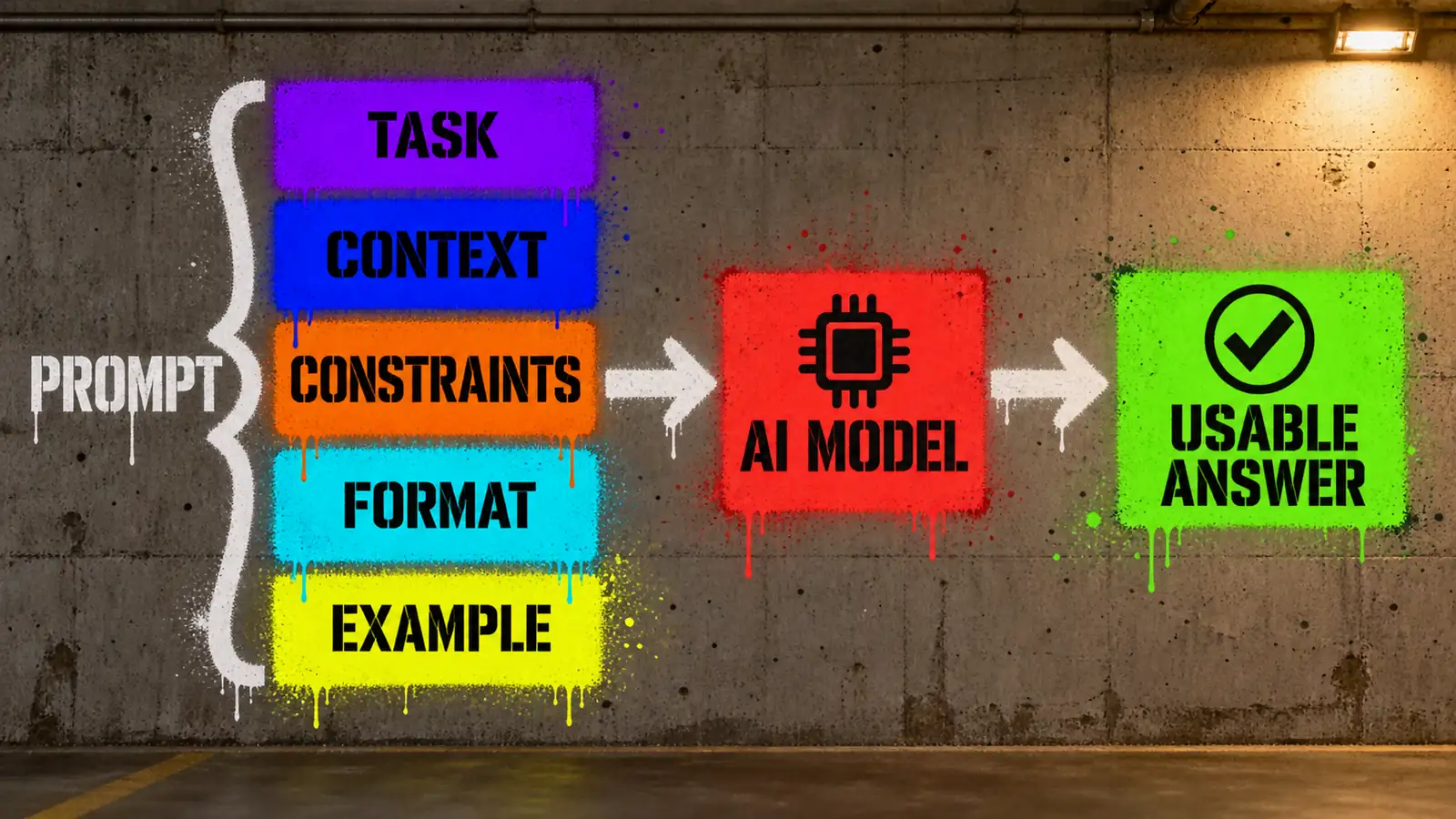
| part | what it answers | example |
|---|---|---|
| task | what should come out? | "write an email to a customer about a delayed order." |
| context | what does the model need to know that it can't guess? | who the customer is, the order, the new date, why it's late, what you offer |
| constraints | what are the limits? | "under 120 words. one apology. don't promise refunds." |
| format | what shape should the answer have? | "a subject line, then the body. sign it Sam, Deskworks support." |
| example | what does good look like? | one sample answer, when the format is unusual |
the task is the only part people never forget. context is the one they forget most: the model doesn't know your customer, your numbers or your rules, so it fills the gap with something generic – or invents it.
we tested it: same task, weak prompt vs full prompt
we ran four everyday tasks twice each: once with a one-line prompt, the kind people actually type, and once with a full prompt built from the five parts. both went to two models through our subscriptions, not the paid API: Claude Opus 5.5 in Claude Code (claude -p) and GPT-6 Astra in the Codex CLI (codex exec), with our personal instruction files and memory removed from both tools. before the runs we wrote a checklist for each task – 18 checks in total – to keep the scoring from drifting toward the result we expected. the full prompts change several things at once (context, limits, format, examples), so the test shows what a complete prompt does, not which single part matters most.
| task | checks | Claude, one line | Claude, full prompt | GPT, one line | GPT, full prompt |
|---|---|---|---|---|---|
| email about a delayed order | 5 | 3 | 5 | 5 | 5 |
| summary of a 645-word article | 5 | 1 | 5 | 2 | 4 |
| sales data question | 4 | 3 | 4 | 3 | 4 |
| Python function | 4 | 2.96 | 4 | 2.87 | 4 |
| total | 18 | 9.96 | 18 | 12.87 | 17 |
one run per prompt and model, September 27, 2026 – a small test, not a benchmark. words are counted by spaces. the code check counts hidden tests as a share, so 22 of 23 passed tests gives 0.96 of a point. what each task showed:
1. the email: the one-liner can't know what you didn't say
the one-line prompt:
write an email to our customer Maria saying her standing desk order 48213 is delayed until october 7
GPT's answer was clean and passed every check – but it could only say "delayed" and "sorry", because that's all it was told. Claude's answer ended with [Your name], [Company name], [Contact info] and offered to "change or cancel your order", which nobody had approved. the full prompt added the reason (a damaged motor from the supplier), the offer (free express shipping), the cancel option, a tone rule, a word limit and a signature. it has one flaw we only noticed later – "do not promise refunds" next to "cancel for a full refund" – and both models resolved it the same sensible way, offering a refund only if she cancels:
Write an email to a customer about a delayed order.

Context:
- Customer: Maria Lopez. Order #48213, a standing desk.
- It was due on September 30. The new delivery date is October 7.
- Reason: the motor for the desk arrived damaged from our supplier, and we are waiting for a replacement.
- What we offer: free express shipping when it ships. Nothing else — do not promise refunds or discounts.
- She can cancel for a full refund by replying to this email.

Tone: plain, human, one apology, no corporate phrases like "we value your business".

Format:
- A subject line, then the email body.
- Under 120 words in the body.
- Sign it "Sam, Deskworks support".
both models then wrote an email you could send as is – Claude's body was 79 words, GPT's 62:
your standing desk (order #48213) won't arrive on September 30 as planned. the desk's motor was damaged when it reached us from our supplier, and we're waiting for a replacement. your new delivery date is October 7. – Claude Opus 5.5, full prompt
2. the summary: say who it's for and how long
"summarize this article" plus the text of our Opus 5.5 vs Fable 5.1 vs GPT-6 Astra film test got back 571 words from Claude, with headings, a table and a "bottom line", and 164 words from GPT with an intro and a conclusion. neither invented a fact, but both rounded numbers – Claude turned "7m 18s to 10m 32s" into "7–10.5 minutes", GPT turned run times like 27m 16s into "27 minutes" – which our checklist counted as a miss. the full prompt named the reader (a developer choosing a model for 3D scenes), asked for exactly 3 bullets under 70 words, kept exact numbers and banned intros. both answers came back at 67 and 68 words, every number copied exactly from the article. GPT lost one check: it listed the prices but never said which model was cheapest.
3. the data: ask the question you actually have
we gave both models a 10-row sales CSV with two traps: a duplicated July row and a missing August value. with just "analyze this sales data", both models found both traps on their own, and the totals and percentages in their 441- and 209-word reports checked out when we recalculated them (Claude's "about 36% each month" was really 37.5%, then 36.4%). but neither answered the question we cared about, because we never asked it. the full prompt asked it ("which product grew its revenue the most from June to July, in dollars?"), told the model to check the data first and fixed the format. both answered the same way, in 130 and 73 words: Team, +$597 after dropping the duplicate, just ahead of Pro at +$588.
4. the code: every rule you skip, the model decides for you
"write a python function that parses durations like 1h30m into seconds" produced working code from both models. then we ran it against 23 hidden tests written from our own rules: Claude's passed 22, GPT's 20. nothing was broken – the models simply made decisions the prompt didn't make. both accepted 1H in capitals, both added days (2d), and GPT read 1h1h as two hours. the full prompt listed the rules and seven examples, and asked for the function plus pytest tests. both versions passed 23 of 23, and came with their own tests: 51 from Claude, 53 from GPT, all passing. the functions use only the standard library; the tests use pytest, as the prompt asked.
and "think step by step"?
we also asked both models a small trap question – two trains, one with a delay – three times each with and without "Think step by step." at the end. all 12 answers were right, with and without it. with the phrase, Claude's answers averaged 88 words instead of 61 (not counting a 39-word notice Claude Code appended to one answer), GPT's 51 instead of 36. on this task, in these runs, the phrase changed the length, not the answer. anthropic's guide itself says built-in extended thinking is generally preferable to asking for step-by-step reasoning by hand.
what the test says in one line: in these runs, almost every lost point came from something the prompt didn't say. with a one-liner the models filled the gaps with guesses – a placeholder, an extra promise, a format, a rule – and each guess was reasonable, just not ours.
prompt engineering best practices
the official guides from OpenAI, Anthropic and Google agree on most points. here they are, with what our test showed:
- be clear and specific about the task. all three guides recommend it. in our test, a single missing sentence ("which product grew the most, in dollars") was the difference between a report and an answer.
- give context, and say why. anthropic's guide says explaining why something matters helps the model understand your goal. the email only became sendable once the model knew the reason for the delay and what we could offer.
- set constraints and the output format. word limits, bullet counts and "no intro" worked in every run where we used them – 571 words became 67.
- show an example when the format matters. Google's Gemini guide recommends always including few-shot examples; Anthropic suggests starting with one and adding more only if the output still misses. our code prompt combined rules with seven input/output examples, and both models handled every edge case the same way.
- tell the model what to do, not only what not to do. Anthropic recommends phrasing formatting instructions positively. "Output only the 3 bullets" beat hoping it would skip the intro.
- let it say "I don't know". Anthropic suggests giving explicit permission to express uncertainty. our data prompt said "Do not guess missing values", and both models left the missing August number blank.
- split big jobs into steps. Anthropic and Google both describe prompt chaining: one prompt per step, the output of one feeding the next.
- match the prompt to the model. OpenAI's guide says reasoning models do best with a goal and room to work out the details, while its GPT models benefit from precise, explicit instructions.
types of prompting
- zero-shot – instructions only, no examples. fine for common tasks: our email and data prompts were zero-shot.
- few-shot – one or more input/output examples. best when the format or style is unusual; Google calls prompts with examples few-shot and prompts without them zero-shot.
- chain-of-thought – asking the model to reason step by step before answering. Anthropic notes that extended thinking is generally preferable where a model has it; in our small test the phrase changed length, not correctness.
- role prompting – "You are a senior accountant". Anthropic warns that overly specific roles can limit helpfulness and prefers stating the task and audience explicitly.
- prompt chaining – a big task split into several prompts run in sequence.
- prefilling – starting the model's answer for it, for example with
{to steer it toward JSON. Anthropic lists it as an advanced technique.
prompt examples you can copy
each template is built from the five parts. replace the parts in angle brackets.
summary for a specific reader
Summarize the text below for <who will read it and what they need to decide>.
Rules: exactly <3> bullet points, <70> words in total at most. Keep exact numbers from the text; do not add facts that are not in it. No intro, no conclusion – output only the bullets.
Text:
"""
<paste the text>
"""
email or message
Write <an email / a Slack message> to <who> about <what happened>.
Context: <the facts they need, one per line>.
What we can offer: <exactly what you may promise>. Nothing else.
Tone: <plain / warm / formal>. One apology at most.
Format: <subject line + body>, under <120> words, signed "<name>".
a question about data
Below is <what the data is, with the meaning of each column>.
Question: <the exact question, with units>.
First check the data for problems (duplicates, missing values) and say how you handle each one. Do not guess missing values.
Format: "Data issues:" as a list, then a table <columns>, then one line "Answer: <...>".
Data:
<paste>
a function with tests
Write a <language> function `<name(signature)>` that <does what>.
Rules:
- <every rule, including what counts as invalid input and what to raise>
Examples:
- <input> -> <output>
- <invalid input> -> <error>
Use only the standard library. Return one code block: the function, then tests covering every rule.
code review
Review the code below as if it were about to be merged into <project, stack>.
Focus on: <bugs / security / performance>. Ignore style.
For each problem: the line, what goes wrong with a concrete input, and the fix. If you find nothing serious, say so.
Code:
<paste>
a plan
I need to <goal> by <date>. Constraints: <budget, people, tools>.
Make a step-by-step plan: each step with what to do, how long it takes, and how I know it's done. Ask me up to 3 questions first if something important is missing.
rewrite in plain language
Rewrite the text below for <audience>. Keep every fact and number. Short sentences, no jargon – if a term is needed, explain it in the same sentence. Keep the length within ±10%.
Text:
<paste>
turn notes into a document
Here are my rough notes on <topic>. Turn them into <a one-page brief / a README / meeting minutes> for <reader>.
Structure: <sections>. Mark anything that is missing or unclear as [TODO] instead of inventing it.
Notes:
<paste>
context engineering vs prompt engineering
prompt engineering is writing one good instruction. context engineering is deciding everything the model sees around it: fixed instructions that never change, reference material, examples, tool descriptions, earlier results. once a prompt runs every day inside an app or an agent, most of the work is context engineering – what to include, what to leave out, and what must stay word for word.
our own image-prompt writer, Aya, is a working example. its instructions contain one fixed style block that it must copy verbatim into every image prompt, and one creative block – the scene – that it writes fresh for each story. the fixed part holds everything that should look the same from image to image: the artists the style draws on, the palette as hex codes, the forbidden styles. the instructions also describe our recurring characters in exact terms and tell it not to turn them into generic robots. the model is only free where freedom helps.
the same split works in text prompts: keep what must never change in a fixed block, and give the model one clearly marked place to do the task. if you build agents, this is also where the agent's instructions live, and why tool descriptions in an MCP server are prompts too – the model reads them to decide when to call each tool.
prompts for images and video work differently
prompts for image and video models look different. in our own image prompts – like Aya's above – most of the words go to the subject, composition, light and style, and reference images often do more than extra text. we will cover image and video prompting in separate guides.
common mistakes
- leaving out what only you know. names, numbers, what you can promise. the model will fill the gap, and you won't always notice.
- asking for a report when you have a question. "analyze this" gets you everything except the answer you needed.
- no length or format. you get the model's default – often three times longer than you wanted.
- fixing the answer instead of the prompt. if you edit the same thing in every output, that rule belongs in the prompt.
- magic phrases instead of information. "think step by step" or "you are a world-class expert" don't replace the one fact the model is missing.
- contradicting yourself. "be brief" and "cover every detail" in the same prompt – the model will pick one, maybe not yours.
faq
what is prompt engineering? prompt engineering is writing and testing the instructions you give an AI model so that it reliably produces the output you need. in practice: a clear task, the right context, limits, a format and examples – then checking the answers and adjusting the prompt.
how do I learn prompt engineering? read the official guides from OpenAI, Anthropic and Google (links below), then practice on your own tasks: write a one-liner, write a full prompt, compare the answers. a checklist of what a good answer must contain makes the comparison honest.
do I need a prompt engineering course? for everyday use, no: the official guides are free and short, and practice on real tasks teaches more. courses make sense if you build AI products and need evaluation, agents and context engineering in depth.
does "think step by step" still work? in our small test it didn't change a single answer – all 12 were right with and without it – but the answers got longer. anthropic's guide says built-in extended thinking is generally preferable where a model has it. missing context is a more common problem than missing reasoning.
what is the difference between a prompt and a system prompt? the system prompt (developer or instructions message) sets the rules for the whole conversation – role, tone, what's allowed. the prompt is the request you send each time. in apps and agents, the fixed rules go in the system prompt and the task goes in the message.
sources
- Anthropic, Prompt engineering best practices (November 10, 2025)
- OpenAI, Prompt engineering (developer docs)
- Google, Prompt design strategies (Gemini API docs, updated September 17, 2026)
- our test: 16 task runs and 12 trick-question runs, Claude Opus 5.5 in Claude Code 2.1.283 and GPT-6 Astra (reasoning: medium) in Codex CLI 0.153.4, September 27, 2026 – prompts, answers, checklists and scores are kept with this article