
 Addy Crezee

to build an MCP server, you write a small program that describes a few functions ("tools") and speaks the Model Context Protocol, then register it in an AI app such as Claude Code, Claude Desktop, Codex or Cursor. with the official Python SDK that is one file and a handful of decorators. we built one on September 26, 2026 – a server that lets an assistant read thehype's own news – tested it, and connected it to three different AI clients: Claude Code, Codex and Cursor. below are the exact commands, the code, what it cost to run, and the six things that broke along the way.
what is an mcp server?
an MCP server is a program that gives an AI model access to something outside it – a database, an API, files, a website – through one standard protocol. the Model Context Protocol was introduced by Anthropic in late 2024 and is now supported by Claude, ChatGPT, Codex, Cursor, VS Code and many agent frameworks.
three roles are involved:
- host – the AI app the user talks to (Claude Code, Claude Desktop, Codex, Cursor);
- client – the part of the host that holds a connection to one server;
- server – your program. it exposes capabilities; the model decides when to use them.
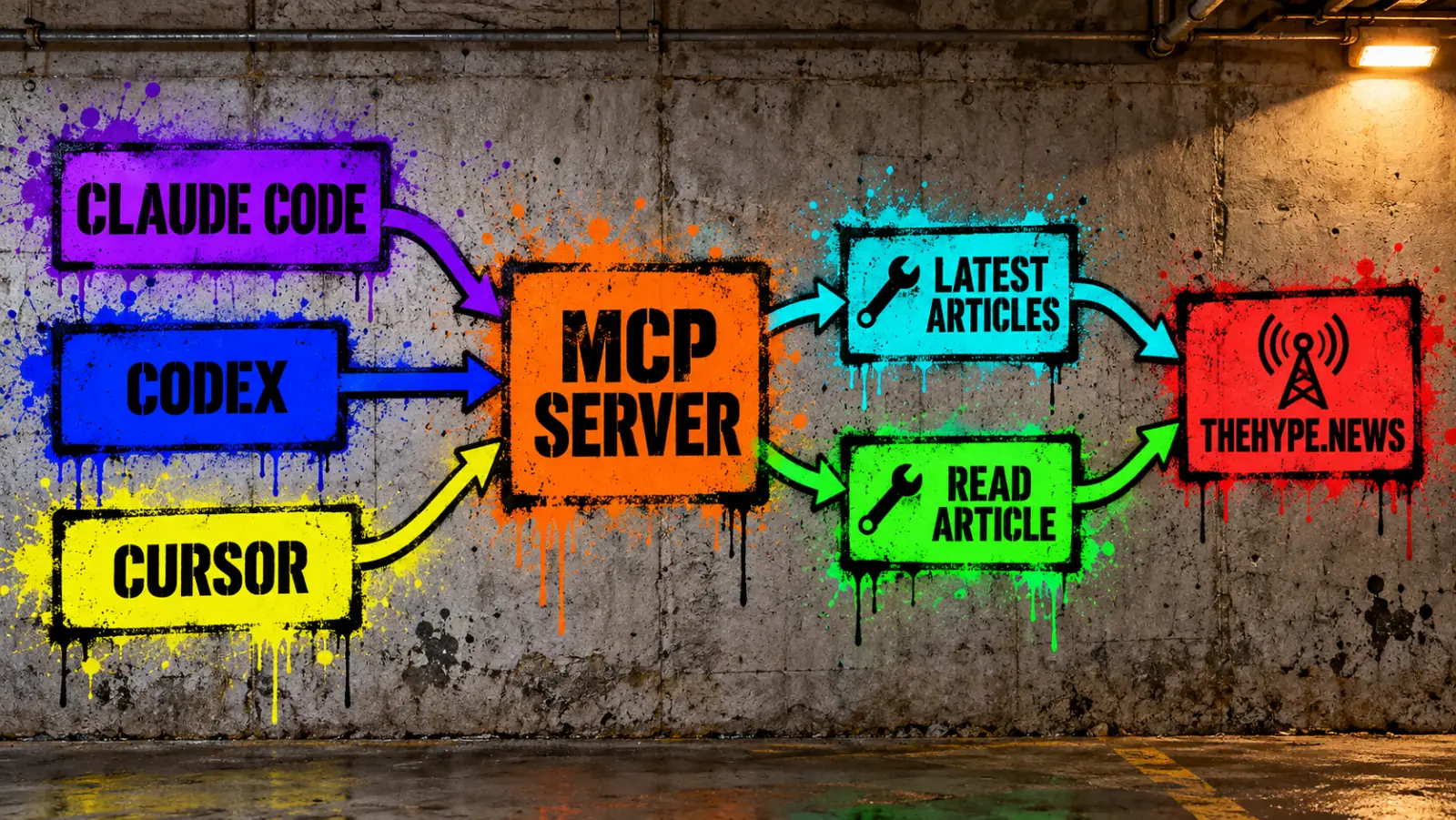
a server can offer three kinds of capabilities:
| capability | what it is | example |
|---|---|---|
| tools | functions the model can call | latest_articles(topic, limit) |
| resources | data the app can read, like files | a document or a database row |
| prompts | ready-made templates the user picks | "summarize this week's news" |
many servers offer tools only, and so does ours. for why this protocol spread so fast, see how MCP became the USB-C port for AI agents. if you are new to agents, start with our guide on how to build an AI agent: an MCP server is simply a way to hand an agent its tools.
what we built
a server called thehype with three tools:
latest_articles(topic, limit)– the newest thehype articles, optionally from one section, read from the site's public RSS feeds;read_article(url, part)– the text of one article, in parts if it is long;search_articles(query, limit)– search by title through Ghost's Content API, which needs a key (see wrapping an API that needs a key).
the first two use only public pages, so you can run them as is. the final file is 180 lines of Python, built on the official MCP Python SDK 2.2.0. our log shows eight minutes from creating the project to testing the first two-tool version in Claude Code and Codex, including the first fixes described below. Cursor, the search tool, the TypeScript version and hardening after two code reviews came later the same day.
step 1: set up the project
you need Python 3.10 or newer, uv (the Python package manager the official tutorial uses) and, for testing with MCP Inspector, Node.js 22.19 or newer.
uv init thehype-mcp
cd thehype-mcp
uv add "mcp[cli]==2.2.0"
we pin the version we tested. this installed mcp 2.2.0 and httpx2, the HTTP client the SDK depends on.
watch out for old tutorials. in version 2 of the Python SDK, the main class was renamed from FastMCP to MCPServer. code written for SDK version 1 starts with from mcp.server.fastmcp import FastMCP; with version 2 installed it fails with No module named 'mcp.server.fastmcp'. the error message itself names the replacement, and the migration guide lists the other changes. older tutorials still work if you pin version 1.
step 2: write the tools
here is the part of our server that defines the first two tools, copied from the tested file. it is an excerpt: the helper functions fetch, format_item and strip_tags are in the full file at the end of this article – save that file as server.py before step 3. each tool is an ordinary Python function with a decorator; the SDK turns the function name, the docstring and the type hints into the tool definition the client passes to the model.
SITE = "https://thehype.news"
# Listing sections as a Literal turns them into an enum in the tool schema,
# so the client can show the allowed values and invalid ones are rejected.
Topic = Literal["", "analysis", "guides", "opinions", "pulse", "reviews", "roundups"]
MAX_ARTICLES = 10
MAX_ARTICLE_CHARS = 8000
TIMEOUT_SECONDS = 20
MAX_DOWNLOAD_BYTES = 2_000_000
HEADERS = {"User-Agent": "thehype-mcp/1.0"}

# stdio servers talk JSON-RPC over stdout, so every log line must go to stderr.
logging.basicConfig(stream=sys.stderr, level=logging.INFO)
logger = logging.getLogger(__name__)

mcp = MCPServer("thehype")


@mcp.tool()
async def latest_articles(
    topic: Annotated[
        Topic, Field(description="Article section; empty for all sections.")
    ] = "",
    limit: Annotated[
        int, Field(ge=1, le=MAX_ARTICLES, description="How many articles.")
    ] = 5,
) -> str:
    """Get the newest thehype articles about AI: title, date, link and summary."""
    feed_url = f"{SITE}/tag/{topic}/rss/" if topic else f"{SITE}/rss/"
    logger.info("latest_articles topic=%s limit=%s", topic or "all", limit)
    try:
        feed = await fetch(feed_url)
    except httpx2.HTTPError as error:
        return f"Could not load the thehype feed: {error}"
    try:
        items = ElementTree.fromstring(feed).iter("item")
    except ElementTree.ParseError as error:
        return f"The thehype feed could not be read: {error}"
    lines = [format_item(item) for _, item in zip(range(limit), items, strict=False)]
    return "\n\n".join(lines) if lines else "No articles found."


@mcp.tool()
async def read_article(
    url: Annotated[str, Field(description="Article address from latest_articles.")],
    part: Annotated[int, Field(ge=1, description="Which part of a long article.")] = 1,
) -> str:
    """Read one thehype.news article. Long articles come in parts: the reply says
    'Part N of M'; call again with the next part number to keep reading."""
    if not re.fullmatch(r"https://thehype\.news/[a-z0-9-]+/?", url):
        return "Only article addresses on https://thehype.news/ are supported."
    # Ghost redirects addresses without the trailing slash; redirects are not followed.
    url = url if url.endswith("/") else url + "/"
    logger.info("read_article %s", url)
    try:
        page = await fetch(url)
    except httpx2.HTTPError as error:
        return f"Could not load the article: {error}"
    match = re.search(
        r'class="th-post-content[^"]*"[^>]*>(.*?)</article>', page, re.DOTALL
    )
    if not match:
        return "This page has no article text."
    text = strip_tags(match.group(1))
    total = max(1, math.ceil(len(text) / MAX_ARTICLE_CHARS))
    if part > total:
        return f"This article has only {total} part(s)."
    start = (part - 1) * MAX_ARTICLE_CHARS
    chunk = text[start : start + MAX_ARTICLE_CHARS]
    return f"Part {part} of {total}.\n\n{chunk}"
four implementation details matter here; two of them came from problems we hit (described below):
- parameter descriptions and limits sit in
Annotated[..., Field(...)], not in the docstring. - the section list is a
Literal, so the schema lists the exact allowed values and the SDK rejects anything else. - logging goes to stderr. on a stdio server, anything printed to stdout corrupts the protocol messages – the official tutorial warns about this.
- long results come in numbered parts instead of being cut off.
step 3: test it with mcp inspector
before connecting a real assistant, check what the model will actually see. MCP Inspector is the official test tool; its --cli mode works from the terminal. run it from the project folder:
npx @modelcontextprotocol/inspector --cli uv run server.py --method tools/list
npx @modelcontextprotocol/inspector --cli uv run server.py \
  --method tools/call --tool-name latest_articles --tool-arg topic=guides --tool-arg limit=2
tools/list prints the JSON schema of every tool – the tool definitions the client will pass to the model. read it carefully: this is where we found a design problem (see below). tools/call runs a tool with the arguments you give, so you can test bad input too – limit=50 came back with "isError": true and the message "Input should be less than or equal to 10", generated by the SDK from our Field(le=10).
step 4: connect it to claude
Claude Code – one command, run in the folder where you want to use the server (use the absolute path of the project from step 1):
claude mcp add thehype -- uv --directory /absolute/path/to/thehype-mcp run server.py
claude mcp list   # thehype: ... ✔ Connected
by default this adds the server to the current project only; --scope user makes it available everywhere. then ask in plain words. in a script (-p), list the tools Claude may call without asking – MCP tools are named mcp__<server>__<tool>:
claude -p "What guides has thehype published recently? Pick the most recent one, read it in full and give me its three main takeaways." \
  --allowedTools "mcp__thehype__latest_articles,mcp__thehype__read_article"
Claude Desktop – per the official tutorial (we did not test the desktop app), add the server to claude_desktop_config.json (on macOS in ~/Library/Application Support/Claude/) and restart the app:
{
  "mcpServers": {
    "thehype": {
      "command": "uv",
      "args": ["--directory", "/absolute/path/to/thehype-mcp", "run", "server.py"]
    }
  }
}
use absolute paths, and if the app cannot find uv, put its full path (from which uv) in command.
step 5: connect the same server to codex
one server works with any MCP client. in OpenAI's Codex CLI:
codex mcp add thehype -- uv --directory /absolute/path/to/thehype-mcp run server.py
in our first non-interactive run (codex exec), Codex refused to call the tool: it "requires approval" and the session's approval policy was "never". our tools only read public pages, so we allowed exactly those two for the run with command-line overrides:
codex exec \
  -c 'mcp_servers.thehype.tools.latest_articles.approval_mode="approve"' \
  -c 'mcp_servers.thehype.tools.read_article.approval_mode="approve"' \
  "List the 3 newest thehype articles in the analysis section..."
to make it permanent, put the same settings in ~/.codex/config.toml:
[mcp_servers.thehype.tools.latest_articles]
approval_mode = "approve"

[mcp_servers.thehype.tools.read_article]
approval_mode = "approve"
allow tools one by one rather than the whole server, and never auto-approve a tool that can change or delete something.
step 6: connect it to cursor
Cursor reads MCP servers from .cursor/mcp.json in the project (or ~/.cursor/mcp.json for all projects). the format is the same mcpServers block as Claude Desktop:
{
  "mcpServers": {
    "thehype": {
      "command": "/opt/homebrew/bin/uv",
      "args": ["--directory", "/absolute/path/to/thehype-mcp", "run", "server.py"]
    }
  }
}
in the Cursor editor you then switch the server on in the MCP settings and approve its tools when asked. we tested it with the Cursor CLI (cursor-agent, build 2026.09.26, on a free Cursor account), which needed three more things before it would call a tool in a script:
cursor-agent mcp enable thehype      # approve the server once
cursor-agent mcp list-tools thehype  # lists each tool with its arguments
cursor-agent -p --trust "List the 3 newest thehype articles in the reviews section..."
--trustmarks the project folder as trusted; without it a non-interactive run stops and asks.- tool calls still need approval. we allowed exactly our two tools in
.cursor/cli.jsonrather than using--force, which lets the agent run anything:
{
  "permissions": {
    "allow": ["Mcp(thehype:latest_articles)", "Mcp(thehype:read_article)"],
    "deny": []
  }
}
in the CLI build we tested, the empty "deny": [] was not optional: without it the CLI rejected the file with "schema validation failed… permissions.deny Required".
step 7: run it over http – the first step to a remote server
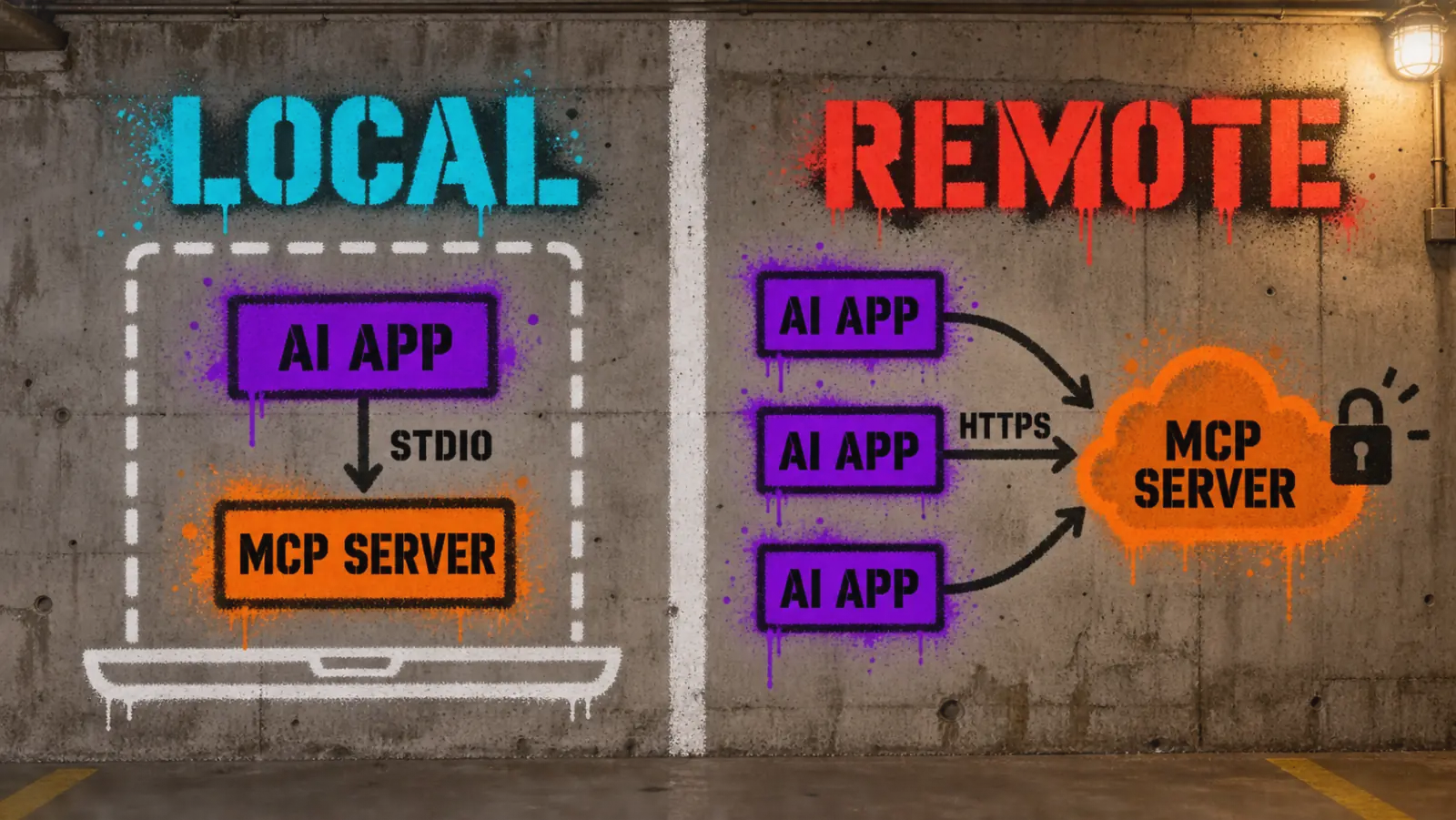
a stdio server runs on the user's machine, started by the app. a remote MCP server runs as a web service that many users and apps can reach by URL, over the Streamable HTTP transport. the SDK switches with one argument – in our file, the --http flag calls mcp.run(transport="streamable-http"), which serves http://127.0.0.1:8000/mcp:
uv run server.py --http          # terminal 1: start the server
claude mcp add --transport http thehype-http http://127.0.0.1:8000/mcp   # terminal 2
we tested this on our own machine with the two-tool version: MCP Inspector listed both tools and called both of them over HTTP, and Claude Code reported the server as connected. a server on 127.0.0.1 is reachable only from that machine; to make it truly remote you deploy it somewhere else. the MCP specification makes authorization optional, but for anything public we recommend authentication following its OAuth-based authorization framework, plus HTTPS and rate limits – our local test had none of them.
where to host a remote mcp server
a Streamable HTTP server is an ordinary web app, so it runs anywhere a small Python or Node service runs. the choice depends on how many people will use it and what it must reach:
| option | good for | watch out for |
|---|---|---|
| your own VPS (a small Linux server behind nginx or Caddy) | full control, tools that need private network or files | you run TLS, updates, auth and monitoring yourself |
| container platforms (Docker on any cloud that runs containers) | teams that already deploy web services this way | cold starts can delay the first tool call |
| Serverless / edge platforms with MCP support | public servers with many users and little state | short time limits for long-running tools; state must live elsewhere |
| managed MCP hosting from gateway and integration vendors | not running infrastructure at all | your data and tokens pass through a third party |
whatever you pick, the server needs the same things: HTTPS, OAuth or at least a secret token per client, per-client rate limits, logs of every tool call, and secrets in environment variables rather than in code. we have not deployed this server publicly; the table is a map of options, not a tested ranking.
wrapping an api that needs a key
most useful servers wrap an API with a key – a CRM, a database, a paid data service. we added a third tool that searches thehype's articles through the Ghost Content API, which needs the site's Content API key:
@mcp.tool()
async def search_articles(
    query: Annotated[str, Field(description="Words to look for in article titles.")],
    limit: Annotated[int, Field(ge=1, le=10, description="How many articles.")] = 5,
) -> str:
    """Search thehype articles by title. Returns title, date, link and excerpt."""
    key = os.environ.get("THEHYPE_CONTENT_KEY")
    if not key:
        return "Search is not configured: set THEHYPE_CONTENT_KEY for this server."
    if not SEARCH_QUERY.fullmatch(query):  # letters, digits, spaces, . + -
        return "Use 2-60 letters, digits, spaces, dots, plus or minus signs."
    params = {"key": key, "filter": f"title:~'{query}'", "limit": limit,
              "fields": "title,url,published_at,excerpt"}
    try:
        data = await fetch(f"{CONTENT_API}?{urlencode(params)}")
    except httpx2.HTTPError:
        # The error text contains the request URL, and the URL contains the key.
        return "The thehype search API did not answer. Try again later."
    try:
        lines = [format_post(post) for post in json.loads(data)["posts"]]
    except (ValueError, KeyError, TypeError):
        # Never echo the response: an error page could quote the keyed URL.
        return "The thehype search API returned an unexpected answer."
    return "\n\n".join(lines) if lines else f"No articles with '{query}' in the title."
the key reaches the server as an environment variable set by the client, never through the code or the chat:
claude mcp add thehype --env THEHYPE_CONTENT_KEY=your-key \
  -- uv --directory /absolute/path/to/thehype-mcp run server.py
three details we would not skip:
- keep the key out of error messages. Ghost expects the key in the URL, and HTTP errors quote the URL. returning the raw error would put the key into the model's context – so the tool returns a generic message instead.
- keep the key out of logs. the SDK's HTTP client logs every request URL at INFO level; we saw those lines in our first test. we turned that logger down to warnings; in our test output after the change, the key did not appear.
- validate what goes into the API query. the model's text becomes part of a Ghost filter. our allow-list of characters (no quotes, no backslashes) rejected
x' or title:~'a, an attempt to rewrite the filter. - never echo the API's answer when it is not what you expect. an error page can quote the request – key included – so the tool returns a fixed message for malformed responses too.
result: asked "Has thehype written about MCP?", Claude Code reported searching by title, listed our two MCP articles, and picked the one that explains the protocol – 5 turns, 13.7 s, about $0.31 at API prices. without the environment variable, the other two tools kept working and search answered with the "not configured" message.
the same server in typescript
the official TypeScript SDK is also on version 2 – the package is @modelcontextprotocol/server – and needs Node.js 20 or newer. we rebuilt the first two tools with it:
npm init -y
npm install @modelcontextprotocol/server zod
npm install -D @types/node typescript
add "type": "module" and a "build": "tsc" script to package.json and a tsconfig.json as in the official tutorial. a tool looks like this:
server.registerTool(
  "latest_articles",
  {
    description: "Get the newest thehype articles about AI: title, date, link and summary.",
    inputSchema: z.object({
      topic: z.enum(TOPICS).default("").describe("Article section; empty for all sections."),
      limit: z.number().int().min(1).max(MAX_ARTICLES).default(5).describe("How many articles."),
    }),
  },
  async ({ topic, limit }) => {
    const feedUrl = topic ? `${SITE}/tag/${topic}/rss/` : `${SITE}/rss/`;
    console.error(`latest_articles topic=${topic || "all"} limit=${limit}`);
    let feed: string;
    try {
      feed = await fetchPage(feedUrl);
    } catch (error) {
      return textResult(`Could not load the thehype feed: ${String(error)}`);
    }
    if (!feed.includes("<rss") || !feed.trimEnd().endsWith("</rss>")) {
      return textResult("The thehype feed could not be read: not a complete RSS document.");
    }
    const items = [...feed.matchAll(/<item>([\s\S]*?)<\/item>/g)].slice(0, limit);
    const blocks = items.map(([, item]) => formatItem(item));
    return textResult(blocks.length > 0 ? blocks.join("\n\n") : "No articles found.");
  },
);

const transport = new StdioServerTransport();
await server.connect(transport);
it compiled on the first try with tsc and passed the same Inspector checks. what differed from Python:
| Python SDK 2.2.0 | TypeScript SDK 2.1.0 | |
|---|---|---|
| server class | MCPServer |
McpServer |
| tool schema from | type hints + Annotated[..., Field(...)] |
a zod object passed as inputSchema |
| parameter descriptions | Field(description=...) |
.describe(...) |
limit=50 rejected with |
"input should be less than or equal to 10" | "too big: expected number to be <=10" |
| quirk we noticed | – | z.number().int() also writes "maximum": 9007199254740991 into the schema; harmless |
| logging | logging to stderr |
console.error, never console.log |
| reading RSS | standard-library XML parser | no built-in XML parser; we used regular expressions plus a completeness check – fine for our own feed, not for feeds you don't control |
Claude Code used the TypeScript server exactly like the Python one: asked about the newest article in the "pulse" section, it listed and read it in 4 turns and 12.6 s (about $0.28 at API prices). pick the language of the system you are wrapping.
what happened when we ran it
we asked the same kind of question through three AI clients: Claude Code and Codex on our subscriptions (a Claude account and a ChatGPT account), Cursor on a free account – so none of these runs were billed per token. for Claude, the table shows the API-equivalent price that Claude Code reports; it used Claude Opus 5.5, with most of the context read from cache. Claude and Cursor times are the run time each tool reports; Codex times are the whole command.
| run | client | tool calls / turns | time | cost or tokens | result |
|---|---|---|---|---|---|
| 1 | Claude Code | 4 turns | 14.5 s | ≈ $0.32 API-equivalent | summarized the newest guide, but said the article was cut off |
| 2 | Claude Code (after fix) | 6 turns | 19.5 s | ≈ $0.10 API-equivalent | reported reading all 3 parts; summarized the final section too |
| 3 | Codex, before approval setting | 1 attempt | 19 s | – | blocked: "tool requires approval" |
| 4 | Codex (after fix) | 2 tool calls | 20 s | 92k input tokens (79k cached), 551 output | listed 3 analysis articles and summarized the newest |
| 5 | Cursor CLI, tools not yet allowed | 2 attempts | 15.8 s | 12k input + 47k cached, 771 output | both calls rejected by the approval step |
| 6 | Cursor CLI (after fix) | several calls | 24.3 s | 26k input + 84k cached, 1,371 output | the feed returned one article in "reviews" (the section had one at the time); Cursor reported re-checking with a higher limit and reading it in 2 parts, then summarized it |
| 7 | Claude Code, TypeScript server | 4 turns | 12.6 s | ≈ $0.28 API-equivalent | found and summarized the newest "pulse" article |
| 8 | Claude Code, search with API key | 5 turns | 13.7 s | ≈ $0.31 API-equivalent | found both MCP articles and picked the right one |
in the runs we recorded, the models chose the tools and arguments themselves – Codex, for example, called latest_articles with topic="analysis" from our enum, and Cursor reported calling the tool again with a higher limit after getting a single review back. what went wrong was our server design and client configuration, not the models' reasoning.
six things that broke, and how we fixed them
1. mcp inspector swallowed a flag
our first test command (from our experiment notes), npx @modelcontextprotocol/inspector --cli uv --directory /path run server.py, failed with Connection closed. the Inspector took --directory as its own option, so uv started with no command. fix: run the Inspector from the project folder and drop --directory.
2. parameter descriptions were missing
we first documented parameters the usual Python way, in an Args: section of the docstring. in our notes from that run, the SDK did not split it: the whole docstring became the tool description, and the parameters in the schema had no descriptions. fix: put descriptions and limits in Annotated[type, Field(description=..., ge=..., le=...)]. the schema then showed a description for every parameter, an enum of allowed values for topic, a minimum and maximum for limit – and the SDK started rejecting bad values for us.
3. the model noticed the article was cut off
our first read_article returned only the first 8,000 characters. Claude summarized what it got and then said plainly that the tool "returned only part of the article" and that its takeaways "cover only what I could read." fix: return long text in parts, label each one "Part N of M", and tell the model in the tool description to ask for the next part. on the next run Claude reported that it had read all three parts, and its summary covered the article's final section.
4. codex blocked the tool in automated runs
in codex exec, the first call failed: the tool "requires approval" and the session's approval policy was "never", so nobody could approve it. this is a client setting, not a server bug. fix: set approval_mode = "approve" for the two read-only tools only.
5. cursor did not see the config at all
cursor-agent mcp list answered "No MCP servers configured", although .cursor/mcp.json was right there. our project folder sat inside a larger git repository, and in the CLI build we tested, .cursor/ was only found at the root of that repository. in a folder outside git the same file was found immediately. fix: put .cursor/mcp.json at the root of the repository you open, or use the global ~/.cursor/mcp.json.
6. cursor blocked the tools, then rejected our permission file
with the server found and enabled, the first scripted run ended with both tool calls "rejected in the approval UI" – there was nobody to click. our first .cursor/cli.json allow-list then failed validation because it had no deny list. fix: --trust for the folder, an allow-list with exactly our two tools, and an empty "deny": [].
how to design tools the model uses well
what we would do the same way next time:
- few tools, clear names. two well-named tools beat ten overlapping ones. the name and description are all the model sees.
- constrain inputs in the schema. Enums for fixed choices, minimums and maximums for numbers. the client shows the model the allowed values, and the SDK rejects anything else.
- return errors as readable text. "unknown section, use one of…" lets the model correct itself; a stack trace does not.
- page through long results. never cut silently – say how many parts there are.
- log to stderr, never stdout on a stdio server.
- plan for the client's approval step. Codex and Cursor both refused to run our tools in a script until we allowed them, and for Claude Code we passed the allowed tools with
--allowedTools. that is a good default; allow read-only tools one by one instead of switching approvals off.
security checklist
- validate every input – and every redirect. our
read_articleaccepts only thehype.news addresses and does not follow redirects, because a redirect could lead to another host or an internal address. without these checks, the model could be steered into fetching any URL from your machine. - limit what you download and parse. our server rejects pages over 2 MB and returns a readable error if the RSS feed is malformed. for XML from sources you do not control, consider a hardened parser such as
defusedxml. - treat tool output as data, not instructions. article text goes straight into the model's context, and stripping HTML does not remove a prompt-injection attempt like "ignore your instructions and…". the risk is the assistant acting on it with other tools – so keep approval on anything that writes, sends or deletes.
- least privilege. read-only tools where possible; separate, approval-gated tools for anything that writes, sends or deletes.
- keep secrets out of the code. pass API keys through environment variables (
claude mcp add --env,codex mcp add --env). - remote servers need auth, HTTPS and rate limits before they face the internet.
the full server code
this is the exact file we tested with SDK 2.2.0, all three tools included. copy it into server.py in a project set up as in step 1 and run uv run server.py (stdio) or uv run server.py --http (Streamable HTTP on port 8000).
"""MCP server that lets an AI assistant read thehype (thehype.news) news.

Three tools:
- latest_articles: newest articles, optionally for one topic (tag), from the site's RSS;
- read_article: the text of one thehype.news article;
- search_articles: search by title through the Ghost Content API. Needs the site's
  Content API key in the THEHYPE_CONTENT_KEY environment variable; without it the
  other two tools still work.
Runs over stdio by default; pass --http to serve Streamable HTTP on
http://127.0.0.1:8000/mcp instead.
"""

import html
import json
import logging
import math
import os
import re
import sys
from typing import Annotated, Literal
from urllib.parse import urlencode
from xml.etree import ElementTree

import httpx2
from mcp.server import MCPServer
from pydantic import Field

SITE = "https://thehype.news"
# Listing sections as a Literal turns them into an enum in the tool schema,
# so the client can show the allowed values and invalid ones are rejected.
Topic = Literal["", "analysis", "guides", "opinions", "pulse", "reviews", "roundups"]
MAX_ARTICLES = 10
MAX_ARTICLE_CHARS = 8000
TIMEOUT_SECONDS = 20
MAX_DOWNLOAD_BYTES = 2_000_000
HEADERS = {"User-Agent": "thehype-mcp/1.0"}
CONTENT_API = f"{SITE}/ghost/api/content/posts/"
SEARCH_QUERY = re.compile(r"[\w .+-]{2,60}")

# stdio servers talk JSON-RPC over stdout, so every log line must go to stderr.
logging.basicConfig(stream=sys.stderr, level=logging.INFO)
logger = logging.getLogger(__name__)
# httpx2 logs every request URL at INFO; the Content API key travels in the URL.
logging.getLogger("httpx2").setLevel(logging.WARNING)

mcp = MCPServer("thehype")


@mcp.tool()
async def latest_articles(
    topic: Annotated[
        Topic, Field(description="Article section; empty for all sections.")
    ] = "",
    limit: Annotated[
        int, Field(ge=1, le=MAX_ARTICLES, description="How many articles.")
    ] = 5,
) -> str:
    """Get the newest thehype articles about AI: title, date, link and summary."""
    feed_url = f"{SITE}/tag/{topic}/rss/" if topic else f"{SITE}/rss/"
    logger.info("latest_articles topic=%s limit=%s", topic or "all", limit)
    try:
        feed = await fetch(feed_url)
    except httpx2.HTTPError as error:
        return f"Could not load the thehype feed: {error}"
    try:
        items = ElementTree.fromstring(feed).iter("item")
    except ElementTree.ParseError as error:
        return f"The thehype feed could not be read: {error}"
    lines = [format_item(item) for _, item in zip(range(limit), items, strict=False)]
    return "\n\n".join(lines) if lines else "No articles found."


@mcp.tool()
async def read_article(
    url: Annotated[str, Field(description="Article address from latest_articles.")],
    part: Annotated[int, Field(ge=1, description="Which part of a long article.")] = 1,
) -> str:
    """Read one thehype.news article. Long articles come in parts: the reply says
    'Part N of M'; call again with the next part number to keep reading."""
    if not re.fullmatch(r"https://thehype\.news/[a-z0-9-]+/?", url):
        return "Only article addresses on https://thehype.news/ are supported."
    # Ghost redirects addresses without the trailing slash; redirects are not followed.
    url = url if url.endswith("/") else url + "/"
    logger.info("read_article %s", url)
    try:
        page = await fetch(url)
    except httpx2.HTTPError as error:
        return f"Could not load the article: {error}"
    match = re.search(
        r'class="th-post-content[^"]*"[^>]*>(.*?)</article>', page, re.DOTALL
    )
    if not match:
        return "This page has no article text."
    text = strip_tags(match.group(1))
    total = max(1, math.ceil(len(text) / MAX_ARTICLE_CHARS))
    if part > total:
        return f"This article has only {total} part(s)."
    start = (part - 1) * MAX_ARTICLE_CHARS
    chunk = text[start : start + MAX_ARTICLE_CHARS]
    return f"Part {part} of {total}.\n\n{chunk}"


@mcp.tool()
async def search_articles(
    query: Annotated[str, Field(description="Words to look for in article titles.")],
    limit: Annotated[
        int, Field(ge=1, le=MAX_ARTICLES, description="How many articles.")
    ] = 5,
) -> str:
    """Search thehype articles by title. Returns title, date, link and excerpt."""
    key = os.environ.get("THEHYPE_CONTENT_KEY")
    if not key:
        return "Search is not configured: set THEHYPE_CONTENT_KEY for this server."
    if not SEARCH_QUERY.fullmatch(query):
        return "Use 2-60 letters, digits, spaces, dots, plus or minus signs."
    logger.info("search_articles query=%r limit=%s", query, limit)
    params = {
        "key": key,
        "filter": f"title:~'{query}'",
        "fields": "title,url,published_at,excerpt",
        "limit": limit,
    }
    try:
        data = await fetch(f"{CONTENT_API}?{urlencode(params)}")
    except httpx2.HTTPError:
        # The error text contains the request URL, and the URL contains the key.
        return "The thehype search API did not answer. Try again later."
    try:
        lines = [format_post(post) for post in json.loads(data)["posts"]]
    except (ValueError, KeyError, TypeError):
        # Never echo the response: an error page could quote the keyed URL.
        return "The thehype search API returned an unexpected answer."
    return "\n\n".join(lines) if lines else f"No articles with '{query}' in the title."


async def fetch(url):
    """Downloads a page from thehype.news; raises httpx2.HTTPError on any problem.

    Redirects are not followed: a redirect could lead to another host, and the URL
    check in read_article only covers the address the model passed in.
    Pages larger than MAX_DOWNLOAD_BYTES are rejected instead of loaded into memory.
    """
    async with (
        httpx2.AsyncClient(headers=HEADERS, timeout=TIMEOUT_SECONDS) as client,
        client.stream("GET", url, follow_redirects=False) as response,
    ):
        response.raise_for_status()
        body = bytearray()
        async for chunk in response.aiter_bytes():
            body.extend(chunk)
            if len(body) > MAX_DOWNLOAD_BYTES:
                raise httpx2.HTTPError(
                    f"{url} is larger than {MAX_DOWNLOAD_BYTES} bytes"
                )
        return body.decode(response.encoding or "utf-8", errors="replace")


def format_post(post):
    """One Content API post as a short text block, like format_item for RSS."""
    excerpt = (post.get("excerpt") or "")[:300]
    return f"{post['title']}\n{post['published_at'][:10]}\n{post['url']}\n{excerpt}"


def format_item(item):
    """One RSS item as a short text block: title, date, link, first lines of the summary."""
    title = item.findtext("title", "").strip()
    link = item.findtext("link", "").strip()
    published = item.findtext("pubDate", "").strip()
    summary = strip_tags(item.findtext("description", ""))[:300]
    return f"{title}\n{published}\n{link}\n{summary}"


def strip_tags(fragment):
    """Plain text without HTML tags, scripts and extra whitespace."""
    fragment = re.sub(r"<(script|style)[^>]*>.*?</\1>", " ", fragment, flags=re.DOTALL)
    return " ".join(html.unescape(re.sub(r"<[^>]+>", " ", fragment)).split())


if __name__ == "__main__":
    mcp.run(transport="streamable-http" if "--http" in sys.argv else "stdio")
faq
python or typescript?
both official SDKs work and use the same concepts – we built the same server in both. Python builds the schema from type hints; TypeScript from a zod object. use the language of the API or data you are wrapping.
do i need claude desktop to build an mcp server?
no. any MCP client works. we tested with Claude Code, Codex, Cursor and MCP Inspector and never opened a desktop app; VS Code and other editors support MCP servers too.
is building an mcp server free?
the SDKs and MCP Inspector are free and open source. what costs money is the AI app or model that uses the server (a subscription or API usage), hosting if you run it remotely, and any paid API the server itself calls. our Claude test questions would have cost about $0.10–$0.32 each at API prices.
what is the difference between an mcp server and an api?
an API is built for programmers; an MCP server is built for AI models. it wraps an API, a database or files into tools with descriptions the model can read and decide to use by itself, in any MCP-compatible app.
how do i test an mcp server?
start with MCP Inspector: tools/list shows exactly what the model sees, tools/call runs a tool with any arguments, including bad ones. then ask a real assistant a question in plain words and check which tools it called.
does mcp work with models other than claude?
yes. MCP is a protocol, not a Claude feature. we connected the same server, without changing a line, to Claude Code, OpenAI's Codex and Cursor, and all three used its tools. ChatGPT, Cursor, VS Code and many agent frameworks support MCP servers too – check which transports a client supports (local stdio, remote HTTP or both).
why does from mcp.server.fastmcp import FastMCP fail?
you have version 2 of the Python SDK, where FastMCP was renamed to MCPServer (from mcp.server import MCPServer). change the import, or pin mcp<2 if you follow an older tutorial.
what is a remote mcp server?
a server that runs as a web service over Streamable HTTP instead of as a local process. many users can connect to it by URL. it needs authentication and HTTPS before going public.
keep reading on thehype
- how to optimize your site for AI agents – when your own product should offer an MCP server.
- X launches an MCP server: here's what we get – a real-world MCP server from a big platform.
sources
- model Context Protocol, Build an MCP server (official tutorial, spec version 2026-07-28)
- model Context Protocol, Server concepts: tools, resources, prompts
- model Context Protocol, Specification 2026-07-28
- MCP Python SDK and MCP Inspector on GitHub
- Anthropic, Connect Claude Code to tools via MCP
- Cursor, Model Context Protocol and CLI permissions
- OpenAI, Codex configuration reference