
 Hugo Plat

running ai locally means the model sits on your own disk and runs on your own chip. the setup is one download and a free app. after that the laptop answers with wi-fi off, no meter is running, and the model itself sends nothing off the machine.
this guide covers how to run ai locally in plain terms: the memory numbers, the first app and model, and when the cloud still wins. the test section shows what three models deliver on a 16 gb macbook, including the one setting that stalls them.
a laptop that was "too small" two years ago now runs a useful assistant. google's gemma 4 models came out under a free license in april 2026. hugging face counts tens of millions of local model downloads a month.
what actually happens on your laptop
a large language model, or llm, is one big file of numbers called weights. the b in qwen3.5:9b counts those numbers in billions: nine billion for a 9b model, three times as many for a 27b. more of them means better answers and a heavier file.
a runner such as ollama or lm studio loads that file into memory and turns a prompt into an answer one token at a time. a token is a short word or a piece of a longer one; 1,000 tokens hold about 750 words of english.
summaries, drafts, code help, translation and questions about a pdf all run well on a 9b to 12b model. the hardest reasoning jobs still belong to the cloud; a later section shows where the line sits.
the one number that matters: memory
the first question is not "how fast is my cpu" but "how much memory do i have". that means ram, not disk space: apple menu → about this mac, or settings → system → about on windows.
a model needs roughly as much memory as its file size, plus a few gigabytes for the conversation and the operating system. that is how much ram you need to run ai locally. the table maps each machine to the largest class it runs comfortably, with sizes from the ollama library tags pages on october 19, 2026.
| your machine | model class | what to pull | download | ollama's default context on a mac |
|---|---|---|---|---|
| 8 gb laptop | 2b–4b | qwen3.5:2b, qwen3.5:4b | 2.7–3.3 gb | 4,096 tokens |
| 16 gb laptop | 9b–12b | qwen3.5:9b, gemma4:12b | 6.6–8.0 gb | 4,096 tokens |
| 32 gb machine | 20b–31b | gpt-oss:20b, qwen3.8:27b, gemma4:31b | 14–19 gb | 32,768 tokens |
| 64 gb mac studio or multi-gpu pc | 70b | llama3.1:70b | 43 gb | 262,144 tokens |
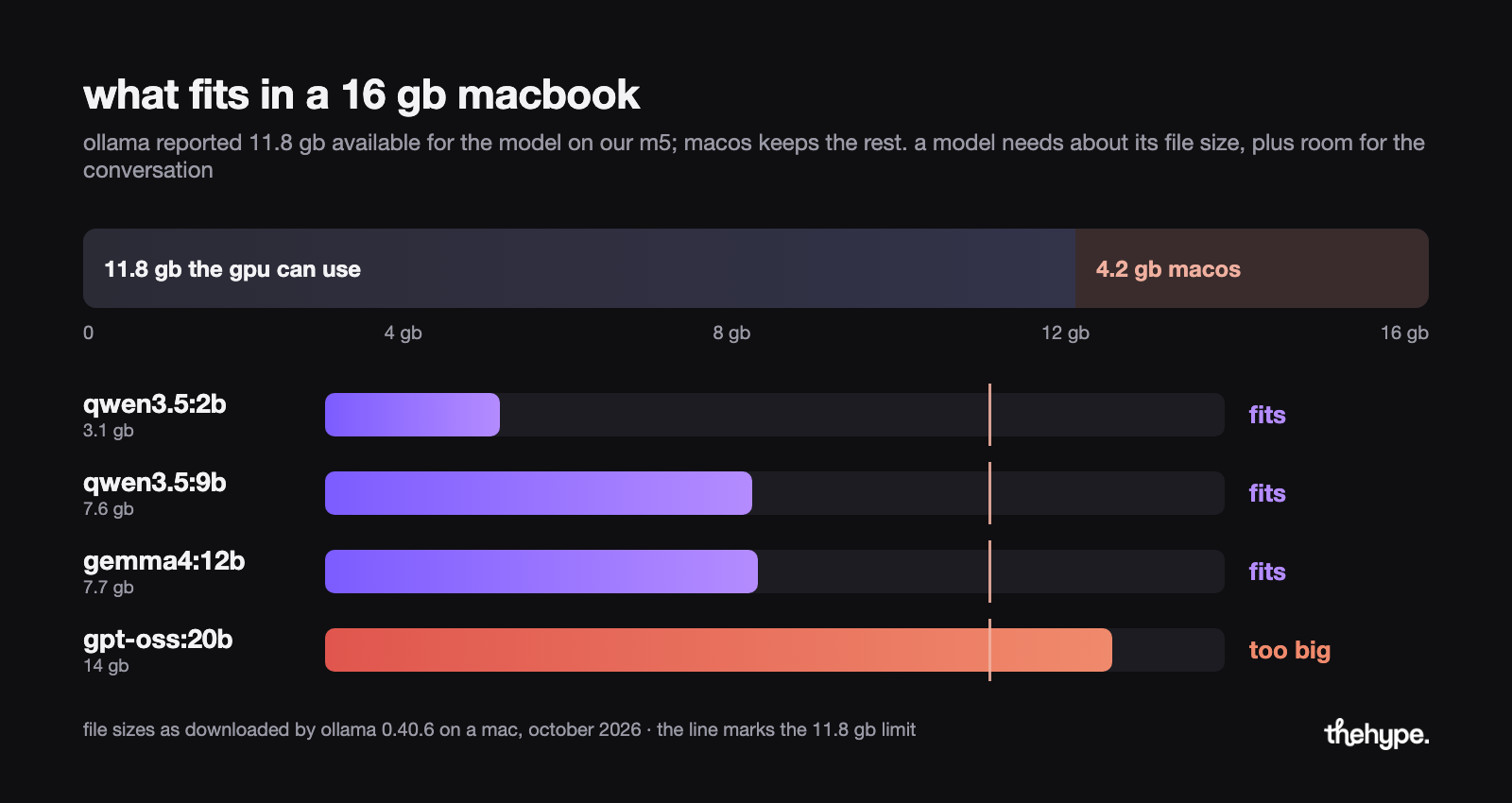
the last column is the context, the amount of conversation the model keeps in mind at once. ollama sets it by the memory the gpu can see. on the 16 gb macbook in the test below that was 11.8 gb, because macos keeps the rest. since version 0.15.5 the default steps up at 24 gb and again at 48 gb of gpu-visible memory, as the last column shows.
when a laptop loses the thread halfway through a long pdf, that 4,096-token default is the usual culprit, not the model. inside the chat, /set parameter num_ctx 16384 raises it, at the cost of memory.
a 14 gb download such as gpt-oss:20b does not fit in the 11.8 gb a 16 gb mac offers. openai says it runs within 16 gb, but that assumes a pc with a 16 gb graphics card. treat it as a 24 gb model.
the downloads are this small because of quantization. a model is trained with very precise numbers and shipped to laptops with rougher 4-bit ones, in a file format called gguf. when llama.cpp's developers introduced the q4_k_m format in 2023, a 7b file shrank from 13.0 gb to 3.8 gb for about 0.9% more error. that trade settles which quantization level to download: every runner hands you the q4 build unless you ask for another.
two kinds of hardware do this well. macs with apple's own m chips have no separate graphics memory. the gpu draws from the same ram as everything else, so a 32 gb macbook pro can hand most of it to a 27b model. for the $5,000 question, thehype's mac studio vs rtx 5090 guide has the numbers. the mac mini with m6 starts at $899 with 16 gb and the macbook air with m5 at $1,099. both go up to 32 gb.
on a windows or linux pc the graphics card's own memory is what counts. an nvidia rtx 5090 has 32 gb and launched at $1,999 in january 2025. the 16 gb rtx 5060 ti, $429 at launch, covers the 9b–12b class.
the first model to pull, by machine
pick by memory first and by job second. every model in the table is open-weight, meaning its file is published for anyone to download. all are under apache 2.0, a license that allows commercial use without a separate agreement.
| model | download | machine | good for |
|---|---|---|---|
| qwen3.5:4b | 3.3 gb | 8 gb | the smallest model worth talking to; can look at images |
| qwen3.5:9b | 6.6 gb (7.6 gb on a mac) | 16 gb | general chat and code; can look at images |
| gemma4:12b | 8.0 gb (7.7 gb on a mac) | 16 gb | google's pick for 16 gb machines; images and audio in |
| gpt-oss:20b | 14 gb | 24 gb | calling other programs and agent tasks; openai's open-weight model |
| qwen3.8:27b | 18 gb | 32 gb | vision and long documents; 7.5m hugging face downloads last month |
the best local llm on a 16 gb mac, by our test, is qwen3.5:9b for speed; gemma4:12b adds audio input. hugging face's state of open models report counts monthly gguf downloads: qwen about 39.6 million, gemma 20.8 million and llama 7.5 million.
meta's llama also works, and its newer muse glimmer 30b is apache 2.0 for 24 to 32 gb machines. llama's community license only bites companies with more than 700 million monthly users, so a startup can ignore the clause.
the apps: ollama, lm studio and the rest
beginners need one app. the table lists the free ones most people use in 2026; pick ollama unless you hate terminals, in which case lm studio.
| tool | what it is | platforms | version on october 19, 2026 | pick it when |
|---|---|---|---|---|
| ollama | a background server with a chat app and a one-line command; other programs plug into it through its api, a local address they send questions to | macos, windows, linux | 0.40.6 | you want the fastest start, or your editor to use the model |
| lm studio | a chat window with a built-in model catalogue and an optional local server | macos (apple silicon), windows, linux | 0.4.26 | you want to click, not type |
| jan | the same idea as lm studio, fully open source under apache 2.0 | macos, windows, linux | 0.8.6 | you want open code end to end |
| llama.cpp | the engine inside lm studio and jan, and inside ollama on windows and linux, with its own server | everything, including android | 0.7.0 | you build software yourself |
lm studio's terms allow personal and internal business use, and its requirements page sets 16 gb of memory as the comfortable floor. since version 0.40.0 in september 2026, ollama on macs runs gemma 4, qwen3.5 and other supported families on apple's mlx engine by default.
apple, microsoft and google are also building small models into their own systems: apple's third-generation on-device model, microsoft's foundry local and google's litert-lm. they let an app ship with a local model inside, for developers rather than for chat.
first run in four steps
the install is a couple of minutes of clicking. the download is the long part: 31 minutes for the 2b model and 61 for the 9b on our slow line.
- install ollama from ollama.com/download. once it runs, all you see is a small llama icon in the menu bar on a mac or next to the clock on windows.
- open a terminal (mac: cmd+space, type terminal, enter; windows: windows key, type powershell, enter) and run
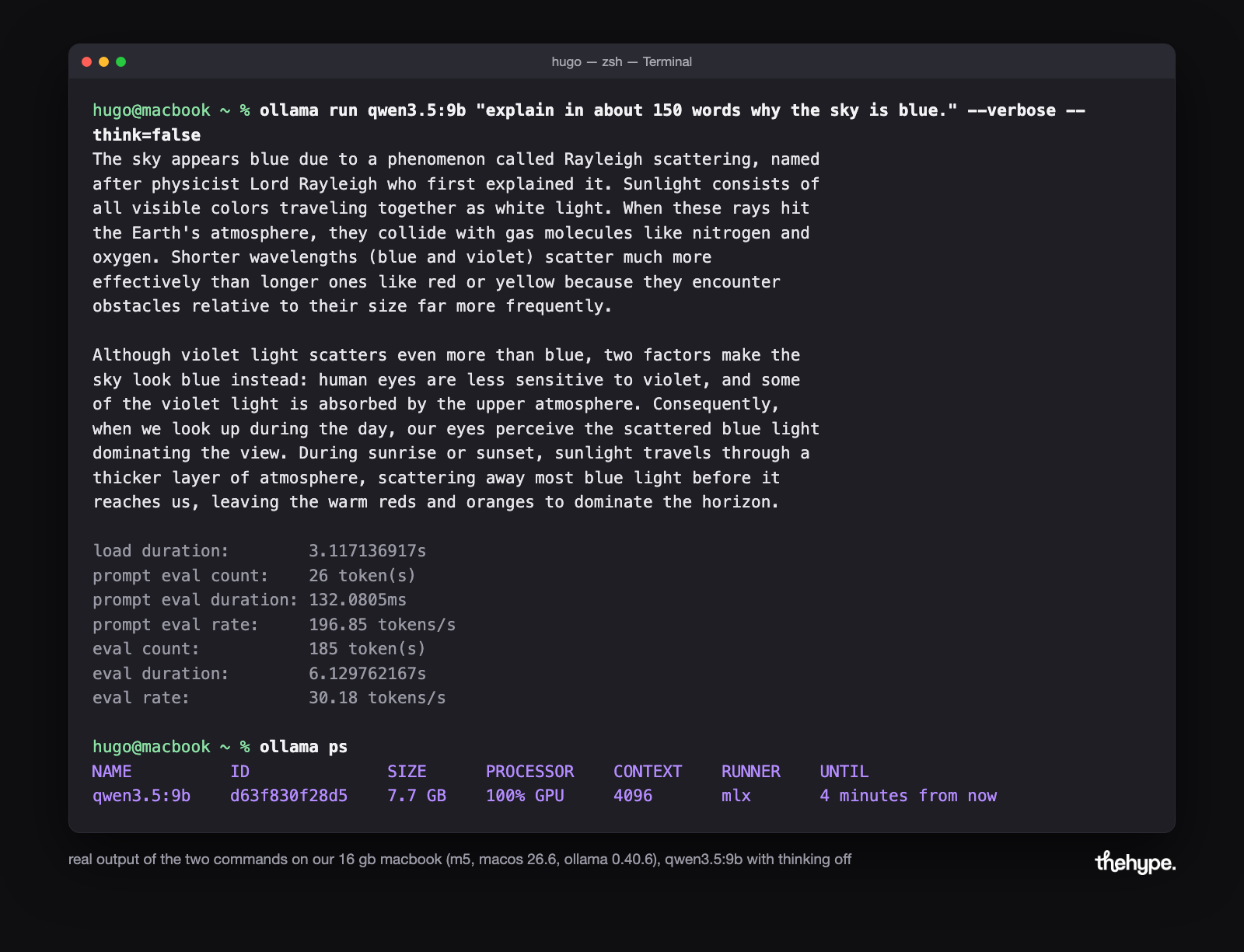
ollama run qwen3.5:9b --think=false. one command fetches the file and drops you into a chat when the progress bar fills. the--think=falsepart matters; the test below shows why. - give it a job you would otherwise do yourself this afternoon: the email thread you have to answer, a paragraph that has to go out in german, the piece of code you keep looking up. to paste several lines, type
"""first, paste, then"""again and press enter. /byeends the session. nothing is deleted: the file stays in ollama's model folder and reloads in a few seconds, so the download is a one-time cost.
other programs can use the model too: ollama listens at http://localhost:11434, and any app with an "openai-compatible" setting can be pointed there. thehype's openclaw and ollama guide turns the same setup into a local agent.
lm studio replaces the terminal with a catalogue. the discover tab lists each model with its file size and a warning badge when it will not fit the machine. search "qwen3.5 9b", accept the q4 version it suggests, download, and chat.
our test: three models on a 16 gb macbook
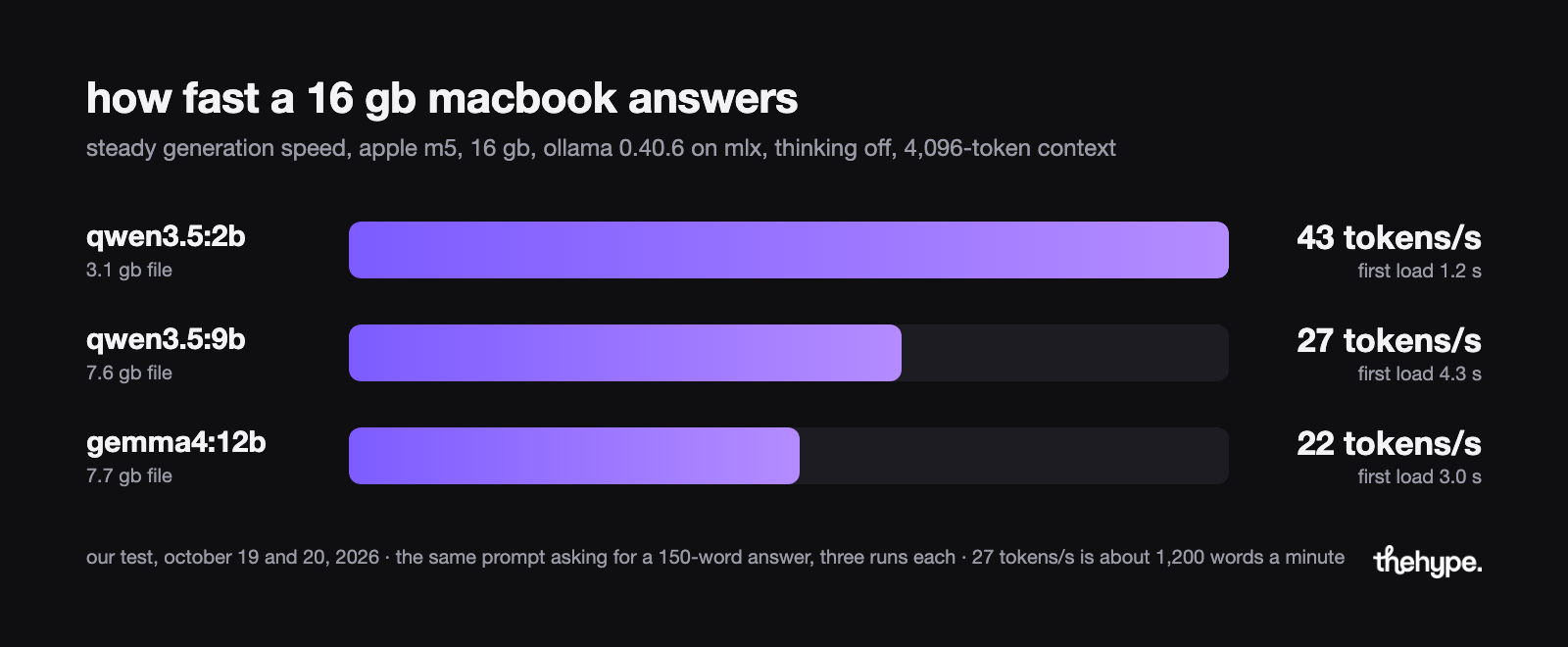
we ran the steps above on a macbook with the base m5 chip and 16 gb of memory. the software was macos 26.6 and ollama 0.40.6, on october 19 and 20, 2026. each model got the same question, asking for a 150-word answer, three times. first load was measured after the download, generation with the model's "thinking" mode off, explained below.
| model | file on the mac | first load | generation |
|---|---|---|---|
| qwen3.5:2b | 3.1 gb | 1.2 s | 43 tokens/s |
| qwen3.5:9b | 7.6 gb | 4.3 s | 27 tokens/s |
| gemma4:12b | 7.7 gb | 3.0 s | 22 tokens/s |
all three ran fully on the gpu through apple's mlx. that is why the file sizes differ from the memory table above: on a mac, ollama picks the build its runtime wants. the 9b and the 12b came as 4-bit "nvfp4" files, the 2b as an 8-bit one. 27 tokens a second is roughly 1,200 words a minute. a good tokens per second figure for a local llm starts near 10, which already outruns most readers.
the three downloads, 18.4 gb in all, took two and a half hours on our connection of about 2 megabytes a second.
qwen3.5 "thinks" by default: it writes out its reasoning before the real answer. in that mode the 2b model spent 2 minutes 21 seconds on planning notes. it still had not started the 150-word answer when we stopped it. with --think=false on the command line, the same question took 4 seconds.
for scale, llama.cpp's community tables list a base m4 at 24 tokens/s on a 7b model and an rtx 5090 at 290. a 16 gb laptop sits at the bottom of that ladder.
local or cloud: the three numbers that decide
the three are cost, privacy and quality; the numbers are from october 2026.
cost: once the hardware is paid for, the meter on a local model reads in watts, not tokens. apple measures the mac mini with m6 at 70 w flat out. at the 18.31 cents per kwh residential average the u.s. energy information administration reports for july 2026, that is about 1.3 cents an hour. an rtx 5090 at its 575 w card budget is about 11 cents an hour, before the rest of the pc.
the cloud charges per token instead: input is what you send, output is what it writes back. openai lists its cheap gpt-6-luna at $0.10 per million input tokens and $0.50 per million output tokens. its biggest, gpt-6-astra, costs $10 and $50. for a few questions a day the chatgpt or gemini app costs nothing.
privacy: a prompt typed into a local model has no network hop to log. that matters most to a law firm, a clinic or any team whose data must stay in one country. the consumer chat apps are the real comparison for a beginner. chatgpt's individual plans may use conversations for training unless the user turns off "improve the model for everyone". anthropic's consumer privacy policy, effective september 10, 2026, says the same about claude. google's gemini app keeps activity for 18 months by default and uses it to improve its models.
the paid developer apis promise not to train on customer data, openai's by default and anthropic's by contract. with a local model there is no company to trust in the first place.
quality: the best open-weight models come close to the cloud's best but not level with it; laptop models are further away. artificial analysis, a site that tests models, scored the best downloadable model at 46 on its intelligence index on october 19, 2026. the top score, 58, went to claude opus 5.5 at its max setting. that open model, xiaomi's mimo-v2.6-pro, has a trillion parameters, a hundred times too big for a laptop.
on the same scale, qwen3.5 9b gets 11, gemma 4 12b an estimated 14 and gpt-oss-20b 9. a 32 gb machine changes the picture: qwen3.8 27b scores 34 at its highest reasoning setting.
| use local when | use the cloud when |
|---|---|
| the data cannot leave the building | the question is hard enough that a 9b answer would need checking anyway |
| the same job runs hundreds of times a day, so per-token fees add up | you ask a few questions a week and would never buy hardware for them |
| the wi-fi is unreliable or the reply has to start instantly | you need the newest model or one that reads a whole book at once |
most founders will end up running two: the laptop for the daily volume, a cloud model for the few genuinely hard questions.
faq
short answers to the questions that come up first.
ollama vs lm studio: which should i install first?
lm studio if the word "terminal" puts you off, ollama if you already live in one or want your editor to call the model. nothing is locked in: switching apps later costs a re-download, not a re-learn.
how much does it cost to run ai locally?
nothing for the software: every app and model in this guide is a free download. the running cost is the electricity worked out above, about 1.3 cents an hour on a mac mini. the one paid option you will meet is ollama's cloud models, billed on credits with a $20-a-month pro plan, and nothing here needs them.
is local ai as good as chatgpt?
not on a laptop, and not quite at the top either. on the intelligence index in the local-or-cloud section, qwen3.5 9b scores 11 against 58 for the cloud leader. the gap shows on hard reasoning, not on summaries and drafts.
do i need internet to run ai locally?
only for the first download and the app's own updates.
is local ai automatically private?
not automatically. the model leaks nothing; the risk sits one layer up. a note app or coding plugin that calls ollama may also sync to its own cloud. ollama's optional cloud models send the prompt off the machine. read the settings of whatever stands between you and the model.
can i run chatgpt or claude locally?
no app lets you run claude locally, and the same goes for chatgpt and gemini. anthropic, openai and google keep those weights private, which is why their privacy settings matter. the open-weight models in the first-model table are the local alternative.
can i run ai locally without a gpu?
it still works, on the processor. ollama's docs list what it speeds up: nvidia cards from the gtx 900 generation up and amd cards through rocm on linux and windows. a vulkan path covers the rest; intel macs run on the cpu only. without a supported gpu, expect the 2b–4b class at a fraction of the speed we measured.
why is my local llm so slow?
two causes cover most cases. qwen3.5 and other models "think" before answering; the test section shows what --think=false saves. or the model has landed on the cpu, usually because the file is bigger than the memory the gpu can see; ollama ps shows it.
why does my local llm forget the conversation?
almost always the context window, not the model. ollama's 4,096-token default holds about 3,000 words and drops the oldest ones silently. the memory section has the num_ctx line that raises it.
what fits in 8 gb?
the 2b–4b class, with qwen3.5:4b as the comfortable pick. keep conversations short, because the 8 gb also has to hold macos or windows. lm studio's requirements page agrees for 8 gb macs. reasoning is weaker than the 9b models, but email summaries and first drafts are within reach. phones are a separate story, covered in thehype's guide to picking a local ai model for your phone.
sources
- ollama v0.40.6 release notes – github, october 16, 2026
- lm studio system requirements – lm studio docs, accessed october 19, 2026
- gemma 4 announcement – google, april 2, 2026
- state of open models: summer 2026 – hugging face, adina yakefu, apolinário and irene solaiman, august 14, 2026
- openai api pricing – prices as of october 19, 2026
- electric power monthly, table 5.6.a – u.s. energy information administration, september 24, 2026