 Nick Trenkler
your phone can now run ai without the internet – no server, no subscription, no one reading your chats. the model lives on your device and works offline. in 2026 this finally works well enough for everyday use. the hardware caught up.
the signs are everywhere. openai is reportedly working on a phone where ai replaces apps entirely. developers are already shipping react native apps with local ai baked in, no cloud required.
Gemma 🤝 React Native📱
— Google Gemma (@googlegemma) May 4, 2026
Exciting news for mobile developers! We love seeing the community unlock new ways to build.
You'll soon be able to run Gemma 4 completely on-device in React Native. pic.twitter.com/CC10IfWbhj
but here's the problem: not every model runs well on every phone. pick the wrong one and it crawls, drains your battery in an hour, or simply refuses to load because it doesn't fit in memory. there are real tradeoffs and they're not obvious.
this guide walks you through every criterion you need to make a smart choice – explained in plain language, no assumed knowledge.
checklist by thehype
1. ram
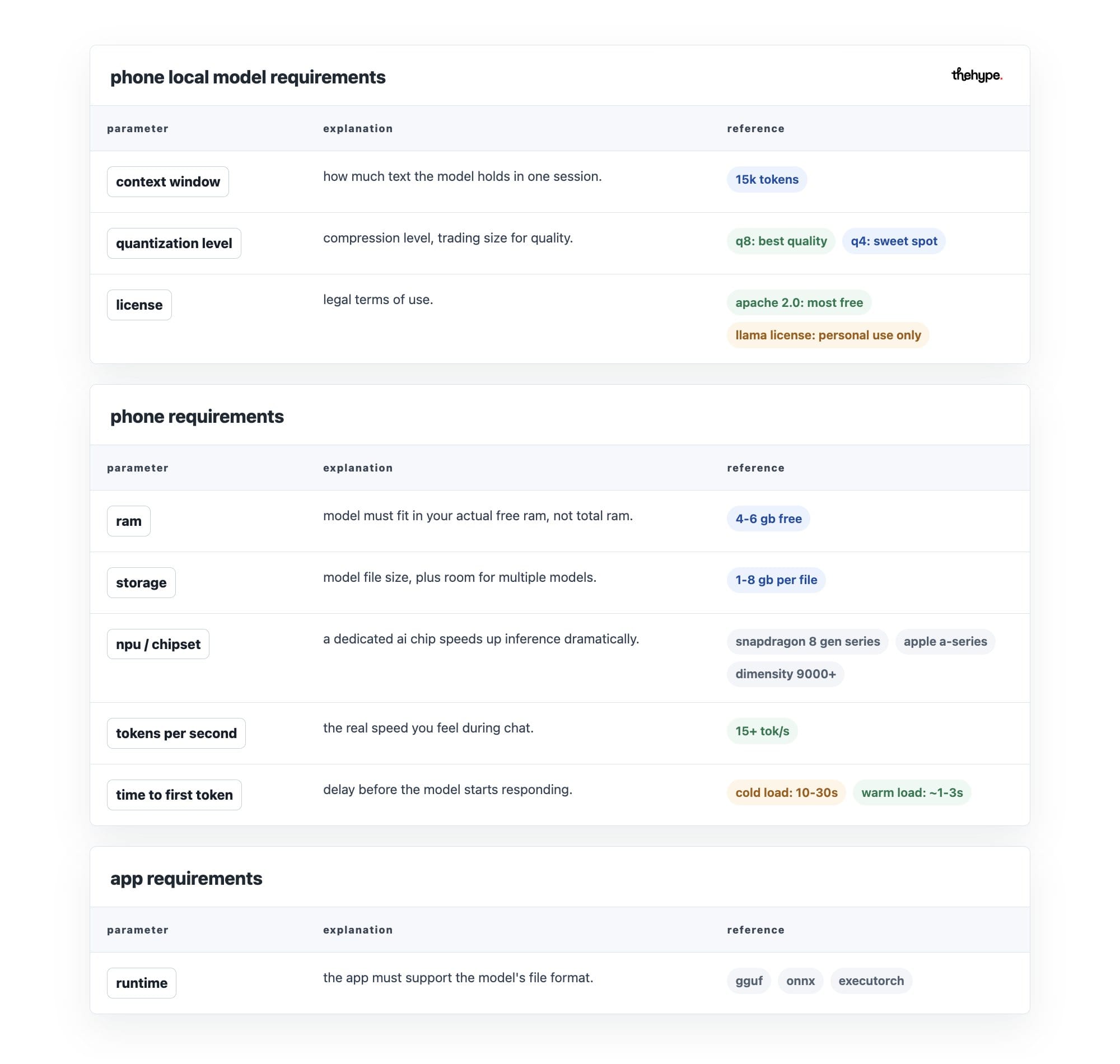
ram is your phone's short-term working memory – like a desk where work happens. the model's size in memory must fit alongside the operating system – android or ios, the app that actually runs your ai, and background processes (apps running silently in the background).
a phone showing "8 gb ram" might only have 3-4 gb free, while the optimal free ram is around 4-6 gb. you need to know your actual free ram, not total.
DDR6, the next version of RAM, is planned to start selling in 2028.
— Pirat_Nation 🔴 (@Pirat_Nation) May 5, 2026
Major companies Samsung, SK Hynix, and Micron are developing it.
It will launch with base speeds of 8,800 MT/s and can go up to 17,600 MT/s.
This means much higher bandwidth than today’s DDR5 memory, so… pic.twitter.com/MRTNFcPA69
2. storage
models are heavy. you better have several gb free. but also consider: where is the model stored?
internal storage is faster than sd card (a removable memory card you insert into the phone). some apps stream from sd card (read the model piece by piece instead of loading it) which causes stutters.
also factor in that you may want to try multiple models, so headroom (extra free space) matters.
npu / chipset
an npu is neural processing unit – a chip designed specifically to run ai fast.
check whether your runtime (the software engine running the model) actually uses the npu – many apps use the gpu (graphics chip, also good at ai math) instead, and some fall back to cpu (the main processor, slowest for ai) entirely.
cpu-only inference (running the model only on the main processor) on a large model is unusably slow.
metal (apple's system for using the gpu on iphone/ipad) and vulkan (android's equivalent) are the main gpu paths. some snapdragon and dimensity chips (popular phone processor brands) have dedicated ai engines but software support varies.
OpenAI Picks MediaTek Over Qualcomm For Its First Smartphone, Customizing The Dimensity 9600 With A Dual-NPU Architecture To Challenge The iPhone | Wccftech
— Déji Fadahunsi (@DJone01) May 5, 2026
Read the article on the quoted post.#Wccftech #OpenAI #MediaTek https://t.co/ufqkw0xEod pic.twitter.com/PqwUgsFfxE
tokens per second
tokens per second show how fast the model produces text – your main speed indicator.
a token is roughly ¾ of a word – so 10 tok/s means about 7-8 words per second. below ~8 tok/s feels sluggish for chat. above ~20 is comfortable. this depends on model size, quantization (compression level – explained below), chip, and runtime together – not any one factor alone.
Grok 4.3 just took the crown for the fastest output speed on Artificial Analysis
— X Freeze (@XFreeze) May 1, 2026
207 output tokens per second
That's faster than you can blink
xAI is currently dominating output token speed while delivering top-tier performance at the lowest cost
Grok 4.3 is the complete… pic.twitter.com/IKpVejL3RM
time to first token
separate from generation speed. this is how long before the model starts responding.
cold load time (starting from scratch, model not in memory yet) can be 10-30 seconds. warm load (model already loaded and ready) is much faster. matters a lot if you open and close the app frequently.
context window
this is how much text the model can hold in one session – including your messages, its replies, and any documents you paste. it's measured in tokens.
small context (2k-4k tokens, about 1,500-3,000 words) means it forgets earlier parts of long conversations. large context (32k+, about 24,000+ words) is more demanding on ram and speed.
match this to your actual usage: short q&a needs little, document summarization needs a lot.
1 million context window: Now generally available for Claude Opus 4.6 and Claude Sonnet 4.6. pic.twitter.com/jreruGukcm
— Claude (@claudeai) March 13, 2026
training data cutoff
determines what the model knows about the world. a model with a cutoff in early 2023 won't know about anything that happened after. for factual queries about recent events this matters a lot. for coding help or reasoning tasks it matters much less.
runtime / app support
the model format (the file type the model is saved in – like gguf, onnx, or executorch) must be supported by your app. not every app supports every format.
quantization level
quantization compresses model weights (the numbers that encode everything the model knows) to take up less space and ram, at the cost of some accuracy.
think of it like image compression – a heavily compressed jpeg is smaller but looks worse. lower bit = smaller and faster but more degraded. the degradation is not linear – going from q8 (high quality, large) to q4 (half the size, barely worse) loses little, going from q4 to q2 loses a lot.
also: the type of quantization matters, not just the bit level. k-quants (smarter compression methods that preserve important weights) like k_m and k_s are generally better than naive rounding (compressing everything equally regardless of importance).
license
some models are open weights (the model files are publicly downloadable) but restrict commercial use (using it in a business or product), require attribution (crediting the creators), or prohibit certain applications. for pure personal use this rarely matters. if you're building something on top of it, check carefully.
common licenses you'll encounter:
- apache 2.0 – most permissive. use freely, commercially, modify, distribute. just keep the license notice. no restrictions worth worrying about for most people.
- mit – similarly permissive. very short and simple. do almost anything, just credit the author.
- llama community license – meta's custom license for llama models. free for most uses but has restrictions above 700 million monthly active users, and prohibits using it to train other models.
- gemma terms of use – google's license for gemma models. allows commercial use but prohibits using outputs to train competing models and restricts certain harmful use cases.
- cc-by-4.0 (creative commons attribution) – use and modify freely including commercially, but must credit the creator.
- cc-by-nc-4.0 (creative commons non-commercial) – same but no commercial use at all. common on older or research-focused models.
- bigscience openrail-m – designed specifically for ai models. permissive but includes an explicit list of prohibited use cases (weapons, surveillance, disinformation, etc.).
- proprietary / custom – some models have fully custom licenses written by the company. always read these carefully as they vary wildly.
our top 5 local ai models for phones
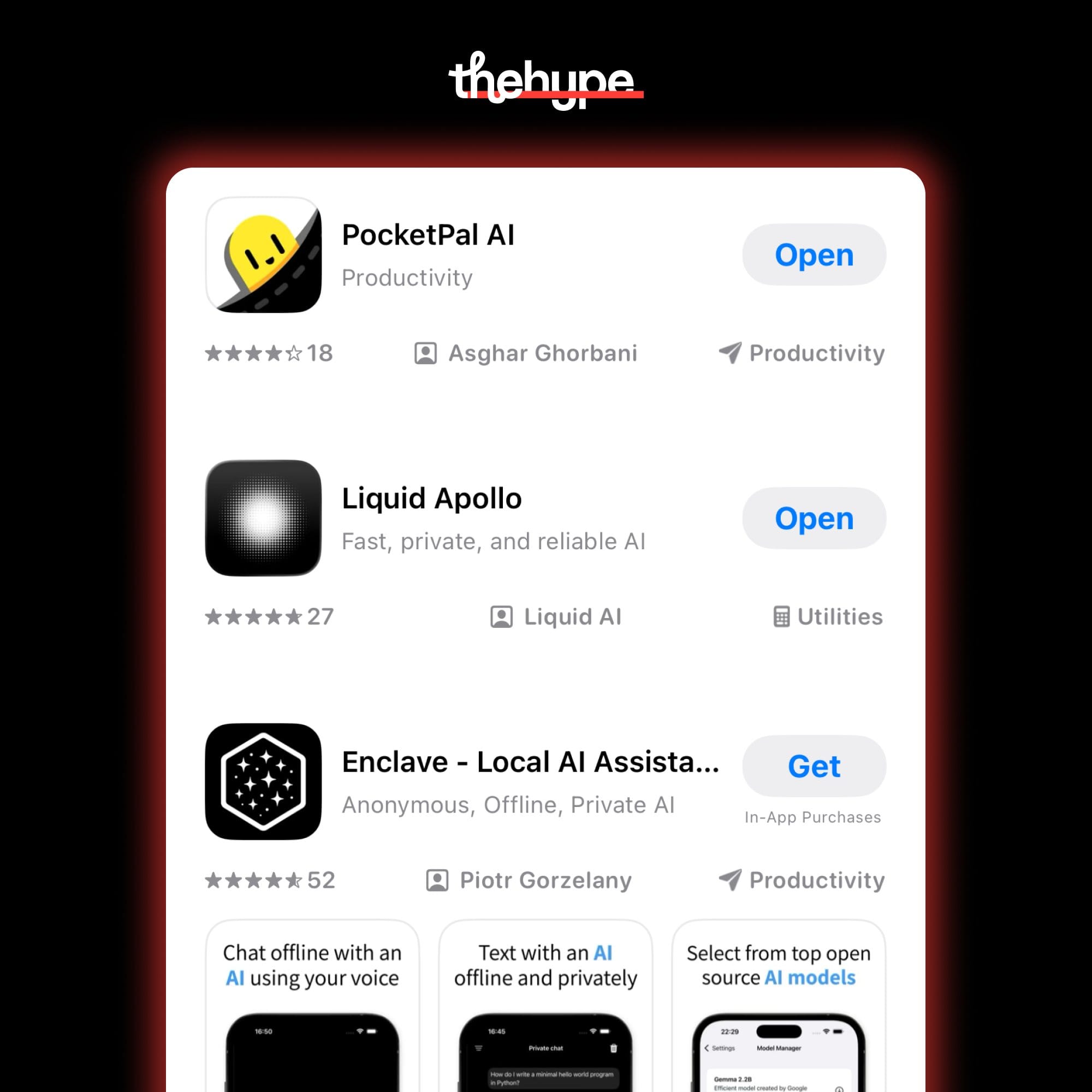
for your comfort, we've picked some of the best local models to try in 2026 — all in gguf format, all phone-ready.
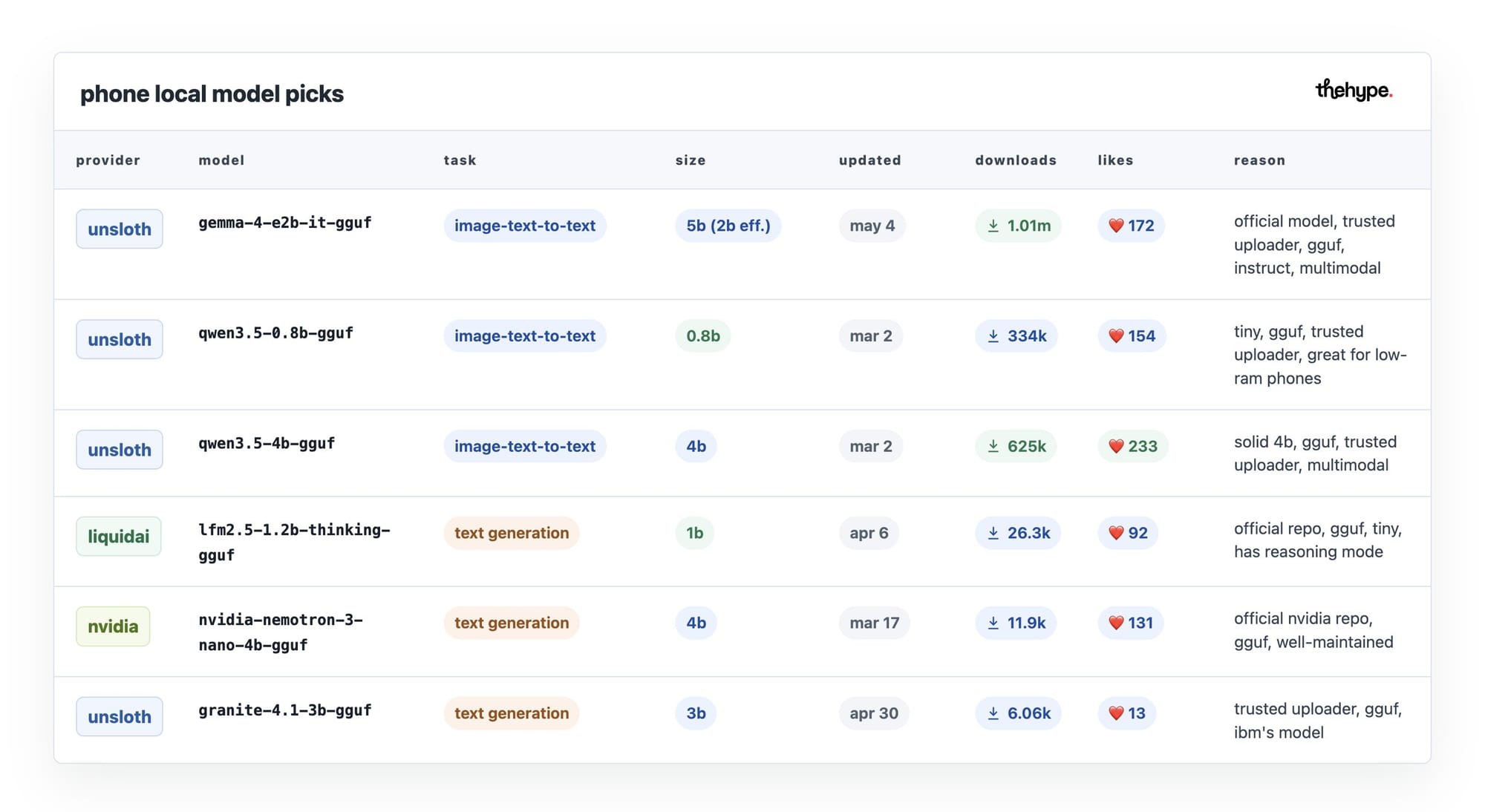
gemma 4 e2b (unsloth) – google's flagship mobile model. handles text, images, and audio in one. the most downloaded phone-ready model right now for a reason.

qwen3.5 0.8b (unsloth) – the smallest viable option. if your phone is older or low on ram, start here. surprisingly capable for its size.

qwen3.5 4b (unsloth) – the sweet spot of the qwen family. multimodal, fast, and well-tested by the community.

lfm2.5 1.2b thinking (liquidai) – tiny but smart. has a built-in reasoning mode that lets it think through complex questions before answering. unusually capable for 1b.

nemotron 3 nano 4b (nvidia) – nvidia's own edge model. solid all-rounder with strong instruction following, backed by a major lab.

granite 4.1 3b (unsloth) – ibm's open model. good for structured tasks, reliable, and actively maintained.

https://huggingface.co/bartowski/ibm-granite_granite-4.1-3b-GGUF
all of these run on a modern phone with 6gb+ of free ram at q4 quantization. if your phone has less, stick to the 0.8b or 1.2b options. if you have a flagship with 8gb+ free, any model on this list will run comfortably.
start with gemma 4 e2b if you're unsure – it covers the most ground.