 Vladimir Arustamov
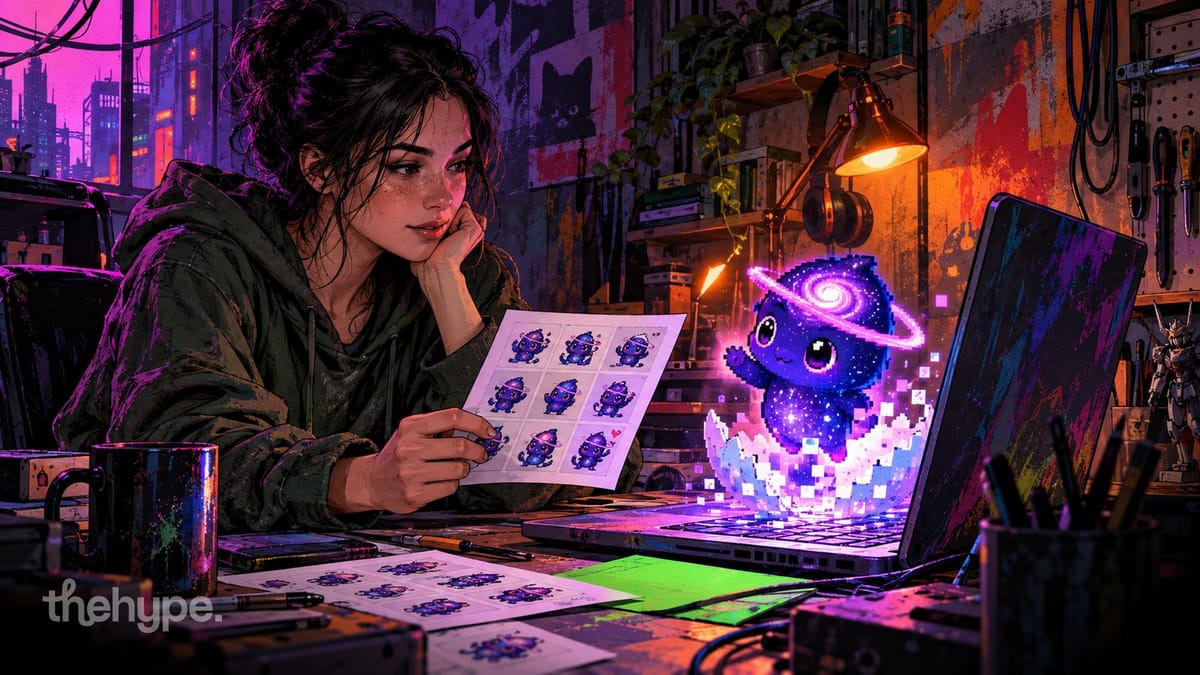
Codex pets are small animated characters from the Codex desktop app that float on your screen, react to what Codex is doing – working, waiting for your approval, failing – and follow your pointer with their eyes. the app ships 9 of them. you pick one in settings → pets, install more from community galleries, or make your own with the built-in hatch-pet skill. we made one from a character Codex doesn't ship – Astra, the GPT-6 mascot – with free ChatGPT and no API key. everything below is from that run, plus the skill's own spec.
what codex pets do
a pet floats above your windows and shows the state of your Codex task:
- working – Codex is running a task (each pet has its own working animation: typing, thinking, scanning)
- waiting – Codex needs your approval or input
- review – it looks over finished work
- failed – something went wrong
- idle – nothing is happening
it also follows your pointer with its eyes, can be dragged around, and gives you quick access to ChatGPT through its own input. one catch from our run: typing into the pet's input starts a new chat outside your project, so do project work in the main Codex window.
how to turn a pet on, switch it and make it bigger
- show or hide it. press ⌥space on a Mac (super+alt+p on other systems) – it works from any app, and you can reassign it. in a Codex chat, the
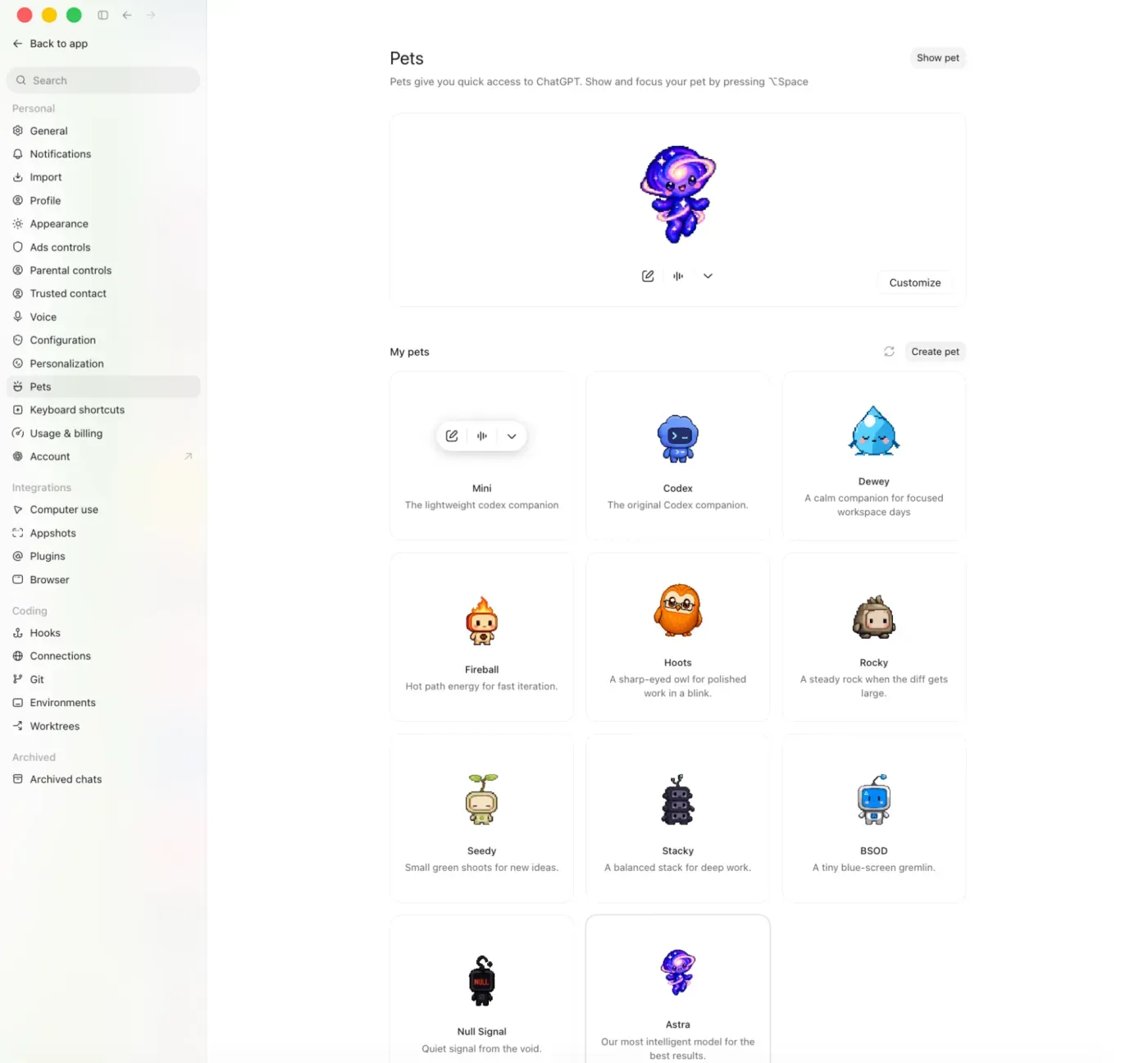
/petcommand wakes or tucks away the pet, and settings → pets has the same two buttons - switch it. settings → pets → my pets: click any pet. the "mini" tile there is not a pet – it's a bar-only mode without a character
- make it bigger or smaller. settings → pets → customize has a pet size setting, with a reset back to the default
the app ships 9 built-in pets:
| pet | description in the app |
|---|---|
| Codex | the original Codex companion |
| Dewey | a calm companion for focused workspace days |
| Fireball | hot path energy for fast iteration |
| Hoots | a sharp-eyed owl for polished work in a blink |
| Rocky | a steady rock when the diff gets large |
| Seedy | small green shoots for new ideas |
| Stacky | a balanced stack for deep work |
| BSOD | a tiny blue-screen gremlin |
| Null Signal | quiet signal from the void |
one naming note: on our Mac the app is now called ChatGPT, but it's the same Codex app – its bundle id is still com.openai.codex, and pets live under its settings.
where to get more codex pets
the community already made hundreds. three community collections:
- petdex – a gallery, a CLI and a desktop app. with Node.js 20+ installed, add a pet with
npx petdex install boba(github) - codexpet.top – a free gallery of community pets with animation previews and one-command install (github)
- codex-pokepets – Pokémon as Codex pets
a pet is just a folder, so any pet you download installs the same way: put its folder into ~/.codex/pets/ (or $CODEX_HOME/pets/ if you moved your Codex home), press refresh in settings → pets so the app rereads the folder, and pick it. the same page has an "open folder" button that opens this folder for you.
how a codex pet is built: the v2 spritesheet
every pet is a folder in ~/.codex/pets/<name>/ with two files:
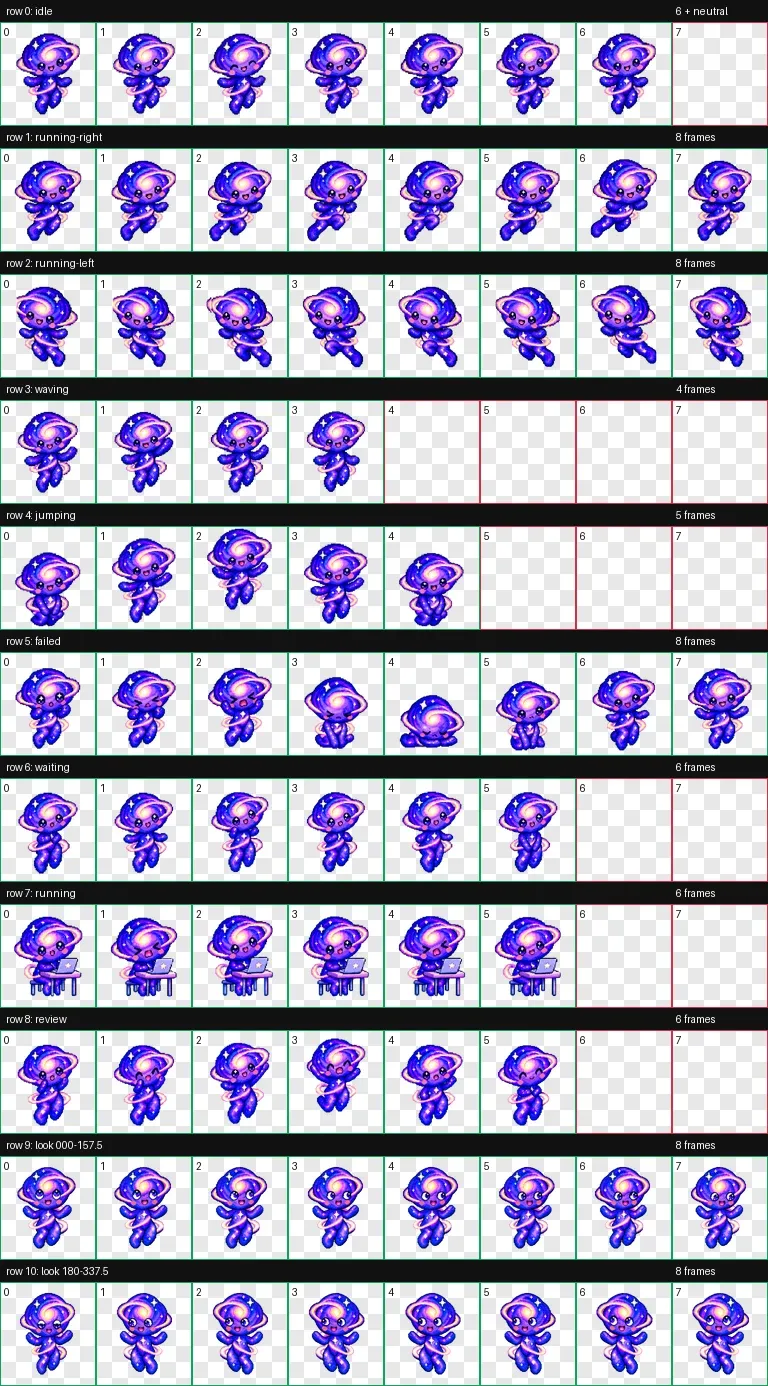
pet.json– the manifest- one spritesheet – for a new v2 pet, a 1536x2288 PNG or WebP with a transparent background: 8 columns x 11 rows, each cell 192x208 px. older v1 pets use an 8x9 sheet without the gaze rows, and still install
rows 0–8 are animations, rows 9–10 are 16 gaze directions, 22.5° apart. this is the layout the hatch-pet skill builds and validates for every newly hatched pet (from its own animation-rows.md). cells after the last frame of a row stay fully transparent.
| row | state | frames | timing |
|---|---|---|---|
| 0 | idle | 6 | 280, 110, 110, 140, 140, 320 ms |
| 1 | running-right (dragged right) | 8 | 120 ms each, last 220 ms |
| 2 | running-left (dragged left) | 8 | 120 ms each, last 220 ms |
| 3 | waving | 4 | 140 ms each, last 280 ms |
| 4 | jumping | 5 | 140 ms each, last 280 ms |
| 5 | failed | 8 | 140 ms each, last 240 ms |
| 6 | waiting | 6 | 150 ms each, last 260 ms |
| 7 | running – Codex is working, not locomotion | 6 | 120 ms each, last 220 ms |
| 8 | review | 6 | 150 ms each, last 280 ms |
| 9 | look 000–157.5° | 8 | one pose per direction |
| 10 | look 180–337.5° | 8 | one pose per direction |
- 000 means looking up, 12 o'clock – not "front". front is the neutral zone and falls back to idle
- the manifest needs these five fields. a v2 sheet needs
"spriteVersionNumber": 2– without it the app treats the pet as v1 and rejects the 2288 px tall sheet
{
  "id": "astra",
  "displayName": "Astra",
  "description": "Our most intelligent model for the best results.",
  "spriteVersionNumber": 2,
  "spritesheetPath": "spritesheet.webp"
}
how to make a custom codex pet with hatch-pet
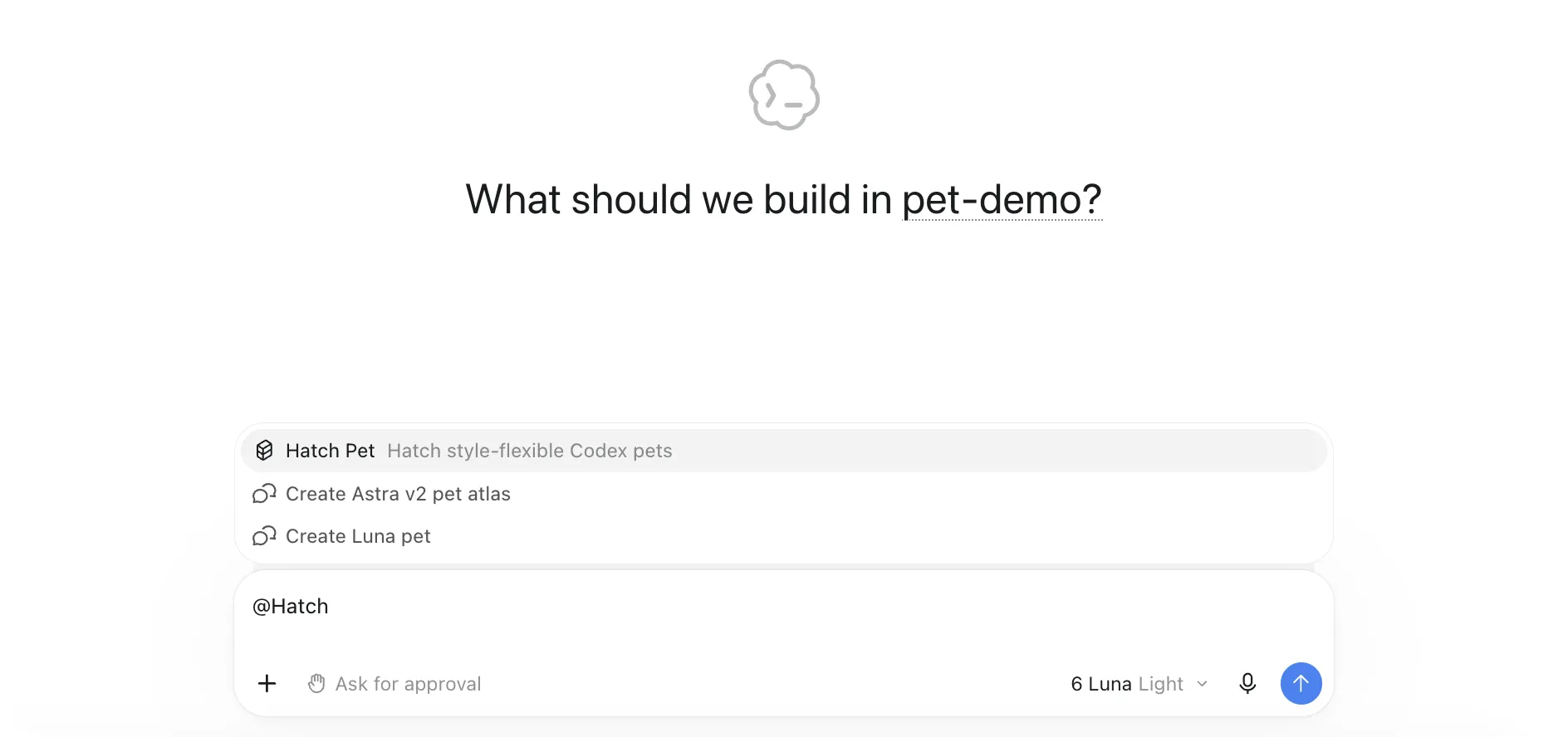
hatch-pet is a skill that ships with the Codex app. skills teach Codex a workflow; to give it your own tools instead, see how to build an mcp server. type @hatch in the input and pick "hatch pet" – or press "create pet" in settings → pets.
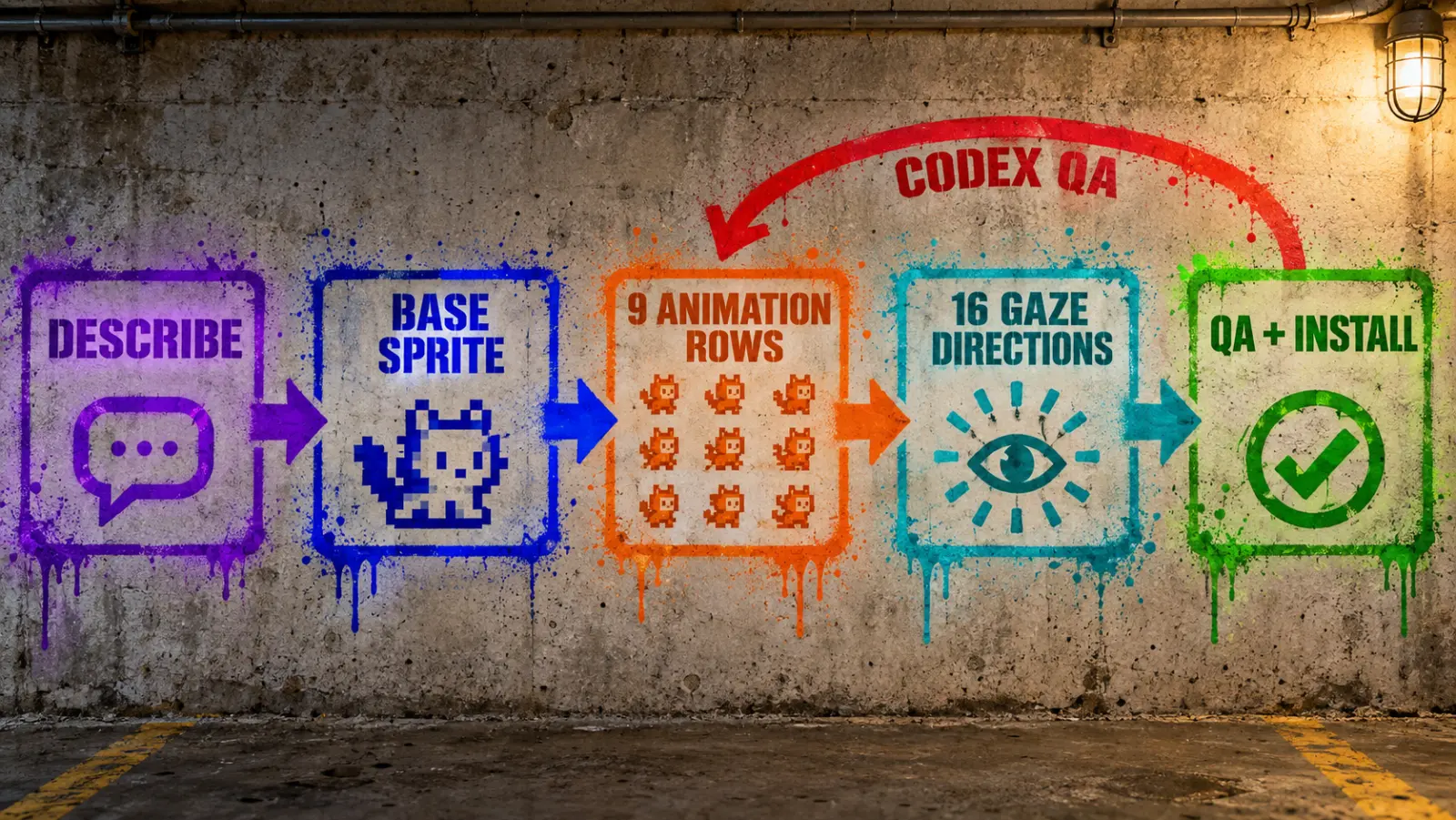
- describe the pet. a name, a one-line description and references: a text concept, a photo, a logo or existing art all work. attach an existing pet's atlas if you want the same style and scale
- main look. the skill generates one base sprite. it becomes the reference for everything after it
- poses. it generates the 9 animation rows (running-left can be a mirror of running-right), then 4 anchor poses and the 2 gaze rows – up to 13 image jobs in total
- hatching. it assembles the 8x11 atlas, runs QA on every row and direction, writes
pet.jsonwithspriteVersionNumber: 2and installs the pet
by default the skill draws with the app's built-in image generation. its only documented fallback is an image CLI that needs local API credentials, and it asks before using it. if image generation is off for your account – ours was – you can draw every image in a ChatGPT chat yourself and hand the files back to Codex. that's what we did.
our run: astra, a pet codex doesn't ship
OpenAI's GPT-6 launch video featured three pixel mascots: Astra, Sol and Luna. none of them is among the 9 built-in pets – the closest, Fireball, looks like Sol to us but is a different character. so we built Astra ourselves: no API key, no paid image generation. (the model behind the mascot we tested separately in grok 4.7 vs gpt-6 astra in 3d scenes.) fan-made – the characters belong to @OpenAI.
what we used:
- the Codex desktop app, the built-in hatch-pet skill, GPT-6 Luna on high
- 4 stills cut from the launch video with ffmpeg – the identity reference
- the built-in Fireball atlas – the style and scale reference
- free ChatGPT for every image, because built-in image generation was off for our account and we refused the API fallback
step 1 – the prompt that starts the run
we attached the 4 stills plus the Fireball atlas and sent this to Codex, word for word:
Create a new Codex pet named "Astra".
Description: "Our most intelligent model for the best results."
The attached images are stills of the GPT-6 Astra mascot from OpenAI's launch video. Treat them as the canonical identity reference. Crop out the dark starry card background, title text and grid floor — only the character matters.

Identity:
- a small humanoid creature whose whole body is a spiral galaxy: deep indigo/violet glossy body with a bright white-pink galactic core glowing on the head
- a glowing pink-lavender orbital ring/nebula swirl wraps around the head and the body
- tiny white and gold four-pointed sparkle stars float around it and are embedded in the body
- cute face: big round dark eyes with highlights, pink blush cheeks, small open happy smile
- chubby limbs, floating/hovering pose, one hand raised in a greeting
- one of the stills shows it from behind (galaxy core facing us) — use it for back/turned look directions

Style: match the built-in Fireball pet exactly — the same pixel-art mascot family, chunky silhouette, visible stepped pixel edges, limited palette, flat cel shading, same scale and framing inside the cell. Use the built-in fireball atlas as the style and geometry reference.

Animation personality: calm, floating, dreamy. Idle = gentle hover with the orbital ring slowly rotating and sparkles twinkling. Running = glides rather than walks. Thinking/working = ring spins faster, core pulses. Error = ring wobbles, sparkles dim.

Produce the full v2 8x11 atlas (9 standard rows + 16 look directions), spriteVersionNumber 2, run QA and install it as a local pet.
Codex asked for image generation, and we picked "stop before generation". the skill still built the whole job graph: 13 jobs, a prompt per row, layout guides for every cell, a green chroma key.
step 2 – the base sprite in chatgpt
on our free ChatGPT account the upload limit hit after 2 images. so we merged the 4 stills and the Fireball sprite into one sheet, labeled "style only" over Fireball, and sent:
The uploaded sheet shows the Astra character (ref 1-4) and, on the right, a style reference only (do NOT copy that character). Draw Astra as a small humanoid spiral-galaxy creature: deep indigo-violet glossy body, glowing white-pink galaxy core on the head, pink-lavender orbital ring swirling around head and body, tiny white/gold four-point sparkles, big dark shiny eyes, pink blush, small happy smile, chubby limbs, floats. Match the style reference exactly: pixel-art mascot, chunky silhouette, visible stepped pixel edges, simple dark outline, limited palette, flat cel shading. One single centered full-body front-facing pose, compact and readable at 192x208, on a flat pure green #00FF00 background. No text, scenery, shadow or glow; no green inside the character.
then we saved the result into the run folder as decoded/base.png and told Codex to validate it, treat its green background as the chroma key and wait for the row strips.
step 3 – 8 animation rows, one chat
every row after the base went into the same ChatGPT chat as plain text, no uploads. the idle row, word for word:
Now make the `idle` animation strip. Same character as the approved base sprite above: identical face, proportions, palette, pixel style and scale. Output ONE wide horizontal image, flat pure green #00FF00 background, exactly 6 full-body poses in a single left-to-right row, evenly spaced in 6 equal invisible slots, same size and same baseline in every slot, generous padding, no overlap, no text, labels, borders, grid lines, shadows, glows, motion blur or scenery. Action: calm resting loop: subtle breathing, tiny blink, slight bob; same pose in all frames, first and last frames nearly identical. Idle hovers gently with the ring slowly turning. Running glides rather than walks.
the other 7 rows used the same template with a different frame count and action line. running-left we let Codex mirror from running-right. then Codex extracted and normalized all 57 frames to one scale – and flagged the running row: it "doesn't read as running". it isn't meant to – running is the working state. we pushed back:
Row 7 `running` is correct as is. Per pet_request.json its purpose is "active task work or processing", not locomotion — movement is covered by running-right/running-left. The built-in Fireball atlas uses the same concept in row 7 (typing at a laptop). Please approve `running` without changes, mark all 9 standard rows approved, and prepare the look-cardinals job. Stop before generating.
all 9 rows approved.
step 4 – 16 gaze directions: where it got hard
the base and the 8 row strips took 9 generations. the 16 gaze cells took about 15 more.
Codex's first rule was "turn the head toward the direction". ChatGPT kept the face frontal in 8-pose strips, so every side-facing slot failed. the fix was a rule, not a better prompt. we told Codex:
Also, I want to change Astra's look mechanic. Update qa/look-mechanics.md: Astra's gaze is carried by the pupils and eye highlights inside her large eyes; the face stays broadly frontal and the head does not need to turn.
the next failure: ChatGPT drew a lowered eyelid on one eye only, and Codex failed the slot for a "mismatched eyelid". the prompt that finally passed all 8 slots banned eyelids for the whole row:
Eyes rule: both eyes are always fully open, round and identical to each other in every pose — NO eyelids, no squinting, no half-closed eyes anywhere. Both pupils always point in exactly the same direction.
the last row (down → left → up) failed 5 times in a row: crossed eyes, a different eye style, pupils in the wrong quadrant. the skill doesn't allow repair cells from a separate generation, so we approved our own exception in writing – a departure from the skill's rules, not a feature of it:
I explicitly approve a one-time workflow exception for Astra: build look-row-10 deterministically — slot 180 from the approved 180 anchor, and slots 202.5–337.5 as horizontal mirrors of approved row-9 slots 157.5–022.5. Then run the full QA you listed (registration, semantic direction review, continuity across 157.5→180→202.5 and 337.5→000, blind direction checks, ring asymmetry review). If it passes, compose the 8x11 atlas, package with spriteVersionNumber 2 and install Astra.
step 5 – codex blocks the install
the 180° frame was 123 px wide, its neighbors 110 px. two independent reviewers saw a size pop and Codex refused to install. the fix, no new art:
Fix the 180° scale pop without new generation: apply the same scale normalization you used for the standard rows to the 180 slot only — rescale and re-register the approved 180 anchor cell so its pet height, eye size and baseline match the neighboring 157.5 and 202.5 cells (use their measured bounding boxes as the target). Keep its pixels otherwise unchanged. Then re-run the continuity check for 157.5→180→202.5, the final independent review and the atlas validation. If everything passes, package with spriteVersionNumber 2 and install Astra.
- one resample at 0.8943x. then a WebP re-save left 1,618,083 invisible RGB pixels under transparency – validation failed again, and Codex re-exported losslessly, zero residue
- final: 16/16 gaze directions pass, blind cardinal checks pass, the atlas validates as v2, Astra installed
the numbers
- ~24 ChatGPT generations, 12 of them made it into the final atlas
- 88 atlas cells, 57 animation frames, 16 gaze directions
- 0 API calls, 0 paid image generations
- Codex QA gates: frame extraction, scale normalization, semantic direction review, 3 blind reviewers, continuity metrics, chroma and transparency checks
codex hatch not working? what blocks the install
hatch-pet refuses to install a pet while a major QA failure is open. what stopped us, and the fix:
- a gaze cell fails and you redraw only that cell. the skill never copies a separately generated repair cell into the final atlas – regenerate the whole 8-pose row
- a size pop between neighboring cells. the skill registers every row with one transform and doesn't patch single cells – rerun registration and QA, and regenerate the row if it still doesn't fit. rescaling one cell, like we did in step 5, is an exception you approve yourself
- validation fails on transparency. chroma-key colour left behind a cell, or colour data kept under transparent pixels by a lossy WebP. re-export losslessly, or rerun assembly with a wider chroma threshold
- the app rejects a new pet's sheet. a v2 pet needs
"spriteVersionNumber": 2inpet.jsonand a sheet of exactly 1536x2288. in a hatch-pet run, an 8x9 sheet (1536x1872) is only the intermediate step before the gaze rows – don't package it as a new pet - Codex fails a row that is right. check the row's purpose in the skill's own spec and argue with evidence, like we did with the working row
tips before you start
- lock the gaze rule first. "pupils only, face frontal, no eyelids" before the first gaze strip saves ~10 generations
- keep one ChatGPT chat per pet: upload one merged reference sheet once, then send text only – the chat keeps the character
- if a strip only half-works, "fix pose 7" won't save it. regenerate the whole row; if the chat starts drifting, open a fresh chat and upload the same reference sheet again
- read Codex's failures. twice it was wrong (the working row, and a crop of the wrong row) and said so once we pointed at the evidence
- Codex runs the QA, you art-direct. the drawing is the easy part
faq
are Codex pets free? the 9 built-in pets come with the Codex app. our custom pet cost 0 API calls and 0 paid image generations: every image came from free ChatGPT, and Codex did the rest.
do I need an API key to make a pet? no. hatch-pet uses the app's built-in image generation. only its CLI fallback needs local API credentials, and the skill asks before using it.
can I turn any character into a Codex pet? technically yes – a text concept, a photo, a logo or existing art all work as input. a character someone else owns stays theirs, though: keep fan-made pets for yourself and credit the owner.
how do I make my Codex pet bigger? settings → pets → customize → pet size. reset puts it back to the default size.
where are Codex pets stored? in ~/.codex/pets/<name>/, one folder per pet with pet.json and the spritesheet. if you set CODEX_HOME, they live in $CODEX_HOME/pets/.
what is the difference between v1 and v2 pets? a v2 pet adds two rows of 16 gaze directions to the 9 animation rows, so the sheet is 8x11 instead of 8x9. both install. hatch-pet makes every new pet as v2 and can upgrade a valid 8x9 sheet by adding the gaze rows.
sources
- the hatch-pet skill as bundled with the Codex app 26.915 on macOS:
SKILL.md,references/codex-pet-contract.mdandreferences/animation-rows.md– the v2 format, rows, timings and QA rules. the public copy in openai/skills still describes the older 8x9 v1 sheet - the Codex app 26.915 itself: the built-in pet list, pet settings, the ⌥space shortcut and the
/petcommand - petdex, awesome-codex-pet and codex-pokepets on GitHub
- our own run: the Astra pet, built in September 2026
follow @thehypedotnews for 24/7 AI news, analysis and breakdowns