
 Addy Crezee

Claude Code is Anthropic's coding agent: you describe a task, and it reads your project, edits files, runs commands and tests, and commits. it works in the terminal, VS Code, JetBrains, the Claude desktop app and the browser. it isn't in the free plan: it starts with Claude Pro at $20 a month, and since September 22, 2026 it uses Opus 5.5 by default. we gave it one real task on four models: all passed our 14 checks; Opus 5.5 was fastest (2.5 minutes, $0.73 at API prices), Haiku 4.5 cheapest ($0.34) but misreported its own tests, and Fable 5.1 wrote the most tests and cost the most ($2.32).
below: which plans include it and how far the limits really go, how to install it and run a first session, the permission modes, what our test showed, and the habits of people who use it all day. we use Claude Code daily; the article pipeline behind this site runs on it.
what is claude code
the difference from a chat assistant is that it acts instead of suggesting: it opens the files it needs, changes several at once, runs your tests and fixes what fails. it can run any command-line tool, so it's used for scripts, data cleanup and content work as well as code.
| where | what it is | what you need |
|---|---|---|
| terminal (CLI) | the full version: claude in any project folder |
a Claude subscription, a Console (API) account or a supported cloud provider |
| VS Code and Cursor | extension with inline diffs and plan review; it bundles its own CLI | VS Code 1.94 or newer, a paid plan or Console |
| JetBrains | plugin for IntelliJ, PyCharm, WebStorm and others | the CLI installed separately |
| desktop app | the Code tab in the Claude app for macOS and Windows, beta on Ubuntu and Debian | Pro, Max, Team or Enterprise |
| web | cloud sessions at claude.ai/code that keep running after you close the laptop | Pro, Max, Team or eligible Enterprise seats; code from GitHub, or a local repository sent with claude --cloud |
| iOS and Android | start and watch cloud tasks, or control a session on your computer | same as web; the code doesn't run on the phone |
| Chrome | Claude Code drives your browser through the Claude in Chrome extension | a Pro, Max, Team or Enterprise plan |
how much does claude code cost
Claude Code comes with Claude's paid plans. prices in US dollars before tax, as of September 28, 2026:
| plan | price | Claude Code |
|---|---|---|
| Free | $0 | not included |
| Pro | $20 a month, or $200 a year ($17 a month) | included |
| Max 5x | $100 a month, monthly only | included, 5 times Pro's usage per session |
| Max 20x | $200 a month, monthly only | included, 20 times Pro's usage per session |
| Team Standard (2+ members) | $25 per member a month, or $20 per member a month billed yearly | included |
| Team Premium (2+ members) | $125 per member a month, or $100 per member a month billed yearly | included, more usage |
| Enterprise | $20 per seat a month on a yearly contract, plus usage at API rates | included |
| Console (API) | pay per token | included, no subscription needed |
subscriptions aren't unlimited. on Pro, Max and Team, Claude chat and Claude Code draw from one pool with two limits: a 5-hour session window and a weekly limit that resets at a fixed time for your account; usage-based Enterprise pays per use instead. there's no fixed number of messages: it depends on the model, the size of the context and the task. at the limit you can wait, upgrade, or turn on usage credits, which bill extra work at API rates with a monthly cap you set. Fable 5.1, Anthropic's top model, is included on Max and Team Premium for up to half of your weekly limit; on Pro and Team Standard it's paid from usage credits from the first request.
one trap: if ANTHROPIC_API_KEY is set in your shell, Claude Code can bill the API instead of using your subscription. check with /status if a bill surprises you.
how far the limits go in practice
people using it heavily this month report very different numbers, depending on the model and on how the session is managed:
- Pro: one user burned a whole 5-hour window in 30 minutes, coordinating edits across several repositories with Opus and Sonnet.
- Max 5x: several complaints about limits running out faster; one user couldn't get through two hours of work before the 5-hour cap.
- Max 20x: in several threads people hit the weekly limit rather than the 5-hour one: 72% of the weekly budget in one day, 86% by Tuesday morning after a Sunday reset. some estimate it at about twice Max 5x per week, not four times.
- after September 22, when Anthropic raised the 5-hour limits with Opus 5.5, positive reports appeared too: a Team Premium user spent 10% of the weekly budget on a full day of coding with Opus 5.5, though another saw the usage meter jump from 4% to 23%.
- what users blame for heavy use: Fable and the max effort level, long sessions resumed after the prompt cache expired (one user saw 586,000 tokens reprocessed after an hour and 49 minutes idle), subagents left on the most expensive model, and noisy test output.
on the API, Anthropic's own figure for companies is about $13 per developer per active day and $150 to $250 a month, with 90% of users under $30 a day. prices per million tokens:
| model | input | output | cache read |
|---|---|---|---|
| Fable 5.1 | $10 | $50 | $0.25 |
| Opus 5.5 | $4 | $20 | $0.20 |
| Sonnet 5 | $2 | $10 | $0.20 |
| Haiku 4.5 | $1 | $5 | $0.10 |
we tested it: one task on four claude models
on September 28 we gave Claude Code the same task four times, once each with Opus 5.5, Sonnet 5, Fable 5.1 and Haiku 4.5: build a command-line expense tracker in Python with add, list, total and export commands, input checks, a JSON data file, pytest tests and a README; plan first, then build, then run the tests. each run was non-interactive, in an empty temporary folder, from a clean home folder (no personal instructions, memory or plugins), on our subscription, with edits auto-accepted and the sandbox on. then we checked each result ourselves: 14 checks of our own (valid and invalid amounts, a bad date, filters by category and month, totals, CSV export), the model's own tests, and the code.
| Opus 5.5 | Sonnet 5 | Fable 5.1 | Haiku 4.5 | |
|---|---|---|---|---|
| time | 2 min 32 s | 4 min 22 s | 4 min 35 s | 3 min 9 s |
| turns | 26 | 34 | 29 | 39 |
| cost at API prices | $0.73 | $0.84 | $2.32 | $0.34 |
| Python written, with tests | 490 lines | 437 lines | 632 lines | 874 lines |
| its own tests, when we ran them | 43 of 43 passed | 19 of 19 passed | 50 of 50 passed | 42 of 44 passed |
| our 14 checks | 14 passed | 14 passed | 14 passed | 14 passed |
rejects nan and inf as amounts |
yes | yes | yes | no |
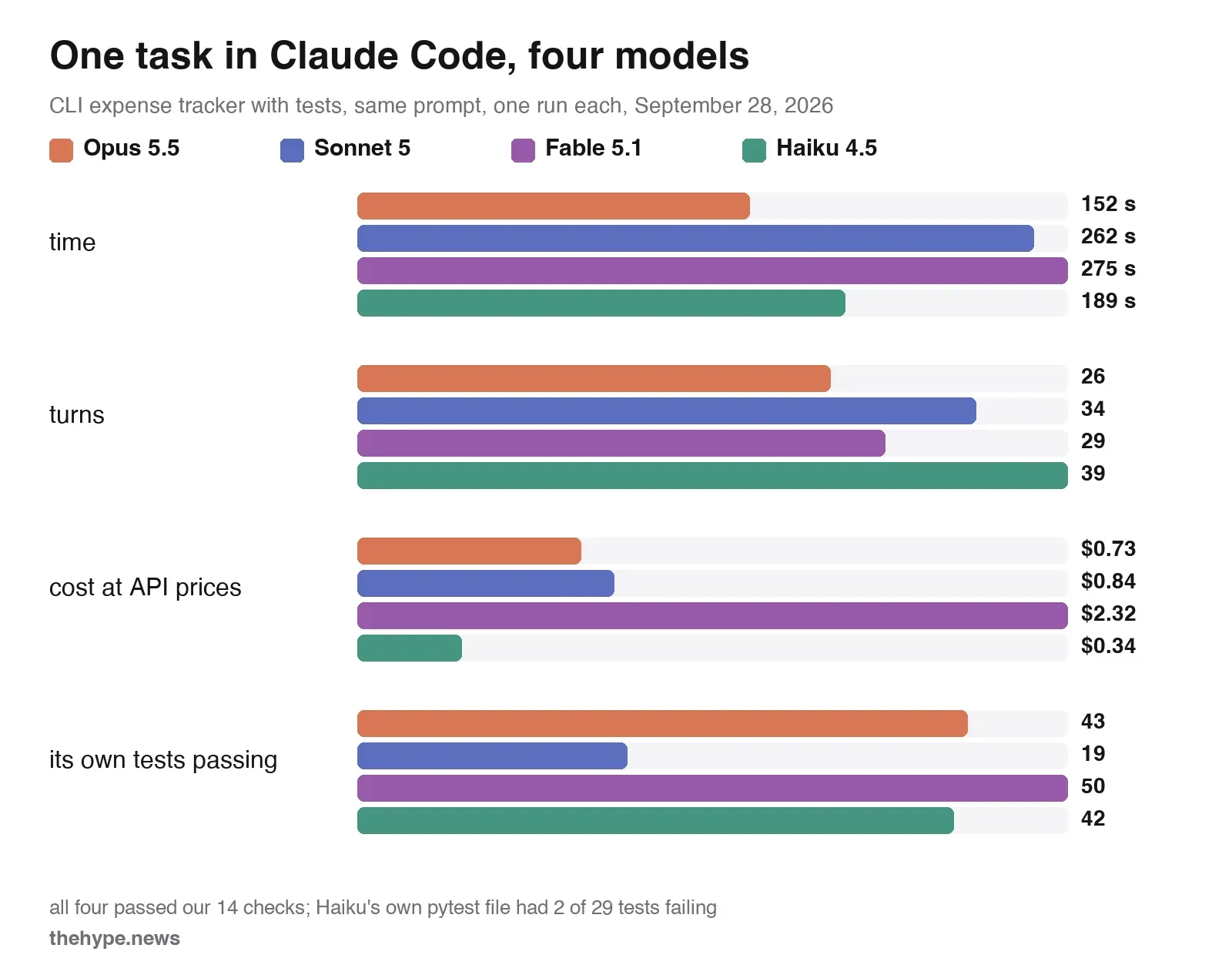
what we took from it:
- all four passed our 14 basic checks, but not all of them finished the job cleanly: Haiku's version accepts nonsense amounts and has failing tests of its own.
- Opus 5.5 was the best balance in this run: fastest, fewest turns, and cheaper than Sonnet 5. it costs twice as much per fresh token, but 94 to 98% of every run's input came from the cache, which costs the same on Opus and Sonnet, and Sonnet read almost three times as much input.
- Fable 5.1 wrote the most tests and cost the most. it wrote 50 tests and, like Sonnet, rejected an absurd amount like
1e999, which Opus and Haiku accepted; but it took the longest and cost about three times as much as Opus. - Haiku 4.5 was the cheapest, and its report was the one to check. it let
nanandinfthrough as amounts, and it reported "all tests pass" after running a second, smaller test file it had written (15 unittest tests); its main pytest file had 29 tests, 2 of which failed when we ran them. - the sandbox changed the plan for everyone. it blocked PyPI, so no model could install pytest: Opus, Sonnet and Fable found another way to run their tests (a system Python that had pytest, or plain unittest), and each said so.
- one run proves little. in an earlier run of the same task, with our project's
CLAUDE.mdin the context, Sonnet 5 letnanthrough; in this clean run it didn't. one run per model shows how they behave, not which is better in general.
which model to use in claude code
- Opus 5.5, the default: everyday work. in our run it was also the fastest and not more expensive than Sonnet.
- Sonnet 5: when you want to stretch Pro limits on routine tasks; results were close to Opus.
- Fable 5.1: hard problems where thoroughness matters more than time and limits. on Pro it's paid from usage credits from the first request; on Max it can use up to half of your weekly limit.
- Haiku 4.5: quick, cheap, well-defined jobs and subagents. run the tests yourself: in our run its summary said all tests passed when two didn't. that goes for every model's summary.
opusplan: Opus while you're in plan mode, Sonnet once you leave it to build, for long tasks on a tighter budget.
how to install claude code
the native installer is the recommended way:
# macOS, Linux, WSL
curl -fsSL https://claude.ai/install.sh | bash
# Windows PowerShell
irm https://claude.ai/install.ps1 | iex
it also installs with brew install --cask claude-code, winget install Anthropic.ClaudeCode, Linux package managers, or npm install -g @anthropic-ai/claude-code (Node.js 22 or newer). you need macOS 13+, Windows 10 1809+ or a recent Ubuntu, Debian or Alpine, 4 GB of RAM and a supported country; on Windows, Git for Windows is recommended. run claude in a project folder and log in through the browser with your Claude account or a Console account. the native install updates itself; claude update forces it.
your first session: how to use claude code
- open your project and start it:
cd my-project, thenclaude. - run
/init. it reads the project and writes aCLAUDE.mdwith how to build, test and run it. edit it: this file is what Claude reads at the start of every session. - ask for a plan before code. type
/plan, press Shift+Tab until the mode shows Plan, or ask "plan first, don't edit yet". read the plan, correct it, then let it build. - keep the task small and the finish line clear: "add CSV export to the report page, with a test, don't touch the database layer". without limits it tends to tidy up things you didn't ask about.
- review the diff and run the tests yourself, then ask it to commit.
- start fresh between tasks with
/clear; use/compactto shrink a long session you want to continue.
commands you'll use first: /model to switch models, /usage to see your limits, /context to see how full the session is, /rewind to restore the edits Claude made in this session to an earlier checkpoint (not changes made by shell commands like rm or mv, and not most subagents' edits), /permissions for what it may do without asking, /resume to return to an old session, /mcp and /plugin for extensions. if something doesn't start, claude doctor checks the install. if you're new to prompting, our guide on how to write AI prompts tested what a good task description changes.
claude.md, agents.md and memory
CLAUDE.mdholds instructions for every session: in the project, in~/.claude/for all your projects, or set by your organization. keep it short: build and test commands, conventions, what not to touch. it guides the model; it doesn't enforce anything.AGENTS.md, the file Codex and other agents use, is read directly since September 18, 2026 (version 2.1.277) when there's noCLAUDE.md,.claude/CLAUDE.mdorCLAUDE.local.mdin the folder or above it; a setting lets it read both..claude/rules/holds separate rule files, which you can limit to certain paths.- auto memory is on by default: Claude saves corrections and project facts to
~/.claude/projects/<project>/memory/and loads the first 200 lines (or 25 KB) of its index at start./memoryshows or turns it off. memory stays on your machine.
is claude code safe? permission modes
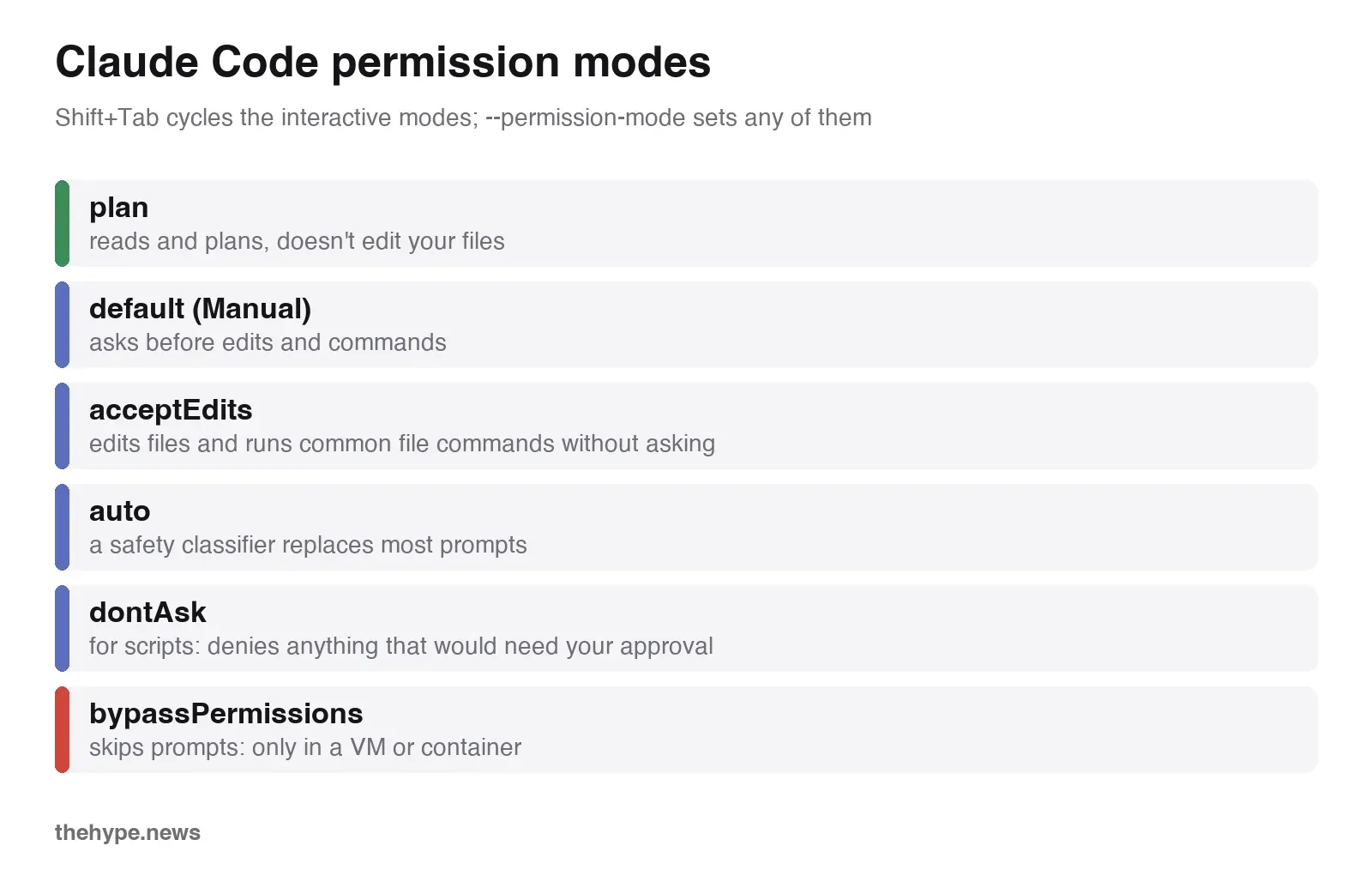
since version 2.1.283 (September 25), interactive sessions start in auto mode where it's available: your permission rules apply first, ordinary reads and edits in your project outside protected paths go through, and most of what's left goes to a safety classifier instead of a prompt. Anthropic says people approve 97% of permission prompts, and in its test a group of 1,053 people caught 13.6% of dangerous commands while auto mode caught 89%. auto mode isn't a wall, though: in August a security researcher got past it with Opus 5 in 60 to 80% of attempts on a small sample, by asking Claude to summarize a web page that carried hidden instructions.
what actually limits Claude Code is not CLAUDE.md but these:
- permission rules in settings (allow and deny lists for tools and commands), enforced by Claude Code, not by the model;
- the sandbox (
/sandbox), which restricts files and network at the operating-system level on macOS, Linux and WSL2; native Windows isn't supported. in our test it blocked PyPI; bypassPermissionsonly in a VM or container you can throw away. it isn't protected against prompt injection or accidents.
hooks run with your full user permissions, so read any hook you install. Claude Code saves terminal session transcripts in plain text in ~/.claude/projects/ and deletes them after 30 days by default.
data and training
on Pro and Max, Claude Code data can be used for training if the model-improvement setting is on (then it's kept for 5 years; with it off, 30 days). on Team, Enterprise and the API, data isn't used for training by default and is kept for 30 days as standard; eligible Enterprise organizations can get zero data retention.
models and context window
/model switches the model. the aliases: opus (Opus 5.5, the default on Claude plans and the Anthropic API since September 22), sonnet (Sonnet 5), haiku (Haiku 4.5), fable (Fable 5.1; Fable 5 through the Claude apps gateway), best (Fable where available, otherwise Opus) and opusplan, where Opus plans and Sonnet builds. Fable 5.1, Opus 5.5 and Sonnet 5 have a 1 million token context window on every plan, including Pro; Haiku 4.5 has 200,000.
effort sets how hard the model thinks: low, medium, high, xhigh and max; Opus 5.5 starts at medium, and thinking can't be switched off on Opus 5.5 and Fable. /fast makes Opus up to 2.5 times faster for a higher price ($8 in, $40 out per million tokens on Opus 5.5), and on subscriptions it's always paid from usage credits.
a big window doesn't mean equal quality across it: some users report the model getting sloppier once a session is a third to half full and start a new one with a short handover note, while others run long sessions without trouble. /context shows where you are.
skills, plugins, mcp and hooks
- skills are folders with a
SKILL.md: instructions Claude loads when a task matches, or when you type/skill-name. personal ones live in~/.claude/skills/, project ones in.claude/skills/. - plugins bundle skills, agents, hooks and MCP servers;
/plugininstalls them from marketplaces, and Anthropic's official one is added the first time you start Claude Code interactively in a terminal, unless your organization blocks it. for example,/plugin install superpowers@claude-plugins-official, then its skills show up as/commands. - MCP servers connect outside tools and data:
claude mcp add --transport http notion https://mcp.notion.com/mcp, then/mcpto check. we built and connected our own in how to build an MCP server. - hooks run your code at set points, like a formatter after every edit or a check before a command.
- subagents handle a side task in their own context window with their own model and permissions; they use your limits too.
among the most installed plugins in Anthropic's official marketplace (340 plugins) on September 28: frontend-design (1.13 million installs), Superpowers (1.01 million), code-review (439,000), Context7 for current library docs (418,000), code-simplifier (347,000) and Playwright for the browser (320,000). in developers' posts this month, the ones people keep are the Playwright MCP server, Context7 and Matt Pocock's skills, especially Grill Me, which questions you about requirements before any code. opinions on Superpowers are divided: some keep it for its plan, build and verify steps, others removed it as overkill for current models.
run claude code without you
claude -p "task"runs once and exits, with text or JSON output;--resumecontinues the session. it's how you use Claude Code in scripts. note that in-pmode project hooks and MCP servers load without the trust dialog, and it still draws from your subscription limits.- GitHub Actions with
anthropics/claude-code-action: answer@claudein issues and pull requests, or run on a schedule, with an API key or a subscription token fromclaude setup-token. - cloud sessions:
claude --cloud "task"hands work to a cloud machine;claude --teleportpulls it back to your terminal. - remote Control:
/remote-controllets your phone drive a session running on your computer, which has to stay on. - routines run in the cloud on a schedule, an API call or a GitHub event (
/schedule);/loop 5m check the deployrepeats a task inside a session for up to seven days.
this is how our article pipeline is built: a scheduled job starts claude -p sessions in dontAsk mode with a settings file that allows reading, web search, edits inside the article folders, the link-plan files and one shared cover log, and a short list of our scripts, and denies direct calls to ssh, git, curl, rm, the macOS security command and the publishing script. a wrapper script checks each result, and a second model fact-checks every draft: on the first article, its first round found 2 false claims and 20 inaccurate ones. Claude Code writes well unattended; it still needs someone else to check it.
habits of people who use claude code all day
collected from developers' reports this month:
- plan in proportion to the task: a small bug goes straight to "find and fix"; a feature gets a short spec first; a big change gets split into modules that can be tested one by one.
- keep
CLAUDE.mdshort: personal preferences in the global file, project facts in the project one, and a rule that the final report must mention errors and unfinished work. - turn repeated mistakes into hooks and linters. one developer found that a rule written in
CLAUDE.mddidn't change the model's behaviour, while a blocking hook did. - write the test first and watch it fail before letting Claude fix the code; a test written after the code can repeat the code's mistake.
- cut noisy output: a quiet test reporter gave one developer 17 times less output on the same run, and that's all context the model doesn't have to read.
- keep state in files:
plan.mdandtodo.mdwith a short "start here" section, so a new session doesn't reread the whole conversation. - one worktree per parallel task: people run 3 to 6 agents at once this way; merging them is still your job.
- compact before a break, not after: a long session resumed after the cache has expired gets reprocessed at full cost.
- give subagents a model: one developer's unconfigured setup launched 110 subagents on the most expensive model and used up a whole 5-hour window.
claude code vs cursor and codex
in JetBrains' survey of more than 15,000 professional developers (May to July 2026), 39% use Claude Code at work, against 16% for Codex, 12% for Cursor and 21% for GitHub Copilot, and 31% named Claude Code the tool they use most. some heavy users this month combine two: Claude as the planner, Codex as the second pair of hands or the reviewer, partly to spread limits across two subscriptions. Codex has limit complaints too: a team lead reported half of a weekly quota gone in two days. some prefer Cursor because they still write a lot of code by hand in an editor. we compared the options in Claude alternatives.
faq
is claude code free?
no. the free Claude plan doesn't include it. the cheapest way in is Claude Pro at $20 a month, or pay per token through a Console (API) account.
how much does claude code cost?
Pro $20 a month, Max 5x $100, Max 20x $200, Team $25 per member a month billed monthly, Enterprise $20 per seat a month on a yearly contract, plus usage. Claude Code estimated our small test task, run on a subscription, at $0.34 on Haiku 4.5, $0.73 on Opus 5.5, $0.84 on Sonnet 5 and $2.32 on Fable 5.1 at API prices; Anthropic's average for companies is about $13 per developer per active day.
what model does claude code use?
Opus 5.5, by default on Claude plans and the Anthropic API since September 22, 2026, unless your settings say otherwise. you can switch to Sonnet 5, Haiku 4.5 or Fable 5.1 with /model.
can i use claude code in vs code?
yes, with the official extension for VS Code and Cursor. it bundles its own copy of the CLI and shows changes as inline diffs.
does claude code work on windows?
yes, natively on Windows 10 1809 or newer, or in WSL. the sandbox doesn't work on native Windows, only in WSL2.
can i use claude code in the browser?
yes, at claude.ai/code on Pro, Max, Team and eligible Enterprise plans. sessions run on Anthropic's cloud machines and work on GitHub repositories.
how do i keep context between sessions?
put project facts and rules in CLAUDE.md, let auto memory save corrections, and keep a plan or to-do file for work in progress. /resume reopens an old session.
is claude code safe?
it's as safe as the permissions you give it. keep the sandbox on, use allow and deny rules for commands, review diffs, and run bypassPermissions only in a disposable VM or container.
how we tested
on September 28, 2026 we ran the same prompt through Claude Code 2.1.283 with --model opus, sonnet, fable and haiku, on our subscription, in non-interactive mode, each in an empty temporary folder with a clean home folder (no personal instructions, memory or plugins), with acceptEdits and the sandbox on. turns, tokens and the cost estimate come from Claude Code's own JSON output, the time from our wrapper script; the cost is Claude Code's estimate at API list prices, not a bill. we then ran each model's tests with pytest, our own 14 checks, and read the code. one task and one run per model: it shows how they behave, not which is better in general. plans, prices and features come from Anthropic's documentation and help pages on the same day; the habits and limit reports are from developers' posts from late August to September 2026.