 Felix Laurent
The best AI video model for motion graphics in November 2026 depends on what the motion has to carry. Gemini Omni Flash 1.2 leads the motion design category of the largest independent video arena. For titles, logos and anything with exact text, the stronger route is a language model that writes animation code. On that test Claude Opus 5.5 leads every other model.
That split is the main thing to know before you pick a tool. This guide covers both routes, the benchmarks behind them and the best choice for each kind of motion graphics job. Scores, prices and terms were checked against leaderboards and vendor pages on November 17, 2026.
Why motion graphics are hard for AI video models
Motion graphics are mostly text, shapes, logos and timing. A video model like Gemini Omni or Seedance draws every frame as pixels from a prompt. It is very good at light, texture and organic movement. It is much weaker at the things a motion designer is paid for.
The first problem is text. A video model has to spell every word again in every frame, and letters can drift, swap or turn into gibberish. The second is the logo. Video models redraw a brand mark from scratch, so it can change shape or come back mirrored, as Kittl found when it tested Seedance 2.5.
The third problem is control. A designer needs to move one keyframe, change a color or swap a headline without starting over. A generated clip is a flat video file, so every change means a new generation. None of the current flagship models documents a transparent background or a seamless loop either. Those limits explain why a second route has grown so fast in 2026.
Two ways to make motion graphics with AI
The first route is a video model. You write a prompt, sometimes add a first and last frame, and get an MP4. It suits backgrounds, textures, product shots and abstract motion, where small changes between frames do no harm.
The second route is code. A language model such as Claude Opus 5.5 writes an animation in HTML, CSS and GSAP or in React. A renderer then turns it into video frame by frame. HeyGen's open-source HyperFrames and the Remotion framework both work this way. Text stays sharp, the logo is the real SVG file, and every value can be changed later.
The code route is now one of the main ways people make AI motion graphics. HyperFrames has about 85,500 stars on GitHub, and Remotion's agent skills work in Claude Code, Codex and Cursor. ChatCut went further and built its own GPU render engine for motion graphics written by AI. Both routes now have their own benchmarks.
What the benchmarks say about AI motion graphics
No single benchmark covers motion graphics as a whole. Three tests come close, and each one measures a different part of the job.
Video models on motion design
Artificial Analysis runs the largest independent video arena. Viewers compare two clips made from the same prompt and vote for one, and the votes become Elo scores. Its UIUX & Motion Design category looks only at prompts for interfaces, product animation and motion design.
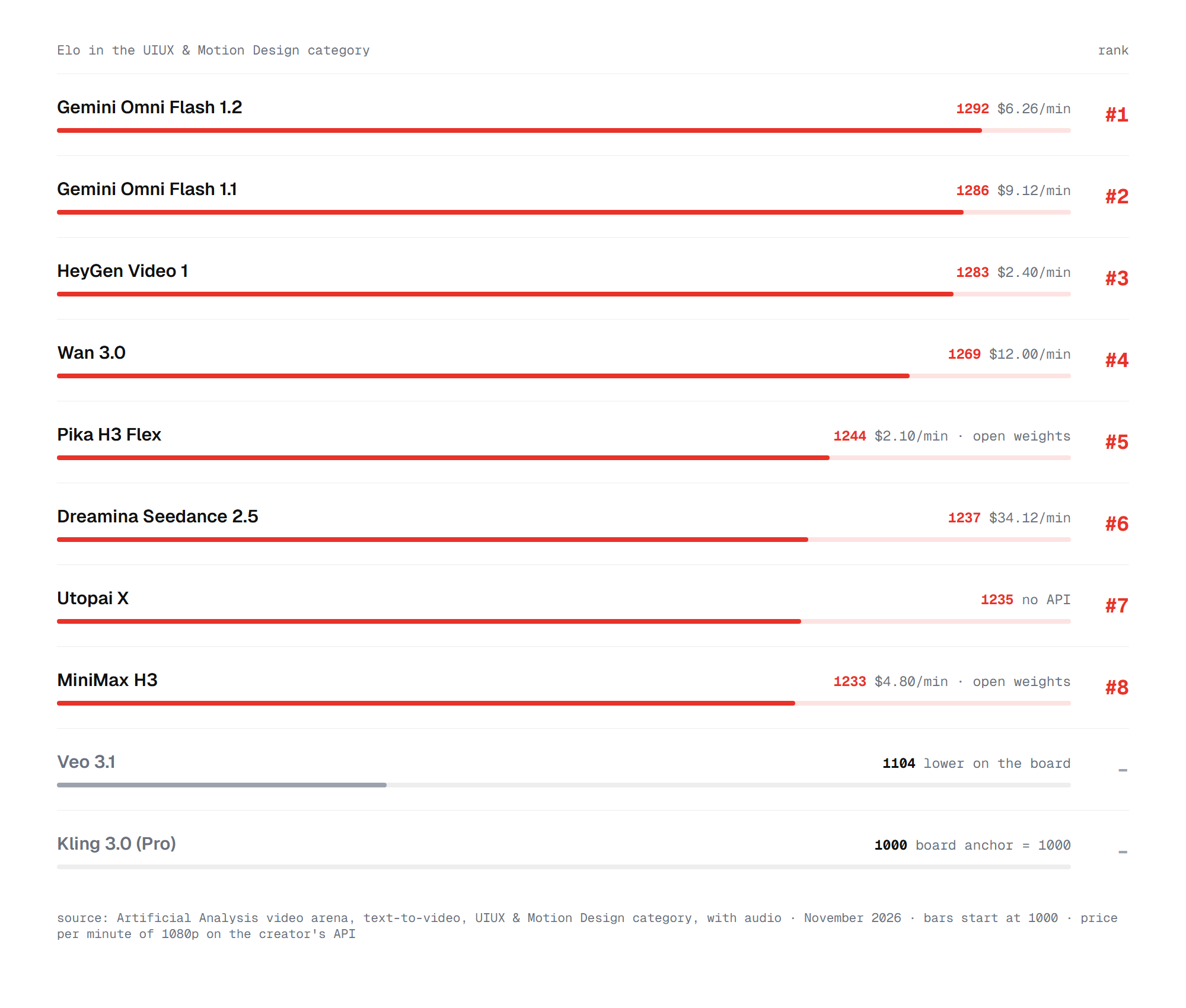
Google's Gemini Omni Flash 1.2 leads at 1292 Elo, and the older Omni Flash 1.1 is second at 1286. HeyGen Video 1 is third at 1283 and costs $2.40 per minute of 1080p video, the lowest price in the top 10. Pika H3 Flex at 1244 is the best open-weights model in the category.
The gaps at the top are small. The confidence interval for each score is about ±45 points, so the first four models are statistically close. Veo 3.1 scores 1104, and Kling 3.0 sits at 1000 because the board uses it as its anchor. On the overall text-to-video board, Alibaba's Wan 3.0 leads at 1174 and drops to fourth here.
Sound changes the order. The default board judges clips with audio, but most motion graphics get their music and sound effects in the edit. On the silent version of the same category, HeyGen Video 1 ranks first at 1253, ahead of Wan 3.0 and MiniMax H3. Gemini Omni Flash 1.2 scores 1280 there, but it has too few votes to get an official rank yet.
Text in the frame
On-screen text is where video models fail most often, so it needs its own test. Artificial Analysis has a Text Rendering category. VTR-Bench, a research benchmark published in October, counts how many words in generated video come out wrong.
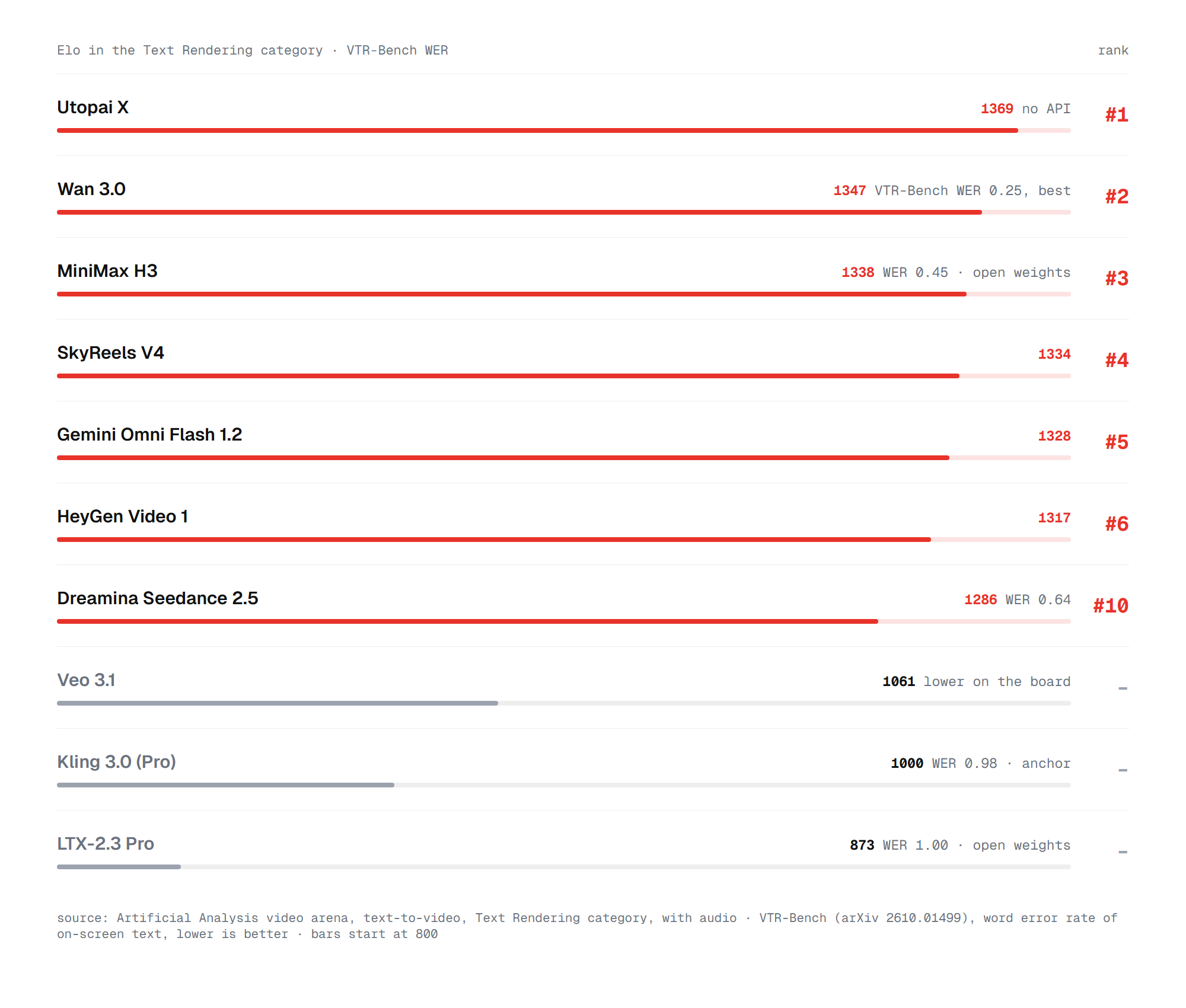
Utopai X leads the Text Rendering category at 1369, but it has no public API. Wan 3.0 is second at 1347 and has the best word error rate on VTR-Bench at 0.25. That means about one word in four still comes out wrong in the best case. MiniMax H3 is the best open-weights model at a 0.45 error rate.
Some well-known models do much worse. Kling 3.0 gets 0.98 on VTR-Bench, so almost every word it writes has an error. LTX-2.3 is at 1.00. For motion graphics with real copy, these numbers settle the question. Text should come from a design file or from code, while the video model handles the motion around it.
Models that write animation code
Artificial Analysis launched Code2Video-AA on October 26. It gives a language model 114 product and brand briefs. The model returns one HyperFrames file animated with GSAP, which is rendered and judged on five quality axes.
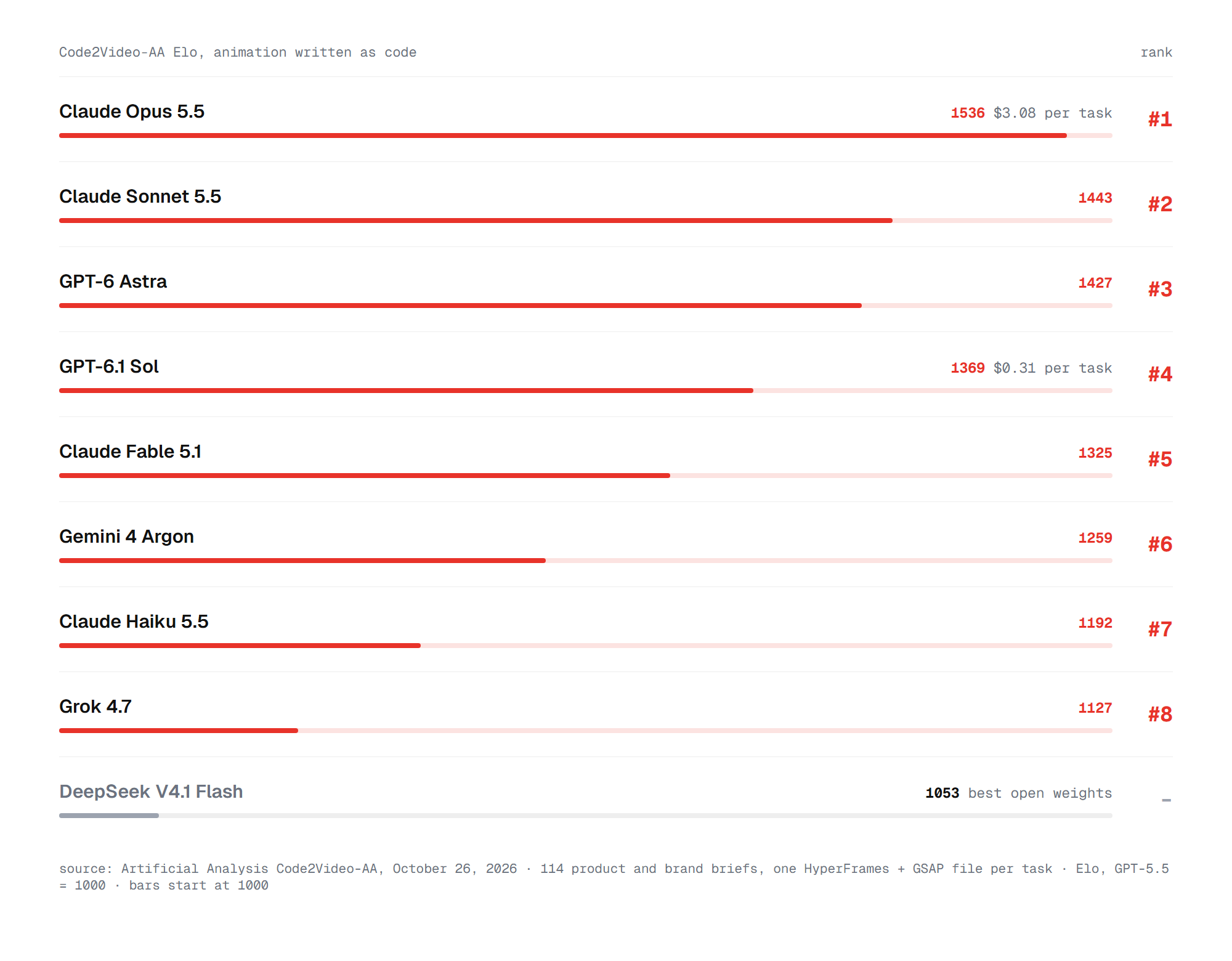
Claude Opus 5.5 leads at 1536 Elo and ranks first on all five axes. Claude Sonnet 5.5 is second at 1443, ahead of GPT-6 Astra at 1427. GPT-6.1 Sol scores 1369, and one task costs $0.31 against $3.08 for Opus 5.5. DeepSeek V4.1 Flash is the best open model at 1053, far behind the closed leaders.
The four leaders got the same Code2Video-AA brief: kinetic type that turns into a product page reveal. Opus 5.5 keeps the cleanest layout, while Gemini 4 Argon's text runs small and crowds the cards.
Same Code2Video-AA brief, four models: Claude Opus 5.5, GPT-6 Astra, GPT-6.1 Sol and Gemini 4 Argon. Renders: Artificial Analysis
Two other tests point the same way, with some caveats. HeyGen's own Code2Video benchmark from September put GPT-6 Astra first, but it ran before Opus 5.5 came out. Figma's MotionGraphicsBench asks models to animate real SVG designs. Its first-try success rate ranges from 6% to 67.7% across 32 models.
Why some well-known models are missing
Several names that top older lists are left out on purpose. OpenAI shut down Sora: the app closed in April 2026 and the Sora 2 API in September. Google's current video model is Gemini Omni, and Veo 3.1 is the previous generation. Runway's newest model is still Gen-4.5 from December 2025.
Kling 4.0 shipped in October and makes the boldest claim about text. Kuaishou says text and logos stay "clear and stable" through motion in more than nine languages. It is not on the arena boards yet, so we cover it by its features. Utopai X tops two boards but has no API, so few teams can use it. The models below are the ones worth testing.
The AI video models worth testing for motion graphics
Benchmarks show which clips viewers like. For motion design, the controls matter just as much: clip length, keyframes, reference images and export formats. Here is what each current model offers.
Gemini Omni Flash 1.2 (Google, November 5). Clips run 3 to 15 seconds, with extension to 30. The API makes 16:9 and 9:16 video at native 720p, upscaled to 1080p or 4K. It takes a first and last frame, up to six reference images and up to three reference videos. You can also edit a clip in conversation. Every output carries Google's SynthID watermark.
Kling 4.0 (Kuaishou, October). It makes 3 to 30 seconds in one pass and takes up to 10 keyframes. It also accepts up to 15 reference assets, from images and videos to a voice. Kuaishou still lists 4K and HDR as "coming soon". Through Runway it costs about $0.157 per second at 720p. Our Kling 4.0 API guide covers access in detail.
Seedance 2.5 (ByteDance, July). Clips run up to 30 seconds and extend twice. It takes first and last frames, up to 30 reference images and timeline editing. On Runway's API it costs $0.30 per second at 720p and $0.68 at 1080p.
Wan 3.0 (Alibaba, August). It makes up to 30 seconds at 480p, 720p or 1080p. It can start from a PDF, slides or a spreadsheet as well as a prompt or image. Alibaba lists $0.10 per second at 720p, and admits that on-screen text accuracy is "still improving".
MiniMax H3 (MiniMax, July). It makes 4 to 15 seconds at native 2K, with a cheaper 768p mode. First frame, last frame and both together are supported, but not in the same call as reference media. It is marked as open weights on Artificial Analysis.
Luma Ray3.2 (Luma, June). It takes up to 16 keyframes per clip, the most of any model here, and makes up to 20 seconds at 1080p. It exports native HDR and 16-bit EXR. Those features suit choreographed motion and compositing, though Luma makes no claim about text.
Runway Gen-4.5 (Runway, December 2025). It makes 720p clips in six aspect ratios at $0.12 per second through the API. Its strength is the pipeline around it: Aleph 2.0 for editing, ProRes 4444 export and plugins for After Effects and DaVinci Resolve. In an independent February test it failed to spell the requested text.
Specs only go so far. On November 8, the YouTube channel Marin Method ran Gemini Omni Flash 1.2, Seedance 2.5 and Kling 4.0 side by side on the same prompts:
The right pick comes down to the job.
Best AI for motion graphics by task
Each kind of motion graphics favors one of the two routes. The sections below go from text-heavy work to pure motion.
Kinetic typography, titles and lower thirds
For anything built on words, use a language model that writes code. Claude Opus 5.5 with HyperFrames or Remotion gives sharp text, exact timing and files you can still edit. It leads Code2Video-AA by 93 points over the next model.
We tested this route ourselves. Opus 5.5 built a 22-second Halloween short entirely from code in about 2.5 hours of agent time. On a Claude subscription it cost nothing extra. At API prices the same work would cost about $34.
The method matters as much as the model. Give exact numbers for colors, sizes and timing instead of adjectives, and point follow-ups at specific frames. For a smaller budget, GPT-6.1 Sol and Claude Sonnet 5.5 score well below Opus but cost much less per task. The setup takes a few minutes.
How to make motion graphics with Claude, step by step
You need a coding agent such as Claude Code and a renderer that turns its code into video. The full loop looks like this.
- Install a renderer as a skill for your coding agent. For HyperFrames, run
npx skills add heygen-com/hyperframes. For Remotion, runnpx skills add remotion-dev/skills. - Put your assets in the project folder: the logo as SVG, brand fonts and a short list of hex colors.
- Write a brief with fixed sections. The Motion Lab method we tested uses goal, output, time, look, motion, shots, banned and QA.
- Set the format in numbers, for example 1920×1080, 30 fps and 12 seconds. Tie every event to a time, such as "logo scales from 0.9 to 1.0 between 1.2 s and 1.6 s".
- List what you do not want, such as glow on everything, generic gradients or extra text. Add to the list after each render.
- Ask the agent to render, check a contact sheet of frames and fix one or two issues per round.
Each round keeps the earlier work, so the animation improves without starting over. When the job needs organic motion, a video model takes over.
Logo animation
A video model should never redraw your logo. The safe options are code that animates your real SVG file, or image-to-video that starts from approved artwork. Seedance 2.5 scored well for text in Kittl's tests, but a supplied mark "can come back mirrored".
Kling 4.0 is the video model to try if you need the logo inside a generated scene. Its claim of stable logos is still only lightly tested by outside reviewers. For brand work, the common workflow is to generate the background motion and place the real logo on top in an editor.
Explainers, charts and UI animation
Agent tools now package the code route for people who do not code. Hera turns a prompt into editable motion graphics such as charts, maps and UI animations. It exports MP4, GIF and transparent MOV. Its free plan reportedly renders at 720p with a watermark, and it does not publish plan prices. Hera also has a REST API and an MCP server, so an agent can create videos and fetch the results without opening the app. That makes it easy to build many short scenes from one template.
Higgsfield's Vibe Motion does a similar job and returns the animation code with the result. Pro plans start at $17.40 a month, and one report says it runs on Claude. On the video model side, Wan 3.0 can turn a PDF, slides or a spreadsheet into video, and Alibaba says data can become "animated charts".
Abstract backgrounds, textures and product motion
This is where video models win. Liquid metal, particles, light leaks and product spins need organic motion that code makes slowly. Gemini Omni Flash 1.2 leads the motion design category and costs about $0.07 per second at 720p through Google's API. It is also included in the Google AI Plus plan at $7.99 a month.
HeyGen Video 1 is the budget choice at $2.40 per minute and ranks third. Seedance 2.5 handles clips of up to 30 seconds and up to 30 reference images. It is also the most expensive model in the top 10. Two gaps remain. No flagship model outputs a transparent background, and none documents a seamless loop.
Wan-Alpha, an open research model built on Wan 2.1, is the only option we found with a real alpha channel. For everything else, plan to key the background or mask it in post.
How to prompt a video model for motion graphics
Video models are trained mostly on cinematic footage, so they drift toward live action unless the prompt says otherwise. A few habits make the output look designed.
- Name the style first. "Flat 2D vector animation", "isometric 3D render" or "abstract liquid chrome loop" sets the look better than a list of adjectives.
- Lock the camera. Motion graphics rarely use handheld moves. Write "static camera" or "slow push-in", or the model may add a creative camera move of its own.
- Give the palette. Hex colors or a reference image keep the clip on brand.
- Start from a design frame. Image-to-video from an approved frame keeps layout and type. A first and last frame together give the most control.
- Keep text out. Leave space for a headline and add it in the edit, or limit the prompt to one or two short words.
- Turn off audio when you can. Many models generate sound by default. You will replace it, and it can cost more.
- Generate several takes. Four short variations at low resolution cost less than one long full-HD clip. Upscale only the take you keep.
The same rules apply in every tool, from the Gemini app to Runway. Designers who live in professional software have a third set of options.
Working inside After Effects
AI now reaches into After Effects directly. Adobe's newest release adds an AI Assistant that runs tasks from text prompts and writes JavaScript expressions. Single-app plans include 25 generative credits a month, and After Effects costs $34.49 a month.
Higgsfield's AI Motion Designer builds titles, transitions and logo reveals as native layers and keyframes in an open composition. You run it from ChatGPT or through its MCP server in Claude or Cursor. Higgsfield says it runs on GPT-6 Astra.
For generated footage that goes into a composite, two video models fit the pipeline best. Luma Ray3.2 takes up to 16 keyframes per clip and exports HDR as 16-bit EXR. Runway exports ProRes 4444 or PNG sequences and has plugins for After Effects and DaVinci Resolve. Its Standard plan costs $12 a month billed yearly and includes Gen-4.5, Aleph 2.0 and Kling 4.0.
Free and local options
Both routes have free paths. HyperFrames is open source under Apache 2.0, and Remotion is free for individuals and small teams. Both run with any coding agent you already pay for. Google Vids makes 15-second Omni clips at no extra cost.
For local video generation, LTX-2.5 from Lightricks is the main open model. It runs in ComfyUI and is free for commercial use for companies under $10 million in yearly revenue. It ranks low on quality, though: LTX-2.5 Fast scores 961 in motion design, and LTX-2.3 gets a 1.00 word error rate on VTR-Bench. Pika H3 Flex and MiniMax H3 score much higher and are marked as open weights on Artificial Analysis. For more no-cost options, see our guide to the best free AI video generator. Price matters just as much on paid plans.
What AI motion graphics cost
The two routes are billed in different ways. Video models charge per second of output. On their own APIs, a minute of 1080p costs $2.10 for Pika H3 Flex and $2.40 for HeyGen Video 1. Gemini Omni Flash 1.2 costs $6.26, Wan 3.0 costs $12 and Seedance 2.5 costs $34.12 per minute.
Takes multiply those prices. Say a 30-second explainer needs six background shots of five seconds, with four takes each. At 720p that is 120 seconds of generation, or about $8.40 with Gemini Omni Flash 1.2. The same plan costs about $36 with Seedance 2.5 through Runway's API.
The code route charges for the language model's tokens. A Code2Video-AA task costs $3.08 with Opus 5.5 and $0.31 with GPT-6.1 Sol. On a $20 Claude Pro or ChatGPT Plus plan, the cost sits inside the subscription limits. Rendering is free on your own machine.
Retries change the math. A video model often needs several generations to get one usable clip. A code animation needs review rounds instead, which take time but keep earlier work. Our guide to choosing an AI video model covers the wider trade-offs between price and quality. Put together, the picture is clear enough for a verdict.
So which AI is best for motion graphics?
For most motion graphics, the best AI in November 2026 is Claude Opus 5.5 writing code in HyperFrames or Remotion. It leads Code2Video-AA at 1536 Elo, keeps text and logos exact and leaves every frame editable. GPT-6.1 Sol is the budget option at a tenth of the cost per task.
The best AI video model for motion graphics is Gemini Omni Flash 1.2. It leads the motion design arena at 1292 and costs about $0.07 per second at 720p. Use it for backgrounds, textures and product motion, and keep real text and logos out of the prompt. HeyGen Video 1 is the cheaper alternative, and Wan 3.0 is the safest video model when short words must appear in the frame itself.
FAQ
The questions below come up most often when people choose an AI tool for motion graphics.
Can AI make motion graphics?
Yes. Video models such as Gemini Omni Flash 1.2 generate motion from a prompt. Language models such as Claude Opus 5.5 write animation code that renders into video. The code route is better for text and logos, and video models are better for organic motion.
Can Claude make motion graphics?
Yes, by writing code. Claude Opus 5.5 leads the Code2Video-AA benchmark when it writes HyperFrames animations. It cannot generate video pixels itself, so you need a renderer such as HyperFrames or Remotion.
Can AI animate my logo?
Yes, but give it your real logo file. Ask a language model to animate the SVG, or start an image-to-video model from approved artwork. Video models that draw a logo from a prompt can change its shape or mirror it.
Can AI video models export a transparent background?
Not natively, as of November 2026. None of the flagship models documents an alpha channel. Hera exports transparent MOV files from its code-based animations, and Runway can export ProRes 4444 for keying in post.
Which AI is best for kinetic typography?
A language model writing code. Kinetic typography depends on exact letters and timing, which video models still get wrong in about one word out of four at best. Claude Opus 5.5 with HyperFrames or Remotion keeps every letter sharp and lets you retime any word later.
How do I keep the same style across shots?
Reuse the same inputs for every shot. With a video model, start each clip from frames in one design system and keep the palette and style words fixed in the prompt. With the code route, keep one shared file for colors, fonts and easing, and every scene stays consistent.
What is the best free AI for motion graphics?
HyperFrames and Remotion are free to use with a coding agent you already have. For generated video, Google Vids makes 15-second Gemini Omni clips at no extra cost. LTX-2.5 runs locally for free if your company earns under $10 million a year.