 Felix Laurent

Knowing how to choose an AI video model matters more than knowing which one is first. The top 10 text-to-video models on Artificial Analysis are 45 Elo points apart, but their prices differ 14x. This guide covers seven checks that narrow the list, the leading models one by one and a short test to run before you pay. All figures come from the leaderboards and model pages as of October 24, 2026.
What an AI video model is
An AI video model is the neural network that turns a prompt, an image or a clip into new video. Most current models also generate sound in the same pass. Wan 3.0, Seedance 2.5 and MiniMax H3 are models.
An AI video generator is the app or platform you use to reach a model. One generator can wrap one model or dozens of them. TechNode reported that ByteDance rolled out Seedance 2.5 inside its Jimeng AI and Doubao apps first, with the API to follow. The model is the same in each place, but limits, prices and features can differ by platform.
This guide compares models. Once you've picked one, check which generator or API gives you the version, resolution and price you need.
Why the leaderboard rank is not enough
Artificial Analysis runs a blind video arena. Viewers compare two clips made from the same prompt and vote for one. The votes become Elo scores, and audio counts toward the vote.
Alibaba's Wan 3.0 leads text-to-video with 1175 Elo. Google's Gemini Omni Flash 1.1 is tenth with 1130. A 45-point gap means the leader is expected to win about 56% of head-to-head votes. That's a preference, not a different class of model.
The leader also changes with the task. On the image-to-video board, MiniMax H3 is first and Wan 3.0 drops to fifth. Neither board measures clip length, resolution, reference control, license terms or whether a model has an API at all.
The current top AI video models at a glance
The card puts both Artificial Analysis boards side by side. Price is the leaderboard's figure for one minute of 1080p video on the creator's API at default settings.
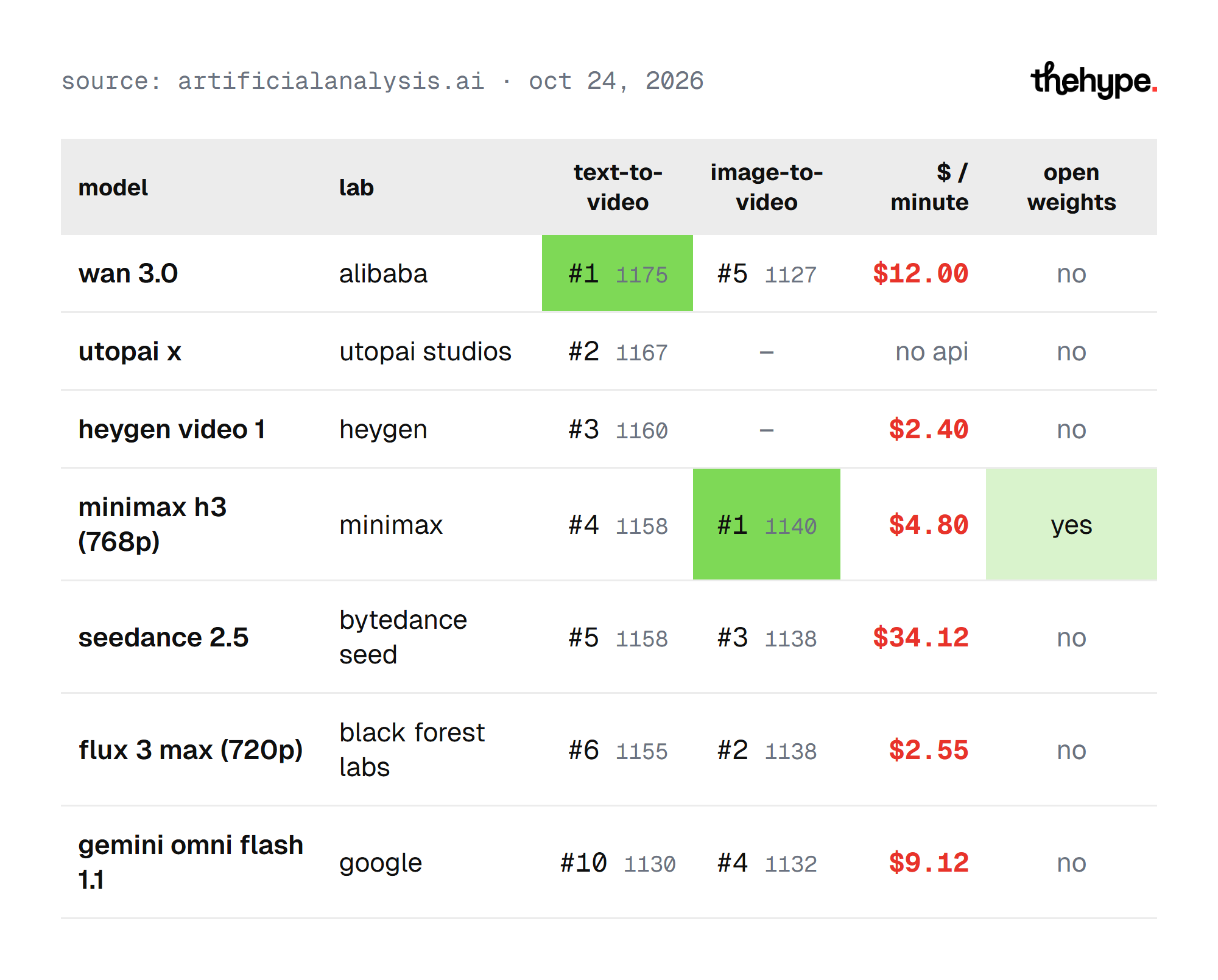
Only three models make the top 5 on both boards: MiniMax H3, Seedance 2.5 and Wan 3.0. FLUX 3 Max just misses, at sixth and second. The cheapest of the group, HeyGen Video 1 at $2.40, is third in text-to-video.
The rest of the leaderboard
The card shows seven models, but the boards go deeper. These models sit just below them, with their text-to-video rank and price from Artificial Analysis:
- MiniMax H3 Max: #7 at 1154 Elo, $4.80 per minute, and #6 in image-to-video at 1125
- FLUX 3: #8 at 1145, $17.40, and #8 in image-to-video at 1086
- Seedance 2.0: #9 at 1136, $22.45, released in March 2026
- Agnes-Video-2.5 from Sapiens AI: #11 at 1066, $2.40
- Grok Imagine Video 1.5 from SpaceXAI: #12 at 1056, $15.00, and #9 in image-to-video at 1067
- HappyHorse-1.1 from Alibaba-ATH: #13 at 1051, $10.80
- Wan2.7 from Alibaba: #15 at 1037, $9.00
New generations replace old ones fast. Seedance 2.5 is 22 points above Seedance 2.0, and Wan 3.0 is 138 points above Wan2.7. If you built on an older version this spring, test its successor before you renew a plan.
Step 1: pick the input mode
Decide first whether you start from a prompt, a still image or an existing video. Text-to-video invents the whole shot. Image-to-video animates a frame you already have, such as a product photo or a character design.
The two boards rank models differently, so use the one that matches your input. Gemini Omni Flash 1.1 is tenth in text-to-video but fourth in image-to-video. HeyGen Video 1 is third in text-to-video and absent from the image-to-video top 12.
Some models take more than one input. HeyGen says HeyGen Video handles text-to-video, image-to-video and reference-to-video, where a reference clip guides motion or style. Google prices Gemini Omni Flash input for text, image, video and audio.
Editing an existing clip is a third mode. Fal lists video editing for the full Kling 4.0, with up to five input clips and a 30-second combined limit. If you mostly fix footage you already shot, look for this mode first.
For most professional work that starts from a brand asset, image-to-video is the safer route. The first frame is already approved, so the model only has to add motion.
Step 2: set clip length, resolution and aspect ratio
Write down the longest single shot you need, the resolution you'll deliver in and the aspect ratio. These are hard requirements. A model that can't reach them is out, whatever its score.
Clip length varies more than quality does:
- Wan 3.0: up to 30 seconds in one pass, according to The Next Web
- Seedance 2.5: a 30-second clip in a single run, with multi-turn extension for longer sequences, according to TechNode
- MiniMax H3: 4 to 15 seconds, per its Hugging Face model card
- Kling 4.0: 3 to 30 seconds announced, and Kling 4.0 Flash 3 to 20 seconds, according to fal
Resolution needs the same check. The open weights of MiniMax H3 output 768p, and its 2K module is not open-sourced yet. Kling 4.0 Flash is 720p only. The leaderboard ranks FLUX 3 Max at 720p and MiniMax H3 at 768p, so those scores don't show how the models look at 1080p.
Aspect ratio matters for social media. A 9:16 vertical cut for Reels or Shorts and a 16:9 web video are different shots. Check that the model renders your ratio natively instead of cropping a wide frame.
Step 3: decide whether you need native audio
Native audio means the model generates sound in the same call as the picture. It saves a separate voice, music and effects pass. Both Artificial Analysis boards used here rank models with audio, so sound is part of every score.
HeyGen says its clips come with dialogue, ambience and sound effects generated in the same call. MiniMax H3's model card lists native 32 kHz stereo audio. Fal lists stereo output for the full Kling 4.0.
Dialogue is the hardest test. Lip sync has to match the words, and the voice has to stay the same across shots. If a scene has a line of speech, make it part of your test.
If you plan to add your own voiceover or licensed music, audio quality matters less. In that case, compare the boards' "no audio" view, which Artificial Analysis offers as a filter.
Step 4: check reference control and character consistency
References are the images, clips or sounds you feed in to keep a character, product or style the same. Character consistency means the same face, outfit and proportions in every shot. For ads, series and branded content, this often matters more than raw quality.
The limits differ widely. TechNode reports that Seedance 2.5 accepts up to 30 images, 10 videos and 10 audio clips in one input. Fal says Kling 4.0 takes voice references for audio. HeyGen's reference-to-video mode bills the input video seconds as well as the output.
Test references with your own assets. A model that wins the arena with free-form prompts can still drift on your product's logo or a character's face. Look at the last second of each clip, where drift usually shows first.
Stories with several shots need one more check. Generate every shot with the same references, then watch them side by side. A face that changes between the first and third shot breaks a story faster than a soft frame does.
Step 5: count the cost per usable clip
The price per minute is only the start. What you pay for is a clip you can actually use, so retries count.
Within the text-to-video top 10, Seedance 2.5 costs $34.12 per minute and HeyGen Video 1 costs $2.40. Seedance 2.5 and MiniMax H3 are tied at 1158 Elo, and Seedance 2.5 costs 7x more.
A quick calculation shows why retries matter. At the leaderboard's prices, a 10-second clip costs $2.00 on Wan 3.0 and $0.40 on HeyGen Video 1. Five HeyGen attempts cost the same as one Wan 3.0 clip. Track how many attempts each model needs for your type of shot, then divide.
Check for temporary prices too. HeyGen runs a 50% launch promotion through the end of October. Google's pricing page puts Gemini Omni Flash at about $0.10 per second of 720p video on standard pricing.
Generation time is part of the cost for teams on a deadline. A slower model that gets the shot right first time can still finish sooner than a fast one that needs five tries.
Step 6: check the license and the region
"Open weights" doesn't mean you can use a model anywhere for anything. Read the license before you build on downloaded weights.
MiniMax H3, the highest-ranked open-weights model, uses the MiniMax H3 Community License. Its model card points users in the US, the EU, the UK and South Korea to a separate license application form. Lightricks' LTX-2.5 uses the LTX-2.x Community License. Its Hugging Face page says commercial use is free for companies under $10M in annual revenue, and access requires sharing your contact details.
Hosted APIs carry their own terms. A model you call through a provider is governed by that provider's agreement, not by the weights license.
Step 7: make sure the model is still available
Video models are being switched off fast, so check the status page before you commit a workflow.
Two shutdowns happened within a month:
- OpenAI removed the Videos API and every Sora 2 model on September 24, 2026, and its deprecations page names no replacement
- Google shut down the Veo 3.1 Preview in the Gemini API on October 22, 2026, and recommends migrating to Gemini Omni Flash
Some ranked models aren't usable yet. Utopai X is second in text-to-video with no public API. Sand.ai's MAGI-2 Preview lists its API price as "coming soon". Kling 4.0 has an October launch date with no day named. TechNode reported in July that the Seedance 2.5 API would follow its app rollout.
Build your workflow so the model can be swapped. Keep prompts, references and settings in one place, and test a second model now rather than after a shutdown notice.
The leading AI video models, one by one
The profiles below cover the models that lead the boards or fill a gap the leaders leave. Each one lists what its own pages or the cited reports confirm.
Wan 3.0 (Alibaba)
Wan 3.0 is first in text-to-video at 1175 Elo and fifth in image-to-video at 1127. The Next Web reports clips of up to 30 seconds in a single pass. It also reports prices of $0.05 per second at 480p, $0.10 at 720p and $0.20 at 1080p. That matches the leaderboard's $12.00 per minute.
Pick it when the arena score and long single shots matter most. Image-to-video work has stronger options.
Seedance 2.5 (ByteDance)
Seedance 2.5 is fifth in text-to-video at 1158 Elo and third in image-to-video at 1138. TechNode reports 30-second clips in one run and up to 30 images, 10 videos and 10 audio clips as references. At $34.12 per minute, it's the most expensive model in the top 10.
Pick it for long, reference-heavy scenes where consistency outweighs cost.
MiniMax H3
MiniMax H3 (768p) is first in image-to-video at 1140 Elo and fourth in text-to-video at 1158. Its model card lists a 33B-parameter dense transformer, 4 to 15 second clips and 32 kHz stereo audio. It's the highest-ranked model with downloadable weights, at $4.80 per minute on the API.
Pick it for image-to-video, for self-hosting where the license allows it, or as a lower-cost match for Seedance 2.5.
HeyGen Video 1
HeyGen Video 1 is third in text-to-video at 1160 Elo, and the leaderboard lists it as released in October 2026. HeyGen says it handles text, image and reference-video input, with dialogue, ambience and effects in the same call. At $2.40 per minute, it's the cheapest model in the top 10.
Pick it for many fast iterations, such as testing ad concepts before a final render.
FLUX 3 Max and FLUX 3 (Black Forest Labs)
FLUX 3 Max (720p) is second in image-to-video at 1138 Elo and sixth in text-to-video at 1155. The leaderboard lists it at $2.55 per minute. The larger FLUX 3 is eighth in text-to-video at 1145 and costs $17.40.
Pick FLUX 3 Max for cheap image-to-video drafts. Check its output at your delivery resolution, since its scores are at 720p.
Gemini Omni Flash 1.1 (Google)
Gemini Omni Flash 1.1 is fourth in image-to-video at 1132 Elo and tenth in text-to-video at 1130. Google bills it by tokens and puts the effective price at about $0.10 per second of 720p video. It accepts text, image, video and audio as input.
Pick it if you ran Veo 3.1 Preview in the Gemini API. Google names it as the migration path.
Kling 4.0 (Kuaishou)
Kling 4.0 isn't ranked yet. Fal reports an October launch with no date, clips of 3 to 30 seconds, 720p, 1080p and 4K output, and stereo audio. Kling 4.0 Flash has been in limited early access since September 28, capped at 20 seconds and 720p.
Watch it if you need 4K or editing of existing clips, which fal lists for the full model.
LTX-2.5 (Lightricks)
LTX-2.5 is an open-weights model with synchronized video and audio. Its Hugging Face files point to a 22B-parameter transformer, and its examples include a 4K pipeline. The license is free for companies under $10M in annual revenue.
Pick it when you need to run video generation on your own hardware.
Which model fits which job
The card turns the seven checks into a starting shortlist. It's a place to begin testing, not a verdict.
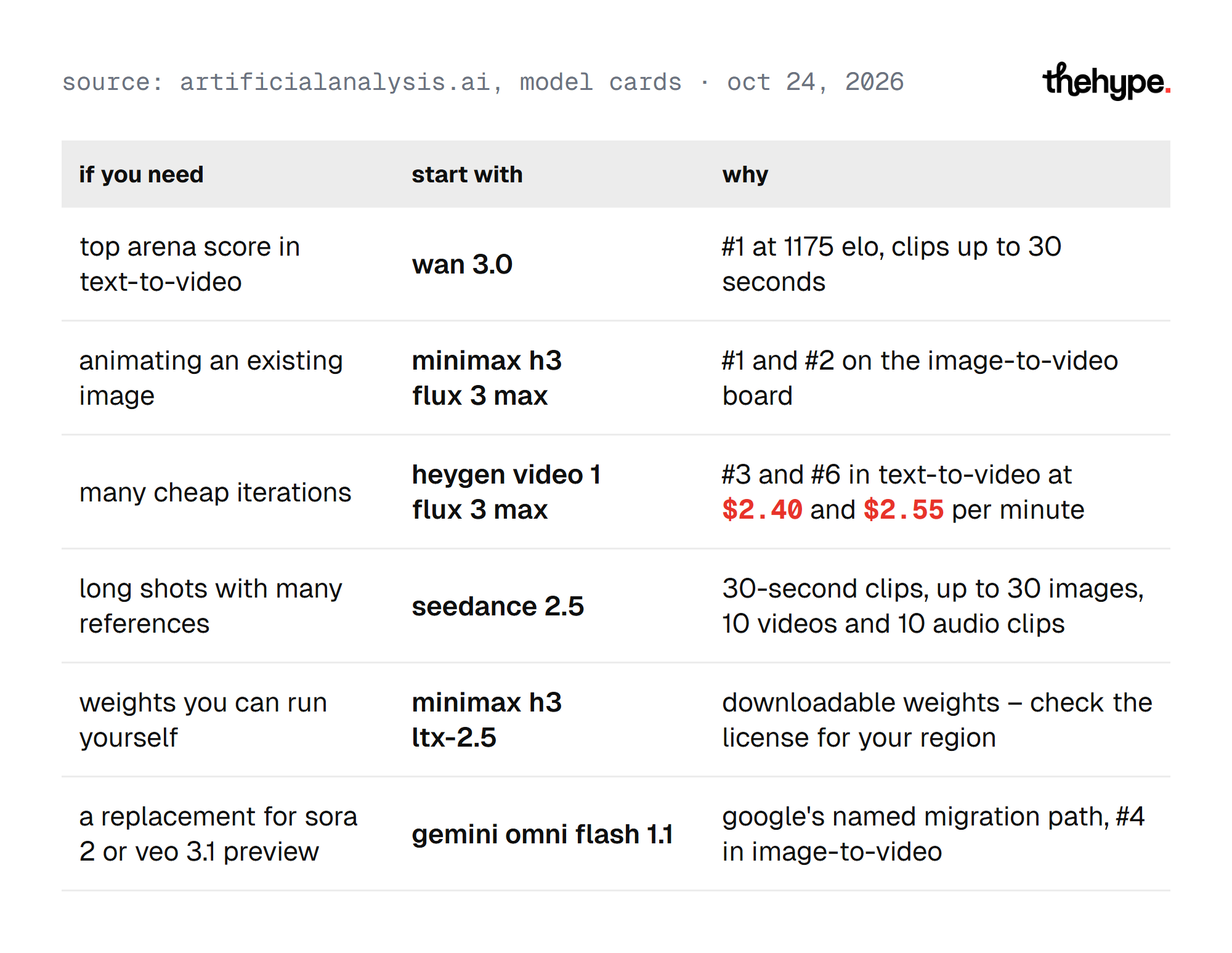
Run your own test before you commit any budget. The scores reflect average viewers on general prompts, not your product or your style.
Best AI video model by user type
Different teams weigh the seven checks differently. These shortlists follow from the data above.
Marketers and e-commerce teams
Product videos start from approved images, so image-to-video and reference control come first. MiniMax H3 and FLUX 3 Max lead the image-to-video board at $4.80 and $2.55 per minute. Test your real product photo and check the logo in the last frame.
Social media creators
Social content needs volume, a 9:16 aspect ratio and native audio. HeyGen Video 1 ranks third in text-to-video at $2.40 per minute and generates sound in the same call. Its launch promotion halves the price through October.
Filmmakers and studios
Long takes and consistent characters across shots matter most. Wan 3.0 and Seedance 2.5 both reach 30 seconds in one pass, according to The Next Web and TechNode. Seedance 2.5 takes the most references but costs the most.
Developers
Engineering teams need a stable API, clear pricing and a fallback. Gemini Omni Flash has published token prices and a named migration path from Veo 3.1. For self-hosting, MiniMax H3 and LTX-2.5 publish weights, each under its own license.
Plan a budget: a worked example
A budget needs two numbers: the price per attempt and the attempts per usable clip. The first comes from the leaderboard. The second only comes from your own test.
Take a team that needs 20 finished 10-second clips a week. At the leaderboard's prices, one 10-second attempt costs $0.40 on HeyGen Video 1 and $0.80 on MiniMax H3. On Wan 3.0 it's $2.00, and on Seedance 2.5 it's $5.69. The attempt counts below are assumptions for the example, not measured results:
- HeyGen Video 1 at five attempts per clip: $2.00 per clip, $40 a week
- MiniMax H3 at three attempts: $2.40 per clip, $48 a week
- Wan 3.0 at two attempts: $4.00 per clip, $80 a week
- Seedance 2.5 at one attempt: $5.69 per clip, about $114 a week
The order changes as soon as the attempt counts change. If Seedance 2.5 needs two tries for your shots, it costs about $228 a week. Measure attempts on your own prompts before you sign up for a monthly plan.
Run a five-prompt test before you pay
A short test on your own material tells you more than a leaderboard. Use the same prompts and the same references on two or three shortlisted models.
- A product close-up with your real product image
- A person walking and turning, to check body motion
- A line of dialogue, to check lip sync and audio
- A specific camera move, such as a slow push-in
- Your longest required shot at your delivery resolution
Count the attempts each model needs before you'd publish a clip. That number, multiplied by the price, is your real cost per usable clip.
How to write prompts that video models follow
Video models read prompts more literally than people expect. A clear prompt cuts retries, which cuts cost.
- Describe the scene first: place, time of day, lighting and mood
- Describe the action in order, one movement per clause
- Name the camera movement: a slow push-in, a pan left or a static shot
- Say what must stay consistent: the character's face, the outfit, the product label
- Describe the audio: the line of dialogue, the ambience, any sound effects
- Name the aspect ratio and the clip length if the tool allows it
Change one thing at a time between attempts. If you change the scene, the camera and the lighting together, you won't know which change fixed the shot.
Mistakes to avoid when choosing a video model
Most wasted budget comes from a few repeated errors.
- Picking by rank alone, when the top 10 are within 45 Elo points
- Comparing price per minute instead of cost per usable clip
- Testing with stock prompts instead of your own product or character
- Building on open weights without reading the license for your region
- Locking a workflow to one model, as Sora 2 and Veo 3.1 Preview users found in two months
Each of these is cheaper to avoid now than to fix after a campaign is in production.
Questions to ask before you sign up
A plan or an API key commits you to more than one clip. These questions settle most of the choice before money changes hands.
- Does the model accept my input: a prompt, a product image or a reference clip?
- Can it render my longest shot at my resolution and aspect ratio in one pass?
- Does it generate the audio I need, including dialogue with lip sync?
- How many references can I add, and do they hold across the whole clip?
- What does one usable clip cost after retries, not one attempt?
- Does the license cover my company size and my country?
- Is there a public API today, and what happens if the model is retired?
If a model fails any of the first three, drop it. The other four decide between the models that remain.
Terms used in this guide
Video model pages use the same few terms in slightly different ways. This is how they're used here.
- Text-to-video: the model creates a clip from a written prompt alone
- Image-to-video: the model animates a still image you supply, keeping it as the first frame or the visual guide
- Reference-to-video: a reference clip or image guides motion, style or a character without becoming the first frame
- Native audio: sound generated in the same call as the picture, rather than added in a separate step
- Lip sync: how closely mouth movement matches the generated speech
- Character consistency: the same face, outfit and proportions across frames and shots
- Elo: a rating built from head-to-head votes; a higher score means viewers preferred the model more often
- Open weights: model files you can download and run yourself, under the model's own license
- Multi-turn extension: continuing a clip in further steps to build a longer sequence
Knowing these terms makes model pages faster to compare. A spec sheet that lists "audio" may mean native audio or only audio references.
How we read the data
We read the Artificial Analysis text-to-video and image-to-video leaderboards, with audio, on October 24, 2026. Neither page shows an update date, so rankings may shift as new votes come in. Prices are the leaderboards' figures, not ours. Specs come from the model cards and the reports listed below. We didn't run our own generations for this guide.
FAQ
Short answers to the questions people ask most when picking a video model.
What is the best AI video model in October 2026?
On Artificial Analysis, Wan 3.0 leads text-to-video at 1175 Elo and MiniMax H3 leads image-to-video at 1140. The top 10 in text-to-video sit within 45 points, so the best fit depends on your clip length, budget and license needs.
How do I choose an AI video model?
Start with your input mode, clip length and resolution. Then check native audio, reference control, cost per usable clip, the license and whether the model is still available. Test two or three models on your own prompts.
Is Sora still available?
No. OpenAI removed the Videos API and all Sora 2 models on September 24, 2026. Its deprecations page lists no replacement.
Can I still use Veo 3.1?
The Veo 3.1 Preview in the Gemini API was shut down on October 22, 2026. Google recommends Gemini Omni Flash instead.
Which AI video model has open weights?
MiniMax H3 is the highest-ranked open-weights model: fourth in text-to-video and first in image-to-video. LTX-2.5 from Lightricks and MAGI-2 Preview from Sand.ai also publish weights. Each uses its own license, so check the terms for your region.
What is the cheapest good AI video model?
Among the text-to-video top 10, HeyGen Video 1 is the cheapest at $2.40 per minute and ranks third. FLUX 3 Max (720p) costs $2.55 and ranks sixth.
How much does AI video generation cost?
On the Artificial Analysis text-to-video board, a minute of 1080p video ranges from $2.40 on HeyGen Video 1 to $34.12 on Seedance 2.5. Wan 3.0, the leader, costs $12.00. Retries raise the real cost, so count attempts per usable clip.
Which AI video model is best for image-to-video?
MiniMax H3 (768p) leads the image-to-video board at 1140 Elo. FLUX 3 Max (720p) and Seedance 2.5 share second place at 1138. FLUX 3 Max is the cheapest of the three at $2.55 per minute.
Can AI video models generate sound?
Yes, most leading models now generate audio in the same call. HeyGen Video, MiniMax H3, LTX-2.5 and the full Kling 4.0 all list native audio. Artificial Analysis ranks them on boards with audio included.
Which AI video model is best for social media?
For volume on a tight budget, HeyGen Video 1 ranks third in text-to-video at $2.40 per minute and generates audio in the same call. Check that your chosen model renders 9:16 natively for Reels and Shorts.
Do I need a GPU to use an AI video model?
No, not for hosted models. Wan 3.0, Seedance 2.5, HeyGen Video 1 and Gemini Omni Flash run on their providers' servers and are billed per second or per token. Running open weights such as MiniMax H3 or LTX-2.5 yourself needs your own GPU hardware. Each model card lists its own requirements.
AI video model vs AI video generator: what is the difference?
The model is the network that makes the video. The generator is the app or API you use to reach it. One generator can offer several models.