 Felix Laurent

Nemotron 3 Diarization is NVIDIA's open-source, open-weights model for speaker diarization, the job of working out who spoke when in a recording. It tracks up to eight speakers, handles overlapping speech and runs both offline and in real time. To use it, install NVIDIA NeMo, load nvidia/Nemotron-3-Diarization and call diarize() on a 16 kHz mono file.
This tutorial covers every step: setup, a first run, latency presets, live streaming, speaker-labelled transcripts and hosted APIs. Code comes from NVIDIA's model card and launch blog. Benchmarks and prices were checked on November 20, 2026.
What Nemotron 3 Diarization is
NVIDIA released Nemotron 3 Diarization on September 23, 2026. It replaces Streaming Sortformer v2.1, which handled only four speakers. The new model has about 100 million parameters and is built on the same Sortformer architecture, a 31-layer Transformer encoder.
The model does not transcribe words. It returns time ranges with an anonymous label for each voice, such as speaker_0 and speaker_1. Labels follow the order in which people first speak, so they stay stable as the audio streams in. A speaker cache keeps that order across chunks of a long recording.
The weights are on Hugging Face under the OpenMDW 1.1 license, which allows commercial use. NVIDIA built it for Linux machines with Ampere, Hopper or Blackwell GPUs. It accepts single-channel 16 kHz audio in WAV, FLAC, Opus or MP3.
Under the hood, the encoder turns audio into 80 ms frames and scores each of eight speaker slots for every frame. For streaming, two buffers sit in front of the current chunk. A FIFO queue holds the most recent frames, and the speaker cache keeps short samples of every voice heard so far. That is how the model remembers who speaker_2 was after a long silence.
NVIDIA trained it from a NEST self-supervised checkpoint on about 10,000 hours of real conversations and 82,611 hours of simulated ones. Training ran in two stages: offline processing first, then a streaming fine-tune. Before setting it up, it helps to know how much better it is than the alternatives.
How accurate is Nemotron 3 Diarization?
Diarization is scored by diarization error rate, or DER. It adds up speech that was missed, speech that was invented, and speech given to the wrong speaker, as a share of all speech. Lower is better.
The most useful outside test is VoiceArena's Diarization-Bench, launched in September. It scores 12 systems on 139 English conversations, 22 hours in total, with overlapping speech included and no tolerance at speaker boundaries.
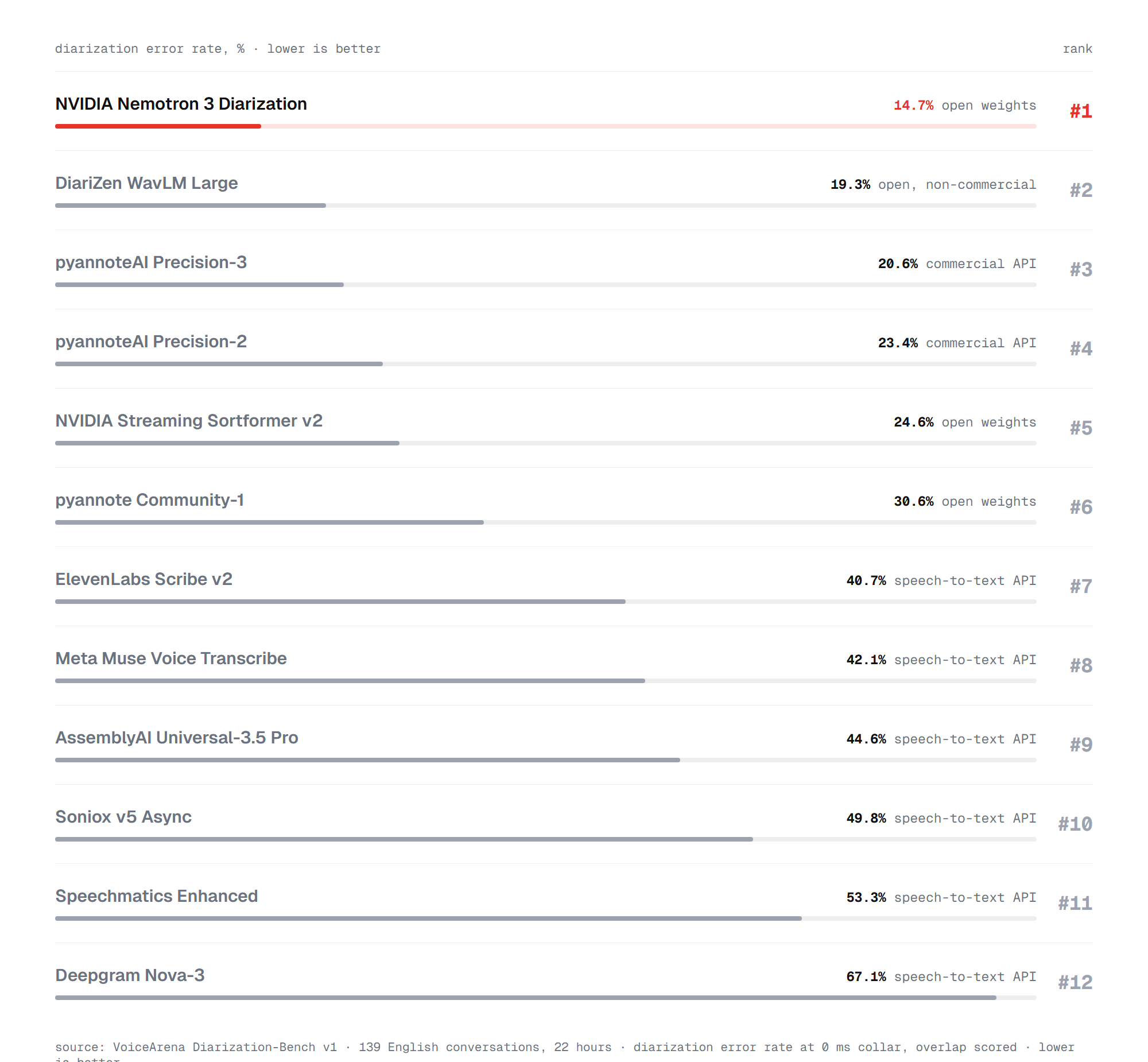
Nemotron 3 Diarization ranks first at 14.7% DER. The open DiariZen model is second at 19.3%, but its license rules out commercial use. The paid pyannoteAI Precision-3 API scores 20.6%, and the open pyannote Community-1 scores 30.6%. Nemotron guessed the exact number of speakers in 83% of conversations.
Speech-to-text APIs with built-in diarization fall far behind on this test. ElevenLabs Scribe v2 scores 40.7%, AssemblyAI Universal-3.5 Pro 44.6% and Deepgram Nova-3 67.1%. VoiceArena scores those services only on the speaker timeline in this version, so their transcripts may still be useful.
NVIDIA's own tests compare the new model with Streaming Sortformer v2.1 on eight public datasets. The chart uses the 1.04-second streaming setting, the default for live use.
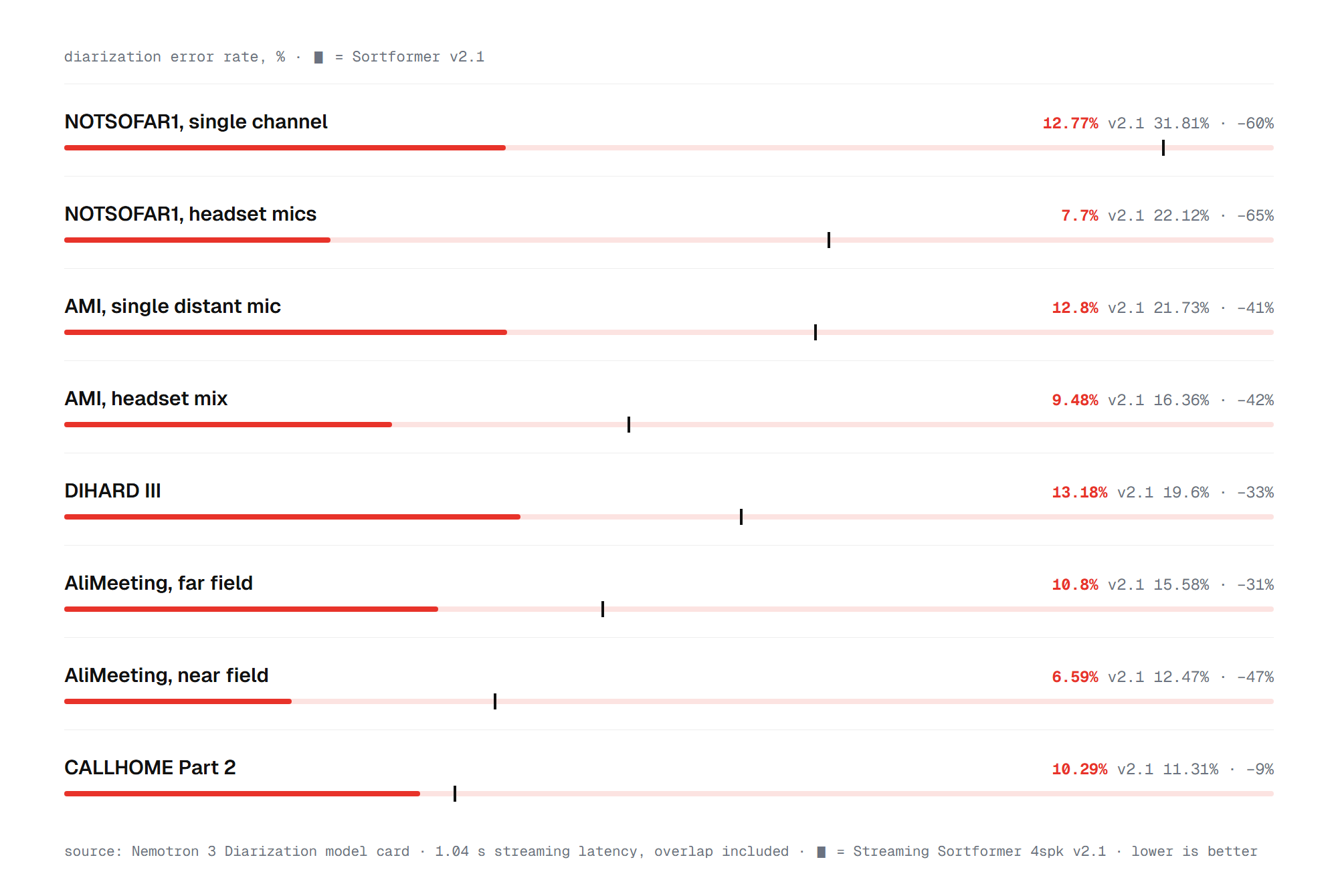
The error rate falls on every dataset. The biggest gains come in meetings with many people: on NOTSOFAR1 with headset mics, DER drops from 22.12% to 7.7%. On DIHARD III, a mix of hard real-world audio, it falls from 19.6% to 13.18%. Phone calls on CALLHOME improve least, by 9%. Those numbers make the model worth trying, and setup takes a few minutes.
What you need before you start
NVIDIA supports Nemotron 3 Diarization on Linux with a recent NVIDIA GPU. On Windows, use WSL2 with Ubuntu, which passes the GPU through to Linux. NeMo needs Python 3.12 or later, Cython and a recent PyTorch.
The model is small at 100 million parameters, so it fits on consumer graphics cards. NVIDIA does not publish a minimum VRAM figure. Its own speed tests ran on an RTX PRO 5000 Blackwell card.
Your audio must be mono and sampled at 16 kHz. Convert any file with ffmpeg first:
ffmpeg -i meeting.m4a -ac 1 -ar 16000 meeting.wavThe model card notes that downloading the weights may need a Hugging Face token. Run hf auth login once if the download asks for one. With audio and access ready, install the toolkit.
Step 1: install NVIDIA NeMo
The model runs on NVIDIA's speech toolkit, and the model card targets NeMo Framework 3.0. Install the system audio libraries, then the ASR extras:
apt-get update && apt-get install -y libsndfile1 ffmpeg
uv pip install Cython packaging
uv pip install 'nemo-toolkit[asr]'
NVIDIA's commands use uv, a fast replacement for pip. Plain pip install works the same way. Use a fresh virtual environment, because NeMo pins many dependencies.
Step 2: run speaker diarization in Python
The model loads through NeMo's SortformerEncLabelModel class. This script uses NVIDIA's recommended offline settings, which look 30.4 seconds ahead for the best accuracy:
from nemo.collections.asr.models import SortformerEncLabelModel

diar_model = SortformerEncLabelModel.from_pretrained(
    "nvidia/Nemotron-3-Diarization"
)
diar_model.eval()

diar_model.sortformer_modules.spkcache_len = 264
diar_model.sortformer_modules.fifo_len = 40
diar_model.sortformer_modules.chunk_len = 340
diar_model.sortformer_modules.chunk_right_context = 40
diar_model.sortformer_modules.spkcache_update_period = 300
diar_model._check_streaming_parameters()

predicted_segments = diar_model.diarize(
    audio=["/path/to/conversation.wav"],
    batch_size=1,
)

for segment in predicted_segments[0]:
    print(segment)
All five values are counted in 80 ms frames. Each segment is a line of text with a start time, an end time and a speaker, in seconds:
0.400 2.100 speaker_0
1.800 3.250 speaker_1
3.600 4.700 speaker_0
Segments can overlap, as in the first two lines, when two people talk at once. The audio argument also accepts a list of files or a NumPy array with sample_rate=16000. For many files, pass a JSON manifest with one audio_filepath, offset and duration per line.
To get the raw scores, add include_tensor_outputs=True. The model then also returns a matrix with one probability per speaker for every 10 ms of audio. You can set your own threshold on it or plot it. Offline mode is the most accurate, but live audio needs a shorter delay.
Step 3: pick a latency preset
The five settings in Step 2 decide how far ahead the model listens before it commits to a label. NVIDIA publishes four tested combinations, all measured in 80 ms frames:
- Offline, 30.4 s: spkcache_len 264, fifo_len 40, chunk_len 340, chunk_right_context 40, spkcache_update_period 300.
- Low latency, 1.04 s: 264, 264, 9, 4 and 222.
- Very low latency, 0.64 s: 264, 264, 6, 2 and 222.
- Ultra-low latency, 0.32 s: 264, 264, 3, 1 and 222.
The delay equals the chunk plus its right context, times 80 ms. For the low-latency preset that is (9 + 4) × 80 ms, or 1.04 seconds. NVIDIA says 0.32 seconds is the lowest setting it recommends.
Accuracy drops only slightly as the delay shrinks. On DIHARD III, DER goes from 12.73% offline to 13.18% at 1.04 seconds and 13.55% at 0.32 seconds. Speed changes more. On NVIDIA's test card, one stream runs 1,340 times faster than real time offline and 38 times faster at 1.04 seconds, before torch.compile. To run live, feed the audio in chunks.
Step 4: real-time speaker diarization with Transformers
Hugging Face Transformers also supports the model, which suits projects that already use it. Install the current development version:
pip install git+https://github.com/huggingface/transformersFor a whole file, the shortest path is three calls: a processor, the model and extract_speaker_dict. For live audio, the processor has three streaming modes. low_latency waits 1.04 seconds, very_low_latency 0.64 seconds and ultra_low_latency 0.32 seconds. This example from the model card feeds a file chunk by chunk, the way a live microphone would:
import torch
from transformers import AutoModelForAudioFrameClassification, AutoProcessor
from transformers.audio_utils import load_audio

model_id = "nvidia/Nemotron-3-Diarization"
processor = AutoProcessor.from_pretrained(model_id)
model = AutoModelForAudioFrameClassification.from_pretrained(model_id, device_map="auto")
processor.set_streaming_mode("low_latency")

sampling_rate = processor.feature_extractor.sampling_rate
audio = load_audio("meeting.wav", sampling_rate=sampling_rate)


def inputs_generator():
    yield processor(
        audio[: processor.num_samples_first_audio_chunk],
        sampling_rate=sampling_rate,
        is_streaming=True,
        is_first_audio_chunk=True,
    )
    mel_frame_idx = processor.num_mel_frames_per_step
    start_idx = processor.audio_chunk_start(mel_frame_idx)
    while (end_idx := start_idx + processor.num_samples_per_audio_chunk) <= audio.shape[0]:
        yield processor(
            audio[start_idx:end_idx],
            sampling_rate=sampling_rate,
            is_streaming=True,
            is_first_audio_chunk=False,
        )
        mel_frame_idx += processor.num_mel_frames_per_step
        start_idx = processor.audio_chunk_start(mel_frame_idx)
    yield processor(
        audio[start_idx:],
        sampling_rate=sampling_rate,
        is_streaming=True,
        is_first_audio_chunk=False,
        is_last_audio_chunk=True,
    )


speaker_cache, logits = None, []
with torch.inference_mode():
    for inputs in inputs_generator():
        inputs = inputs.to(model.device, dtype=model.dtype)
        outputs = model(**inputs, speaker_cache=speaker_cache)
        logits.append(outputs.logits)
        speaker_cache = outputs.speaker_cache

logits = torch.cat(logits, dim=1)
segments = processor.extract_speaker_dict(logits)[0]
for s in segments:
    print(f"speaker_{s['Speaker']}: {s['Start']:.2f}s - {s['End']:.2f}s")
The speaker_cache variable is what links the chunks. Pass it back on every call, and speaker labels stay the same for the whole session. In a live app, replace the file slices with buffers from your microphone. Labels alone still don't say what anyone said, so the next step adds words.
Step 5: Parakeet and diarization for speaker-labelled transcripts
Speaker-labelled transcription is the most common use of diarization, from meeting notes to call analytics and podcast captions. Nemotron 3 Diarization pairs with any speech recognition model that returns word timestamps. NVIDIA suggests Parakeet TDT 0.6B v3 or Nemotron ASR 3.5. This script continues from Step 2 and gives each word the speaker who was talking at its midpoint:
from nemo.collections.asr.models import ASRModel

asr_model = ASRModel.from_pretrained(
    model_name="nvidia/parakeet-tdt-0.6b-v3"
)
words = asr_model.transcribe(
    ["/path/to/conversation.wav"], timestamps=True
)[0].timestamp["word"]

turns = []
for segment in predicted_segments[0]:
    start, end, speaker = segment.split()
    turns.append((float(start), float(end), speaker))

def speaker_at(midpoint):
    active = sorted({
        speaker for start, end, speaker in turns if start <= midpoint < end
    })
    if len(active) == 1:
        return active[0]
    return "overlap/ambiguous" if active else "unassigned"

for word in words:
    midpoint = (word["start"] + word["end"]) / 2
    label = speaker_at(midpoint)
    print(f"{word['start']:.2f}-{word['end']:.2f} {label}: {word['word']}")
NVIDIA calls this a simple heuristic. It does not separate two voices talking at once, so those words get the overlap/ambiguous label. Group consecutive words with the same label into lines, and you have a readable transcript. If you'd rather not run any of this yourself, the model is also available as a service.
Use Nemotron 3 Diarization through an API
Two hosting providers already offer the model. DeepInfra lists it at $0.0006 per minute of audio, or about 3.6 cents per hour, with zero data retention. That suits occasional jobs or machines without an NVIDIA GPU. For a fully managed transcript with speaker labels, see our guide to transcribing video with ElevenLabs Scribe.
Baseten offers three ready presets on RTX PRO 6000 cards: real-time, batch and a diarized transcript that adds a multitalker Parakeet model. The real-time preset uses a WebSocket and takes low, ultralow or offline latency. A batch request looks like this:
import os
import requests

model_id = os.environ["BASETEN_MODEL_ID"]
response = requests.post(
    f"https://model-{model_id}.api.baseten.co/environments/production/predict",
    headers={"Authorization": f"Bearer {os.environ['BASETEN_API_KEY']}"},
    json={
        "diarization_input": {
            "audio": {"url": "https://example.com/meeting.wav"},
            "latency": "offline",
        }
    },
    timeout=300,
)
response.raise_for_status()
for turn in response.json()["turns"]:
    print(f"{turn['speaker']}  {turn['start']:7.2f}  {turn['end']:7.2f}")
Baseten bills for the dedicated GPU, and it lists no per-minute price for this model. For a quick test without code, NVIDIA's Nemotron 3 Diarization demo on Hugging Face runs live diarization from a microphone or an uploaded file. It also has an eight-speaker mode and synthetic conversations to try. Whichever route you pick, a few limits apply.
Common problems and limits
Most issues come from the input or from the model's design.
- More than eight speakers. The model has eight speaker slots. NVIDIA warns that extra voices can be missed or merged into another channel.
- Wrong sample rate. Stereo or 44.1 kHz audio needs converting to 16 kHz mono first, with the ffmpeg command above.
- Anonymous labels.
speaker_0is the first person to talk, not a named person. Mapping labels to names needs meeting metadata or a separate speaker verification model. - Hard audio. NVIDIA says accuracy can drop on very long recordings, heavy noise, echo, far-away microphones or audio unlike its training data. Test on your own recordings first.
- Windows. NeMo targets Linux. Use WSL2, or try the Transformers route, which depends only on PyTorch.
- Personal data. Voice recordings can count as personal data under privacy law, so plan storage and consent before you process calls.
With those limits in mind, the decision is fairly simple.
Should you use Nemotron 3 Diarization?
Yes, for most projects that need to know who spoke when. Nemotron 3 Diarization is the most accurate system on VoiceArena's Diarization-Bench at 14.7% DER, and it is free for commercial use. It beats pyannote's paid API and every speech-to-text service on that test. It also runs live with a delay as short as 0.32 seconds.
Use the NeMo route on a Linux GPU machine for batch jobs, or the Transformers route for live audio inside an existing Python app. Pair it with Parakeet or Nemotron ASR 3.5 for transcripts. Choose something else only if your recordings regularly have more than eight speakers.
FAQ
The questions below come up most often about Nemotron 3 Diarization.
Is Nemotron 3 Diarization free?
Yes. The weights are free on Hugging Face under the OpenMDW 1.1 license, which allows commercial use. Hosted versions cost extra, from $0.0006 per minute on DeepInfra.
How many speakers can Nemotron 3 Diarization handle?
Up to eight per recording. Labels are assigned in the order people first speak, and overlapping speech is marked for each speaker at once.
Does Nemotron 3 Diarization transcribe speech?
No. It only marks who spoke when. For words, pair it with a speech recognition model such as Parakeet TDT 0.6B v3, as shown in Step 5.
Can I run Nemotron 3 Diarization on Windows or a Mac?
NVIDIA supports Linux with an NVIDIA GPU. On Windows, use WSL2. A Mac has no NVIDIA GPU, so a hosted API is the easier option there.
Where can I download Nemotron 3 Diarization?
From Hugging Face, at nvidia/Nemotron-3-Diarization. NeMo and Transformers download the weights automatically on the first from_pretrained call. The training and inference code lives in NVIDIA's NeMo repository on GitHub.
Is there a Nemotron 3 Diarization demo?
Yes. NVIDIA's Hugging Face Space runs live speaker diarization in the browser from a microphone or an uploaded file, with no setup.
Is Nemotron 3 Diarization better than pyannote?
On VoiceArena's Diarization-Bench, yes. It scores 14.7% DER against 20.6% for the paid pyannoteAI Precision-3 and 30.6% for the open pyannote Community-1.