 Felix Laurent
Google has brought Guided Vision in Gemini Live to the iPhone. The feature turns the phone's camera into a talking visual assistant for people who are blind or have low vision. Gemini describes what the camera sees and tells users how to move the phone when the shot is off. Until now, it worked only on Android, where it launched on October 1.
The Gemini account announced the iOS release on X on November 25. "Open Live, point your camera, and get real-time guidance right on screen," the post said. Google has not published iPhone requirements, supported countries or any other details for the iOS version. Its help page for the feature still describes only Android. Here is what Guided Vision does, how Google built it and what is still unclear on the iPhone.
What Guided Vision does
Guided Vision runs inside Gemini Live, the voice mode of the Gemini app, and it is aimed first at blind and low vision users. The user turns it on, starts a Live session and shares the camera. Gemini then works as a conversational partner. It describes the scene, answers follow-up questions and can be interrupted at any time.
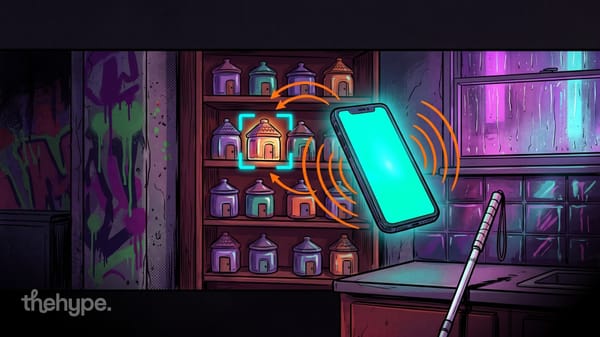
The key difference from a plain camera chat is the reframing cues. Sometimes the camera points too high, too close or slightly to the side. Gemini then asks the user to pan slowly right, tilt down or step back. A blind user cannot check the framing on the screen, so these spoken cues are what make the answers possible.
Google lists four main uses:
- Reading text. Small nutrition labels, appliance dials, washing machine settings and printed menus in dim restaurants.
- Finding objects. A dropped earbud on the floor or the black pepper in a crowded spice cabinet.
- Describing objects. Colors, patterns and shapes, for example whether a striped shirt goes with a pair of trousers.
- Exploring a space. Overviews of unfamiliar rooms, layouts or items spread across a table.
The level of detail depends on the request. Asked to find the black pepper, Gemini focuses on guiding the camera to that jar. Asked what a room looks like, it gives a full overview.
Google says these skills came from months of work with the people who would use them.
Google built it with the blind community and Aira
Google developed Guided Vision together with Aira, a company that connects blind and low-vision people with professional visual interpreters over live video. Aira's specialists interpreted visual data for Gemini Live for tens of thousands of hours. More than 1,000 people from Aira's Trusted Tester network stress-tested the model in their daily routines. Aira experts also helped set up and evaluate the feature's safety guardrails.
The feature supports conversations in several languages. Google says blind and low-vision testers in India, Brazil, Singapore, Indonesia, Japan and other countries shaped how its descriptions and cues sound. Google also pitches it beyond accessibility, for older adults, people with low literacy or anyone reading fine print in bad light.
There are firm limits. Google warns that Guided Vision can make mistakes and is not a medical device or a mobility aid. It is not meant for navigation or obstacle detection, and it should not replace a white cane or other safe-travel practices. One user under the iOS post asked how it handles a crowded street. That is exactly the case Google rules out.
Those rules apply on both platforms, but the way users reach the feature differs a lot.
What changes on the iPhone
On Android, Guided Vision is deeply built into the system. Users can switch it on in the Gemini app settings with the Use Guided Vision in Live toggle. They can also launch it with an Android accessibility shortcut, such as the floating accessibility button, a two-finger swipe or both volume keys. People who use the TalkBack screen reader can open it with a three-finger tap. It works on Android 9 and later in regions and languages where Gemini Live is available.
None of those system shortcuts exist on the iPhone. There, the feature lives inside the Gemini app, and users open Live and point the camera. Google has not said which iPhone models or iOS versions it supports, or in which countries it is rolling out. Its help page still covers only Android and notes that the feature is reaching users gradually. Google has not said whether it works with Apple's VoiceOver screen reader either, which matters most for the people the feature is built for.
The iPhone version also enters a crowded field. Be My Eyes has offered Be My AI, an assistant built on OpenAI's models, since 2023, next to its network of human volunteers. Aira itself offers human interpreters by subscription or for free at partner locations. Google's pitch is an AI assistant inside an app many people already have, with a live conversation and spoken framing help built in.
Should iPhone users try Guided Vision
Yes, especially blind and low-vision users who already use Gemini. The spoken reframing cues solve a real problem for people who cannot see the screen. Google's testing with Aira's community also shows in the everyday tasks it chose. For reading labels, checking colors or finding a lost item, it can save a call to a human helper.
The rollout itself is less clear. Google has not given requirements, regions or VoiceOver details for iOS, so some users may not see the feature yet. It also lacks the Android shortcuts that let users start it without opening an app. iPhone owners should update the Gemini app and check the Live settings. Guided Vision is a helper for close-range tasks, never a guide for walking around.
Sources
- Google Gemini on X – November 25, 2026
- Google Gemini on X, Android launch thread – October 6, 2026
- Guided Vision in Gemini Live: built for accessibility, Google – October 1, 2026
- Get audio descriptions with Guided Vision in Gemini Live, Gemini Apps Help
- Guided Vision in Gemini Live now rolling out on iOS, Digit – November 26, 2026