 Felix Laurent

Sponsored content: this article was produced in partnership with Bright Data. How thehype labels partner materials is set out in our editorial policy.
How Claude and Bright Data turn one product link into a price check (illustrative prices)
Want to grab the best prices this Black Friday? Then don't trust the red sticker. A "was $120, now $94" tag looks great, until you find out the same thing cost $95 back in October.
Well, we have a way to check. You send Claude links to the things you want to buy, and it compares their prices across several stores and keeps watching them. It reads store pages through the Bright Data MCP server, keeps the price history and builds you a page where every change is visible at a glance. It can email you when a price drops, and on November 27 it tells you which deals are real.
No code needed. All it takes is a handful of prompts and a free Bright Data account.
Why you can't trust the "was" price
A crossed-out price only shows what the store says the product used to cost. Whether anyone ever paid that much is another matter.
Stores have three favorite tricks. They show a "was" price the product rarely sold at. They raise the price a few weeks before the sale, so the "discount" only undoes the raise. Or they count "save 40%" from the maker's list price instead of last week's price.
Every one of these falls apart once you have your own record of daily prices. So let's make one. First, a quick look at what can go wrong along the way.
Four things your tracker has to get right
Sounds simple: read a price, write it down, compare it with yesterday. In practice there are a few catches, and Claude needs a clear rule for each of them.
Reading the price. Most big US stores put the product name, price and availability into structured data on the page. Some load the price with JavaScript after the page opens. Many simply block automated visitors.
Finding the same product elsewhere. Every store names products its own way. So match by the manufacturer's model number or barcode (GTIN), then check color, size and version. Careful here: one page can hold several versions, like AirPods 4 with and without noise cancellation.
Comparing like with like. Look at the price of the product itself, without shipping or tax.
Knowing what failed. Some checks won't load. A tracker that fills the gaps with guesses will mislead you, so every gap should say why it's there.
Claude can handle all of this, except the blocks. For those it needs help.
So how do Claude and Bright Data work together?
MCP (Model Context Protocol) is how Claude connects to outside tools. The Bright Data MCP server gives Claude tools to open store pages, search Google and run ready-made store scrapers.
During a price check, Claude decides what it needs and calls a Bright Data tool. Bright Data opens the page on its side, deals with proxies, CAPTCHAs and bot checks, and sends the result back to Claude. Claude reads the price, compares it with the history and saves it.
A handful of tools do most of the work:
| Tool | What it sends back to Claude |
|---|---|
search_engine and search_engine_batch | Google or Bing results, one query or up to five at once, used to find other stores that sell the model |
scrape_as_markdown and scrape_batch | Product pages as clean text, one or up to five at once, past the store's bot protection |
| Scraping browser tools | A real browser session for pages that load slowly or build the price with JavaScript |
search_scrapers and run_scraper | Clean JSON from ready-made scrapers for stores like Amazon, Walmart and eBay |
Under the hood these run on Bright Data's Web Unlocker, SERP API and Web Scraper API. You don't have to touch any of them. Claude picks the tool, and the data lands right in your chat.
Every account gets 5,000 free requests a month, and you don't need a credit card to start. Setup comes first.
Step 1: plug Bright Data into Claude
Create a Bright Data account and copy your API token from the account settings. Using Claude Code? One command does it:
claude mcp add --transport http brightdata "https://mcp.brightdata.com/mcp?token=YOUR_API_TOKEN"Prefer the Claude desktop app? Add the same URL as a custom connector in the connector settings. Either way, there's nothing to install, because Bright Data hosts the server.
Now test it. Ask Claude to search for any product with Bright Data. Fresh results and the name of the Bright Data tool it used mean you're good to go.
Step 2: just paste a link
This part is the easiest. You don't need to know model numbers or list stores. Found a PS5 you like? Copy the link from the store and send it to Claude with one short prompt:
Use Bright Data. Here's a product I want to buy:
https://www.walmart.com/ip/PlayStation-5-Disc-Console-Slim/17816601985
Find the same model at other big US stores and compare prices.
Match by model number, color and storage. Take the item price without
shipping or tax, and note stock and who actually sells it.
If a price did not load, say so and don't guess.
Show a table: store, price, stock, seller, link.
Claude then works through a chain of steps on its own. It opens your link with scrape_as_markdown and reads the product name and model. Then it searches for the same model at other stores with search_engine_batch and checks up to five store pages at once with scrape_batch. If a store page doesn't load in time, Claude retries it in Bright Data's scraping browser. For Amazon it runs the ready-made Amazon scraper.
We tried exactly this prompt on November 19 with a PS5 Slim disc edition, and it paid off right away. The Walmart link asked $849.99, but Walmart doesn't sell the console itself there: the offer came from a third-party seller. Best Buy had the same model in stock for $649.99, sold by Best Buy. Target listed $649.99 but was out of stock, and Amazon had no offer at all. One link and one prompt saved $200.
That's why "who actually sells it" is in the prompt. A marketplace seller on a big store's site can charge whatever it wants.
That covers today's prices. To catch a fake deal, Claude needs a memory.
Step 3: give Claude a memory
Claude doesn't remember past chats, so the history lives in a file. In Claude Code, make a folder for your tracker and a list of what you want to watch:
watchlist.csv
link,target_price
https://www.walmart.com/ip/PlayStation-5-Disc-Console-Slim/17816601985,599
One line per product: the link you'd paste in step 2 and the price you'd be happy to pay. Claude reads the model from the link and finds the other stores itself.
Then tell Claude how to save the data:
For every link in watchlist.csv, find the same model at other big US
stores with Bright Data, as in our first check. Append one row per store
to history.csv: date, time, product, store, price, in_stock, seller, link, note.
If a check failed, write the row with an empty price and the reason
in the note. Never change earlier rows.
Each run adds new rows to the history. Raw rows in a CSV are hard to read, though, so the next step turns them into a page.
Step 4: all your price changes on one page
Ask Claude to build a page from the history after every check:
After updating history.csv, rebuild tracker.html, one self-contained page,
dark background, big clear numbers:
- three cards on top: best price now and where, the price at my link,
  and how much I save;
- a table of stores: price, stock, seller (mark third-party sellers),
  difference from the best price, and a note;
- change since the last check (green down arrow, red up arrow),
  lowest price ever seen, target price, and "target reached" when it is;
- a small line chart per product with one line per store;
- failed checks shown as gaps with the reason.
Put products whose price dropped since the last check at the top.
Here's the page Claude built for the PS5 from our check:
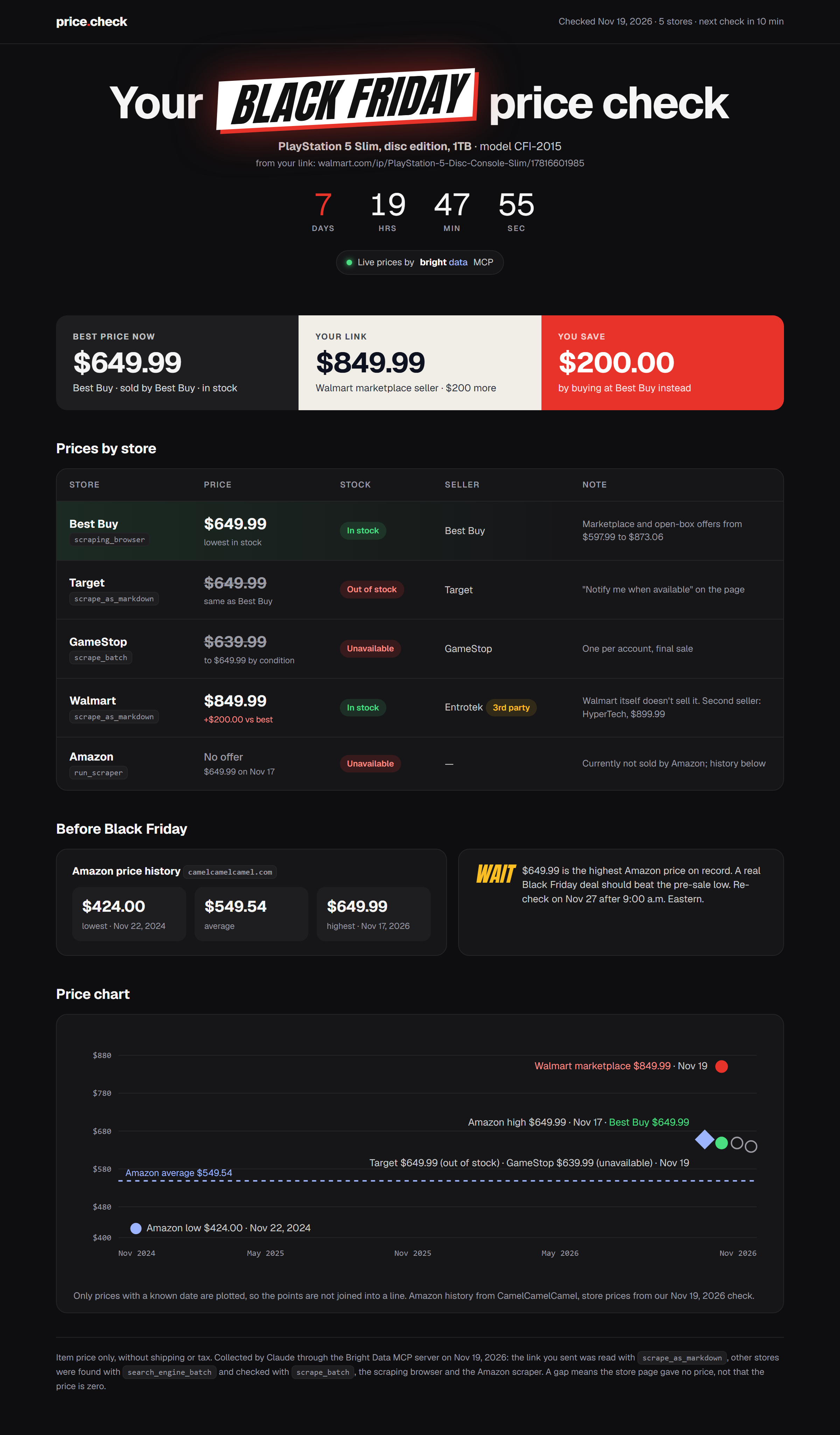
Open tracker.html in your browser and the answer is right at the top: where to buy and how much you save. The table below shows every store with its seller and stock, and the history block shows how today's price compares with the past. This was the very first check, so there are no arrows or charts yet: they appear as soon as the history has a few runs to compare. In the desktop app, Claude can show the same page right in the chat.
The page is only useful while the data stays fresh, so the next step runs the checks on a schedule.
Step 5: put it on autopilot
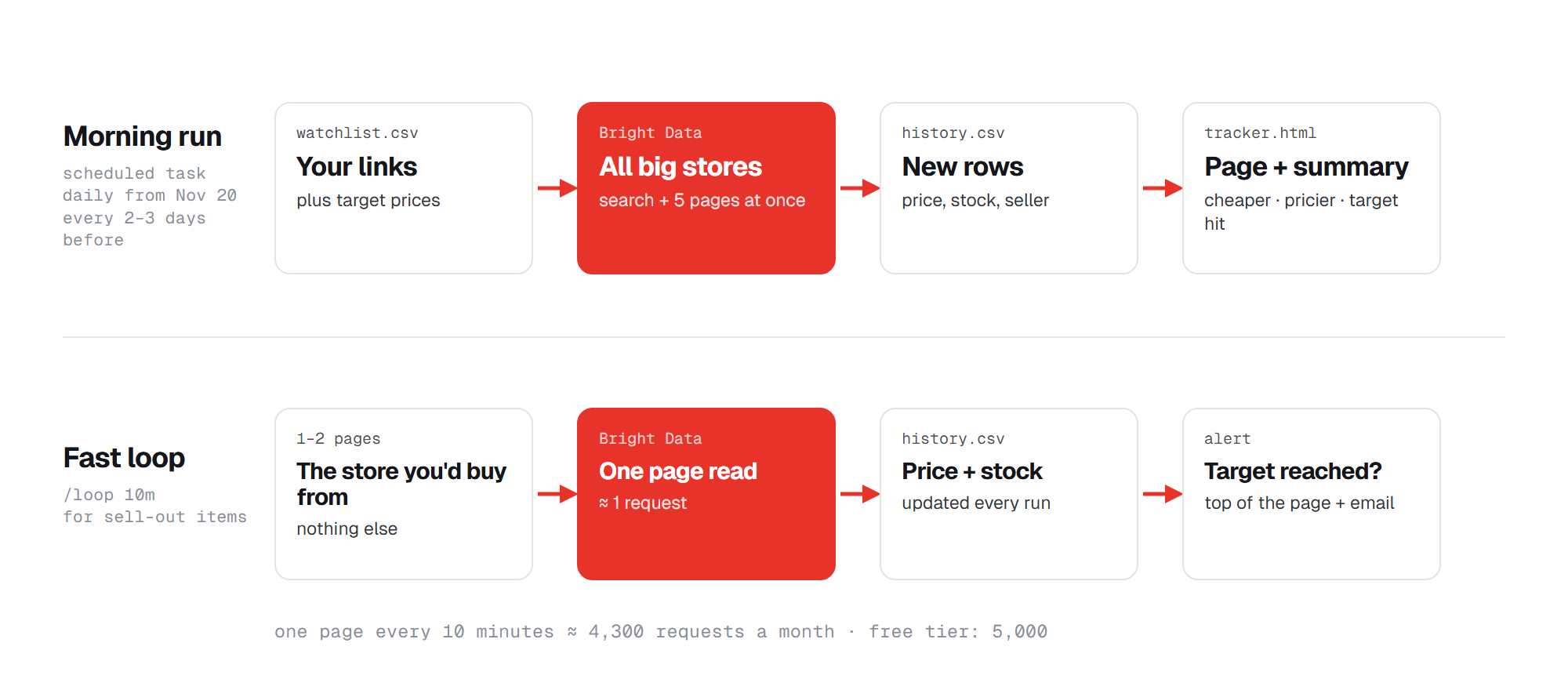
Combine the prompts from steps 3 and 4 into one instruction and put it on a schedule. In the Claude desktop app, a scheduled task can repeat it every morning. While you're having coffee, Claude checks the stores through Bright Data, adds the new rows and rebuilds your page.
Ask Claude to end each run with a short summary: what got cheaper, what got pricier and what reached your target.
How often should it check? Every two or three days is plenty in October and early November. From November 20 to Black Friday, go daily, since that's when stores change prices the most.
Hunting a console that sells out in minutes? Then go much faster. You can ask Claude to check the store pages you care about as often as every 10 minutes. In Claude Code, the /loop command repeats a prompt on a timer:
/loop 10m With Bright Data, open only these store pages:
https://www.bestbuy.com/product/playstation-5-slim-console-1tb/JXHQ37TYLC
Add the price and stock to history.csv and update tracker.html.
If it is in stock at or below my target price in watchlist.csv,
put it at the very top and alert me.
Just keep an eye on your request budget. Every check of a page is about one request, so one page every 10 minutes adds up to about 4,300 requests a month. That's why the fast loop opens only the one or two store pages you'd actually buy from, and the full store comparison stays in the morning run.
Get an email when the price drops
A fast loop is only useful if you hear about a drop right away, even when you're away from the screen. There are two ways to get an email.
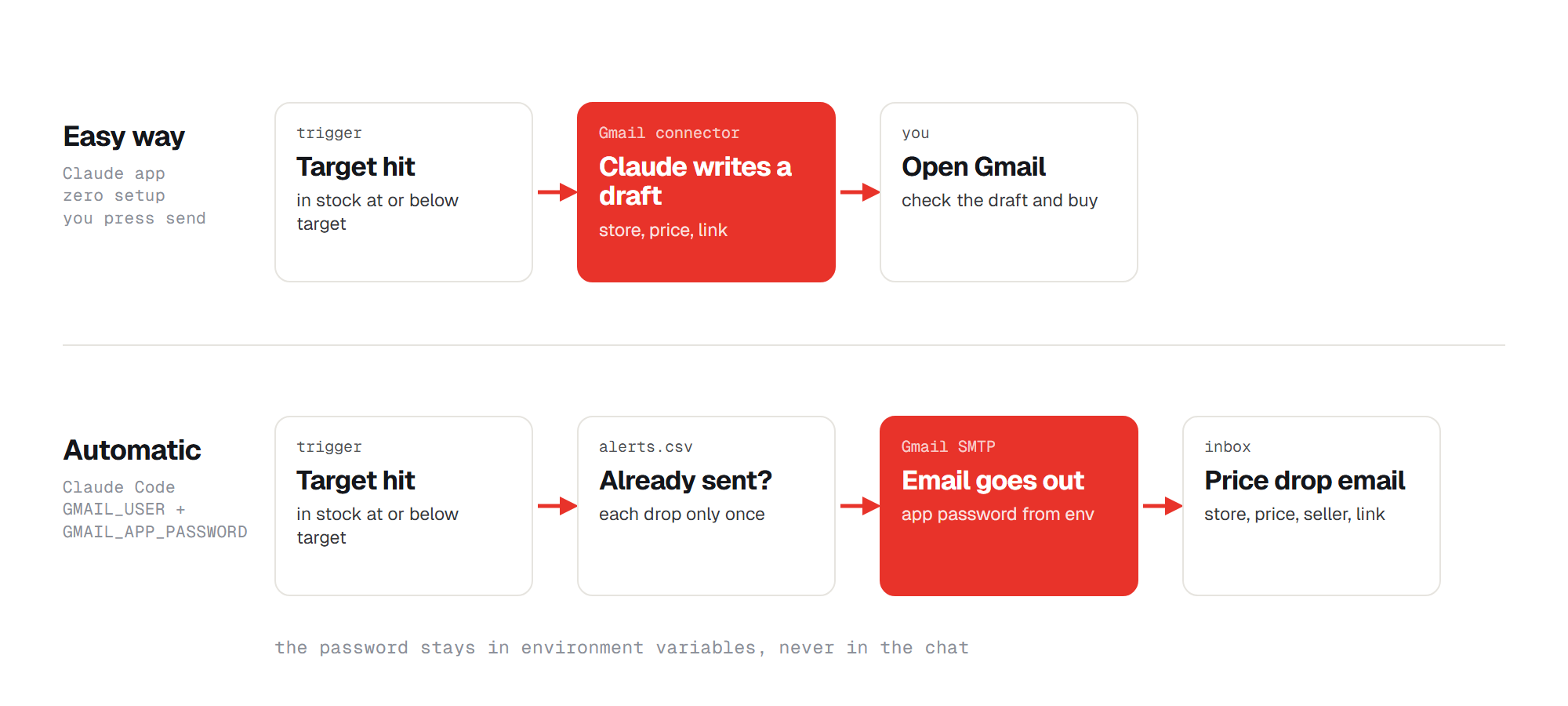
The easy one is the Gmail connector in Claude. Connect it, and Claude writes you an email draft whenever a product hits your target price. You open Gmail, see the draft with the store, the price and the link, and buy. The draft doesn't send itself, but it takes zero setup.
For fully automatic emails, use Claude Code. Create an app password in your Google account (it needs 2-Step Verification turned on) and save it on your computer as environment variables, GMAIL_USER and GMAIL_APP_PASSWORD. Never paste the password into the chat. Then add this to your scheduled prompt and your loop:
If any product is in stock at or below its target price in watchlist.csv
in this run, send me one email through Gmail SMTP (smtp.gmail.com, port 465)
using GMAIL_USER and GMAIL_APP_PASSWORD from the environment.
Subject: "Price drop: PRODUCT now $PRICE at STORE".
Body: store, price, target price, seller, link.
Send each drop only once: note it in alerts.csv and skip it next time.
Claude writes the small sending step itself the first time and reuses it on every run. The alerts.csv file keeps it from emailing you about the same drop every 10 minutes.
That leaves the main question of the season.
Step 6: real deal or fake discount?
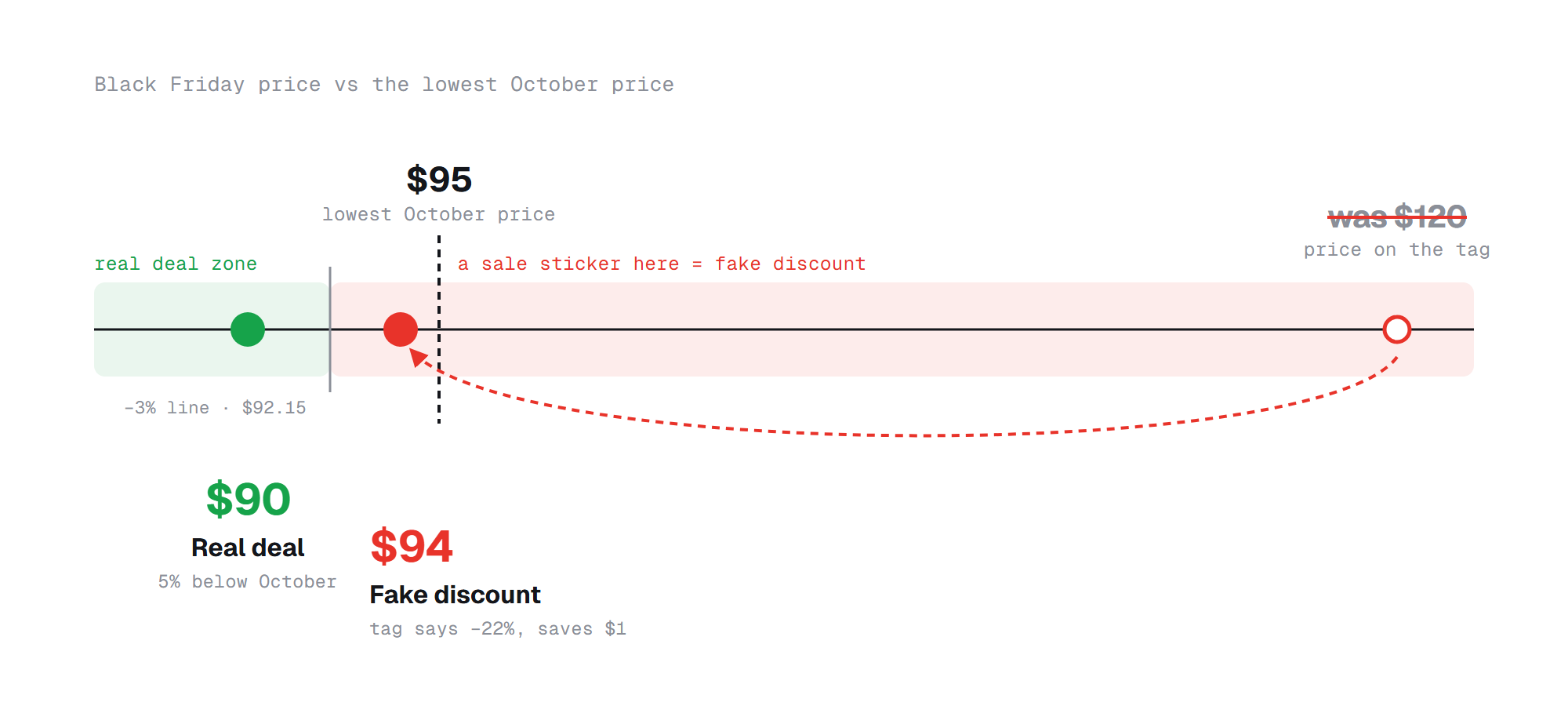
Here's the simplest test there is: compare the Black Friday price with the lowest price of October. October is quiet, before the early sales and before stores start pumping prices up for the big day. If the product was already that cheap back then, the Black Friday "discount" is nothing special.
So the rule is short. If the Black Friday price is clearly below October's lowest price, at least 3% lower, it's a real deal. If the store shouts about a discount but the price isn't even 3% below October, it's a fake discount. Without a sale sticker, a price in between is just a normal price.
Take an example. The lowest October price was $95. A Black Friday price of $90 beats it, so grab it. Now the "was $120, now $94" tag: it promises almost 22% off, yet saves you exactly $1 against October. That one is a fake.
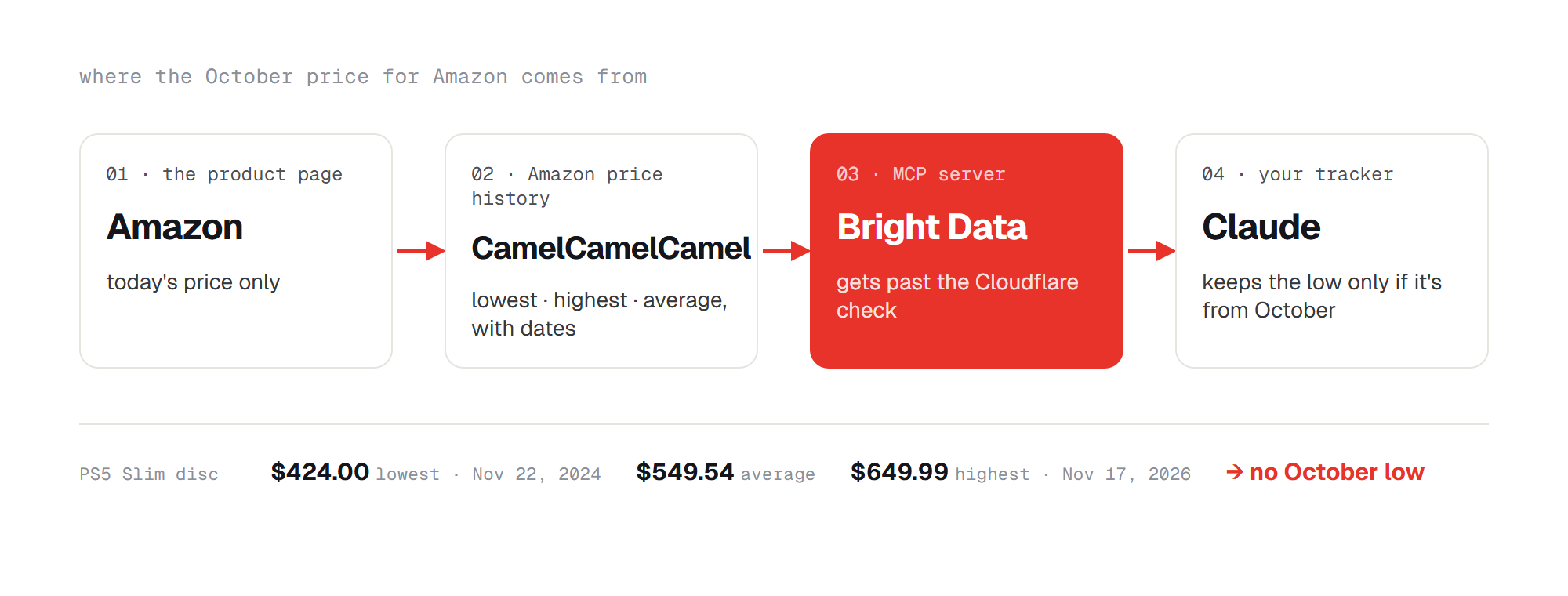
But wait, you only started tracking today. Where does October come from? Claude digs it up through Bright Data, from two places.
For Amazon, there's CamelCamelCamel. Its product page lists the lowest, highest, current and average Amazon price, each with a date. It doesn't break the history down by month, so Claude uses the lowest price only if its date falls in October. CamelCamelCamel sits behind a Cloudflare check, which Bright Data gets past.
For Walmart, there's the Wayback Machine at web.archive.org. It keeps old snapshots of popular product pages with their dates, and Walmart pages keep the price inside the snapshot. Walmart's page for the black Sony WH-1000XM5 headphones, for example, was saved several times in early October, with the price in each copy.
Ask Claude to collect the pre-sale minimum for your whole list:
For every link in watchlist.csv, find the lowest October price
using Bright Data:
- for Amazon, open the product's page on camelcamelcamel.com. Take the
  lowest Amazon price and its date if the date is in October;
  otherwise write "no October low". Add the average price.
- for Walmart, get the list of October snapshots of the product page:
  web.archive.org/cdx/search/cdx?url=PRODUCT_URL&from=20261001&to=20261031
  Open each snapshot and read the price. Check that the color and model match.
- add your own October rows from history.csv if there are any.
Write october_low.csv: product, store, lowest price, date, source link.
If you found no price, write "no history". Don't guess.
Insist on the source link and the date. They let you check any number yourself in one click.
On November 27, hand Claude the rule along with a fresh check:
Check all products in watchlist.csv with Bright Data now.
Compare today's price at each store with october_low.csv.
Mark "real deal" if today's price is at least 3% below the October low.
Mark "fake discount" if the store shows a discount but today's price
is less than 3% below the October low.
Mark "no history" if there is no October price.
Add the verdict and the October low to tracker.html.
Why 3%? A price a few cents lower than in October is not a deal worth rushing for. The margin also covers small errors, like a one-day glitch price in an old snapshot.
Watch out for colors. One Walmart listing can hold several colors at different prices: in early October the blue WH-1000XM5 cost $50 more than the black one on the same page. When Claude finds no clean price, it marks "no history", and you still have the store comparison from step 2 to fall back on.
History also helps when there's no deal at all. For our PS5, CamelCamelCamel showed that $649.99 was the highest price Amazon had ever asked, set on November 17, 2026, against an average of $549.54. So the page added a "wait" note: today's price is a record high, so there's no reason to rush before Black Friday.
Which stores play fair?
Once a few weeks of checks have piled up, your history can answer one more question: which stores pump prices before the sale and which keep them honest. Ask Claude to rank them:
Using history.csv and october_low.csv, rank the stores on my watchlist.
For each store show:
- markup before the sale: its price on November 19 versus its October low,
  in percent, averaged over my products;
- how often it had the lowest in-stock price across all checks;
- its average gap from the cheapest store, in dollars and percent;
- how often the offer came from a third-party seller instead of the store;
- after November 27, how many of its Black Friday prices were real deals
  and how many were fake discounts.
Count a store only if it has prices for at least two products on at least
seven different days. Sort by the biggest markup first.
Add the ranking to tracker.html as a separate table.
The ranking only describes the products you track, so treat it as your own shopping record rather than a verdict on a whole store. Even our single PS5 check hinted at what a ranking would catch: on Walmart the console came from a third-party seller, $200 above Best Buy.
Other things you can track
Once Claude can read the web through Bright Data, it can watch far more than holiday deals. The same tools that read a headphone price read a hotel rate, a flight fare or a job listing. Through the MCP server Claude can reach more than 1,200 ready-made scrapers, including Amazon, eBay, Etsy, Home Depot, LinkedIn, Zillow, Crunchbase and the big social networks.
Swap the products in your watchlist for other pages to build a different tracker. It can watch competitors' prices, rentals in your neighborhood, game prices in regional stores or the stock status of that sold-out GPU. The history file and the page stay the same.
Who gets the most out of this? Anyone who needs fresh web data every day:
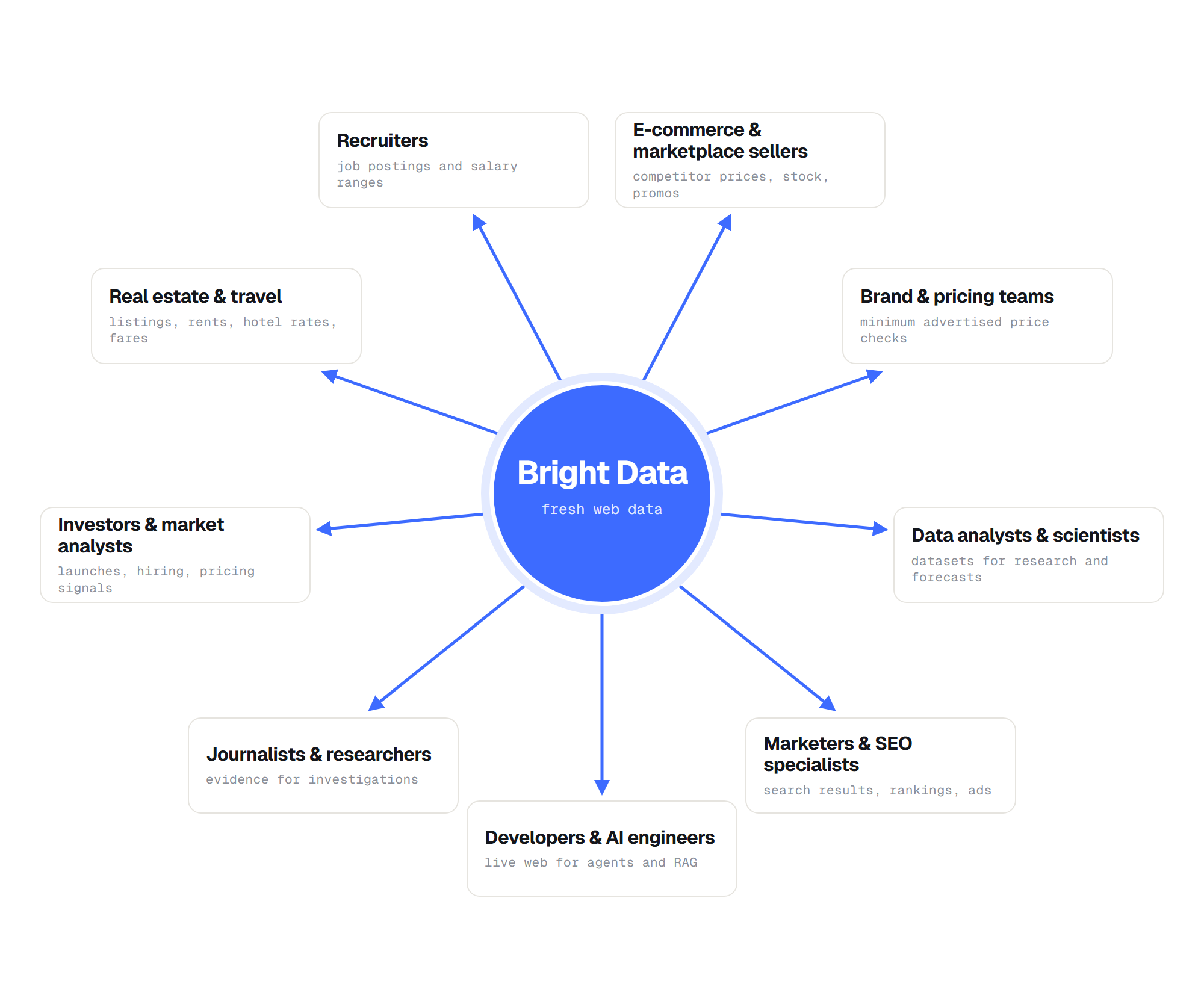
For a shopper the stakes are smaller. Still, a record of real prices tells you more than any sticker in the store.
So, is Claude with Bright Data enough for Black Friday?
For your personal shopping list, yes. One connection gives Claude live store data, and everything else is a handful of prompts: paste a link, save the history, rebuild the page, repeat every morning or every 10 minutes. Ten products across five stores take about 60 requests a day, roughly 1,800 a month, well within the free 5,000.
Just keep two things in mind. Claude's answers can vary a little from run to run, so strict rules in your prompts matter more than clever wording. And some stores load prices with JavaScript, in which case Claude needs Bright Data's browser tools instead of a plain page read. Whatever you buy, compare the Black Friday price with the lowest price of October, and ignore the "was" price on the tag.
FAQ
Short answers to the questions readers ask most about this setup.
Is it legal to track prices from store websites?
Prices on public product pages are visible to anyone, and price comparison sites have collected them for decades. Still, read each store's terms of use, keep your request rate low and stay away from anything behind a login. This is general information, not legal advice.
How much does it cost?
The Bright Data MCP server includes 5,000 free requests a month. A daily check of ten products at five stores uses about 1,800. You'll also need a Claude plan that supports MCP connectors.
Can I track Amazon prices?
Yes. Bright Data has ready-made Amazon scrapers that return price and availability as JSON, and Claude can run them through the MCP server.
Do I need to know how to code?
Not at all. Every step here is a plain-language prompt. Claude writes the CSV files and the tracker page itself.
What if a price doesn't load?
Claude writes the row with an empty price and the reason, and the page shows it as a gap. If a store keeps failing, ask Claude to try Bright Data's browser tools or a ready-made scraper for that store.