 Felix Laurent

The best local model for image generation in November 2026 is Qwen-Image-2.1 for top quality. Z-Image-Turbo is the pick for a free license and a 16 GB graphics card. Qwen-Image-2.1 is the highest-ranked open model on LMArena and second on Artificial Analysis. Its license, though, rules out commercial use. MiniMax H3-Image tops Artificial Analysis, but it is a 33B model that is not licensed in the US, EU or UK.
Strictly speaking, no local LLM is good at drawing. The models people run at home are diffusion transformers. Ollama, the most popular local LLM app, removed its image feature in August. This guide explains what to run instead, which model fits which job and graphics card, and the apps that run them. Rankings, licenses and memory figures were checked on November 17, 2026.
Why a local LLM is not the right tool for images
The models that top image leaderboards work differently from chat models. FLUX, Qwen-Image and Z-Image start from noise and refine a picture over 4 to 50 steps. A small language model inside them only reads the prompt. Qwen-Image-2.1, for example, uses a Qwen3-VL language model as its text encoder.
A few open models do generate images the way an LLM generates text. HunyuanImage 3.0 from Tencent is an 80B mixture-of-experts model that needs at least three 80 GB data-center GPUs. ByteDance's BAGEL needs 32 GB for the full model, and it sits last on LMArena's text-to-image board. For now, these models are research projects more than home tools.
The popular LLM apps do not help either. Ollama added experimental image generation for Macs in January 2026, with Z-Image-Turbo and FLUX.2 klein. Version 0.32.6 removed it in August, and it has not returned. LM Studio has no built-in image generation. To make images locally, you need a dedicated image app and an image model. The leaderboards show which model is worth the download.
What the image leaderboards say
Two independent arenas rank image models by blind human votes. Artificial Analysis covers 114 text-to-image models and marks which ones have open weights.
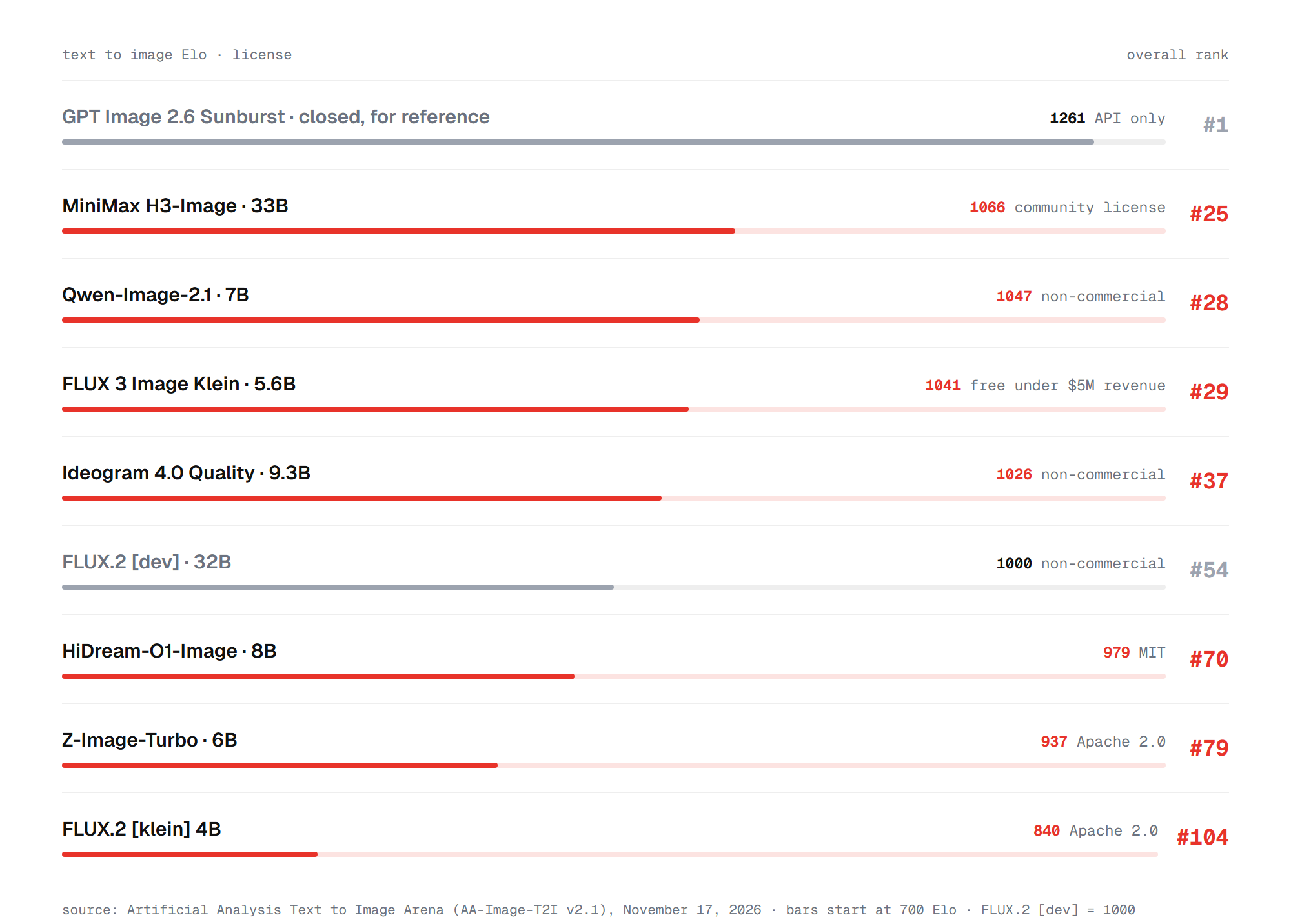
MiniMax H3-Image leads the open models at 1066 Elo, in 25th place overall. Qwen-Image-2.1 follows at 1047, then FLUX 3 Image Klein at 1041. Their confidence intervals overlap, so those three are close to a tie. The best closed model, GPT Image 2.6 Sunburst, scores 1261. That gap of about 195 points is the price of running locally today.
LMArena, the second arena, published its latest image rankings on November 12.
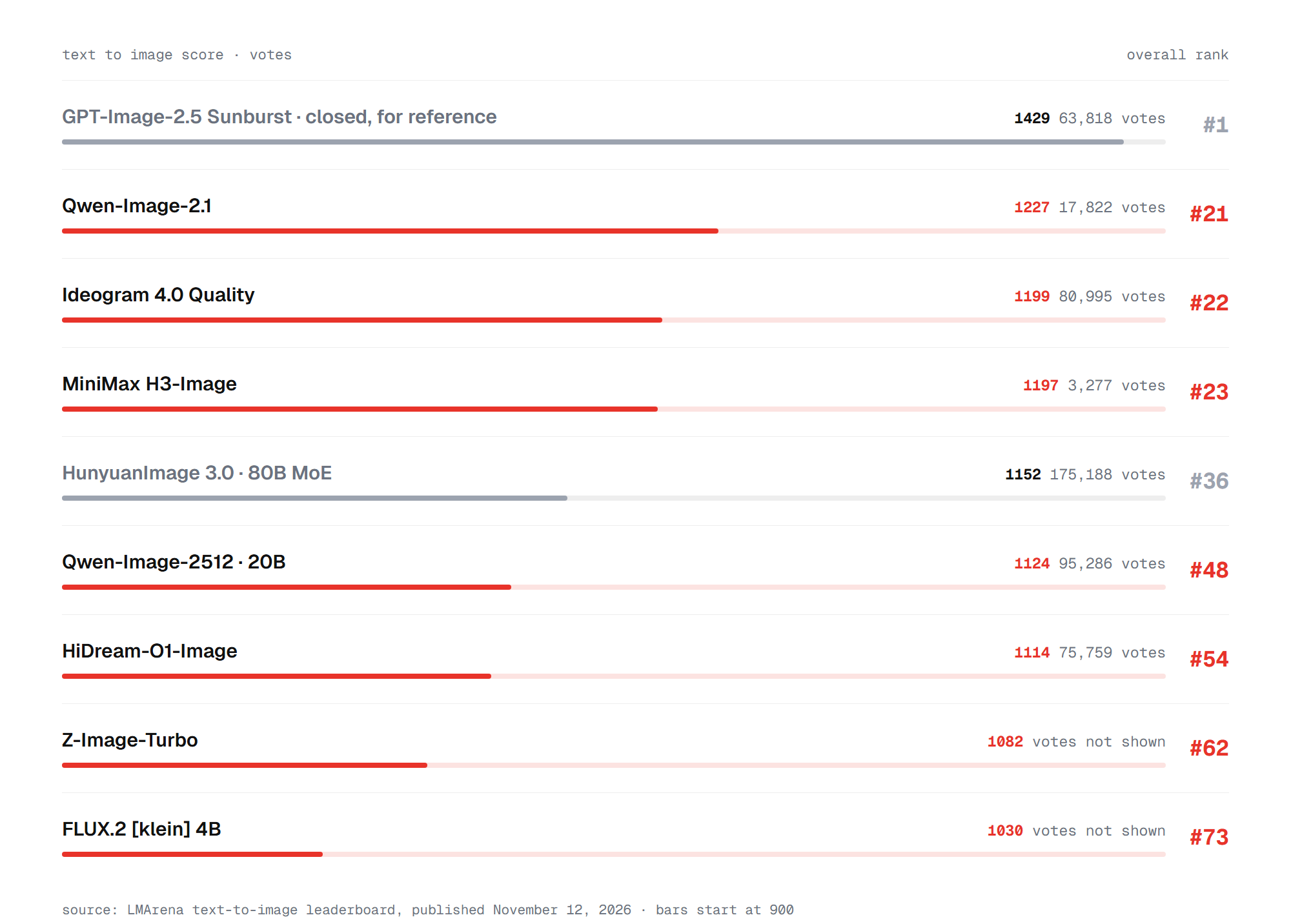
Here Qwen-Image-2.1 leads open models at 1227, ahead of Ideogram 4.0 at 1199 and H3-Image at 1197. H3-Image has only 3,277 votes, so its position is less settled. Qwen-Image-2.1 also leads open models on both arenas' image-editing boards. On Artificial Analysis editing, H3-Image is first and Qwen third.
Why these models and not others
Leaderboards include open models that make poor home picks. Bria's Fibo 2.0 ranks fourth among open models on Artificial Analysis, but its weights are licensed for non-commercial use only. NVIDIA's Cosmos3-Super has 64B parameters, and HunyuanImage 3.0 needs a server rack. Krea 2 Turbo scores 1115 on LMArena, but we could not confirm that its weights are public.
Stable Diffusion 3.5 Large, once a default open model, now ranks 84th of 85 on LMArena. We also left out FLUX.2 [dev]: it scores below the newer 6B to 9B models and needs about 48 GB at FP8. The models below balance quality, memory, license and app support. They start with the strongest.
Best quality: Qwen-Image-2.1
Qwen-Image-2.1 from Alibaba is the best all-round local image model. It came out on September 20, 2026, with a 7B image transformer and a Qwen3-VL 8B text encoder. It renders at 2048 by 2048 pixels, edits images with masks or drawn notes, and accepts up to 10 reference images. It can also output transparent PNGs.
It fits ordinary graphics cards. Unsloth recommends FP8 on GPUs with 24 GB or more and a Q4_K_M build for 12 to 16 GB. The Q3_K_XL build fits 6 to 8 GB. In Unsloth's test, Q4_K_M used 9.1 GB of VRAM. A Turbo version from October cuts generation from 40 steps to 8.
The catch is the license. Qwen-Image-2.1 ships under the Qwen Research License, for non-commercial use only. Earlier Qwen models were Apache 2.0, and Qwen-Image-2512 still is. That 20B model ranks 48th on LMArena and needs about 32 GB at FP8. For client work, look at the next pick.
Best for commercial use: FLUX 3 Image Klein and Z-Image-Turbo
FLUX 3 Image Klein from Black Forest Labs is the strongest open model you can use commercially without paying. It came out on October 15, 2026, with 5.6B parameters, and ranks third among open models on Artificial Analysis. The FLUX Kommunity License makes generation free for companies under $5 million in yearly revenue. Commercial fine-tuning and redistribution need separate permission.
FLUX 3 Klein is also fast. Black Forest Labs says its INT8 build runs on RTX cards with 8 GB of VRAM. It reports about 4 seconds per megapixel on an RTX 5090 and under 9 seconds on an RTX 4070. The model edits images and takes up to 10 reference images.
Z-Image-Turbo from Alibaba's Tongyi lab is the safest license choice. It uses Apache 2.0, so you can use, change and resell it without limits. The 6B model "fits comfortably within 16G VRAM consumer devices", according to its model card. It needs only 8 steps.
Z-Image Base, released in January 2026, is the slower 28 to 50 step version meant for fine-tuning. Turbo scores lower than the newest models, at 937 Elo. Its photorealism and its Chinese and English text keep it in most guides. For a small graphics card, there are lighter options still.
Best for 8 GB and 12 GB graphics cards
With 8 GB of VRAM, FLUX 3 Klein in INT8 is the best quality you can run. That relies on Black Forest Labs' own memory figure. Qwen-Image-2.1 in a Q3 build is the second option for personal projects. SDXL, now three years old, still runs on 8 GB and has the largest library of community fine-tunes and LoRAs.
With 12 GB, FLUX.2 klein 4B is the fast pick. It uses Apache 2.0 and its model card puts it at about 13 GB, on an "RTX 3090/4070 and above". It makes an image in 4 steps, in under a second on a fast card. Z-Image-Turbo in an INT8 build also fits this tier.
On any card, three tricks stretch memory. FP8 weights cut VRAM by about 40% on RTX 40 cards, and NVFP4 by about 60% on RTX 50 cards, according to NVIDIA. ComfyUI can also move part of a model into system RAM, at the cost of speed. Memory matters most for the biggest model on the list.
Best if you have a big GPU: MiniMax H3-Image
MiniMax H3-Image is the open model with the highest Artificial Analysis score, and it is built for big hardware. It has 33.1B parameters and renders natively at about 16 megapixels, up to 4096 by 4096. One checkpoint does both generation and editing, with up to 16 reference images. A distilled sampler needs only 6 steps.
The full BF16 model weighs 68.65 GB. ComfyUI's official template uses a 21 GB INT8 build of the image model, plus a 25 GB INT8 Qwen3-VL-32B text encoder. That puts it in reach of a 32 GB card with offloading, or a workstation with 48 GB or more.
Check the license before you download. Our news story on H3-Image covers its prices and terms in detail. The MiniMax-H3-Image Community License excludes users in the European Union, the United Kingdom, South Korea and the United States. Companies with more than $1 million in yearly revenue need written permission. For text-heavy work, two other models do the job with fewer limits.
Best for text in images: Ideogram 4.0 and HiDream-O1-Image
Ideogram 4.0 is the open model to try for posters, logos and labels. Ideogram released its 9.3B weights on June 3, 2026, calling it the "best text rendering of any open-weight release we benchmarked". It handles several languages and aspect ratios up to 6:1. It ranks second among open models on LMArena. The weights are non-commercial, and an NF4 build needs about 16 GB, with 24 GB recommended.
HiDream-O1-Image is the MIT-licensed alternative. Its 8B transformer works on pixels directly, with no separate text encoder, which we explained when it launched. HiDream reports 0.979 on LongText-Bench for English and 0.978 for Chinese, but those are the vendor's own numbers. Community tests put it at 17 to 20 GB in BF16 and about 10 GB in FP8. Editing an existing picture is a separate skill, with its own leaders.
Best for image editing
Most new open models both generate and edit, and the arenas rank editing separately. On LMArena's image-edit board, Qwen-Image-2.1 leads open models at 1363, just ahead of H3-Image at 1359. On Artificial Analysis editing, H3-Image leads at 1135, and Qwen-Image-2.1 scores 1082. FLUX 3 Image Klein follows at 1069.
For commercial editing, the older Qwen-Image-Edit-2511 is the safe choice. Alibaba released it in December 2025 under Apache 2.0, and it still scores 1233 on LMArena. FLUX.2 klein 4B, also Apache 2.0, scores 1187 there and handles several reference images. Mac owners face a different set of limits.
Best local image generator for Mac
On Apple silicon, unified memory replaces VRAM, and about 80% of it is usable for a model. A 16 GB Mac runs 8-bit Z-Image-Turbo or FLUX.2 klein 4B. With 48 GB, Qwen-Image-2.1 fits comfortably. Unsloth recommends its Q4_K_M build for Macs with 16 GB or more, through stable-diffusion.cpp.
Speed depends on the format. In TeamDay's tests on a Mac, a 4-bit MLX build through mflux made an image in about 40 seconds. A full-precision model in ComfyUI on the same machine took 19 minutes. The easiest Mac app is Draw Things, which supports Z-Image, Qwen-Image, FLUX.2 and FLUX 3 Klein. It is also on the list of apps below.
Apps to run local image models
ComfyUI is the main tool for local image generation, and new models usually work in it on release day. It runs on Windows, macOS and Linux with NVIDIA, AMD or Apple GPUs. It is free and open source, and version 0.45.0 added MiniMax H3-Image. Its node graphs take a while to learn, but the built-in templates load a working setup for each model.
Simpler apps cover most needs:
- Draw Things for Mac, iPhone and iPad: free, with FLUX 3 Klein and Qwen-Image support.
- SwarmUI: a friendlier interface on top of ComfyUI, with Z-Image-Turbo as the default model.
- InvokeAI: a canvas-style editor for Windows and Linux, with Qwen-Image-2.1 and FLUX Klein.
- Forge Neo: a fork of the classic Stable Diffusion web UI that adds Z-Image and Qwen-Image.
- Amuse: a free Windows app backed by AMD, with a catalog of about 200 models.
- Krita AI Diffusion: a plugin that adds local generation to the Krita painting app.
- Local Dream: an open-source Android app that runs Stable Diffusion on a Snapdragon chip.
For more options, including cloud tools, see our guides to choosing an AI image generator and free AI image generators. ComfyUI is also the quickest way to a first image.
How to run your first local image model
Z-Image-Turbo in ComfyUI is the easiest start on Windows with an NVIDIA card. It is free to use and fits 16 GB.
- Download ComfyUI Desktop from comfy.org and install it, or use the portable build.
- Open the template browser and pick the Z-Image-Turbo text-to-image template.
- Let ComfyUI download the missing model files: the image model, the Qwen3 4B text encoder and the VAE.
- Type your prompt into the text node and press Run.
The first run takes longer while the models load into memory. After that, an image takes seconds on a recent RTX card. To try another model, open its template the same way. On a Mac, Draw Things does the same job with a download button inside the app. With a setup like this running, the choice of model comes down to your card and your license needs.
So which local model is best for image generation?
For most people with a 16 GB or larger graphics card, the best local image model is Qwen-Image-2.1. It leads open models on LMArena and both arenas' editing boards, and runs in about 9 GB as a Q4 build. Use it for personal projects, since its license bans commercial use. For paid work, pick FLUX 3 Image Klein if your company earns under $5 million a year. Pick Z-Image-Turbo if you need a clean Apache 2.0 license.
On 8 GB, start with FLUX 3 Klein in INT8 or SDXL. On a Mac, use Draw Things with Z-Image-Turbo or Qwen-Image. MiniMax H3-Image is the quality leader only for owners of 48 GB workstations outside the US, EU, UK and South Korea. Ollama and other LLM apps are the wrong tool for this job until image support returns.
FAQ
Short answers to the questions people ask most about local image generation.
Can Ollama generate images?
Not in current versions. Ollama added experimental image generation for macOS in January 2026 and removed it in version 0.32.6 in August. Mac users can stay on 0.32.5 to keep it. Everyone else should use ComfyUI, Draw Things or another image app.
What is the best model for 16 GB of VRAM?
Qwen-Image-2.1 in a Q4_K_M build, which used 9.1 GB in Unsloth's test. For commercial work, Z-Image-Turbo and FLUX 3 Image Klein both fit 16 GB with room to spare.
Which local image models allow commercial use?
Z-Image-Turbo, FLUX.2 klein 4B and Qwen-Image-2512 use Apache 2.0, and HiDream-O1-Image uses MIT. FLUX 3 Image Klein is free for companies under $5 million in revenue. Qwen-Image-2.1, Ideogram 4.0 and Fibo 2.0 are non-commercial.
Do I need an NVIDIA graphics card?
No. ComfyUI supports AMD cards through ROCm and Apple silicon Macs, and Amuse runs on AMD and Intel Arc cards. NVIDIA cards get the most optimized builds, such as FP8 and NVFP4.
Are local image models as good as Midjourney or GPT Image?
Not yet. The best open model on Artificial Analysis trails the top closed model, GPT Image 2.6, by about 195 Elo points. Local models win on privacy, cost per image and freedom to fine-tune.