 Felix Laurent
How to choose an AI image generator comes down to the job, not to one winner. On October 24, 2026, the top-rated model on the Artificial Analysis text-to-image leaderboard was GPT Image 2.5 Sunburst. It scored 1222 Elo at $210.7 per 1,000 images. Nano Banana 2.1 sat 46 points behind at $33.6, and Meta's Muse Image cost $10.0.
This guide turns the two main human-vote leaderboards into a choice by task. It explains what each rating means and what the price buys. It also covers which model fits which job and how to test a shortlist before you pay for volume.
Model, app or platform: what are you choosing?
Most comparisons mix three different things. A model is the engine that turns a prompt into pixels, such as GPT Image 2.5 or Nano Banana 2.1. An app is the product people open, such as ChatGPT or the Gemini app. A platform resells many models through one account or one API.
The same model can look different in each place. The app may rewrite your prompt, add its own style or cap the resolution. A platform may change the default quality setting or the price. This guide compares models, because the leaderboards rate models, not apps.
Versions matter too. A model name without a version number tells you little. Nano Banana 2 and Nano Banana 2.1 differ by 36 points and by half the price. Check the exact version in the API docs or the app settings before you compare results.
Design tools add one more layer. Adobe Firefly sits inside Creative Cloud apps, and plugins in other design tools call models in the background. There the choice is about the workflow your team already uses, not only about image quality.
What makes the best AI image generator for your work?
Before you compare names, decide which of five things matters most for your work:
- Image quality, meaning how often people prefer a model's images in a blind vote.
- Cost per image through the API, which matters once you generate hundreds of images a day.
- Editing and consistency, meaning changing an existing image or keeping one character across a series.
- Access: an API for your own product, or only an app or a subscription.
- License, meaning whether you can download the weights and use the output commercially.
A model that wins on quality can lose on the other four. Each section below answers one of these questions.
How the leaderboards rate image quality
Both leaderboards used here are blind arenas. A voter sees two images made from the same prompt. The voter does not know which model made which image and picks the better one. The votes are turned into an Elo-style rating, so a higher rating means more wins in head-to-head votes.
A rating does not measure speed, licensing or how well a model edits an existing image. It also does not show how a model handles your brand style or a long, detailed prompt. The two boards use different scales, so a 1222 on one cannot be compared with a 1609 on the other.
Which model makes the best-rated images?
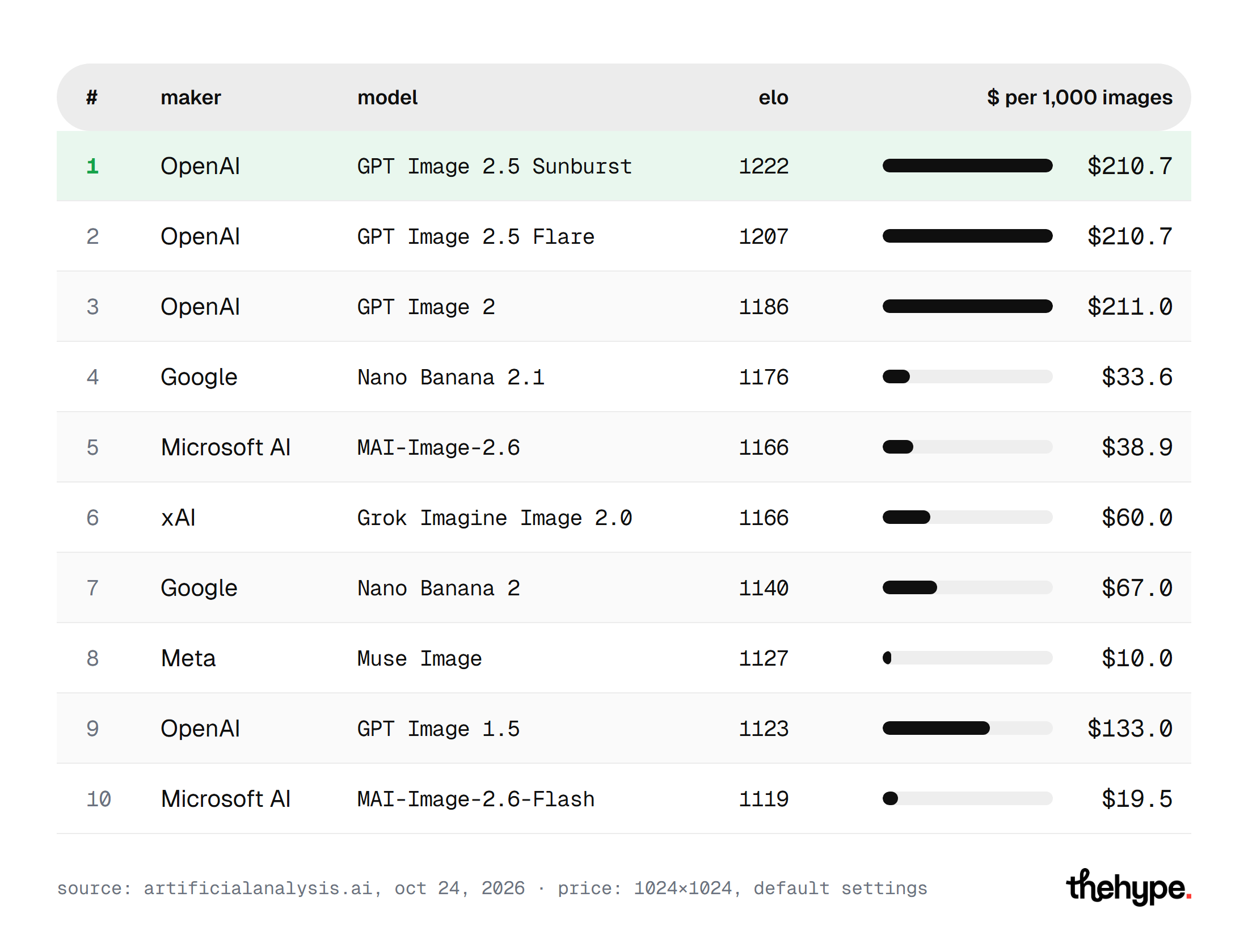
The table below lists the top 10 on Artificial Analysis (AA-Image-T2I v2.1), read on October 24, 2026. Prices are Artificial Analysis figures for one 1024×1024 image at default settings through each maker's API.
| # | Model | Maker | Elo | Price per 1,000 images | Released |
|---|---|---|---|---|---|
| 1 | GPT Image 2.5 Sunburst (max) | OpenAI | 1222 | $210.7 | Sep 2026 |
| 2 | GPT Image 2.5 Flare (max) | OpenAI | 1207 | $210.7 | Sep 2026 |
| 3 | GPT Image 2 (high) | OpenAI | 1186 | $211.0 | Apr 2026 |
| 4 | Nano Banana 2.1 | 1176 | $33.6 | Oct 2026 | |
| 5 | MAI-Image-2.6 | Microsoft AI | 1166 | $38.9 | Aug 2026 |
| 6 | Grok Imagine Image 2.0 | xAI | 1166 | $60.0 | Aug 2026 |
| 7 | Nano Banana 2 | 1140 | $67.0 | Feb 2026 | |
| 8 | Muse Image | Meta | 1127 | $10.0 | Jul 2026 |
| 9 | GPT Image 1.5 (high) | OpenAI | 1123 | $133.0 | Dec 2025 |
| 10 | MAI-Image-2.6-Flash | Microsoft AI | 1119 | $19.5 | Sep 2026 |
OpenAI holds the top three places, and seven of the ten models were released in July or later. The chart shows the same ranking with the price as a bar. It makes the gap between the top three and the rest easy to see.
The second board, BudgetPixel's arena, agrees on the leader. On October 24 it put GPT Image 2.5 Flare and Sunburst level at 1609. Nano Banana 2.1 followed at 1547, then Nano Banana 2 Lite at 1545 and Grok Imagine Image 2 at 1536. Midjourney V8.2 came next at 1535, with Seedream 5.0 Pro at 1528. On this board 1500 is average.
If image quality is the only thing that matters, the answer is GPT Image 2.5 Sunburst. Both boards put GPT Image 2.5 first.
How much does the quality gap cost?
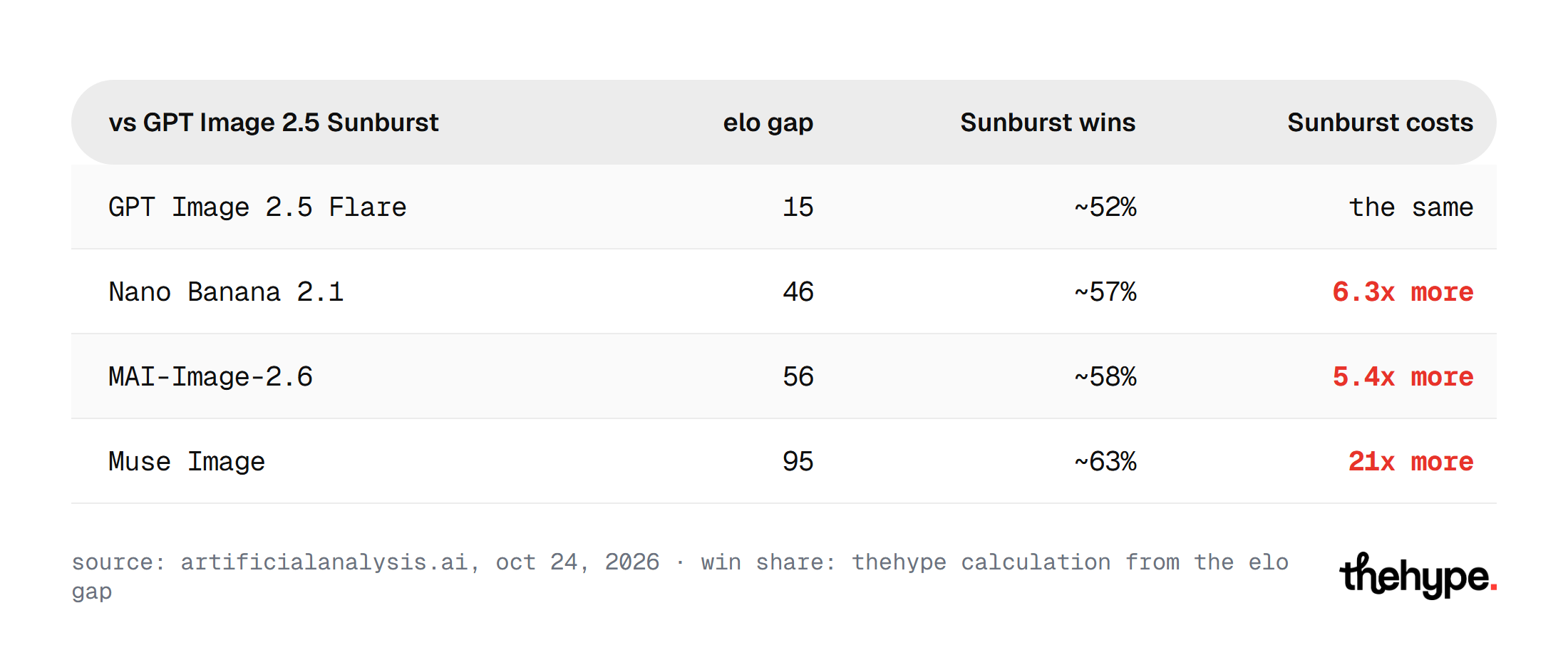
An Elo gap converts into an expected share of head-to-head wins. By the standard Elo formula, a 46-point lead means Sunburst should win about 57% of votes against Nano Banana 2.1. A 95-point lead over Muse Image means about 63%. These are our calculations; neither board publishes them.
The table compares that edge with what it costs per image.
| Against Sunburst | Elo gap | Sunburst wins (our calculation) | Sunburst costs |
|---|---|---|---|
| GPT Image 2.5 Flare | 15 | ~52% | the same |
| Nano Banana 2.1 | 46 | ~57% | 6.3x more |
| MAI-Image-2.6 | 56 | ~58% | 5.4x more |
| Muse Image | 95 | ~63% | 21x more |
The leader wins most votes, but not by much, while the price gap reaches 21x.
At 10,000 images a month, Sunburst costs about $2,107 at the Artificial Analysis list price. Nano Banana 2.1 costs about $336 and Muse Image about $100. For a product that generates images on every user action, that difference decides the budget.
The list price is only the starting point of the bill. Third-party guides list per-token rates for GPT Image 2.5, so a long prompt or several reference images can raise the cost of one image. Larger output sizes cost more on most APIs. Batch modes, where a model supports them, trade speed for a lower price on jobs that can wait. Check the pricing page for the size, quality setting and mode you will actually use.
The main models at a glance
Each profile below gives the facts that matter for a choice: the rating, the price and what the model is for. Ratings and prices are from Artificial Analysis unless BudgetPixel is named.
GPT Image 2.5 Sunburst and Flare (OpenAI)
OpenAI released ChatGPT Images 2.5 on September 8, 2026. The API offers it as two models, Sunburst and Flare. Sunburst leads at 1222 and Flare follows at 1207, both at $210.7 per 1,000 images. Third-party guides say both bill through the same per-token rate card. This is the default pick when image quality matters more than cost.
Nano Banana 2.1 (Google)
Nano Banana 2.1 arrived on October 6 as an update to Nano Banana 2. It rates 1176 at $33.6 per 1,000 images. Google's docs list 1K, 2K and 4K output, up to 14 reference images and Batch API support. It is the strongest option for volume work at close to top quality.
MAI-Image-2.6 and MAI-Image-2.6-Flash (Microsoft AI)
MAI-Image-2.6 came out in August and rates 1166 at $38.9. The Flash version followed in September and rates 1119 at $19.5. Microsoft AI has four models in the top 15, so the family covers several price points.
Grok Imagine Image 2.0 (xAI)
Grok Imagine Image 2.0 came out in August and rates 1166 at $60.0. That ties it with MAI-Image-2.6 on quality at a higher price. On BudgetPixel it is fifth at 1536.
Muse Image (Meta)
Muse Image came out on July 7 and rates 1127 at $10.0. It is the cheapest model in the top 10 by a wide margin. The next cheapest, MAI-Image-2.6-Flash, costs almost twice as much.
Seedream 5.0 Pro (ByteDance)
Seedream 5.0 Pro came out on July 8. It is not in the Artificial Analysis top 15, but BudgetPixel places it seventh at 1528. ByteDance also sells a lighter Seedream 5.0 Lite, released in February 2026.
FLUX 3 Image (Black Forest Labs)
FLUX 3 Image launched on October 1 and rates 1117 at $48.0. It is API-only for now. Its smaller sibling, FLUX 3 Image Klein, is the top open-weights model at 1043.
Which older models are no longer worth the price?
Some older models still cost more than newer ones that rate higher. The table lists three pairs from the Artificial Analysis board.
| Older model | Elo | Price per 1,000 | Newer option | Elo | Price per 1,000 |
|---|---|---|---|---|---|
| GPT Image 2 (high) | 1186 | $211.0 | GPT Image 2.5 Sunburst | 1222 | $210.7 |
| Nano Banana Pro | 1118 | $134.0 | Nano Banana 2.1 | 1176 | $33.6 |
| GPT Image 1.5 (high) | 1123 | $133.0 | Nano Banana 2.1 | 1176 | $33.6 |
In each pair the newer model rates higher and costs the same or less. If your product still calls one of the older models, a switch is worth a test.
Which model should you pick for high-volume work?
Nano Banana 2.1 or MAI-Image-2.6. Both are within 56 points of the leader and cost under $40 per 1,000 images.
Nano Banana 2.1 is Google's update to Nano Banana 2, released on October 6. It is rated higher than Nano Banana 2, at 1176 against 1140, and costs half as much, at $33.6 against $67.0. Google's developer docs list it under the stable ID gemini-nano-banana-2.1, with Batch API support.
MAI-Image-2.6 from Microsoft AI is level with Grok Imagine Image 2.0 at 1166 Elo. It costs $38.9 against Grok's $60.0. Its Flash version, MAI-Image-2.6-Flash, drops to 1119 for $19.5.
Which model is the cheapest?
Muse Image from Meta costs $10.0 per 1,000 images, the lowest price in the top 10. It is eighth on Artificial Analysis at 1127. Third-party coverage disagrees on how it is offered outside Meta AI. Check the provider you plan to use before you build on it.
Which formats and resolution do you need?
Start from where the image will live. A social post often needs a square or a vertical frame, a blog header needs a wide one, and print needs high resolution. A model that only outputs 1024×1024 by default will need upscaling for a poster.
Aspect ratio support also varies. Some models accept any ratio, while others offer a short fixed list. A wide banner made by cropping a square image loses detail at the edges. If most of your images are 16:9 or 9:16, include those ratios in your test from the first prompt.
Resolution options differ by model and by plan. Google's docs list 1K, 2K and 4K output for Nano Banana 2.1, with 1K as the default. The prices in this guide are for 1024×1024 images, so a 4K image will cost more. Check the price page for the size you actually need.
Which model should you use for a series with the same character?
No leaderboard in this guide scores consistency, so this choice rests on what the makers publish. Google's docs say Nano Banana 2.1 accepts up to 14 reference images. It keeps up to four characters consistent and holds the details of up to 10 objects. For a comic, a product series or a brand mascot, start your own test there.
Which model handles text inside images?
Text on an image is still a weak spot for many models: misspelled words, extra letters and broken layouts. Neither leaderboard in this guide scores text rendering separately. A model that wins general votes can still misspell a headline on a poster.
If your images carry text, such as banners, covers, menus or product labels, test it directly. Put the exact words in quotes in the prompt and check every letter in the result. Include a long word, a number and a second language if your audience needs one.
Which model should you use for illustration and a recognizable style?
Midjourney V8.2. It became Midjourney's default model in July. Midjourney has no public API, so Artificial Analysis does not test it. On BudgetPixel it is sixth at 1535, one point behind Grok Imagine Image 2.
Midjourney is sold by subscription only. A preference vote on single prompts does not measure what people use it for. They want a consistent house style, lighting and art direction across a set of images.
Which model fits marketing, social and product images?
Marketing teams need volume, a steady brand look and the right format for each channel. Social content needs square and vertical frames and many variations of one idea. Product images need the product to stay the same in every shot.
For social content at volume, start with Nano Banana 2.1 or MAI-Image-2.6. Both sit close to the top of the board at under $40 per 1,000 images. For product shots, test reference-image support first, because the product must not change between images. For a campaign hero image, the extra cost of GPT Image 2.5 Sunburst is easier to justify.
Brand rules apply to every option. Write your colors, lighting and style into a fixed block of the prompt and reuse it. Then evaluate each model on the same brief, not on its best demo.
Can you run a model on your own hardware?
Yes, but you give up quality. Artificial Analysis names FLUX 3 Image Klein from Black Forest Labs as the best open-weights text-to-image model. It is 21st overall at 1043, 179 points below Sunburst. By the same formula, Sunburst would win about 74% of votes against it.
The full FLUX 3 Image came out on October 1. It is 13th on Artificial Analysis at 1117 for $48.0, but it is API-only. Third-party coverage says Black Forest Labs has promised its weights without publishing them yet.
Running a model yourself trades the per-image price for hardware and setup. It also gives you full control over fine-tuning and data. Before you build on any open model, read its license page, because open weights do not always allow commercial use.
Which well-known models are missing from the rankings?
Three names that come up in every AI image generator comparison are missing from the Artificial Analysis top 15:
- Midjourney V8.2 is not tested by Artificial Analysis because it has no public API. BudgetPixel includes it.
- ByteDance's Seedream 5.0 Pro, released on July 8, is not in the top 15. BudgetPixel places it seventh at 1528.
- Alibaba's Qwen-Image 3.0 is not in either top 15. Third-party reports say it was released without downloadable weights, a model card or a benchmark table.
A missing rating is not a verdict on quality. It means you have to test these models yourself.
Commercial use and licensing: what to check
Every maker sets its own terms for what you can do with the output. Read the terms for the exact plan you use, not a summary on a review site. Terms for a free tier, a subscription and the API can differ.
Check three things before images reach a client or a product. First, can you use the output commercially on this plan? Second, does the maker add a watermark or provenance metadata to every image? Third, does the license of an open model allow commercial use of the model itself?
One model or several?
Many teams use more than one model. A cheap, fast model handles drafts and volume, and a top-rated model handles the final hero images. A third model can cover a specific need, such as a house style or self-hosting.
A multi-model setup costs more time to manage. Each model needs its own prompts, settings and checks. Start with one model per job and add a second only when a real task fails.
Some platforms also turn the finished image into video. That is a separate choice with its own leaderboards. Pick the image model on image results, then check whether your video tool accepts its output.
How to write prompts that work on any model
A good prompt makes a test fair and cuts the number of failed generations. Describe the subject first, then the setting, the lighting, the style and the format. Name the camera angle or the art medium when it matters.
Keep the prompt specific and short enough to read in one pass. Write text that must appear in the image inside quotes. Save every prompt that works, because it becomes the template for the next batch of images.
How do you test an AI image generator before you commit?
A leaderboard tells you which model people prefer on average prompts. Your prompts are not average. Before you pay for volume, run a short test:
- Write 10 prompts that look like your real work, including the hard cases: text on the image, hands, a brand color, a wide format.
- Run each prompt on the three models that fit your budget, such as a leader, a mid-price option and a cheap one.
- Hide the model names and pick the better image for each prompt, the way the arenas do.
- Count your cost per usable image, not per image generated.
- Read the license and the API terms of the winner before it reaches production.
The fourth step matters most. A cheap model that needs three tries for one usable image can cost more than an expensive model that gets it right the first time.
How to evaluate the results of your test
A blind pick tells you which image you like more. A checklist tells you why, and it keeps the test fair when several people vote. Score each image on the same six points:
- Prompt adherence: every object, color and position you asked for is there.
- Anatomy: hands, faces and bodies have no extra fingers or broken joints.
- Text: every word is spelled right and sits where you asked.
- Lighting and materials: shadows, reflections and surfaces look consistent.
- Style: the image matches your brand look or the reference you gave.
- Artifacts: no smeared patches, repeated textures or cut-off edges.
Add up the points per model, then compare them with the cost per usable image. The best AI image generator for your team is the one that wins on both.
Common mistakes when choosing an image model
Most bad choices come from a handful of habits. The first is judging a model by its best demo instead of your own prompts. Demos are picked from many tries and show what the model does best.
The second is comparing an app with an API. The app may rewrite prompts and add its own style, so the same model can look better or worse there. The third is ignoring the version. Ratings for Nano Banana 2 do not apply to Nano Banana 2.1.
The fourth is counting only the list price. Failed generations, retries, reference images and larger output sizes all add to the bill. The last is choosing once and never checking again. New models reached the top 10 every month from July to October 2026.
The short answer by job
The table sums up which model to start with for each job.
| Your job | Model | Elo (Artificial Analysis) | Price per 1,000 |
|---|---|---|---|
| Highest-rated images | GPT Image 2.5 Sunburst | 1222 | $210.7 |
| Second-highest rating, same price | GPT Image 2.5 Flare | 1207 | $210.7 |
| High volume at near-top quality | Nano Banana 2.1 | 1176 | $33.6 |
| High volume, second option | MAI-Image-2.6 | 1166 | $38.9 |
| Lowest API price | Muse Image | 1127 | $10.0 |
| A consistent house style | Midjourney V8.2 | not tested | subscription |
| Your own hardware | FLUX 3 Image Klein | 1043 | self-hosted |
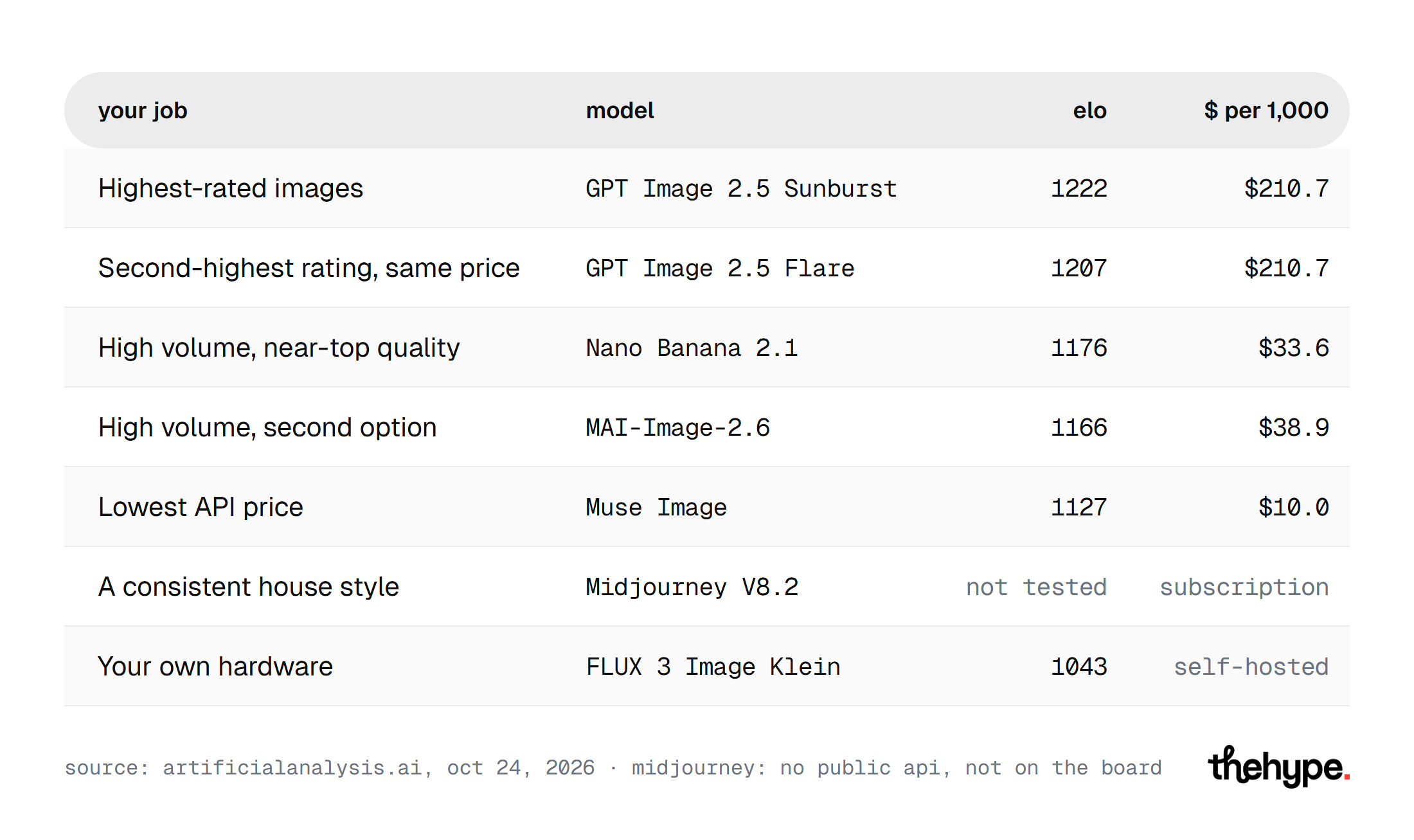
Treat this table as a shortlist for your own test, not as a final answer.
FAQ
The answers below cover the questions readers ask most often about choosing an AI image generator.
What is the best AI image generator right now?
By blind votes on both leaderboards, GPT Image 2.5 is first. On Artificial Analysis the Sunburst version leads at 1222 Elo. It is also among the most expensive models, at $210.7 per 1,000 images.
Is GPT Image 2.5 Sunburst better than Flare?
On Artificial Analysis Sunburst rates 15 points higher. That works out to about 52% of head-to-head wins, close to a coin toss. Both cost $210.7 per 1,000 images there. Third-party guides describe Flare as the faster model and Sunburst as the more detailed one.
Should you move from Nano Banana 2 to 2.1?
On both price and rating, yes. Artificial Analysis rates 2.1 at 1176 against 1140 for version 2. It lists 2.1 at $33.6 against $67.0 per 1,000 images.
How often do these rankings change?
Constantly. BudgetPixel refits its ratings every night, and new models start with fewer votes. Seven of the top 10 on Artificial Analysis were released in July or later. Check the live boards before you sign a contract.
Which AI image generator is best for text in images?
Neither leaderboard in this guide scores text rendering on its own. Run the five-step test with prompts that carry your real headlines, prices and labels. Check every letter, because one wrong character ruins a banner or a product label.
Is the top model worth it on a small budget?
Usually not. GPT Image 2.5 Sunburst leads the ratings at $210.7 per 1,000 images. Nano Banana 2.1 is 46 points lower at $33.6, and Muse Image costs $10.0. For drafts, social posts and tests, a cheaper model with a higher hit rate on your prompts is often the better buy.
Do the leaderboards measure image editing?
The tables in this guide are text-to-image only. Editing an existing image is ranked on separate boards, which this guide does not use.
How we read the data
Both leaderboards were read on October 24, 2026. Prices are Artificial Analysis list API prices for one 1024×1024 image at default settings. They exclude subscriptions, reseller discounts and the token cost of reference images. The win-share percentages and monthly costs are our calculations from those figures. We did not run the models ourselves for this guide. Every rating comes from the two boards, and every feature claim is attributed to the maker or to third-party coverage.