 Vladimir Arustamov

An AI Fortnite skin pipeline turns a few reference photos into a rigged, animated 3D character: an image model draws a front and back turnaround, Meshy turns it into a textured, rigged mesh, and Blender renders it. we ran it four times – Jensen Huang, Dario Amodei, Elon Musk and Mark Zuckerberg as fan-made homages built on the thehype robot – from one Claude Code chat per character on Opus 5 (medium). no 3d artist, nothing modelled by hand, and none of us had used Blender before. everything below is from those four runs, September 3–5, 2026: the stack, every step, the prompts word for word, what broke and what it cost.
what you get, and what it cost
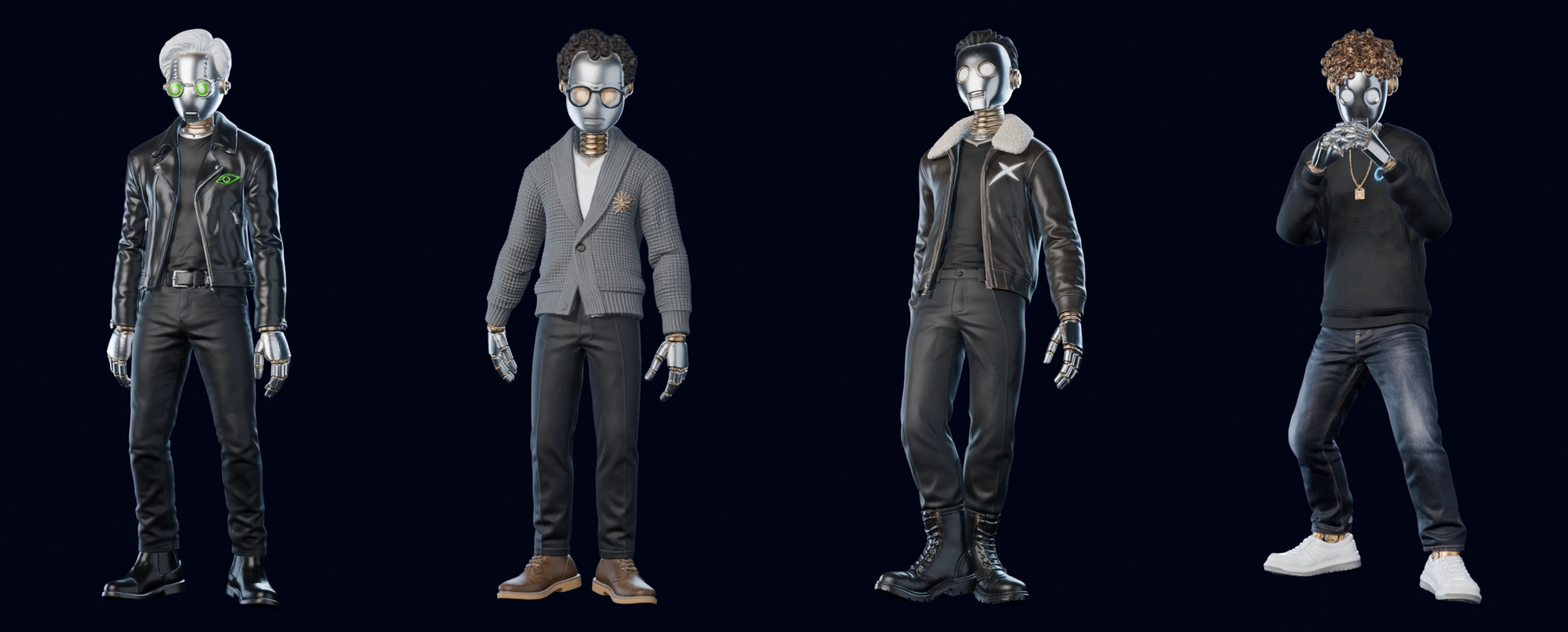
for each character: a textured mesh of 2–3 million polygons, rigged, with 2–3 animation clips, rendered as a 1920x1080 video, a 1080x1920 video and a webm with a transparent background.
| per character | Huang | Amodei | Musk | Zuckerberg |
|---|---|---|---|---|
| gpt-5.4-image-2 | $0.58 | $0.26 | $0.26 | $0.29 |
| image tokens | 32,432 | 15,538 | 16,001 | 16,536 |
| meshy.ai credits | 30 | 35 | 35 | 35 |
| opus 5 (medium), effective | 79.2m tokens | 19.9m tokens | 5.1m tokens | 2.2m tokens |
| machine time | 1.4h | 1.8h | 1.5h | 1.8h |
| polygons in the final render | 1,958,644 | 3,063,082 | 3,059,666 | 3,079,088 |
these are repeat costs: what it takes to build the character again once you know the pipeline. the image calls for all four add up to $1.39. everything we actually spent, dead ends included, was $12.94 in API calls – most of it on the first character, while we were still finding the route.
the Opus column is the interesting one: 36x less on the fourth character than on the first, for the same result on screen. the image spend barely moved. you pay for not knowing the pipeline, not for the work.
the stack
- Claude Code desktop app on Opus 5 (medium) – writes the prompts, runs every script, drives Blender
- OpenRouter with gpt-5.4-image-2 from OpenAI – draws the turnaround sheets
- Python with numpy and Pillow – keying to alpha, framing checks, cutting sheets into single figures
- Meshy on a paid plan – image to 3D, textures, auto-rig, the animation library
- Blender 5.2 LTS, run headless from scripts (
blender --background --python script.py) – moves the rig onto the full mesh, lights and renders with EEVEE - ffmpeg – encodes the frame sequences into mp4 and webm
nobody opened Blender's interface for the final renders. we installed it, Claude wrote Python scripts and ran them through the command line.
the pipeline in six steps
- references. a folder of the robot, a folder of photos per person
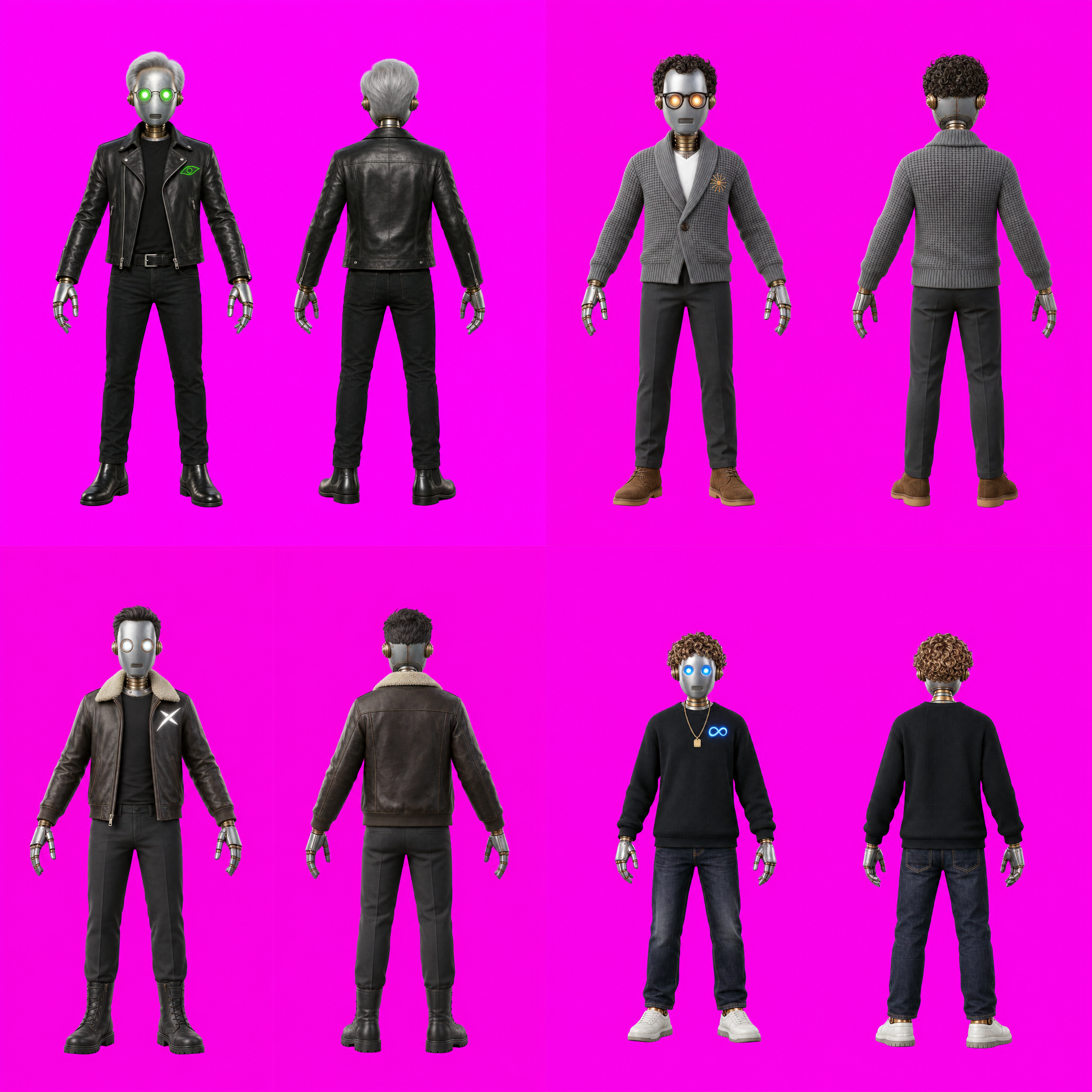
- turnaround sheet. one image: the character from the front and from behind, on a flat magenta backdrop
- key to alpha. cut the magenta out ourselves, split the sheet into a front and a back PNG
- Meshy. front and back in, textured mesh out, then rig and animations
- rig transfer. move Meshy's skeleton from its light rigged mesh onto the full-resolution one
- animate and render. lay out the clips, strip root motion, set the camera, render three formats
step 1 – references, sorted by role
we put every reference into its own folder and gave each image one job in the prompt:
refs/robot/    the thehype robot: chassis, materials, joints
refs/people/   3–4 photos per person: hair, clothes, silhouette
refs/style/    the look we wanted to match
mixing roles makes the model average them. a photo of a person handed over "for the jacket" will also leak a face, a nose and skin into a robot unless the prompt says what to take and what to ignore.
two small rules that saved tokens: scale references down to 1,600 px on the long side (a 5,000 px photo adds cost, not quality), and cut stills out of video references with ffmpeg rather than screenshotting.
step 2 – describe the character by construction, not by mood
every prompt carried the same two blocks. the shared chassis never changes between characters. the personal block is what makes the character this person.
describe how a part is built, not how it feels. "mechanical hand" gets you a different hand every time. "three segments per finger with a brass band at every knuckle" gets you the same hand four times. the chassis block, word for word:
HEAD: an ovoid brushed-aluminium shell with riveted panel seams, matte satin metal, fine wear.
THE FACE IS COMPLETELY FLAT — one smooth continuous curved metal surface, exactly like the face
of the robot in IMAGE 1. There is NO NOSE, no ridge, no bridge, no bump, no nostrils, no lips,
no chin, no cheekbones, no brow, no skin, no human features of any kind.
MOUTH: a shallow RECESSED RECTANGULAR VENT low on the face, containing about five fine
horizontal parallel louvres, like a small speaker grille. Perfectly straight and horizontal.
EARS: on each temple a round BRASS DIAL on a short stem, with concentric machined grooves and
a raised central boss.
NECK: a stack of several BRASS RINGS of decreasing size, an exposed segmented joint.
the personal blocks, and the chest marks. each mark is a homage you can recognise but deliberately not the real logo:
| character | clothes | hair (cast metal) | eyes | chest mark |
|---|---|---|---|---|
| Huang | black leather biker jacket, round wire glasses | silver, swept back | green | a swirling eye in an almond outline |
| Amodei | grey chunky shawl-collar cardigan, round glasses | dark bronze curls | amber | an 11-ray burst with uneven rays |
| Musk | dark brown flight jacket with a shearling collar | graphite, brushed back | white | an angular X with one arm stretched into a trail |
| Zuckerberg | black waffle-knit crew neck, gold chain with a tag | copper-bronze curls | blue | a looped ribbon with one loop larger than the other |
the Musk mark, as it went into the prompt:
CHEST EMBLEM: on the upper left chest, printed straight onto the leather as a GLOWING WHITE
OUTLINE with a faint cool glow on the hide around it, about the size of a large coin: an
ANGULAR LETTER-X shape built from TWO CROSSING WEDGES that are thick at the centre and taper to
sharp points, with ONE of the four arms extended into a LONG SWEEPING TAIL that curves away
like a contrail. Deliberately asymmetric and elongated. White only, no colour. No lettering, no
words, no frame. An original stylised mark.
step 3 – pick the image model before you tune the prompt
we started on gpt-5-image-mini because it's 5–6x cheaper. it kept giving the robot a human nose. nine rounds of prompt work didn't remove it: a direct ban, describing the face as two bolted panels, describing it as a bell. 93 calls, $4.75, nothing usable.
gpt-5.4-image-2 drew a flat face on the first try with the same prompt.
if one defect survives two or three rounds of rewording, it's the model's prior, not your prompt. try another model before you spend more on wording. we used the cheap model for nothing after that.
step 4 – two figures per sheet, or the model crops the head
through OpenRouter, gpt-5.4-image-2 returns 1024x1024 no matter what size you ask for. a single full-body figure in a square frame kept losing the top of its hair or its feet. six rounds of framing instructions ("leave 15% above the head", "pull the camera back", "stand on a podium") hit about one time in three.
what fixed it was the layout, not the wording: put two figures in the frame. each takes its own column and physically can't touch the top or the sides. the front and back view on one sheet also gives Meshy exactly the two images it wants, in one call. the framing block we kept anyway:
- Above both heads there is a WIDE BAND OF EMPTY MAGENTA roughly ONE HEAD-HEIGHT deep, about
  15% of the image height. THE HAIR MUST NOT TOUCH OR CROSS THE TOP EDGE.
- Below the trainers there is a band of empty magenta, about 10% of the image height.
- Each complete figure, crown of the hair to soles of the trainers, occupies only about 70% of
  the image height and sits slightly below centre. Wide empty margins left and right.
- NOTHING is cropped by any edge: hair, hands and shoes all have visible space around them.
three more rules from the same stage:
- anchor on the clean original, never on the last result. we fed a nearly-good image back as the reference and asked for small fixes. four rounds later the fingers had turned into smooth mittens and the robot had become short and big-headed – each round fixed what we asked for and quietly broke something else. starting again from the first clean sheet fixed it in one call
- show, don't describe. we described the glowing eyes seven different ways and none stuck. attaching an image with the right eyes and writing "build the socket like this one" worked immediately
- never mirror a view that shows the chest. a mirrored three-quarter view is a free extra angle – until the chest mark jumps to the other side. mirror back views only
step 5 – shoot on magenta, key it yourself
a metal robot on a grey studio backdrop can't be cut out: the aluminium is the same brightness as the grey, and the head goes half-transparent. we asked for flat magenta, a colour none of the four characters wears:
BACKGROUND — CHROMA KEY: the backdrop is a COMPLETELY FLAT, UNIFORM, PURE MAGENTA field,
RGB(255, 0, 255), absolutely even across the whole image — no gradient, no vignette, no floor,
no podium, no shadow of any kind, no contact shadow, no glow. Both figures float free against
flat magenta.
CRITICAL: NO magenta light may spill onto the character.
then a 65-line Python keyer, in three parts:
- measure the backdrop on every image. the model never returns exact magenta – ours ranged from rgb(220,0,193) to rgb(255,0,255). we take the median of the four corners
- cut by colour dominance, not just distance. the model draws a contact shadow despite the ban. a shadow is darkened magenta: far from the backdrop colour, so a plain key keeps it. we also drop every pixel where the magenta channels dominate the rest
- shrink the edge by one pixel and remove the leftover tint, then check the result on white and on dark. white shows a dark fringe, dark shows a light one
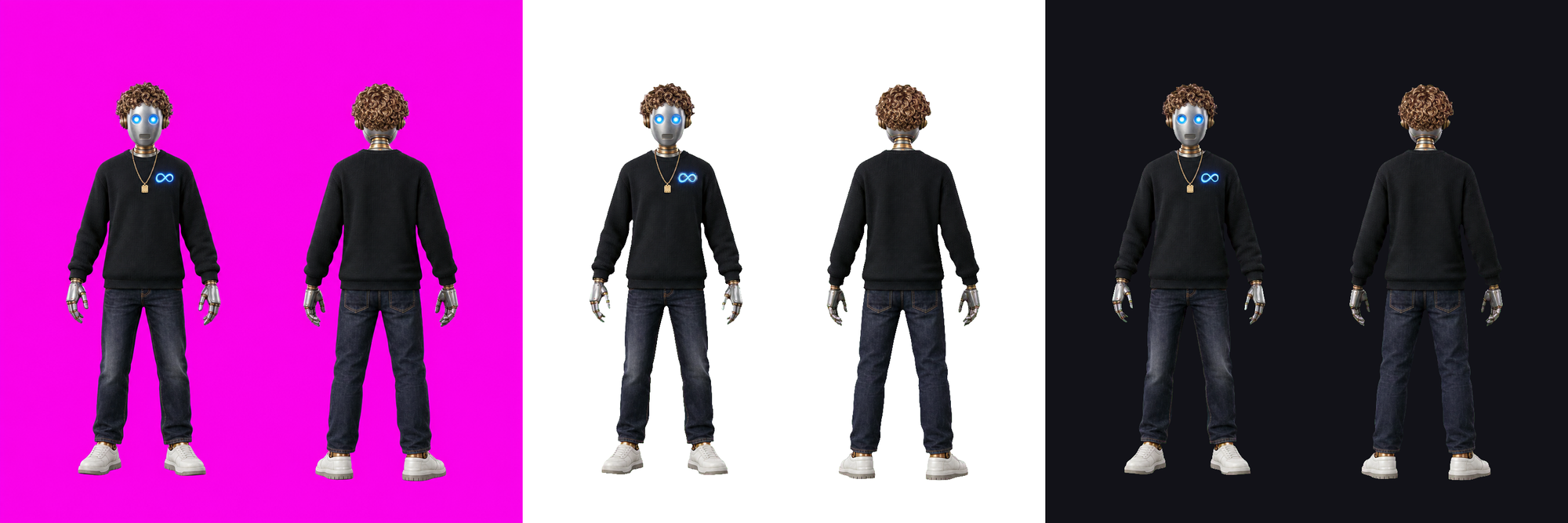
the keyed sheet is then split into a front and a back PNG along the empty gap between the figures, each on a 1024x1024 transparent canvas with the figure at 82% of the height – the same format for all four. (a fifth character we built later wears a pink dress. magenta would have cut the dress out with the backdrop, so she went on pure green.)
step 6 – Meshy: settings and what to download
in Meshy: image to 3D → multi-view → front and back → texture on.
- credits: 25 for the model with two views plus 10 for the texture, 35 per character. Huang, our first, went through with a single front view – 20 + 10 = 30 credits, and Meshy had to invent the back of his head. the other three got a real back
- the paid plan is for the second half. a free account builds the mesh. the rig, the animation library and a download with the animations in it are paid – we paid $10 for the month and used it for all four
- rig: in the animate section, "apply rig to model" → install, then install again on the new compressed model, set up the rig
- animations: pick from the library. what we took: Musk – Proud Strut, Cheer with Both Hands, Walking. Zuckerberg – Punch Combo and Walking. we skipped Running: 0.6 seconds long, it reads as a jerk next to a walk cycle
then download two things:
- the textured GLB – the full model, 2–3 million polygons, with its colour, normal, roughness and metallic maps
- the biped zip – one FBX per animation, rigged, 24 bones, no finger bones, and a mesh of only about 200,000 polygons (226,048 on Musk, 207,413 on Zuckerberg)
step 7 – put Meshy's rig on the full-resolution mesh
this is the step that decides how the character looks. the rigged mesh Meshy exports is 13–15x lighter than the textured one, and it shows: a render straight from the FBX looked plastic and cartoonish next to the GLB. so we kept Meshy's skeleton and animations and moved them onto the full mesh in Blender.
the core of the script, a weight transfer from the light rigged mesh (lo) to the heavy one (hi) by nearest surface:
bpy.ops.object.data_transfer(
    use_reverse_transfer=True,           # pull from the selected lo onto the active hi
    data_type="VGROUP_WEIGHTS",
    vert_mapping="POLYINTERP_NEAREST",
    layers_select_src="NAME", layers_select_dst="ALL",
    mix_mode="REPLACE")

# parent hi exactly like lo: same parent, same inverse matrix
hi.parent = lo.parent
hi.matrix_parent_inverse = lo.matrix_parent_inverse.copy()
before the transfer, both meshes are lined up in the armature's rest pose and scaled to the same height, and every vertex group is created on the heavy mesh first – otherwise there's nowhere to write the weights. the result: 3.06–3.08 million polygons driven by Meshy's rig, 13.5x to 14.8x the rigged export.
two things broke here:
- the mesh exploded into a long spike on the first render. the weights were fine – every vertex summed to 1.0. the heavy mesh was parented to the armature without the parent inverse matrix, and Meshy's armature is scaled 0.01 (centimetres to metres), so the transform applied twice. copying the light mesh's parent and inverse matrix, the last two lines above, fixed it
- it still looked cheap. three causes, in order of how much they mattered: the FBX import had not connected the normal, roughness and metallic maps (the biggest one), our light was overexposed, and the first test used a 9.5x reduced mesh. reconnect the maps before you judge the model
step 8 – animate, frame and render
each demo is one timeline built from the clips in Blender's NLA editor: the character's signature clip first, then a walk cycle looped to fill the time. four fixes it needed:
- strip root motion. Proud Strut moves the hips almost 18 units along one axis – Musk would have walked out of frame before the clip ended. we delete the hip bone's horizontal location curves on every clip, so the character moves in place
def strip_root(action):
    for coll, fc in all_fcurves(action):
        if 'bones["Hips"].location' in fc.data_path and fc.array_index in (0, 1):
            coll.remove(fc)
- measure the framing over the whole timeline, not frame 1. Punch Combo starts in a crouched fighting stance, so a camera fitted to frame 1 cut Zuckerberg's legs off once he stood up. we now sample 16 frames across the timeline and fit the camera to their combined bounding box
- don't push in on vertical. the 16:9 cut slowly zooms to the face mid-clip. on 9:16 the same move lost the top of the head, so the vertical and transparent versions only orbit. Blender fits the camera sensor to the longer side of the frame, which is why the same lens framed the two formats so differently
- Blender 5 moved animation data.
action.fcurvesis gone – curves now live in layers, strips and channelbags. any older script that edits animation needs updating
render settings: EEVEE, four soft area lights (key from the upper left, a cool fill, two cool rims that draw the metal's silhouette), PNG frames first and video second – a render that fails at 90% then costs nothing. 2–8 seconds per frame at 2–3 million polygons on a Mac. Cycles took over 10 minutes per frame on the CPU and we dropped it.
three outputs per character, encoded with ffmpeg: 1920x1080 mp4, 1080x1920 mp4, and a webm with alpha (VP9, yuva420p). one trap with the webm: ffmpeg's built-in VP9 decoder silently drops the alpha, so a composite comes out as a black box. decode with -c:v libvpx-vp9 before the input.
what broke and how we fixed it
| problem | cause | fix |
|---|---|---|
| the robot grows a human nose | the cheaper model's prior | switch to gpt-5.4-image-2 |
| hair or feet cut off by the frame | output locked to 1024x1024 | two figures per sheet |
| fingers turn into mittens over time | each generation anchored on the previous one | anchor on the clean original |
| eye glow never matches | described in words | attach an image of the right eye |
| chest mark on the wrong side | a mirrored front view | mirror back views only |
| the head keys half-transparent | grey backdrop, grey metal | flat magenta backdrop |
| a shadow stays after keying | contact shadow is darkened magenta | cut by colour dominance |
| the rigged model looks cartoonish | Meshy's rigged mesh is 13–15x lighter | transfer the rig to the full GLB mesh |
| the mesh explodes into a spike | parent without the inverse matrix, armature scale 0.01 | copy the light mesh's parent and inverse matrix |
| the model looks plastic | texture maps not connected on FBX import | reconnect normal, roughness and metallic |
| the character walks out of frame | root motion in the clip | delete the hip bone's horizontal location curves |
| legs cut off after a crouch | camera fitted to frame 1 | fit to 16 frames across the timeline |
| the vertical render came out 1920x1080 | two flags arrived as one argument | parse the flags from the joined argument string |
| the transparent webm composites as black | ffmpeg's native VP9 decoder ignores alpha | decode with -c:v libvpx-vp9 |
why the fourth character was 36x cheaper
Opus spent 79.2 million effective tokens on Huang and 2.2 million on Zuckerberg. the work per character was about the same. the difference was context.
Huang was one long chat: finding the image model, a 2D animation route we later threw away, six framing rounds, learning Meshy and Blender. every new message re-read everything before it: about 80% of Huang's tokens went into that re-reading, not into new work. from the second character on, the context stayed short – a fresh or compacted chat that started from a written summary and our notes from the first run, not from the whole history.
one short context per character. write down what worked as you go, and start the next one from the notes.
(effective tokens weight the raw counts by their relative price: cache reads x0.1, cache writes x2, output x5, input x1.)
what we tried and dropped
- animating the flat images. we cut a sheet into limbs and moved them like a puppet. a flat render has no information behind the arm, so every rotation opened a hole or showed a cut edge. dropped for real 3D
- modelling the robot with code in Blender. a script can place boxes and cylinders, not sculpt a jacket or hair. dropped for Meshy
- Cycles. over 10 minutes per frame on the CPU. EEVEE at 2–8 seconds was good enough for metal and leather
tips before you start
- test the image model on one frame before you write a long prompt
- two figures per sheet, front and back – it fixes framing and feeds Meshy in one call
- keep one clean master image and anchor every generation on it
- when words don't land, attach an image of the detail
- shoot on a colour the character doesn't wear, and key it yourself
- pay for Meshy's two views: 5 more credits buys a real back instead of an invented one
- never render Meshy's rigged mesh directly – move the rig to the full mesh
- one Claude Code chat per character, started from your notes
faq
do I need to know Blender? no. we had never used it. Claude Code wrote the scripts and ran Blender from the command line. you install Blender and read the renders.
can I do it on Meshy's free plan? the mesh and textures, yes. the rig, the animation library and an animated download need a paid plan.
why not just render the rigged model Meshy gives you? it's 13–15x lighter than the textured model and looks noticeably more cartoonish. moving the rig onto the full mesh keeps Meshy's animations and the full detail.
how much does one character cost? to repeat: $0.26–0.58 in image calls, 30–35 Meshy credits and 1.4–1.8 hours of machine time, most of it rendering. our first character cost far more, because we were still finding the route.
are these real Fortnite skins? no. they're concept skins and rendered demos, fan-made homages to four people on our own robot character. the faces are flat robot plates and the chest marks are original designs, not the companies' logos.
which image model worked? gpt-5.4-image-2 through OpenRouter. gpt-5-image-mini is cheaper but gave the robot a human nose on every try.
sources
- our own runs: four characters, built September 3–5, 2026 – the prompts, scripts and cost logs above
- Meshy's image to 3D, auto-rig and animation library, as used in those runs
- Blender 5.2 LTS, run headless from Python; ffmpeg for encoding
follow @thehypedotnews for 24/7 AI news, analysis and breakdowns