 Felix Laurent

Unlimited OCR 2 is Baidu's open-source model for reading long documents, released on October 27, 2026 under the MIT license. It can parse a PDF of hundreds of pages in one pass and keeps tables that span pages together. To run it locally, install PyTorch and Transformers, load baidu/Unlimited-OCR-2 and pass it page images.
This guide covers three ways to run it on your own machine: Transformers for a first test, SGLang for batches, and GGUF files with llama.cpp. Commands come from Baidu's GitHub repository and model card, checked on November 23, 2026.
What Unlimited OCR 2 is
The model has 3 billion parameters, but only 500 million are active for each token because it uses a mixture-of-experts decoder. It builds on the DeepSeek-OCR design. Its main trick is sparse attention. While it writes out a page, it looks only at that page and a small fixed set of reference tokens. Baidu's example uses 512 of them. The rest of the document stays out of the attention context.
That keeps the cost of each step roughly flat as a document grows. Baidu reports 7 times faster steps than full attention at the hundred-page scale. Peak cache memory falls from 47 GB to 1.77 GB in its test. The first Unlimited OCR, which we tested in June on a 1998 newspaper scan, stopped at 40 pages. The new version has no stated page limit.
How good is Unlimited OCR 2?
Baidu tested it on MarathonDocBench, its own set of 100 documents between 103 and 300 pages long. Every score below comes from Baidu's paper.
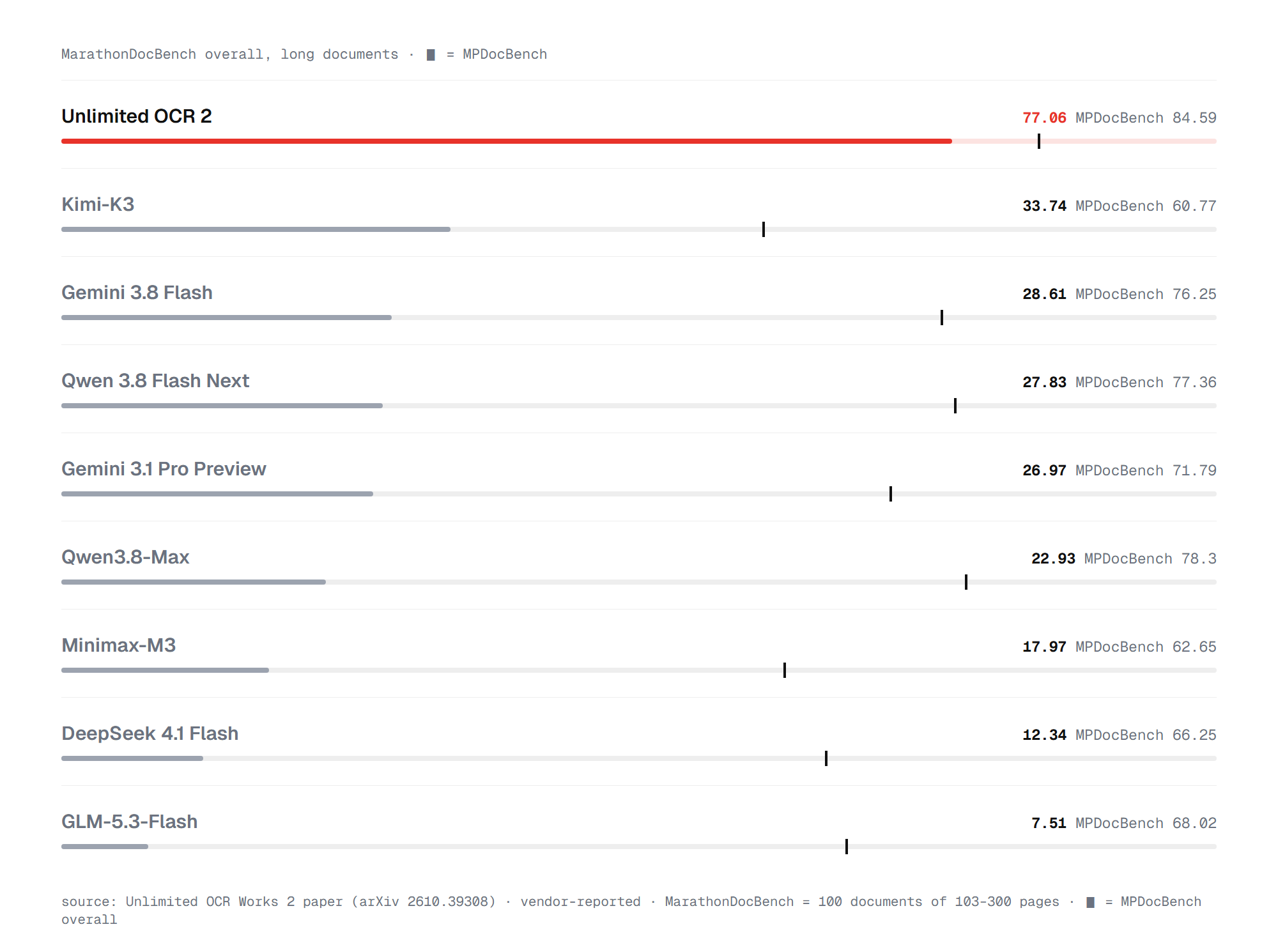
Unlimited OCR 2 scores 77.06, more than twice the next model, Kimi-K3, at 33.74. Large general models such as Gemini 3.1 Pro and Qwen3.8-Max fall below 30 on documents this long. On MPDocBench, a shorter multi-page set, the gap is smaller: 84.59 against 78.30 for Qwen3.8-Max.
Single pages are a different story. On OmniDocBench v1.6, smaller specialist models score higher.
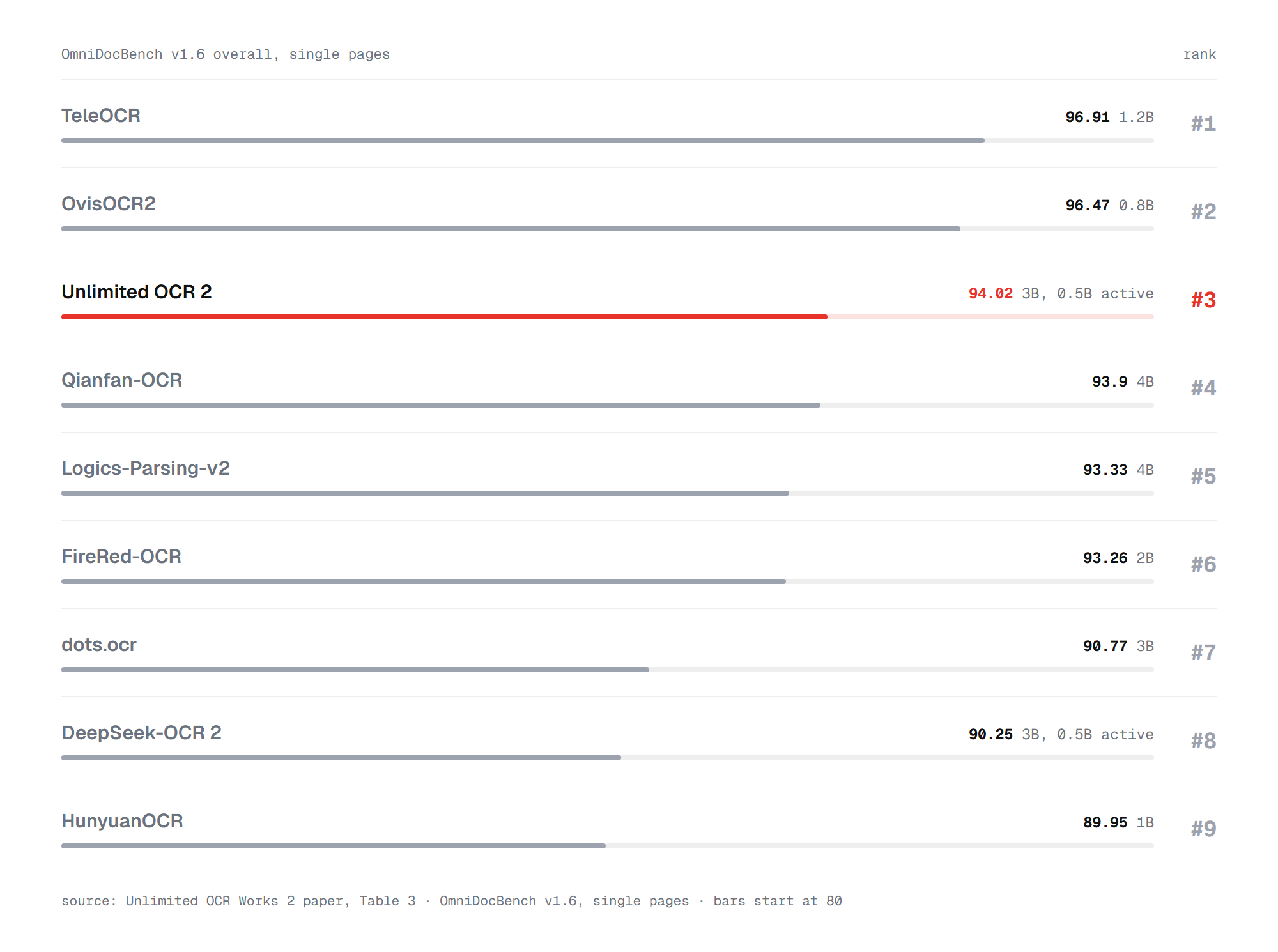
TeleOCR scores 96.91 and OvisOCR2 96.47, against 94.02 for Unlimited OCR 2. In MindStudio's hands-on test, the model also stumbled on mixed scripts and an 1883 newspaper. It skipped the masthead and misread a year. So the case for it is long PDFs such as reports, books and contracts. For receipts and single scans, a smaller OCR model is enough. If long documents are your job, here is how to set it up.
What you need
Baidu tested the Transformers route on an NVIDIA A800 with 80 GB of memory, but the model itself is small. MindStudio reports about 8.3 GB of VRAM at full precision for a single page, which fits a 12 GB or 16 GB consumer card. Baidu publishes no minimum.
- An NVIDIA GPU with CUDA for the Transformers and SGLang routes.
- Python 3.10, the version Baidu tested.
- Linux or WSL2 for SGLang. Transformers and llama.cpp also run on Windows.
- PDF pages converted to images, because the model reads images only.
The weights are a free download from Hugging Face, and no API key is needed. Once the files are cached, every route below works fully offline, so documents never leave your machine.
Option 1: run it with Transformers
This is the quickest way to try the model. Install the versions Baidu tested:
pip install torch==2.13.0 torchvision pillow transformers==4.52.1 huggingface-hub==0.36.0 \
  tokenizers==0.21.4 addict==2.4.0 einops==0.8.2 easydict==1.13 pymupdf
Turn a PDF into page images with PyMuPDF. Baidu's own client renders at 300 dpi:
import fitz

doc = fitz.open("report.pdf")
pages = []
for i, page in enumerate(doc):
    path = f"pages/page_{i + 1:04d}.png"
    page.get_pixmap(matrix=fitz.Matrix(300 / 72, 300 / 72)).save(path)
    pages.append(path)
Then load the model and parse all pages in one call:
import torch
from transformers import AutoModel, AutoTokenizer

model_name = "baidu/Unlimited-OCR-2"
tokenizer = AutoTokenizer.from_pretrained(model_name, trust_remote_code=True)
model = AutoModel.from_pretrained(model_name, trust_remote_code=True, use_safetensors=True,
                                  torch_dtype=torch.bfloat16).eval().cuda()

text, num_tokens = model.infer_multi(tokenizer, image_files=pages,
                                     output_path="output/multi", save_results=True)
infer_multi uses base mode, one global view per page, which keeps memory use low on long files. For a single page, model.infer(tokenizer, image_file=...) uses Gundam mode instead and splits the page into tiles for more detail. The download is about 6 GB on the first run.
Turn the output into Markdown
Unlimited OCR 2 does not write Markdown directly. It returns layout blocks: a type, a heading level, a bounding box and the content, with tables in HTML. Baidu's repository includes a converter that needs only the Python standard library:
from process_unlimitedOCR2 import convert

markdown = convert(text)
The script lives in the utils folder of the GitHub repo. It merges tables that continue across pages and turns figures into image links with their coordinates. For a whole folder of results, run python utils/process_unlimitedOCR2.py --infer-dir raw --out-dir pred.
Option 2: serve it with SGLang for batches
For many documents, Baidu recommends SGLang. It needs Baidu's custom SGLang wheel from the repo's wheel folder, because stock SGLang lacks the page-window scheduling:
uv venv --python 3.10
source .venv/bin/activate
uv pip install wheel/sglang-0.5.20.dev13+g75b9b06b02-py3-none-any.whl
uv pip install pymupdf==1.27.2.2 fastokens==0.3.2
Start the server with python -m sglang.launch_server --model-path baidu/Unlimited-OCR-2 --chat-template unlimited-ocr --port 10000, plus the memory and CUDA graph flags from the README. It then accepts OpenAI-style requests at /v1/chat/completions. Each document goes in one request, with one image per page and the prompt "Multi page parsing.". Baidu's sample client handles PDF conversion and streaming.
The README also sets environment variables that split long files into 10-page windows and cap output at 20,000 tokens per page. Keep --mem-fraction-static at 0.7, which Baidu calls stable for up to 32 parallel requests.
Option 3: run GGUF files with llama.cpp
Community GGUF files from AtomicChat cut the download to 2 to 3 GB. The Q8_0 file weighs 3.13 GB and is the recommended one, and Q4_K is 2.02 GB. Each needs the separate mmproj vision file.
Mainline llama.cpp cannot load these files yet. You need build b11913 with a community patch:
git clone https://github.com/ggml-org/llama.cpp && cd llama.cpp && git checkout b11913
hf download RX5950XT/Unlimited-OCR-2-GGUF llama.cpp-patch/unlimited-ocr2.patch --local-dir .
git apply llama.cpp-patch/unlimited-ocr2.patch
cmake -B build -DGGML_CUDA=ON && cmake --build build --config Release -j --target llama-mtmd-cli llama-server
Then parse a page:
./build/bin/llama-mtmd-cli -m Unlimited-OCR-2-Q8_0.gguf --mmproj mmproj-Unlimited-OCR-2-F16.gguf \
  --jinja --temp 0 -c 32768 -n 8000 --image page.png -p "<PAGE><__media__>Multi page parsing."
On a Mac, drop -DGGML_CUDA=ON and Metal is used. Hugging Face shows an ollama run snippet for this repo. Ollama and LM Studio are built on mainline llama.cpp, though, so they cannot load the files yet. The GGUF route also runs one request at a time and was tested only on single pages. Each route suits a different job.
Which way should you run Unlimited OCR 2?
For most people, start with Transformers on an NVIDIA card. It takes one install command and handles a whole PDF in one call. Move to SGLang when you process documents in bulk on a Linux server. Use the GGUF files only for single pages on a Mac or a small GPU.
Pick Unlimited OCR 2 when your documents run to dozens or hundreds of pages. On Baidu's long-document test it more than doubles the next model. For short scans, TeleOCR or OvisOCR2 score higher and need less memory. For other models you can run offline, see our guide on how to run AI locally.