 Yana Lialuke
claude opus 5.5 built a japanese onsen village in an autumn gorge in three.js, with no 3d models and textures in just 1 prompt. it wrote 16,701 lines of code in 56 modules, ran 58 agents and rendered a 61-second video in about 27 hours.
the setup
we gave one long prompt. the agents had to pick real photos of japanese villages and turned them into 6 references with gpt-image, build the whole environment from them in code, then fly a camera through the world.
- model: claude opus 5.5, gpt-image
- rule: zero external assets – every mesh, texture, shader and effect is generated in code
- output: three.js, rendered offline, frame by frame
- run: oct 19–20, 2026
every tree, rock, ryokan, torii gate, waterfall and wisp of steam on screen is made in code.
six shots, reference vs render
the agents put every render next to its reference, listed what differed and fixed the biggest gap. left is the reference, right is the final three.js frame.
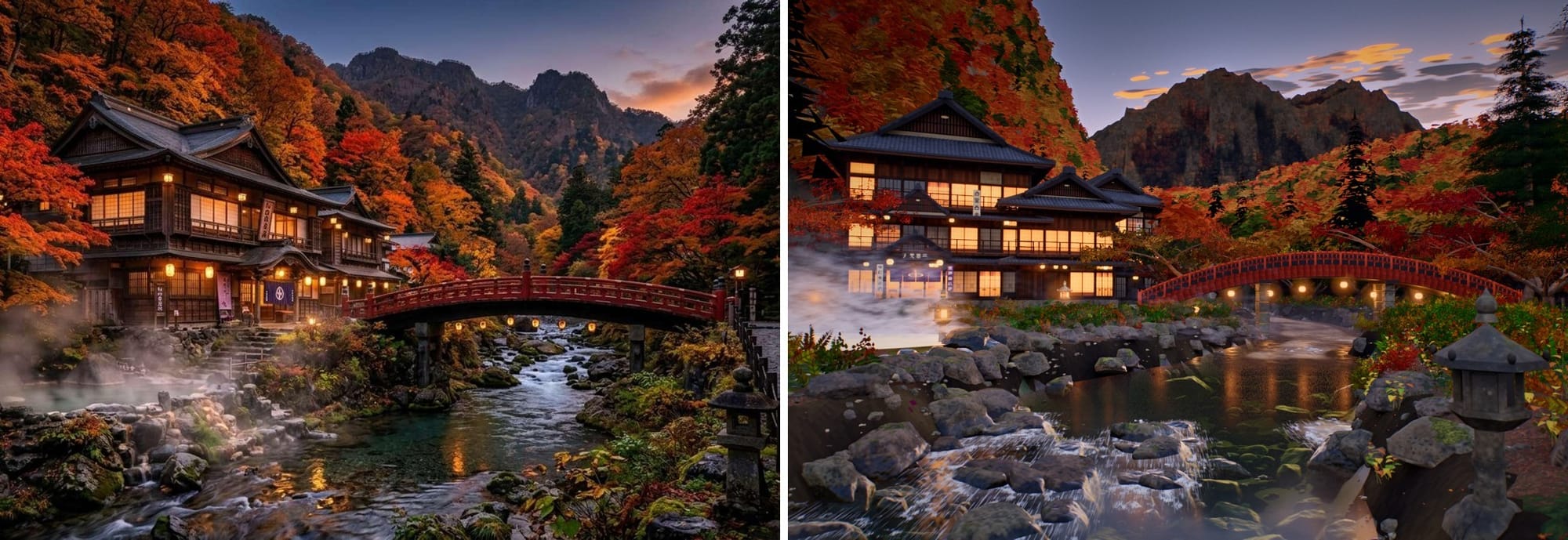
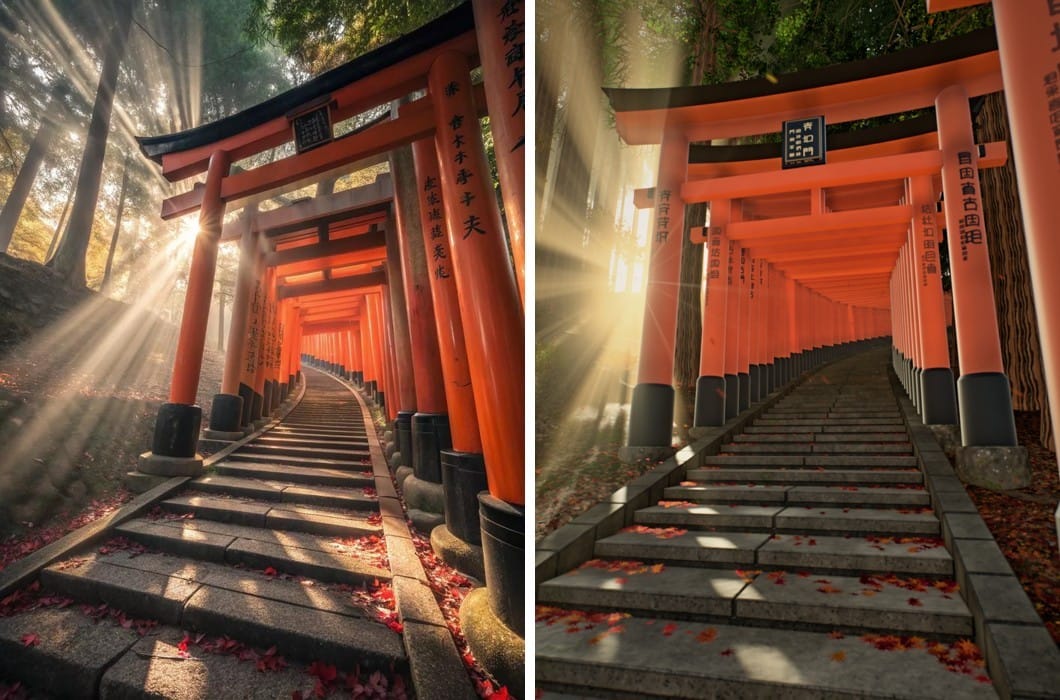
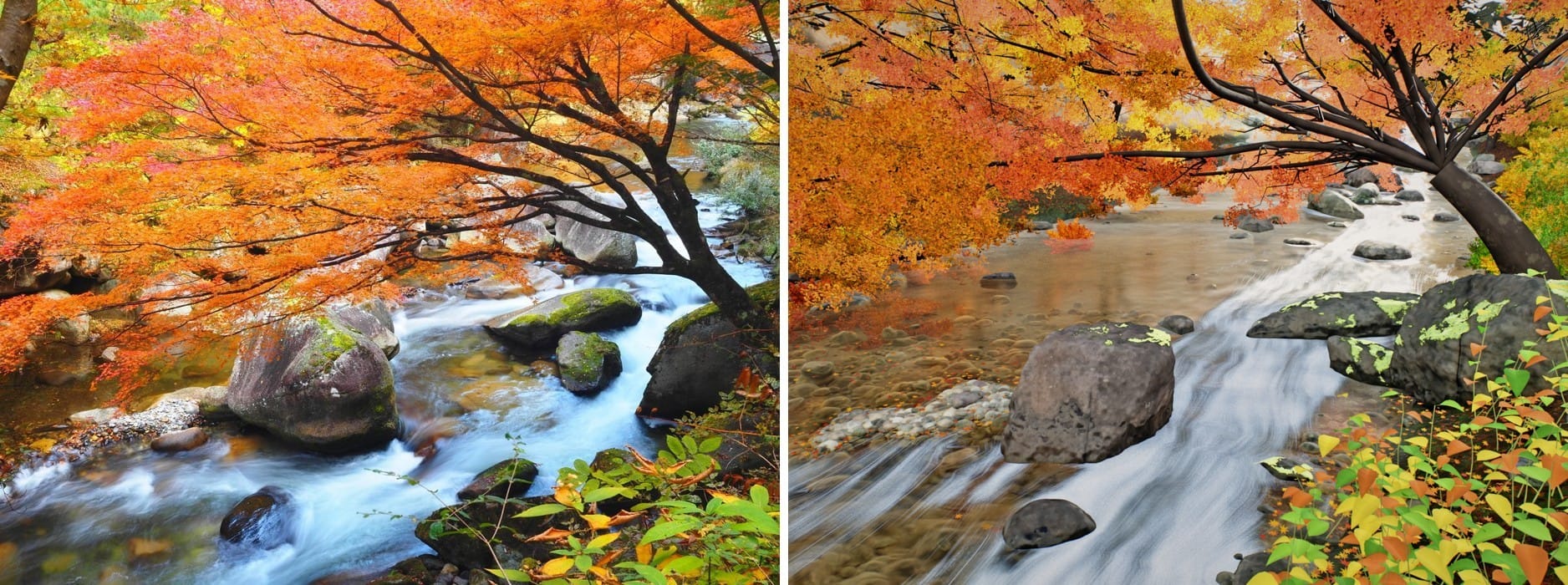
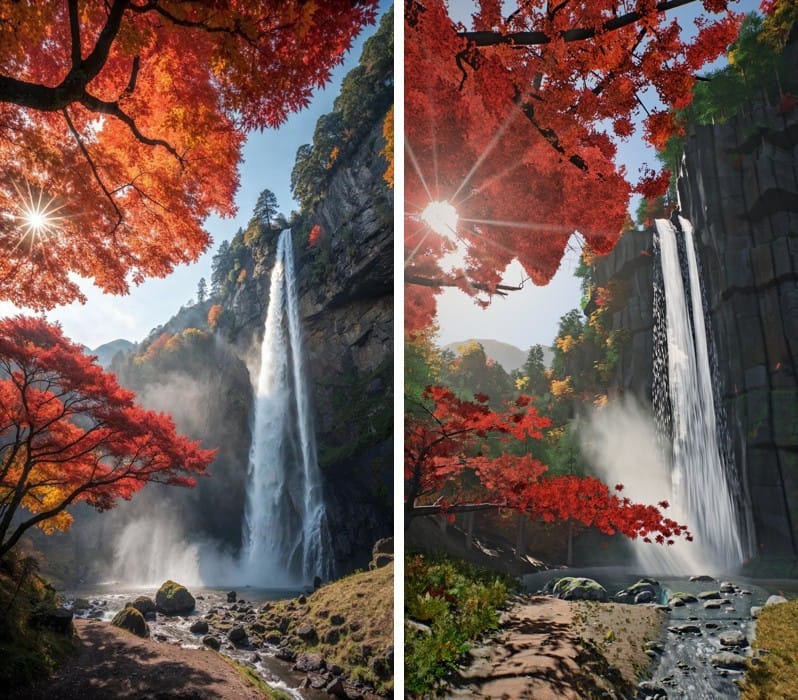
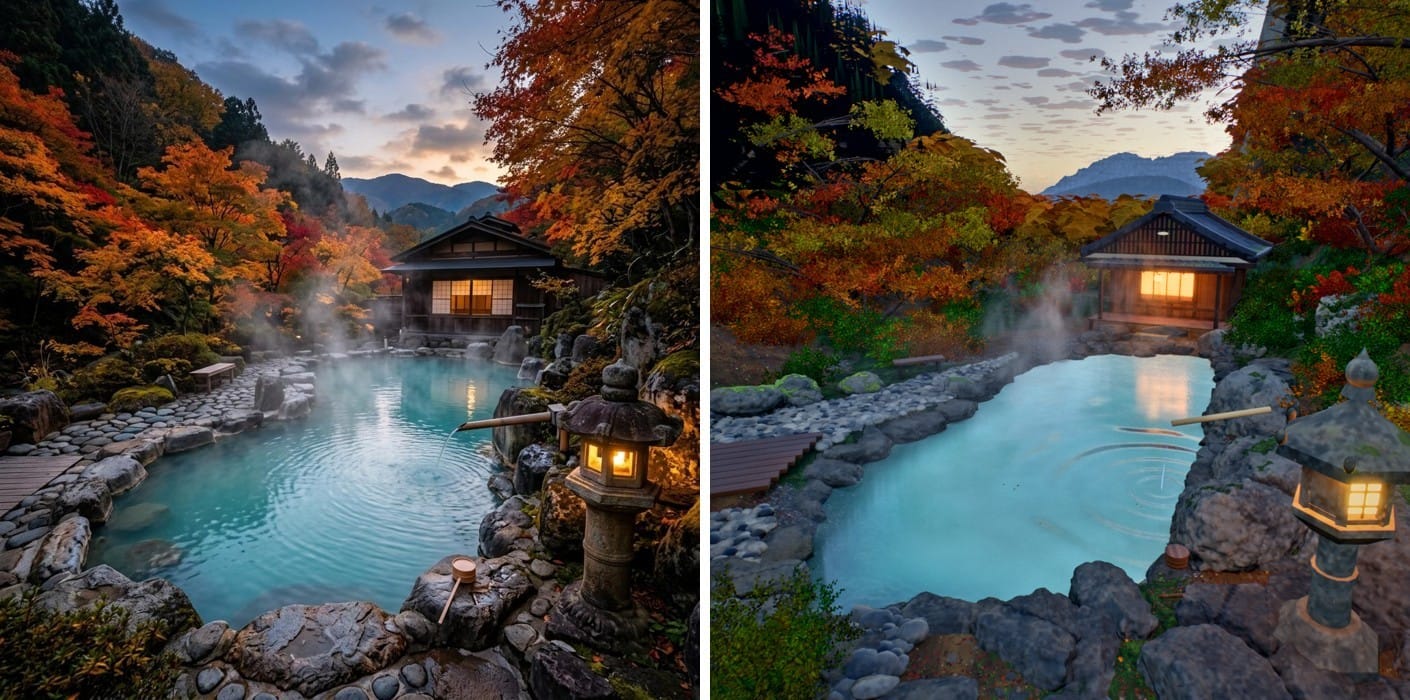
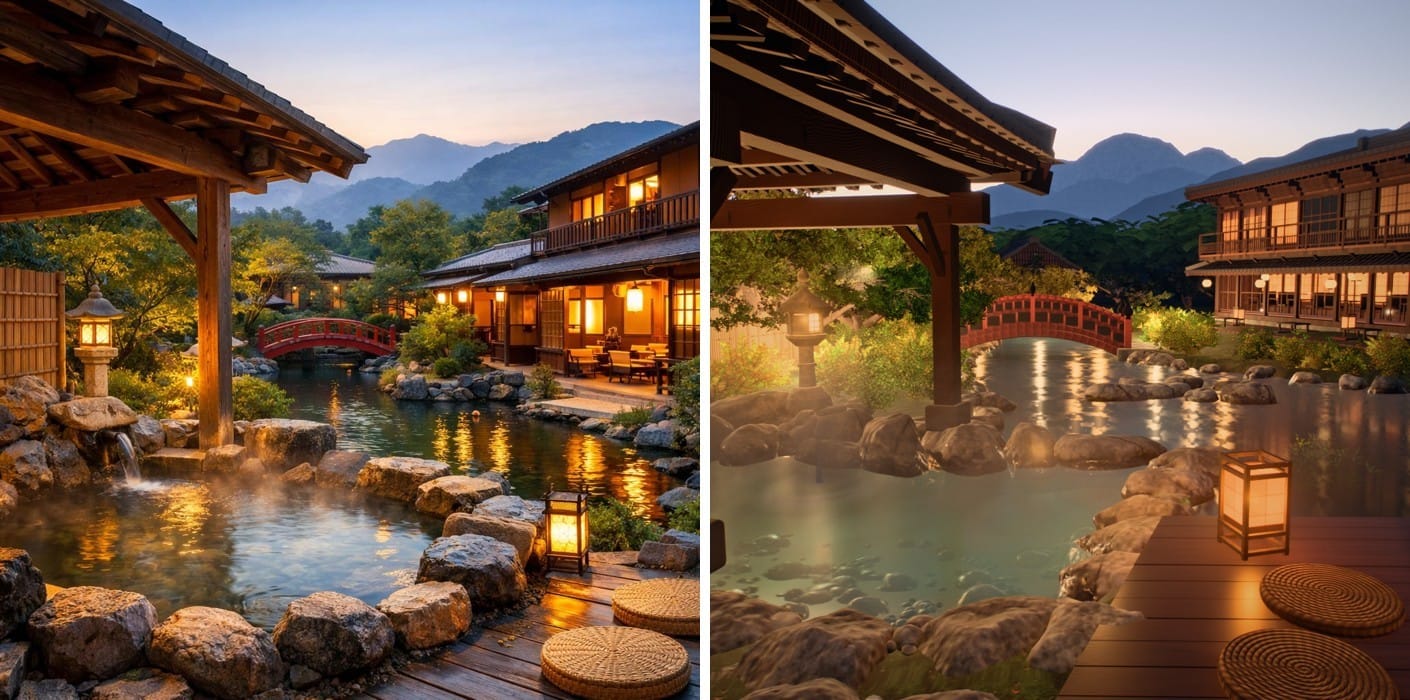
the closest matches are the torii path and the hot spring. the hero shot is the furthest off: the mountains and rocks are simpler than in the reference.
how the work went
the prompt runs the build as multi-agent rounds: one agent writes the engine, then up to 7 specialists work in parallel – terrain, water, sky and light, architecture, trees, rocks, effects – and one director per shot matches each scene to its reference. a critic opens every round after the first with a ranked list of fixes.
| stage | time |
|---|---|
| round 1 | 2h 40m |
| round 2 | 1h 53m |
| round 3 | 1h 36m |
| round 4, photorealism | 4h 07m |
| final video render | 3h 15m |
the four rounds took 10h 17m of agent time, the final render another 3h 15m.
about 10 of the 27 hours went into video renders, including one full render we threw away because the camera was too static.
the render
the final cut is a slow flight through all six places.
- 2560x1440, 30 fps, 61 seconds
- 15 camera moves, two or three per location
- 2,097 frames in 3h 15m on one rtx 3060
- music: suno
the video runs from the garden at blue hour to the torii tunnel at dawn.
the prompt
the prompt we sent:
ultracode

Build me a massive, ultra-detailed 3D world in three.js: a traditional Japanese village. You choose the exact place, the shots and the mood yourself. Do not ask me anything until the final video is done – decide everything on your own. Use workflows – I explicitly want multi-agent orchestration for this whole task, with as many agents as it needs.

STEP 1 – RESEARCH
Search the web for real, beautiful Japanese villages and onsen towns (e.g. Ginzan Onsen, Shirakawa-go, Kurokawa Onsen, mountain villages near Kyoto and Nara, autumn gorges with waterfalls). Look at many photos in the browser (view only, do not download). Choose one coherent world and the 6 key shots that would make the strongest cinematic video, at different times of day (dawn, day, sunset, blue hour). Write down why you chose them.

STEP 2 – GENERATE YOUR OWN REFERENCES
For each of the 6 shots, write a detailed image prompt based on what you saw in the real photos: camera and lens, composition, every element and its position, materials, colours, light direction, time of day, atmosphere. Generate the 6 reference images with gpt-image through the OpenAI Images API (the key is OPENAI_API_KEY in .env; never print or log it) and save them as refs/1.png … refs/6.png. Never copy a real photo – the references must be newly generated. If a reference does not match your idea, rewrite its prompt and generate it again. Save every prompt to refs/prompts.md.

STEP 3 – BUILD THE WORLD
Rules:
- Zero external assets. Every mesh, texture, shader and effect has to be generated in code.
- Match your references as closely as possible (aim for 99.9%): composition, scale, materials and especially the colors. Cinematic and realistic, not oversaturated, but also not grey or washed out.
- Detail everywhere. Nothing should look copy-pasted or simple. Every building, tree, rock and waterfall gets care, and the world has to read as ultra detailed even from far away.
- Waterfalls, rivers and hot springs have to look realistic.
- My GPU is weak, so keep it efficient and get the quality from offline accumulation rendering.
- Work only inside this project folder.

STEP 4 – MULTI-AGENT ROUNDS
Run the work as multi-agent rounds, with agents working in parallel:
- First, one agent writes the engine: rendering pipeline, lighting, atmosphere, offline accumulation, and a module contract (docs/ENGINE.md) with file ownership, so no two agents edit the same files.
- Then, in every round, run up to 7 specialist agents in parallel: terrain, water, sky and light, architecture, trees, rocks, effects (steam, mist, spray, falling leaves). Each owns its module, builds a lab scene to test it, renders, compares with the references and fixes in a loop.
- Then run one director per shot, all shots in parallel: each owns one shot file, adopts the new modules, matches its reference (composition, scale, colour, light) and renders the final still.
- From the second round on, one critic agent goes first: it compares every render with its reference and assigns concrete, prioritised tasks to each agent.
- Run at least 3 rounds, and keep going until the shots stop improving.

STEP 5 – VIDEO
When the stills match, render a cinematic ~60-second showcase video at 2560x1440, 30 fps: dynamic camera moves (2–3 moving shots per location, fly-throughs, crane moves, foreground parallax), smooth, no text on screen, impressive from the very first frame. Preview it at low resolution first, fix framing and motion, then render the final.

STEP 6 – PROOF
Keep docs/LOG.md with every decision and why: which places you looked at, why this world and these shots, the reference prompts, every round (which agents ran, what each changed, how long it took), render times and the final file paths. This log is the proof that you did it on your own.
the music line was not used in the end: we made the track in suno ourselves.
our take
opus 5.5 can hold a 16,000-line three.js project together over a day of work and get close to photo its references with no asset files at all. water, light and the torii path came out best. distant mountains and big rocks are where code still shows.
sources
- claude code, anthropic – the agent we used
- three.js – the 3d library
- suno – the music
- code, renders, timings and logs: our project, oct 19–20, 2026