
 Felix Laurent

Hy-Nomas is Tencent Hunyuan's open-source interactive world model. It generates a video world turn by turn while you steer it with text instructions and camera moves, at 720p and 24 frames per second. To use Hy-Nomas, try it in Tencent's online demo, or run it yourself on one RTX 4090 with the INT8 weights from Hugging Face.
This guide covers both routes: the demo, a local install, prompt files, camera control, ComfyUI and LoRA adapters. It also shows how Hy-Nomas compares with Genie 3 and other world models. Commands come from Tencent's GitHub repository and model card, checked on November 24, 2026.
What Hy-Nomas is
Tencent released Hy-Nomas on October 21, 2026, with the technical report following on arXiv on October 27. The weights, training code and inference code are under the Apache 2.0 license, which allows commercial use. The GitHub repository had about 600 stars a month after launch.
A world model differs from a regular video generator. A video model takes one prompt and returns a finished clip. A world model keeps a scene alive and lets you act on it: walk the camera forward, then ask for rain, then turn around. Each instruction becomes a new segment of video that continues from everything generated so far.
Under the hood, Hy-Nomas has an 8-billion-parameter diffusion transformer with 54 dual-stream blocks. It was initialized from HunyuanVideo 1.5. Text goes through Qwen2.5-VL-7B, and camera motion enters as a separate signal in every block. A distilled version needs only 4 to 8 denoising steps per segment instead of 100, which makes turn-by-turn use practical.
The release also includes Hy-Nomas-PE, a prompt enhancer that turns a short request into the structured prompt the model expects. There are two LoRA adapters, one for a cinematic look and one for robot arm scenes. A 280-case benchmark, Hy-Nomas-Bench, is open too. Those parts make more sense once you see how a session runs.
How Hy-Nomas works: turns, segments and memory
A Hy-Nomas session is a chain of segments, usually a few seconds each. The first segment comes from a full scene description: style, viewpoint, characters and what happens. Every later segment comes from a short change, such as "glowing flowers open beside the path", plus any camera path you add.
The model generates each new segment while it attends to a cache of earlier segments. That cache is its memory. It is how a building you walked past can still be there when the camera turns back. By default, the history is capped at 18 latent frames to save memory.
The prompt enhancer sits between you and the model. In the demo, it reads your request and the video so far, then writes the structured prompt and picks a duration for the next segment. Tencent reports it follows the required format nearly 100% of the time, against about 50% for Qwen3.8-27B used the same way.
Text and camera control can alternate within one session. A first turn can describe a fox in a forest, a second can push the camera in, and a third can make it rain. The next question is how well that holds up against other world models.
How good is Hy-Nomas?
Tencent built Hy-Nomas-Bench with 280 test cases in four groups: multi-turn text, camera navigation, mixed text and camera, and spatial memory. Three human raters compared Hy-Nomas side by side with each rival and picked a winner or a tie. All results below come from Tencent's paper, from Hy-Nomas's point of view.
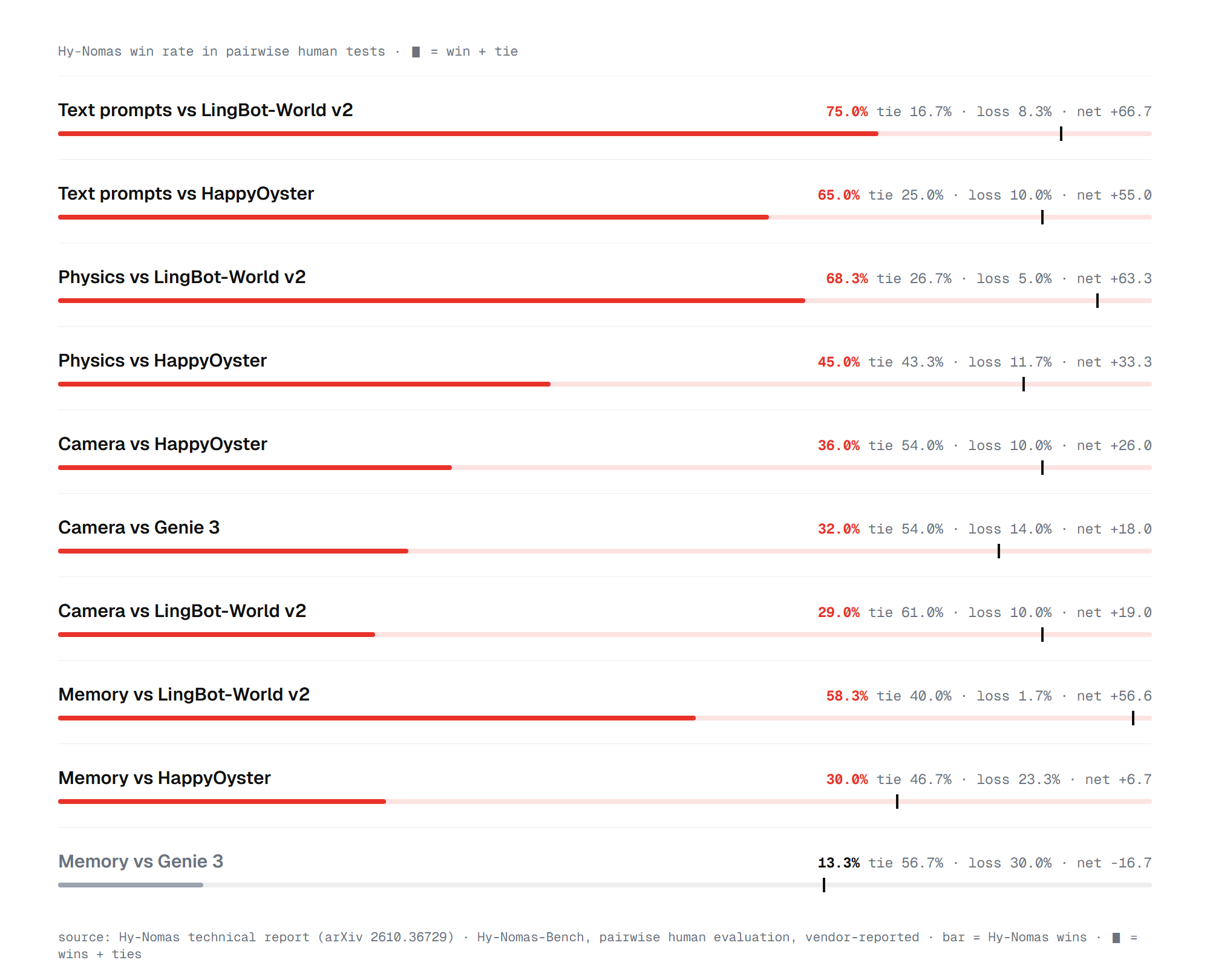
On text instructions, Hy-Nomas wins clearly. It beats the open LingBot-World v2 in 75% of comparisons and loses in 8.3%. Against HappyOyster, the win rate is 65%. Physical plausibility shows a similar lead, with 68.3% wins against LingBot-World v2.
Camera control is closer. Most comparisons end in a tie, and Hy-Nomas wins 29% to 36% of the rest. Against Google's Genie 3 it wins 32% and loses 14%.
Spatial memory is the weak spot. When the camera leaves a scene and comes back, Genie 3 keeps it more consistent. Hy-Nomas wins only 13.3% of those tests and loses 30%. Genie 4 is not in the paper; Tencent posted a comparison video with Genie 4 examples recreated in Hy-Nomas, which is not a measured test. Our Genie 4 overview covers Google's side. With that picture in mind, the easiest way to try the model is the demo.
Option 1: try the online demo
Tencent runs a web demo at hy-nomas.hy.tencent.com. It is the fastest way to see what the model does, and it needs no GPU.
- Open the demo page and start a new world from a text description. Since October 31 you can also start from a reference image.
- Watch the first segment generate. The prompt enhancer writes the structured prompt for you.
- Continue with a text instruction, such as "it starts snowing" or "a dog runs into the frame".
- Or steer the camera with the WASD or arrow keys. Your moves shape the next segment.
- Keep alternating text and camera turns. A good first test is two or three text turns followed by a camera turn back to the start, which shows both the model's strengths and its memory.
Tencent does not publish queue times, daily limits or sign-in rules for the demo, so expect waits at busy times. For full control and no queue, you can run the model on your own hardware.
What you need to run Hy-Nomas locally
Tencent documents only Linux hosts with NVIDIA GPUs. On Windows, WSL2 with Ubuntu is the usual route, though Tencent does not cover it. The software needs Python 3.12 or later, the CUDA 13.0 toolkit and a recent NVIDIA driver.
There are two official hardware setups:
- One RTX 4090 with 24 GB of VRAM. This low-memory preset uses INT8 weights for the transformer and its cache. It adds an FP8 decoder and CPU offloading. Tencent measured a peak of 20.53 GiB of GPU memory for a 100-second video in seven segments. Your PC also needs plenty of system RAM, because offloaded models and the video history live there.
- Eight data-center GPUs. The standard preset splits the full-precision model across eight cards and keeps the whole history in memory.
Cards with 24 GB or more, such as the RTX 5090, can use the single-GPU preset. Tencent publishes no speed figures for the RTX 4090, and the offloading makes it slower than real time. The author of one ComfyUI port reports about 4.3 seconds per one-second turn on an RTX 4090 at 832×480.
Step 1: install Hy-Nomas
Clone the repository first:
git clone https://github.com/Tencent-Hunyuan/Hy-Nomas.git
cd Hy-Nomas
Tencent strongly recommends its prebuilt Docker image, which already contains the compiled attention kernels. You need Docker and the NVIDIA Container Toolkit:
export HY_NOMAS_IMAGE="hynomasoss/hynomasoss:cu130"

docker pull "$HY_NOMAS_IMAGE"
docker run --rm -it --gpus all --ipc=host --network=host \
  -v "$PWD:/workspace/Hy-Nomas" \
  -w /workspace/Hy-Nomas \
  "$HY_NOMAS_IMAGE" bash
Without Docker, install the dependencies with uv. This builds PyTorch 2.10 for CUDA 13.0, FlashAttention 2 and 3, and MagiAttention, and the kernel compilation can take a long time:
uv sync --extra all
source .venv/bin/activate
With the environment ready, the next step is the weights.
Step 2: download the weights
All official files sit in one Hugging Face repository, tencent/Hy-Nomas. Pick a folder and download it:
export Hy_Nomas_Model_Path=/path/to/Hy-Nomas
hf download tencent/Hy-Nomas --local-dir "${Hy_Nomas_Model_Path}"
The repository holds several versions of each part. For a single RTX 4090 you need DiT/distilled_int8 and the FP8 decoder in VAE/PixelUMM_FT_FP8. The full-precision DiT/distilled model is for multi-GPU setups, and DiT/base_ar is the undistilled base for training LoRAs. The INT8 transformer is roughly half the size of the 16-bit one: community repacks list 9.0 GB against 17.1 GB. The Qwen2.5-VL-7B text encoder downloads automatically on the first run. Before generating anything, you need a prompt file.
Step 3: write a prompt file
Local inference reads a JSON file that describes the world and every segment. This example adapts the fox prompt from Tencent's README into two 5-second segments:
[
  {
    "test_id": "forest_world",
    "Style": "Cinematic fantasy",
    "perspective_view": "Third-person view",
    "subject_list": [
      {
        "subject_id": "fox",
        "display_name": "a small orange fox",
        "subject_attribute": "Orange fur, white chest, and a fluffy tail."
      }
    ],
    "segments": [
      {
        "start_time": "00:00.000",
        "end_time": "00:05.000",
        "visual_description_long": "A small orange fox stands on a stone path in a luminous forest. Blue fireflies drift between the trees.",
        "contained_actions": [
          {"start_time": "00:00.000", "end_time": "00:05.000", "action_description": "The fox walks slowly along the path."}
        ]
      },
      {
        "start_time": "00:05.000",
        "end_time": "00:10.000",
        "description_change": "Glowing blue flowers open beside the path as the fox continues forward.",
        "contained_actions": [
          {"start_time": "00:05.000", "end_time": "00:10.000", "action_description": "The fox passes the flowers and looks around."}
        ]
      }
    ]
  }
]
The first segment uses visual_description_long to set up the whole scene. Every later segment uses description_change to describe only what is new. Each segment also lists its actions with timestamps, which helps the model keep events in order. Add more segments to extend the world. The online demo writes this structure for you with the prompt enhancer.
Step 4: generate a world on one RTX 4090
Make sure only one GPU is visible, because the launcher counts GPUs to choose its parallel setup. Then run the low-memory preset with the INT8 transformer and FP8 decoder:
bash scripts/inference/inference_from_config.sh configs/experiment/single_gpu_low_mem_inference.yaml \
  dit_weight="${Hy_Nomas_Model_Path}/DiT/distilled_int8/diffusion_pytorch_model_ema_0_995_int8.safetensors" \
  model.vae.checkpoint="${Hy_Nomas_Model_Path}/VAE/PixelUMM_FT_FP8/diffusion_pytorch_model_fp8.safetensors" \
  inference.prompt=/path/to/prompts.json \
  inference.save_path=./outputs/single_gpu
The video lands in outputs/single_gpu. Expect the first run to spend a while loading and offloading models before any frames appear. Other settings can be added to the same command, such as a smaller inference.video_size than the default [720,1280] for a faster test or inference.seed=42 for repeatable results. Text alone already gives a moving world. Before adding camera paths, it helps to know what makes a prompt work.
How to write good Hy-Nomas prompts
The JSON format rewards precise, physical descriptions. A few habits from Tencent's examples and paper make results more reliable.
- Name each subject once. Define every character in
subject_listwith a fixeddisplay_nameand appearance, then use the same name in every segment. That keeps the fox the same fox after a camera move. - Keep actions short and ordered. Tencent's paper says actions inside a segment used to play in the wrong order, and its action-aware attention reduces this. Short segments with one clear action each still make the order easier to follow.
- Describe only the change. In later segments,
description_changeshould say what is new, not repeat the whole scene. The model already remembers the rest through its cache. - Set the viewpoint early.
perspective_viewdecides whether you get a first-person walk or a third-person shot, and switching it mid-session confuses the model. - Use timestamps. With
inference.video_length=event, the model sets each segment's length from your start and end times, so a 3-second action gets a 3-second segment. - Stay physical. The benchmark rewards plausible motion, and so does the model. "Snow starts to fall and settles on the branches" works better than abstract mood words.
Those rules apply the same way in the demo, where the prompt enhancer writes the JSON for you. Camera paths add the second kind of control.
Step 5: steer the camera
Camera moves are stored in a NumPy .npz file with one camera pose per frame. The repository includes a generator with 15 ready-made moves: move_left, move_right, move_up, move_down, push_in, pull_out, pan_left, pan_right, tilt_up, tilt_down, orbit_left, orbit_right, circle, spiral and fixed. Linear moves can be chained with commas, while circle and spiral only run on their own:
python hymm/models/camera/geometry/generate_npz_trajectories.py \
    --traj pull_out,pan_left --num_frames 129 --output_dir outputs/camera_trajs
Then add the file to the inference command from Step 4:
inference.camera_trajectory=/path/to/camera.npzTwo more settings control how strongly the path is applied: inference.trajectory_translation_scale=1.0 for movement and inference.trajectory_rotation_scale=2.5 for turning. Match the number of frames to your segment length at 24 FPS. For larger setups and other runtimes, Tencent offers a few more paths.
Multi-GPU, SGLang and Diffusers
On eight GPUs, the standard preset runs the full-precision model and keeps the whole history. Use configs/experiment/inference.yaml with the DiT/distilled weights and the full VAE/PixelUMM_FT decoder. The rest of the command matches Step 4.
SGLang support is available as a server, though not yet in a stable SGLang release. It offers a REST endpoint and a WebSocket for real-time generation:
sglang serve --model-path tencent/Hy-Nomas --num-gpus 1 --port 30000There is also a Diffusers pipeline, tencent/Hy-Nomas-Diffusers. It currently installs from a contributor's fork of Diffusers rather than the official library, so expect it to change. On a Google TPU v6e-4 slice, one community demo reports real-time 720p generation. For an interactive browser demo of your own, the repository includes Reactor, the runtime behind Tencent's demo. Its tested profile uses eight B200 GPUs:
cd reactor
reactor validate
reactor build
reactor run --gpus '"device=0,1,2,3,4,5,6,7"' --shm-size 8g --port 8080
A separate web front end in reactor/demo starts with npm run dev and opens on port 5173. Reactor does not load the Nomas-PE prompt enhancer, so plain text is not turned into structured JSON for you. Many users skip all of this and use ComfyUI.
Use Hy-Nomas in ComfyUI
Hy-Nomas runs in ComfyUI through community ports, which appeared within days of the release. Tencent's README links ComfyUI-Hy-Nomas, credited to LatentSpacer and hosted under PedroMarinhoDev. It chains segments and adds WASD camera control. ComfyUI Wiki also lists Nynxz's port.
The Nynxz port uses repacked files: a 9.0 GB INT8 transformer, a 17.1 GB BF16 version and a 15.8 GB decoder. It loads them with ComfyUI's standard model, CLIP and VAE loaders and the Qwen2.5-VL-7B text encoder. Community ports change quickly, so check each repository for current install steps. LoRAs are where the official and community routes differ most.
LoRA adapters: cinematic and robotics
Tencent ships two adapters. The cinematic LoRA improves visual quality, and the dual-arm robotics LoRA was trained on robot manipulation videos for simulated tasks. In Tencent's test, the cinematic LoRA won 35% of prompt-following comparisons against the plain distilled model and lost 24%.
The INT8 single-GPU loader cannot apply a LoRA at inference. To use one there, merge it into the full-precision model first with Tencent's script:
python -m scripts.train.merge_lora --base "${Hy_Nomas_Model_Path}/DiT/distilled/diffusion_pytorch_model_ema_0_995.safetensors" --adapter ./outputs/segment_lora/adapter --output ./outputs/merged_model.safetensorsThen pass dit_weight=./outputs/merged_model.safetensors to the multi-GPU command. Training your own LoRA is supported too, but Tencent's training config is laid out for 128 GPUs. A few more limits are worth knowing before you build on the model.
Limits to know before you start
Hy-Nomas is a research release, and a few gaps show up quickly in practice.
- Not real time on consumer cards. Offloading to system RAM makes the RTX 4090 preset slower than real time. Tencent gives no speed figure for it.
- Linux only. Tencent documents only Linux, so Windows users need WSL2, and the attention kernels take time to compile outside Docker.
- Weak spatial memory. Revisited scenes drift more than in Genie 3, according to Tencent's own test.
- No LoRA in INT8 mode. Merge adapters into a full-precision model first.
- No prompt enhancer in your own demo. Reactor ships without Nomas-PE, so you write the structured JSON yourself or serve the enhancer separately.
None of these rule out experiments, but they matter for production use.
What you can use Hy-Nomas for
The obvious use is fun: build a world and wander through it. The model also suits a few practical jobs.
- Game and level prototyping. Describe a location, walk through it with the camera and check the mood before anyone builds it in an engine.
- Previsualization. Directors can block out a shot with a camera path and a few text beats, then download the clip as a rough reference.
- Robotics simulation. The dual-arm robotics LoRA generates manipulation scenes, useful for testing policies or creating training video.
- Training data. Open weights and an Apache 2.0 license let teams generate synthetic video for other models. Bundled parts such as Qwen2.5-VL keep their own licenses.
For all of these, the open license is the main difference from the closed rivals.
Hy-Nomas vs Genie and other world models
Google's Genie 3 and Genie 4 lead the closed side. They are available only through Google's own apps and research previews, with no weights to download. Hy-Nomas trails Genie 3 on spatial memory but beats it on camera control in Tencent's tests, and you can run it yourself.
LingBot-World v2 is the closest open rival, and Hy-Nomas beats it on every measure in Tencent's tests, including memory. HappyOyster offers separate directing and wandering modes; Hy-Nomas wins most comparisons against both. These are vendor-reported results from one paper, so independent tests may change the picture. Hy-Nomas-Bench itself is open on Hugging Face, so anyone can rerun the same 280 cases on Hy-Nomas or a rival and compare the clips side by side. That leaves one practical question: when it is worth the setup.
Should you use Hy-Nomas?
Yes, if you want an open world model you can run and change yourself. Hy-Nomas is the strongest open option for steering a scene with text, with 75% wins over LingBot-World v2 in Tencent's tests. It runs on one RTX 4090, and the Apache 2.0 license allows commercial projects.
Start with the online demo to see whether the turn-by-turn style fits your idea. Move to the Docker install and INT8 preset for local experiments, and to the eight-GPU setup only for full quality or LoRA work. If your project depends on returning to the same place and finding it unchanged, test spatial memory first, because Genie 3 still does that better.