
 Felix Laurent

The best AI voice assistant in October 2026 depends on the device in your hand. ChatGPT Voice gives the most natural conversation and up to three hours a day on Plus. Gemini Live is the strongest on Android and the only one with camera sharing in its main mode. Siri AI arrived on iPhones on September 14. Alexa+ runs the smart home and comes free with Prime.
This guide compares ten AI voice assistants on price, free tier, talk-time limits and what each can do besides answer. Every fact comes from the vendors' own pricing pages and help centers, checked on October 23, 2026.
Comparison of the best AI voice assistants
Ten assistants cover almost every use case, from phone chats to smart speakers to custom voice agents. The infographic puts the key numbers side by side.
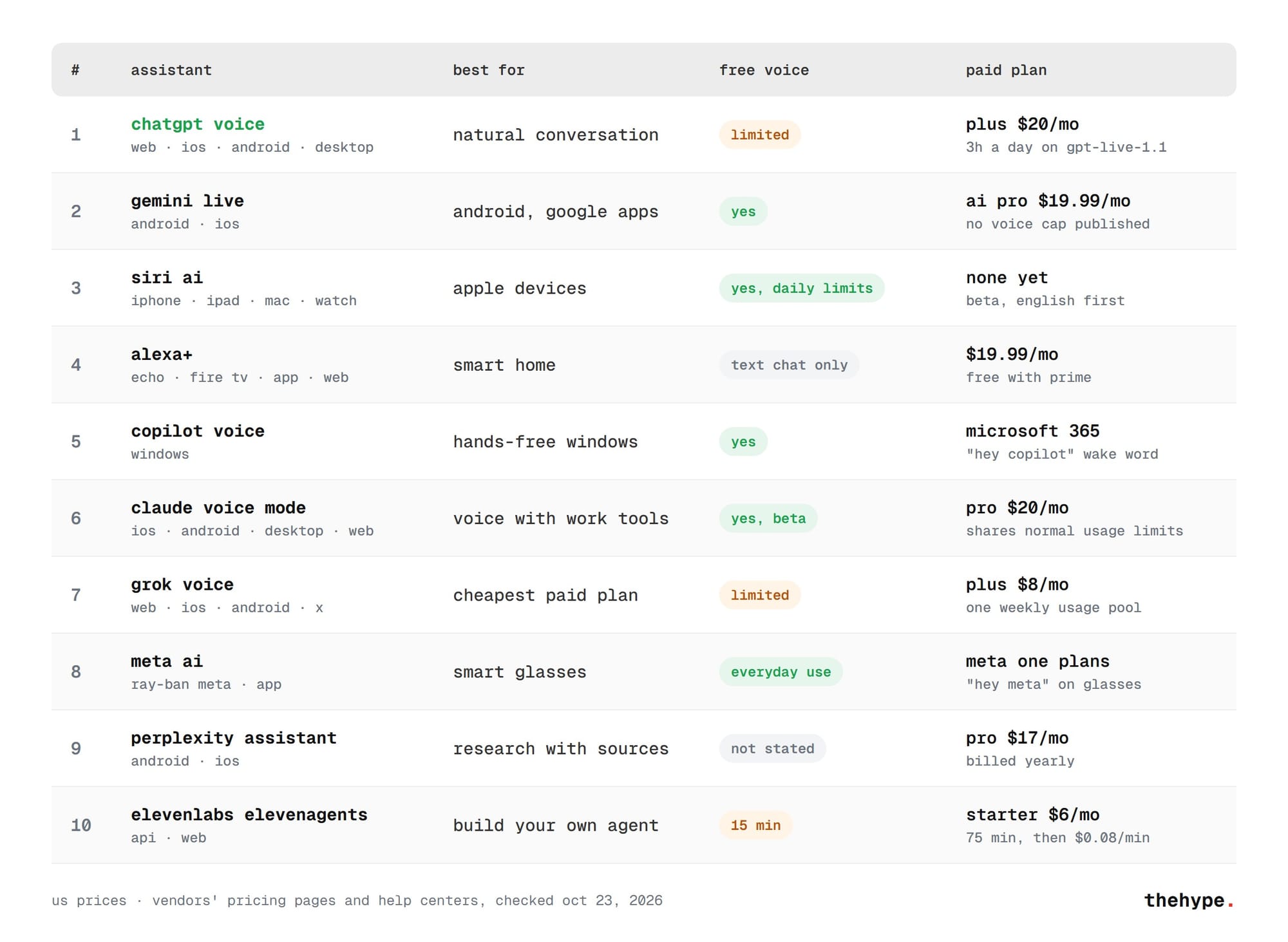
Prices are US list prices. Several apps sell the same plans for less in other countries.
How we picked them
We did not run a scored voice test for this guide. We read each vendor's help center, pricing page and launch post, and we kept only what those pages confirm. Where a claim appears only on third-party blogs, the guide says so or leaves it out.
The picks cover three jobs. Most are personal assistants on a phone, speaker or PC. Meta AI covers smart glasses. ElevenLabs covers builders who want their own voice agent.
1. ChatGPT Voice: the most natural conversation
ChatGPT Voice is the best AI voice assistant for open-ended talk. Its default option, Live, runs on GPT-Live-1.1, which OpenAI rolled out on October 15, 2026. Live can listen and speak at the same time, so turn-taking and interruptions feel natural.
Live works inside a normal chat. You can type when you cannot speak, add images and scroll back through earlier messages. It can use web search, memory and the connected apps on your account. Actions that need approval show up on screen, and spoken approval is not accepted.
OpenAI publishes clear limits, measured over a rolling 24 hours:
- Free: limited access to GPT-Live-1.1 Quip, a smaller model.
- Go: 3 hours with GPT-Live-1.1 Quip.
- Plus, $20 a month: 3 hours with GPT-Live-1.1.
- Pro, $100 a month: 15 hours; Pro, $200 a month: unlimited, with abuse guardrails.
Those caps make Plus the best talk time per dollar among the big assistants.
One detail trips people up. Live does not support video or screen sharing. To show the camera or your screen, switch to the older Advanced option in Settings > Voice. It works in the iOS and Android apps for eligible subscribers.
Strong points: natural interruptions, published limits, voice on web, mobile and desktop. Weak points: no camera in the default mode, and the free tier has no fixed allowance.
2. Gemini Live: the best voice assistant for Android
Gemini Live is Google's voice mode, and it is free on every plan. Google announced Gemini 3.8 Live on September 15, 2026. It says the model supports 97 languages and switches between them mid-conversation.
Its main advantage is sight. Gemini Live can see through your camera and share your full screen. It can also act in Google apps: Gmail, Calendar, Tasks, Keep, Maps and YouTube. On Android it changes phone settings and controls smart home devices.
Gemini Live runs in the Android and iOS apps. Google's help center says Live is not available in the Gemini web app. It also works hands-free with Pixel Buds.
The paid plans raise limits for all of Gemini, not voice alone. In the US, Google AI Plus costs $4.99 a month, Pro $19.99 and Ultra from $99.99. Google does not publish a voice-specific cap.
Strong points: camera and screen sharing, deep Google integration, a free tier. Weak points: phone only, and no published talk-time limits.
3. Siri AI: the new Siri for iPhone and Mac
Apple released Siri AI on September 14, 2026, with iOS 27 and macOS 27. It launched as a beta in English. Apple said French, Japanese, Korean, Portuguese and Spanish would follow in October.
The new Siri understands personal context such as mail, photos and notes. It knows what is on screen and can act inside apps, including Messages and WhatsApp. There is also a dedicated Siri app with synced chat history. You can talk or type, and adjust the voice and its pace.
The models behind it come from a partnership with Google. Apple says they were "custom-built in collaboration with Google and its Gemini models". The two companies first announced the deal on January 12, 2026.
Siri AI is free, with daily limits on server features. Apple says expanded access may cost a fee later. It needs an iPhone 15 Pro, iPhone 16 or later, or an M1 Mac or iPad.
Availability has gaps. Siri AI is not on iPhone in the EU yet, which Apple blames on the Digital Markets Act. It is also not available in China.
Strong points: built into Apple devices, personal context, free. Weak points: beta, English first, and not available everywhere.
4. Alexa+: the best AI voice assistant for the smart home
Alexa+ is Amazon's generative version of Alexa. It costs $19.99 a month on its own and is included with Prime at no extra cost. For Prime households it is the cheapest full voice assistant on this list.
It runs on Echo speakers, Fire TV, Alexa tablets, the Alexa app and Alexa.com. That makes it the only pick built around speakers in every room. Smart home control is its core job.
Non-Prime users get a free text chat on Alexa.com and in the app, limited by use. There is no free Alexa+ on Echo devices.
Alexa+ is generally available in the US and Canada. Early access has reached the UK, Germany, France, Italy, Spain, Brazil, Australia, Mexico and India.
Strong points: speakers, smart home, free with Prime. Weak points: weaker outside Amazon's devices, and no free voice tier on Echo.
5. Microsoft Copilot Voice: hands-free help on Windows
Copilot Voice is the voice mode of Microsoft Copilot. On Windows you can wake it by saying "Hey Copilot". The wake word is off by default and works only in the Windows Copilot app.
Microsoft's support page lists a few limits. The trigger phrase is English only, though the chat can continue in other languages. It does not work on a locked screen or while other audio plays. A session ends after one minute of silence.
The wake word works for the free Copilot, personal Microsoft 365 plans and work accounts. Copilot itself is free on Windows.
Copilot Voice suits people who want to ask questions without leaving the keyboard. For long conversations, ChatGPT and Gemini are stronger. Our guide to the best AI assistant for PC covers Copilot on Windows in more detail.
Strong points: free, built into Windows, a real wake word. Weak points: English-only trigger, and short idle timeout.
6. Claude voice mode: voice with your work tools
Claude's voice mode is in beta on every plan, from Free to Enterprise. It runs in the iOS and Android apps, Claude Desktop and the web. Anthropic notes that it works best from a phone.
Its strength is tools. In voice mode Claude can use Gmail, Calendar, Docs and Slack. The free plan connects one tool, and paid plans connect more. Transcripts are saved after each session.
Voice counts toward your normal Claude usage limits. There is no separate talk-time cap. Claude Pro costs $20 a month.
You can talk hands-free or use push-to-talk. Several preset voices are available, and the pace is adjustable on mobile. Languages other than English are still in beta.
Strong points: free on every plan, work tools in voice, saved transcripts. Weak points: still a beta, and voice shares the normal usage limits.
7. Grok voice: the cheapest paid plan
Grok, from xAI, has voice in its web, iOS and Android apps and on X. The free tier includes limited voice, though xAI does not publish the numbers.
The paid plans are the cheapest of the big chatbots. Plus costs $8 a month and includes chat, voice, image generation and building tools. Premium costs $30 with four times the Plus usage. Super and Ultra cost $100 and $200.
Since June 2026, chat, images, voice and bots share one weekly usage pool. Heavy voice use therefore cuts into everything else.
xAI also sells Grok Voice 3.0 to developers who build voice agents. We compared it with OpenAI's model in Grok Voice vs GPT Audio.
Strong points: $8 entry plan, voice on X and the web. Weak points: shared weekly pool, and no published free limits.
8. Meta AI: the voice assistant for smart glasses
Meta AI is the voice behind Ray-Ban Meta glasses. You start with "Hey Meta", then ask follow-ups or interrupt without repeating the wake word. On glasses this is available in the US and Canada.
Meta showed new glasses at Connect 2026, including Ray-Ban Meta Gen 3 with an action button. It also said its Muse agent will come to AI glasses in the coming months.
The Meta AI app on iOS and Android also has voice. Meta says Meta AI stays free for everyday use.
Glasses make voice the natural interface, since there is no screen to type on. For phone-only users, ChatGPT and Gemini offer more.
Strong points: hands-free on glasses, free for everyday use. Weak points: tied to Meta's hardware for the best experience.
9. Perplexity Assistant: research by voice
Perplexity Assistant answers with sources, which suits fact-checking and research questions. On Android you can set it as the default assistant. It then opens with a long press on the power or home button.
Perplexity describes it as a layer on top of your device that works with many of your apps. It says the assistant can handle multi-step tasks across them.
On iPhone, the voice assistant can be launched with the Action Button. Perplexity Pro costs $17 a month billed yearly. The help center does not say how much voice the free plan includes.
Strong points: cited answers, default assistant on Android. Weak points: free voice limits not published.
10. ElevenLabs ElevenAgents: build your own voice assistant
ElevenAgents, formerly ElevenLabs Conversational AI, is the pick for building a custom voice agent. Companies use it for support lines, booking and in-app assistants. ElevenLabs is known for realistic speech synthesis.
The free plan includes 15 minutes and four concurrent calls. Starter costs $6 a month with 75 minutes. Creator costs $22 with 275 minutes, and Pro $99 with 1,238 minutes. Extra minutes cost $0.08 each, and the language model and phone line are billed at cost.
This is a tool for builders, not a ready assistant for your phone. For a personal assistant, use one of the first nine.
Prices and limits at a glance
The card below sums up the free voice option and the paid plan that adds more voice for each assistant.
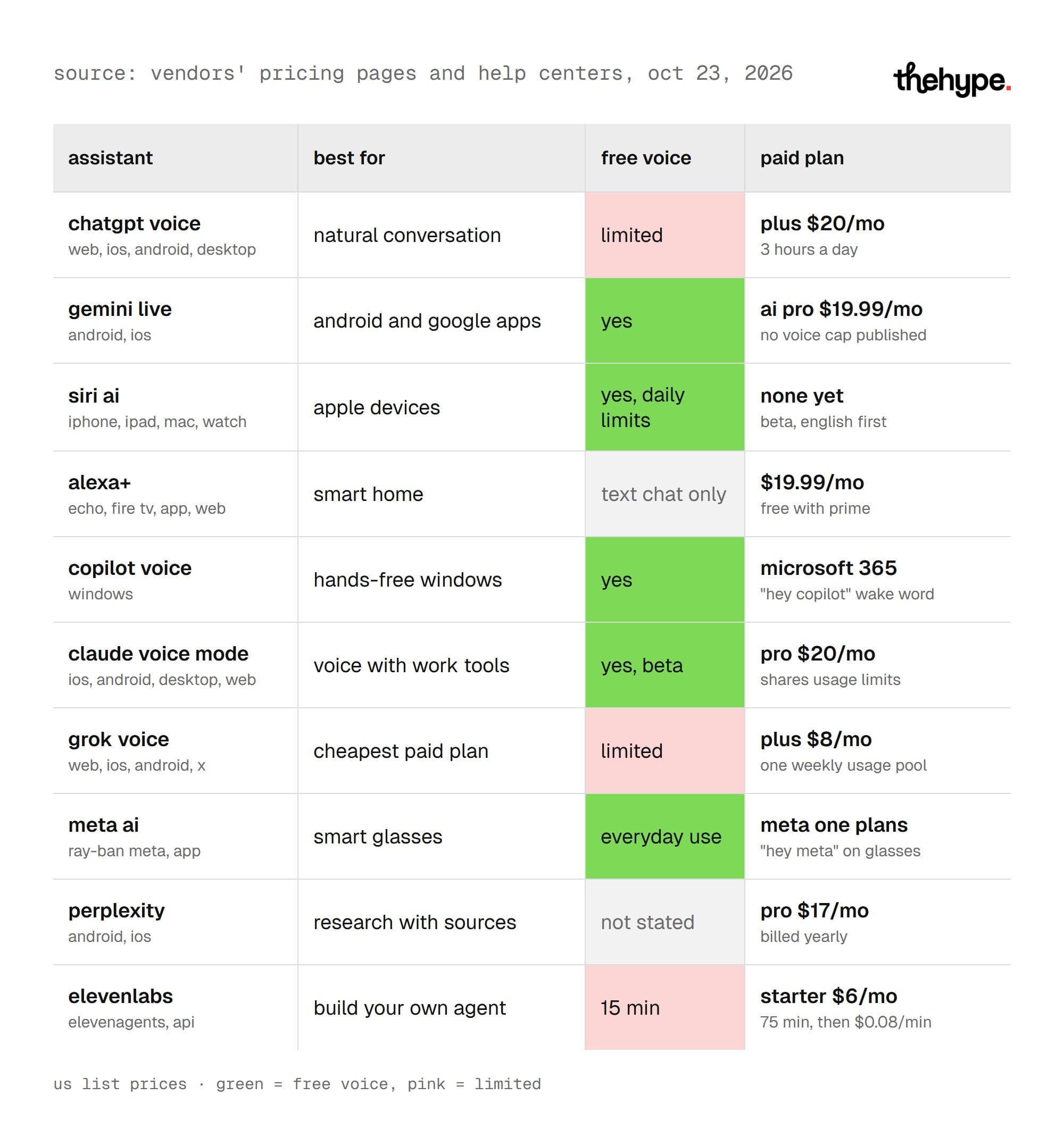
ChatGPT is the only vendor here that publishes a daily voice allowance per plan.
How to choose an AI voice assistant
The right choice follows three questions: which device, which apps and how much you talk. Answer them in order.
Start with the device. iPhone users get Siri AI for free. Android users get the most from Gemini Live. Echo owners should use Alexa+. Windows users have Copilot Voice built in.
Then look at your apps. Google Workspace points to Gemini. Gmail and Slack with work tools point to Claude. A Prime subscription makes Alexa+ free.
Finally, count the minutes. If you talk for more than an hour a day, ChatGPT Plus gives a clear three-hour daily allowance. Other vendors do not publish voice limits, so heavy users may hit caps without warning.
Many people use two assistants: the one built into their phone or speaker, and one paid app for long conversations.
Privacy with voice assistants
Voice assistants hear more than text chats do. A few settings reduce what they keep.
- ChatGPT: turn off model training in the data controls.
- Gemini: review what Gemini Apps Activity saves in your Google account.
- Alexa+: check voice recording settings in the Alexa app.
- Claude: transcripts are saved, so delete sessions you do not need.
Wake words mean the device listens for a phrase. Copilot keeps its wake word off by default, which is a sensible model for the rest.
Final verdict
ChatGPT Voice is the best AI voice assistant for conversation, with the clearest limits. Gemini Live is the best on Android and the only main mode with camera sharing. Siri AI is the default for Apple users, and Alexa+ for the smart home. Claude stands out for voice with work tools, and Grok for price.
Start with the assistant built into your device. Pay only when you hit its limits.
FAQ
What is the best free AI voice assistant?
Gemini Live, which Google lists on its free plan. Siri AI and Copilot Voice are also free on their devices.
Which voice assistant has the most talk time?
ChatGPT Pro at $200 a month is unlimited. Among $20 plans, ChatGPT Plus gives three hours a day with GPT-Live-1.1.
Is Alexa+ free?
It is free with Prime. Without Prime it costs $19.99 a month, with a limited free text chat on the web.
Does the new Siri use Gemini?
Apple says the Siri AI models were custom-built in collaboration with Google and its Gemini models.
Can ChatGPT Voice see my camera?
Not in the default Live option. Switch to Advanced in Settings > Voice to share video or your screen on mobile.