 Felix Laurent

GitHub announced five upgrades to Copilot code review at Microsoft Ignite on November 17. The biggest is Adaptive, a setting that lets Copilot decide how deeply to review each pull request. Reviews can also read related repositories and flag leaked secrets. A new Repository insights page shows whether developers act on Copilot's comments.
Adaptive, cross-repository context and secret detection are in public preview. They are available on the Copilot Pro, Pro+, Max, Business and Enterprise plans. Repository insights and Copilot code review for Azure DevOps are generally available.
Here is what each update does, starting with the one that changes how reviews are billed.
Adaptive picks Lite, Balanced or Max
Copilot code review has three effort levels. GitHub made Lite and Balanced generally available in August, and Balanced became the default in September. Max arrived in public preview in October. It runs several review agents on models from different providers, and an aggregation agent then merges their findings into one review.
The levels differ in depth and price:
- Lite is a quick, low-cost pass for routine changes, such as a dependency bump or a docs fix.
- Balanced uses a model with more reasoning, for larger or sensitive changes.
- Max is the most thorough review. It takes longer and uses more AI credits than the other two.
Until now, someone had to pick a level in settings or when requesting a review. Adaptive makes that choice for each pull request. Copilot looks at the change's complexity and risk, then runs the matching level. Each review shows which level Adaptive picked.
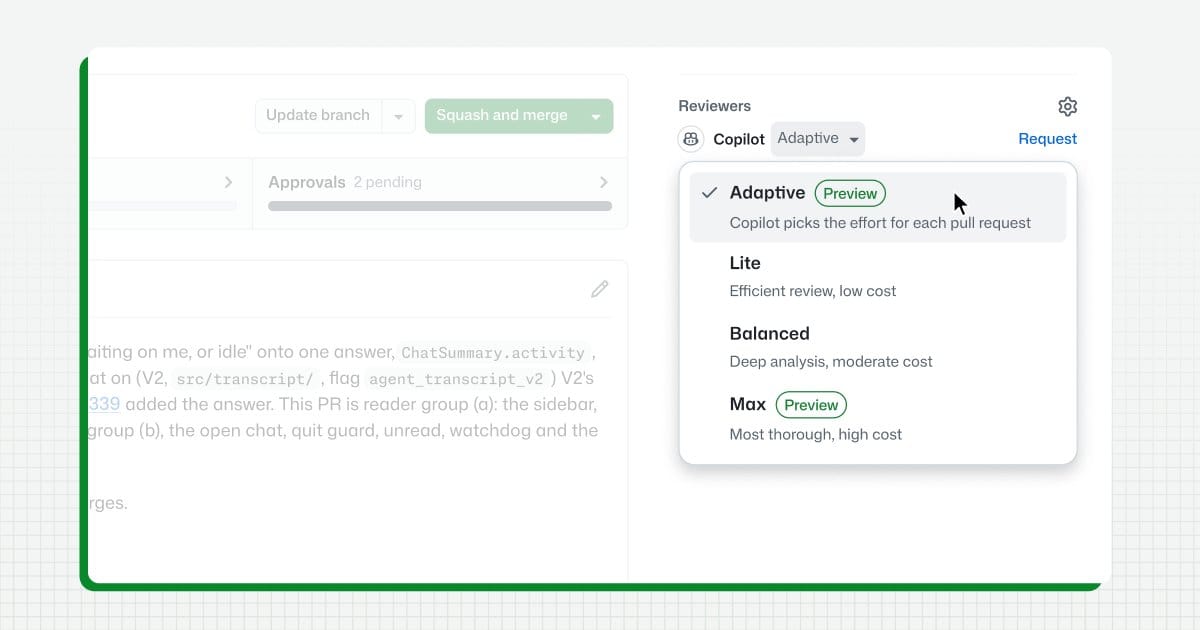
You can choose Adaptive for a single pull request from the Reviewers bar. You can also set it as the default for a person, repository, organization or enterprise. Balanced stays the default for now. Adaptive never goes above the maximum level an admin has set, so a team can keep Max off to control costs.
Cost is the practical reason this matters. GitHub's docs estimate that an average review uses about $0.25 of AI credits with Lite, $1.50 with Balanced and $10 with Max. A single Max review can reach $25 on a large pull request.
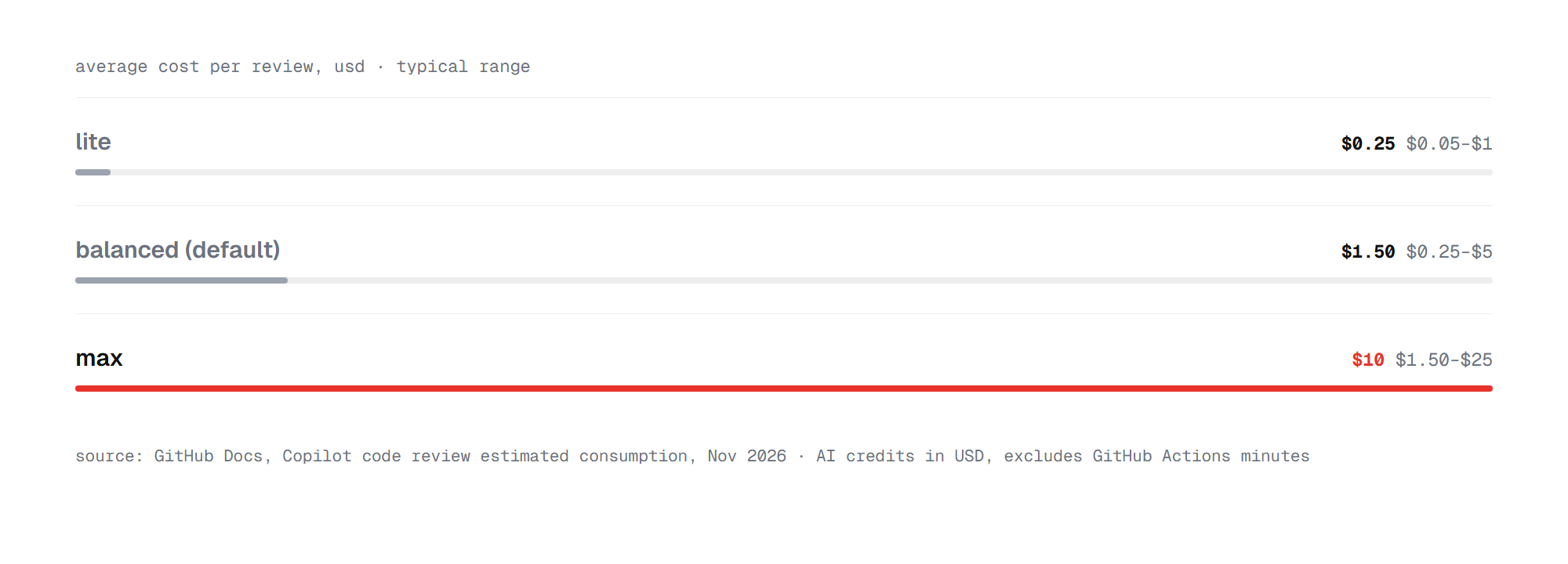
That is a 40-fold gap between the cheapest and the most thorough level. Sending every pull request to Max would be expensive, and sending everything to Lite would miss risky changes. Adaptive is meant to spend the money only where the risk is.
The second update widens what Copilot can see during a review.
Cross-repository context
Many changes break code in other repositories. A renamed API field can break every service that calls it. With cross-repository context, Copilot code review can read related repositories and find code that depends on your change.
It can also pull in documentation, custom instructions and agent skills stored in a central repository. A company can keep its review rules in one place and use them everywhere. You choose which repositories Copilot may read.
For now, cross-repository context works only for public repositories. Teams with private code will have to wait.
Secret detection in pull requests
Copilot code review can now flag credentials that land in a pull request, so you can remove them before merging. It combines two methods:
- Known formats. GitHub's secret scanning program has more than 150 partners. Together they cover over 500 secret types, found with fixed rules such as regex.
- AI-detected secrets. Copilot also uses language models and GitHub's own secret detection model to find credentials that follow no known format.
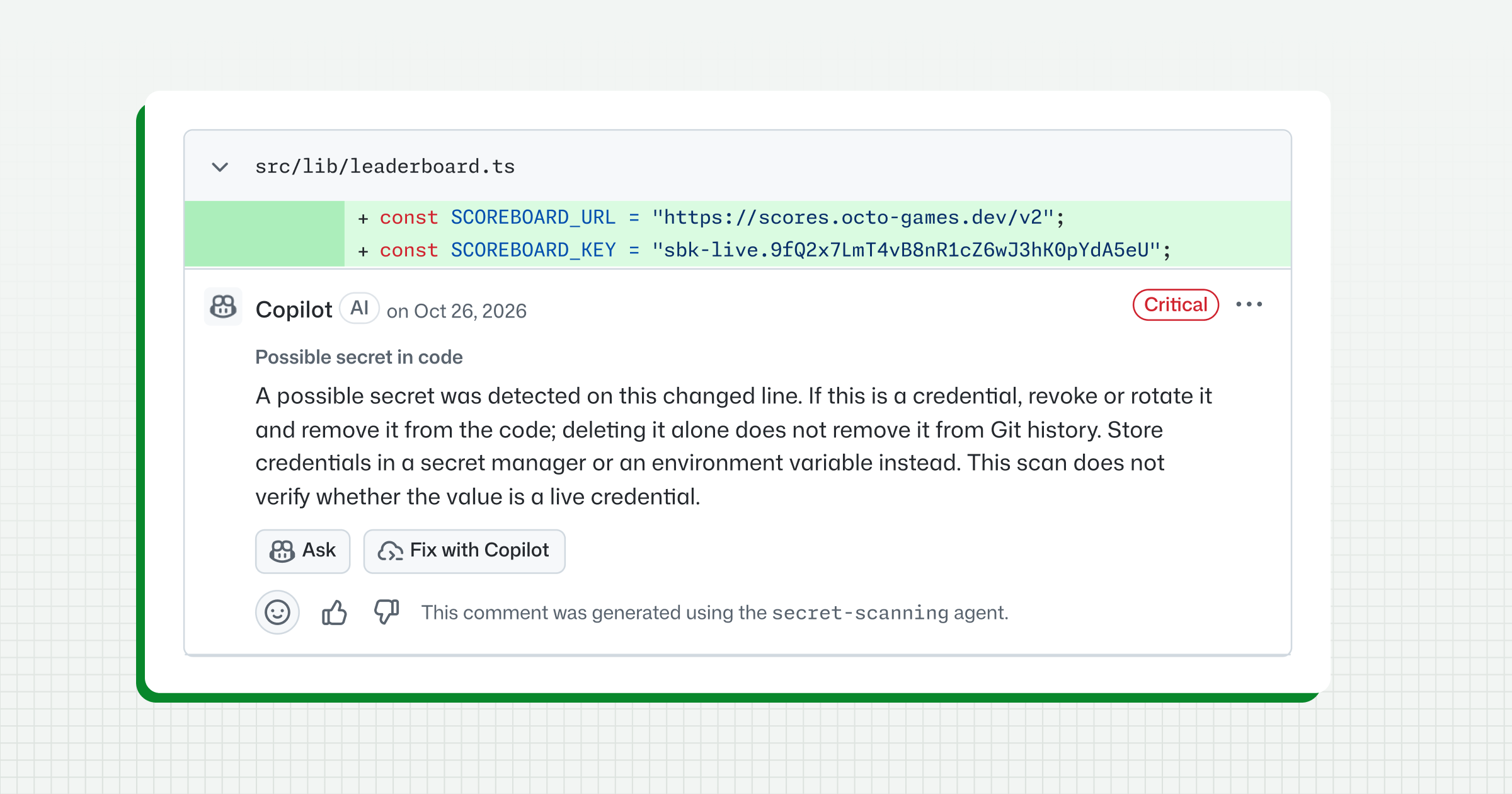
The comment advises revoking or rotating the key. Deleting the line alone leaves the secret in Git history. Admins turn the feature on in the repository or organization settings, under Copilot and then Code review. Secret detection is in public preview.
The fourth update measures how all these comments land.
Repository insights for Copilot reviews
Repository insights is a new page, listed first in each repository's Insights tab. Anyone with read access can open it. It tracks four signals:
- Comments addressed: how many Copilot comments developers acted on.
- High-severity comments addressed: the same, for serious findings only.
- No later human change request: pull requests that a human reviewer did not send back after Copilot reviewed them.
- Merged without Copilot review: pull requests that skipped Copilot entirely.
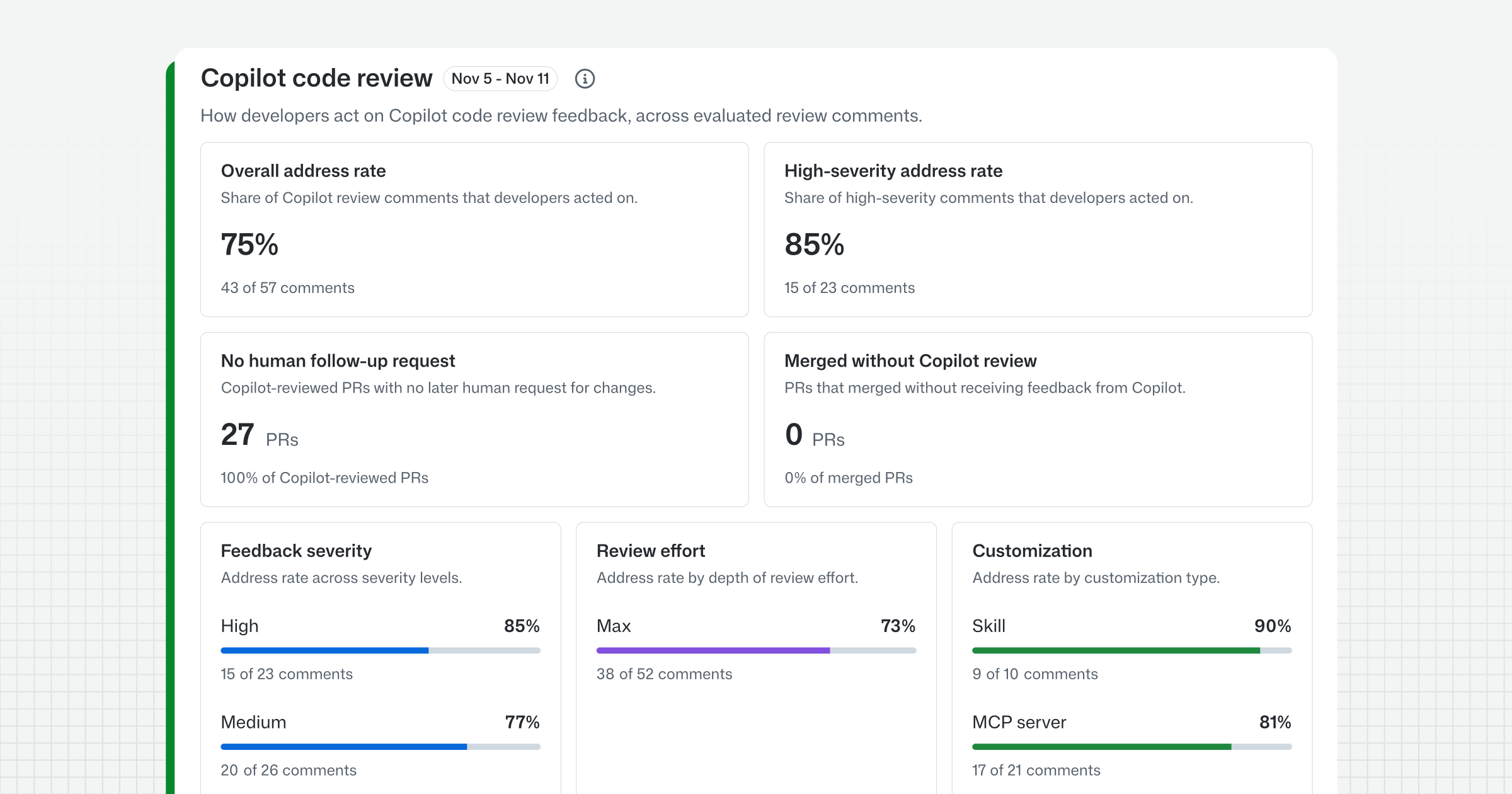
The page also breaks down the address rate over time, by comment type and by review effort. The same metrics are available through the Copilot usage metrics API for organization and enterprise reports.
One question came up under GitHub's post. A resolved thread can mean the issue was fixed or that the comment did not apply. GitHub has not said whether the metric tells those apart.
The last update brings Copilot reviews beyond GitHub.
Copilot code review for Azure DevOps
Copilot code review for Azure Repos is now generally available. Teams that host code in Azure DevOps get Copilot comments and suggested changes on their pull requests.
Admins turn it on at the organization, project or repository level. A branch policy can request a Copilot review automatically. Teams can set Lite or Balanced as the default and add custom instructions and skills. Usage is billed in GitHub AI credits to the linked Azure subscription, so costs show up in Azure Cost Management.
Should you turn on Adaptive
Yes, if your team reviews many pull requests of mixed risk. Adaptive saves credits on small changes and runs a deeper review on risky ones without anyone choosing each time. Set a maximum level first, since Max is the expensive tier. Turn on secret detection as well, because a leaked key costs far more than a review. Then check Repository insights after a few weeks to see whether developers actually act on Copilot's comments.
FAQ
What is Adaptive in Copilot code review?
Adaptive is a review effort setting. Copilot looks at each pull request's complexity and risk and reviews it with Lite, Balanced or Max. It is in public preview.
How much does a Copilot code review cost?
GitHub estimates an average review at about $0.25 in AI credits with Lite, $1.50 with Balanced and $10 with Max. GitHub Actions minutes for context gathering are billed separately.
Which plans include the new Copilot code review features?
Adaptive, cross-repository context and secret detection are available on Copilot Pro, Pro+, Max, Business and Enterprise.
Does cross-repository context work with private repositories?
Not yet. It is in public preview for public repositories only.
How do I turn on secret detection in Copilot code review?
Go to your repository or organization settings, open Copilot and then Code review, and enable secret detection.
Where do I find Repository insights?
Open the Insights tab of any repository you can read and select Repository insights. It is the first item in the tab.
Does Copilot code review work in Azure DevOps?
Yes. Copilot code review for Azure Repos is now generally available and is billed in GitHub AI credits through Azure.
Sources
- GitHub's announcement on X – November 18, 2026
- Copilot code review: Adaptive effort, secret detection, and more, GitHub changelog – November 17, 2026
- Track Copilot code review outcomes in Repository insights, GitHub changelog – November 17, 2026
- Copilot code review: Merge with confidence with Max and approvals, GitHub changelog – October 28, 2026
- About Copilot code review, GitHub Docs
- Copilot code review effort levels are generally available, GitHub changelog – August 7, 2026