
 Felix Laurent

NVIDIA Switchyard, also called NeMo Switchyard, is an open-source LLM router that picks which model answers each call an AI agent makes. Easy steps go to a cheap model, and hard ones go to a frontier model. There are three ways to use it. The quickest is OpenRouter's hosted nvidia/switchyard model. You can also run the Switchyard server on your own machine, or build the library into your agent.
This guide covers each route, with configs for Claude Code and Codex, and shows what the published benchmarks say about savings. Commands and versions were checked against the GitHub repository and partner docs on November 23, 2026.
What NVIDIA Switchyard does
Agent workflows make many model calls per task, and most of them are simple steps: reading a file, running a test, making a single edit. Sending every step to an expensive frontier model wastes money, while a cheap model alone fails on the hard steps. Switchyard is a routing layer that sits between the agent and the model providers to split that work.
NVIDIA announced Switchyard on August 11, 2026, together with its Nemotron 3.5 Lightning model. The repository describes it as "an open-source library that helps an AI agent choose which model handles each request." It uses the Apache 2.0 license. The latest stable release is v0.3.0, and v0.4.0a1 is in preview.
You give Switchyard two targets: a capable model and an efficient one. A routing algorithm then decides, call by call, which one handles the request. Some algorithms read the agent's recent tool activity. Others ask a small judge model whether the cheap model can cope. "Routing can change as the agent continues its work," the README says.
The project is pre-1.0. NVIDIA warns that APIs, configuration and routing behavior can change between releases, so pin the version you use. The obvious question is whether the routing actually saves money.
Does Switchyard save money? The benchmarks
The most quoted test comes from LangChain, which NVIDIA cites in its own announcement. LangChain ran 145 Deep Agents tasks with Claude Opus 4.8 as the strong model and Nemotron 3.5 Lightning as the cheap one. Gemini 3.1 Flash Lite acted as the judge.
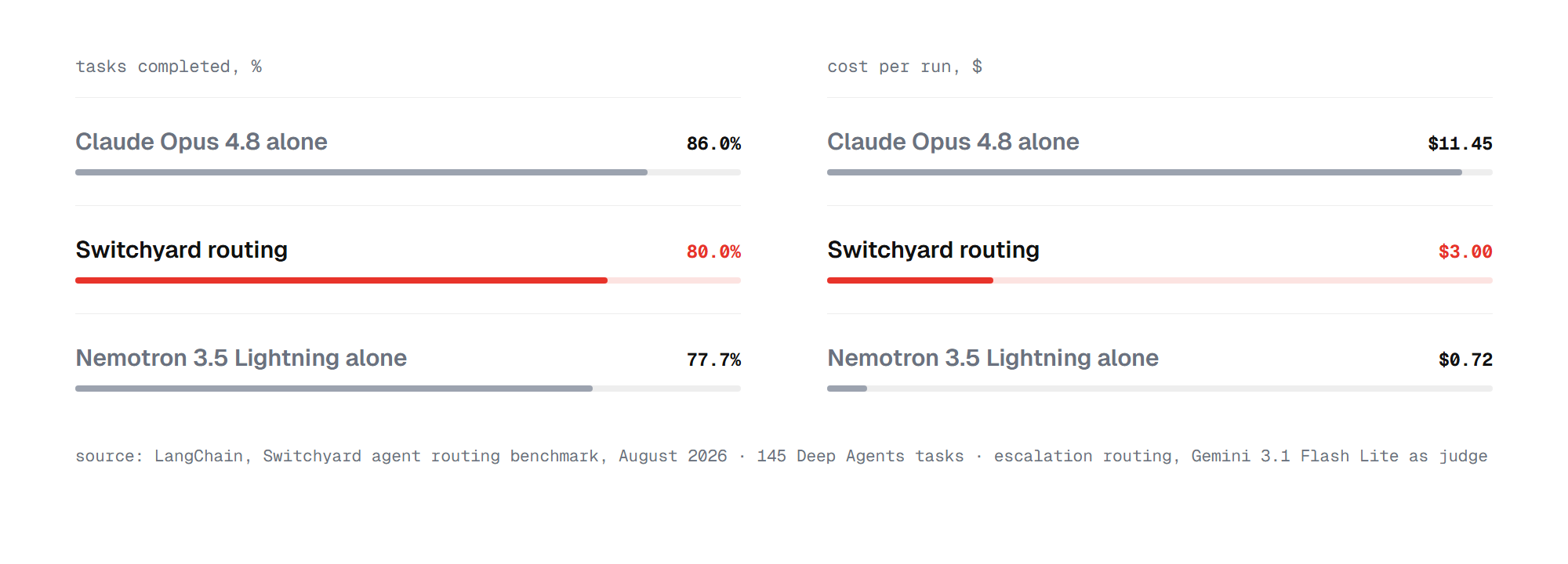
Routing brought a 74% cost reduction per run, from $11.45 to $3.00, and lost 6 points of accuracy. Only about 7% of calls went to Opus, yet they took 68% of the routed spend. The judge took another 21% and added about 700 ms per turn. The cheap model alone scored 77.7% for $0.72, within 2.3 points of the routed setup.
NVIDIA's own repository tests a different pair: GPT-6 Astra as the capable model and GPT-6 Luna as the efficient one, run in Codex CLI.
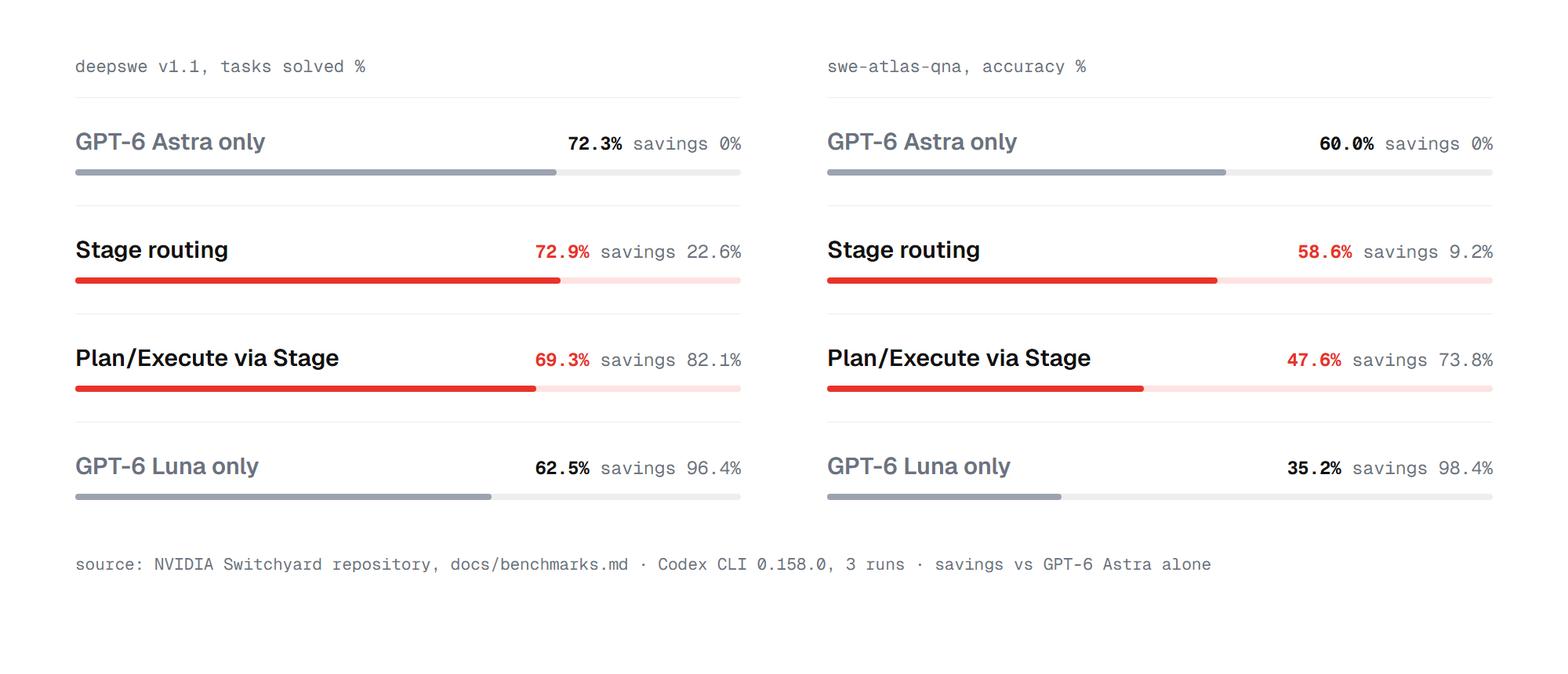
On DeepSWE, Stage routing matched Astra's accuracy and saved 22.6%. Plan/Execute saved 82.1% for a 3-point drop. On SWE-Atlas-QnA, the cheaper setting lost 12 points, so the trade-off depends on the task. The fastest way to test it on your own work is OpenRouter.
Option 1: use Switchyard on OpenRouter
The hosted version runs as a model called nvidia/switchyard, so there is no infrastructure to set up. It charges no routing fee: you pay the rate of the model that answers, plus judge calls billed as normal requests. You pass one to three candidate models and pick an algorithm:
import os
from openai import OpenAI

client = OpenAI(base_url="https://openrouter.ai/api/v1",
                api_key=os.environ["OPENROUTER_API_KEY"])
resp = client.chat.completions.create(
    model="nvidia/switchyard",
    messages=[{"role": "user", "content": "Refactor this function: ..."}],
    extra_body={
        "models": ["anthropic/claude-opus-5.5", "z-ai/glm-5.3-flash"],
        "plugins": [{"id": "switchyard-router", "algorithm": "stage"}],
    },
)
The algorithm can be stage (the default), capability, auto, composite, random or passthrough. Algorithms that use a judge need OpenRouter credits, and the default judge is Gemini 3.5 Flash Lite. Add the X-OpenRouter-Metadata: enabled header to see which model answered. For full control, run Switchyard yourself.
Option 2: run the Switchyard server locally
The local server is the most flexible route, but NVIDIA labels it for "demos and local evaluation only". It needs Rust 1.96.1 or newer, and release builds are validated on Ubuntu 24.04. There is no published Docker image yet, but the Dockerfile in the GitHub repository builds one. Install a pinned version:
cargo install --locked switchyard-server --version 0.3.0Routes live in a TOML file. This routes.toml sends every call through OpenRouter and lets the Auto algorithm pick between two targets:
schema_version = 1

[llm_clients.openrouter]
format = "openai_chat"
base_url = "https://openrouter.ai/api/v1"
api_key_env = "OPENROUTER_API_KEY"

[targets.efficient]
id = "z-ai/glm-5.3-flash"
llm_client = "openrouter"

[targets.capable]
id = "anthropic/claude-opus-5.5"
llm_client = "openrouter"

[routes.smart]
id = "switchyard"
type = "auto"
capable_target = "capable"
efficient_target = "efficient"
Check the config, then start the server:
switchyard-server --config routes.toml --dry-run
switchyard-server --config routes.toml --host 127.0.0.1 --port 4000
For an even cheaper efficient target, NVIDIA's own Nemotron 3.5 Lightning is on OpenRouter as nvidia/nemotron-3.5-lightning. Agents now call http://127.0.0.1:4000/v1 with the model name switchyard. The response header x-model-router-selected-model shows which target answered. Any OpenAI-compatible endpoint works as a client, and format also accepts anthropic_messages and openai_responses. That makes it easy to put a coding agent in front of it.
Use Switchyard as an LLM router for Claude Code and Codex
The repository includes a recipe for Claude Code that routes between Opus 5.5 and Sonnet 5.5, with Haiku as the judge. Its client uses format = "anthropic_messages", base_url = "https://api.anthropic.com" and forward_auth = true, on port 4123. Start Claude Code against it like this:
env -u ANTHROPIC_API_KEY -u ANTHROPIC_AUTH_TOKEN \
  ANTHROPIC_BASE_URL=http://127.0.0.1:4123 \
  ANTHROPIC_DEFAULT_OPUS_MODEL=switchyard \
  ANTHROPIC_DEFAULT_SONNET_MODEL=switchyard \
  claude --model switchyard
For Codex, add a profile with base_url = "http://127.0.0.1:4123/v1" and wire_api = "responses", then run codex --profile switchyard. A Claude Code plugin with /switchyard on and /switchyard off commands also exists, for Linux x86_64 only. Which algorithm you choose matters as much as the setup.
Which routing algorithm to choose
Switchyard ships several algorithms, set with type in the route:
- Auto is a fixed preset with no judge call, the simplest place to start.
- Stage reads recent tool activity: errors and loops push toward the capable model, and steady edits toward the cheap one.
- Task asks a judge model whether the efficient model can handle the task.
- Composite uses a judge to set the default tier when tool signals are unclear.
- Escalation starts cheap and switches to the strong model for the rest of the session after repeated failures.
Stage and Auto add no extra calls. Judge-based algorithms route better on mixed work but cost a call per turn. Switchyard also plugs into tools you may already run.
Other ways in: LiteLLM, Kong, LangChain and Python
LiteLLM added Switchyard's stage router as an auto-router strategy on November 6, under the model name auto_router/switchyard. Kong offers a Switchyard routing policy for AI Gateway 2.2 and later, which runs in observe-only mode by default. LangChain has experimental Deep Agents middleware, though it is not yet published as a package.
Inside your own code, the Python package is nemo-switchyard, installed with pip install nemo-switchyard. It exposes the routing algorithms directly, so your service keeps its own clients and keys. People often ask how it compares with the tools they already know.
NVIDIA Switchyard vs LiteLLM and other alternatives
LiteLLM is a gateway: one API in front of many providers, with keys, budgets and fallbacks. Switchyard only makes the routing decision for each call. The two work together, which is why LiteLLM now ships Switchyard's stage router.
The main alternatives are hosted routers. OpenRouter offers its own Auto Router (openrouter/auto) and Auto Code router next to nvidia/switchyard. NVIDIA's older LLM Router blueprint on build.nvidia.com classifies prompts by task. Switchyard differs from both because it reads the agent's tool activity during a session, so its choice can change mid-task. Before any of this goes near production, a few limits matter.
Limits to know before production
Switchyard is still early software, and its docs list several traps that cancel out the savings.
- The server is demo-only and binds to localhost by default. Production setups embed the library or use a gateway.
- Every switch loses the prompt cache, which can eat into savings on long sessions.
- Escalation needs a session ID in the
x-switchyard-session-idheader, or it never latches to the strong model. - Chat without tool calls never routes under Auto and Stage, since there are no tool signals to read.
- A cheaper call is not a cheaper task. If the small model fails and retries, the total can rise.
Judge calls also add latency, about 700 ms per turn in LangChain's test. Measure cost per completed task on your own data, not cost per call, before you trust the efficiency gains.
So is NVIDIA Switchyard worth using?
NVIDIA Switchyard is worth testing if your agents run long, tool-heavy sessions on a frontier model. LangChain's test cut costs by 74% for a 6-point accuracy loss. NVIDIA's own runs matched the strong model on DeepSWE at 22.6% lower cost. Start with OpenRouter's nvidia/switchyard to measure it on real work, then move to the local server or LiteLLM. For short chats, latency-sensitive apps or work a cheap model already handles, routing adds cost and complexity for little gain.