 Felix Laurent
You can run DeepSeek V4.1 Flash with Ollama today, but only as a cloud model. Ollama's library lists two tags, deepseek-v4.1-flash:cloud and deepseek-v4.1-flash:1017-cloud, and both run on Ollama's servers. Local support in Ollama is still an open pull request. Running the weights on your own machine takes llama.cpp. The smallest quantized build needs at least 122 GB of combined RAM and VRAM.
This guide covers both routes. It shows how to set up DeepSeek V4.1 Flash in Ollama Cloud, call it through the API and connect it to coding agents. It also explains what a fully local setup takes. Commands, prices and sizes were checked against Ollama, Hugging Face, Unsloth and DeepSeek pages on November 13, 2026.
DeepSeek V4.1 Flash at a glance
DeepSeek V4.1 Flash is an open-weights mixture-of-experts model released under the MIT license. The model card lists a 552B-parameter backbone plus a 196B "Engram" memory table, accessed by token lookup. Only 8B parameters are active per token during prefill and 16B during decoding. The context window is 1M tokens, and the model accepts images as well as text.
DeepSeek updated the weights on October 17, 2026. That release, called 1017, is what the deepseek-flash API name and the :1017-cloud tag in Ollama now serve. DeepSeek's own scores show clear gains over the launch version on agentic coding tests.
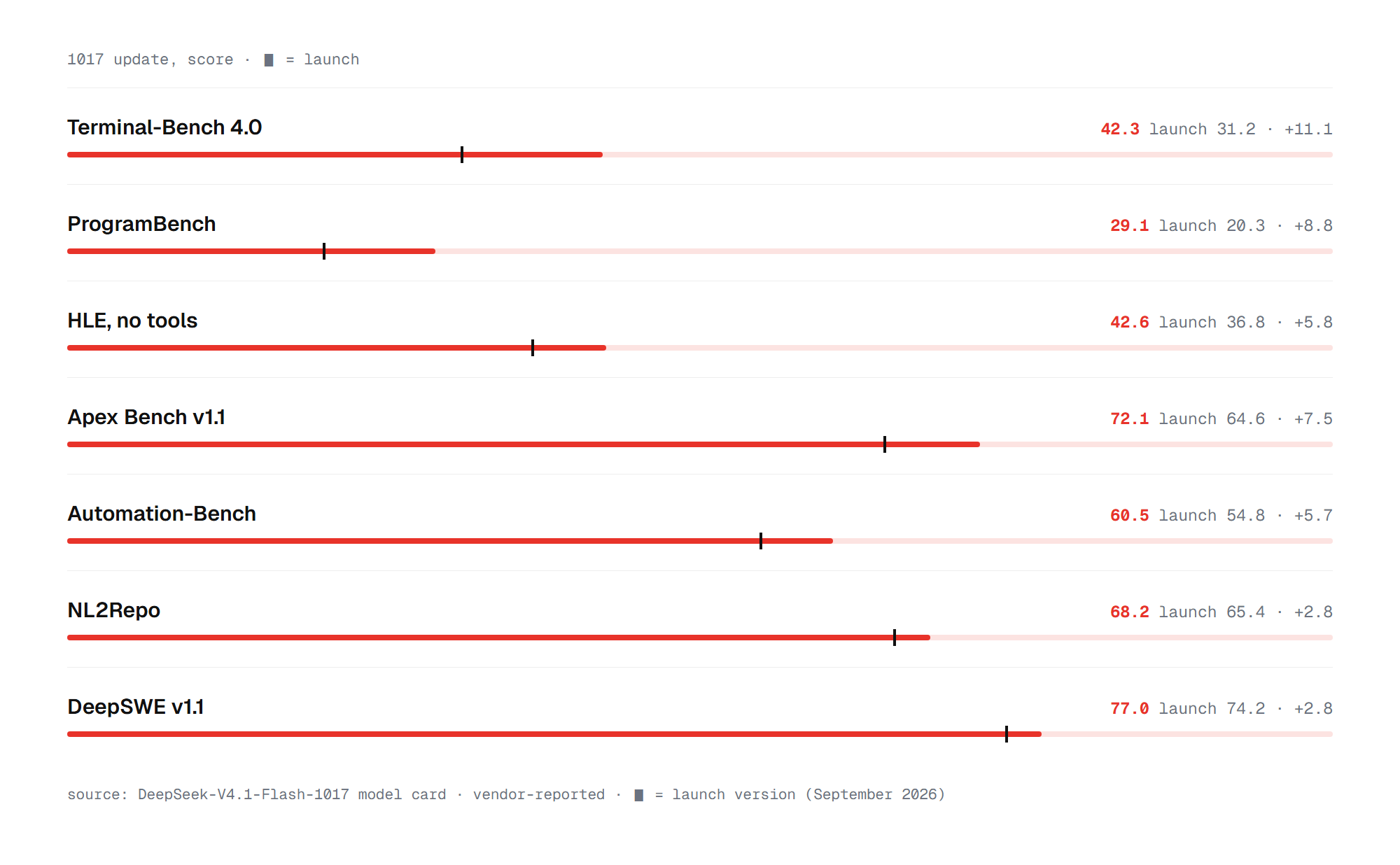
The biggest jump is on Terminal-Bench 4.0, from 31.2 to 42.3, run in the Claude Code harness. ProgramBench climbs from 20.3 to 29.1, and DeepSWE from 74.2 to 77.0. These are vendor-reported numbers. Those gains make the model worth running, which raises the question of where it can run.
Can you run DeepSeek V4.1 Flash locally in Ollama?
Not yet. The official Ollama library page for DeepSeek V4.1 Flash offers only cloud tags, with no q4 or q8 download. Ollama's release notes up to version 0.40.16 and the 0.40.17 pre-release do not mention the model or its Engram architecture. The only work in progress is pull request #19667, opened on November 12, 2026, which adds the model to Ollama's MLX engine. Its author notes it needs about 300 GB of VRAM.
Two shortcuts circulate online, and neither is a good idea. Hugging Face shows an ollama run hf.co/unsloth/... snippet for the Unsloth GGUF files. Unsloth's own page says to run them with llama.cpp or Unsloth Desktop. The quant in that snippet, UD-Q4_K_XL, also needs about 298 GB of RAM plus VRAM. An MLX upload on Ollama by the author of that pull request weighs 511 GB.
For almost everyone, the practical answer is Ollama Cloud. Setting it up takes four short steps.
Step 1: install Ollama
The app runs on macOS, Windows and Linux. On Linux, install it with one command:
curl -fsSL https://ollama.com/install.sh | shOn Windows, run this in PowerShell or download OllamaSetup.exe from ollama.com:
irm https://ollama.com/install.ps1 | iexOn macOS, download Ollama.dmg from ollama.com/download and move the app to Applications. Cloud models need no GPU, so any computer that runs Ollama can use DeepSeek V4.1 Flash this way. They do need an account.
Step 2: sign in and pick a plan
Cloud models require an Ollama account. Sign in from the app or with one command:
ollama signinOllama's pricing page lists no free cloud usage. The Pay as you go plan costs $0 a month and bills every cloud request per token. Pro costs $20 a month and includes $60 in usage credits. Max costs $100 a month with $300 in credits and ten concurrent requests.
For DeepSeek V4.1 Flash, Ollama Cloud charges the same per-token prices as DeepSeek's own API. Input costs $0.30 per million tokens at peak and $0.15 off-peak, and output costs $1.20 and $0.60. Cached input drops to $0.006 and $0.003. Ollama counts weekdays outside 12:00 to 18:00 UTC and all weekends as off-peak. Ollama says it does not use cloud prompts to train models.
Step 3: run DeepSeek V4.1 Flash
With the account signed in, start a chat in the terminal:
ollama run deepseek-v4.1-flash:cloudNothing is downloaded, because inference runs on Ollama's servers. The :1017-cloud tag points to the same model image as :cloud, so either name gives you the October update. The model supports tools, thinking and image input in Ollama, with the full 1M-token context window.
The model can reason before it answers. To skip reasoning on simple questions, set "think": false in the request. Most people will use the model through the API or a coding agent, not in the terminal.
Step 4: call the model through the Ollama API
Ollama exposes an OpenAI-compatible API at http://localhost:11434/v1, and cloud models work through it like local ones. The API key is required by client libraries but ignored by Ollama, so any value works. A quick test with curl:
curl http://localhost:11434/v1/chat/completions \
  -H "Content-Type: application/json" \
  -d '{"model": "deepseek-v4.1-flash:cloud", "messages": [{"role": "user", "content": "Hello"}]}'
Ollama also serves an Anthropic-compatible /v1/messages endpoint on the same port. That is what lets coding agents built for Claude talk to DeepSeek through Ollama. It does not support prompt caching, tool_choice, token counting or PDFs. To call Ollama Cloud directly without the local app, send requests to https://ollama.com/api/chat with an OLLAMA_API_KEY.
Use DeepSeek V4.1 Flash with Claude Code and other agents
The ollama launch command connects a model to a coding agent in one step. The Ollama model page lists Claude Code, OpenCode, Hermes Agent and OpenClaw as supported:
ollama launch claude --model deepseek-v4.1-flash:cloudSwap claude for opencode, openclaw or another supported tool. To configure Claude Code by hand, set ANTHROPIC_BASE_URL=http://localhost:11434, ANTHROPIC_AUTH_TOKEN=ollama and an empty ANTHROPIC_API_KEY, then start claude --model deepseek-v4.1-flash:cloud. In VS Code, any extension that accepts an OpenAI-compatible endpoint can use the same localhost address.
One open issue matters for long sessions. Ollama issue #19249 reports that Claude Code's automatic context compaction can fail with the :1017-cloud tag, though maintainers have not reproduced it. For a full local agent setup with Ollama, see our guide to running OpenClaw with Ollama. If the cloud is not an option, the model can still run on your own hardware, outside Ollama.
Running DeepSeek V4.1 Flash fully offline with llama.cpp
Support for DeepSeek V4.1 Flash reached mainline llama.cpp in late October 2026. It replaced Unsloth's own patch, which had added the Engram table and vision. Unsloth publishes GGUF builds in the unsloth/DeepSeek-V4.1-Flash-1017-GGUF repository. Even the smallest one is a 233 GB download split across five files. The Engram table can stay on a fast SSD, and the rest has to fit in RAM plus VRAM.
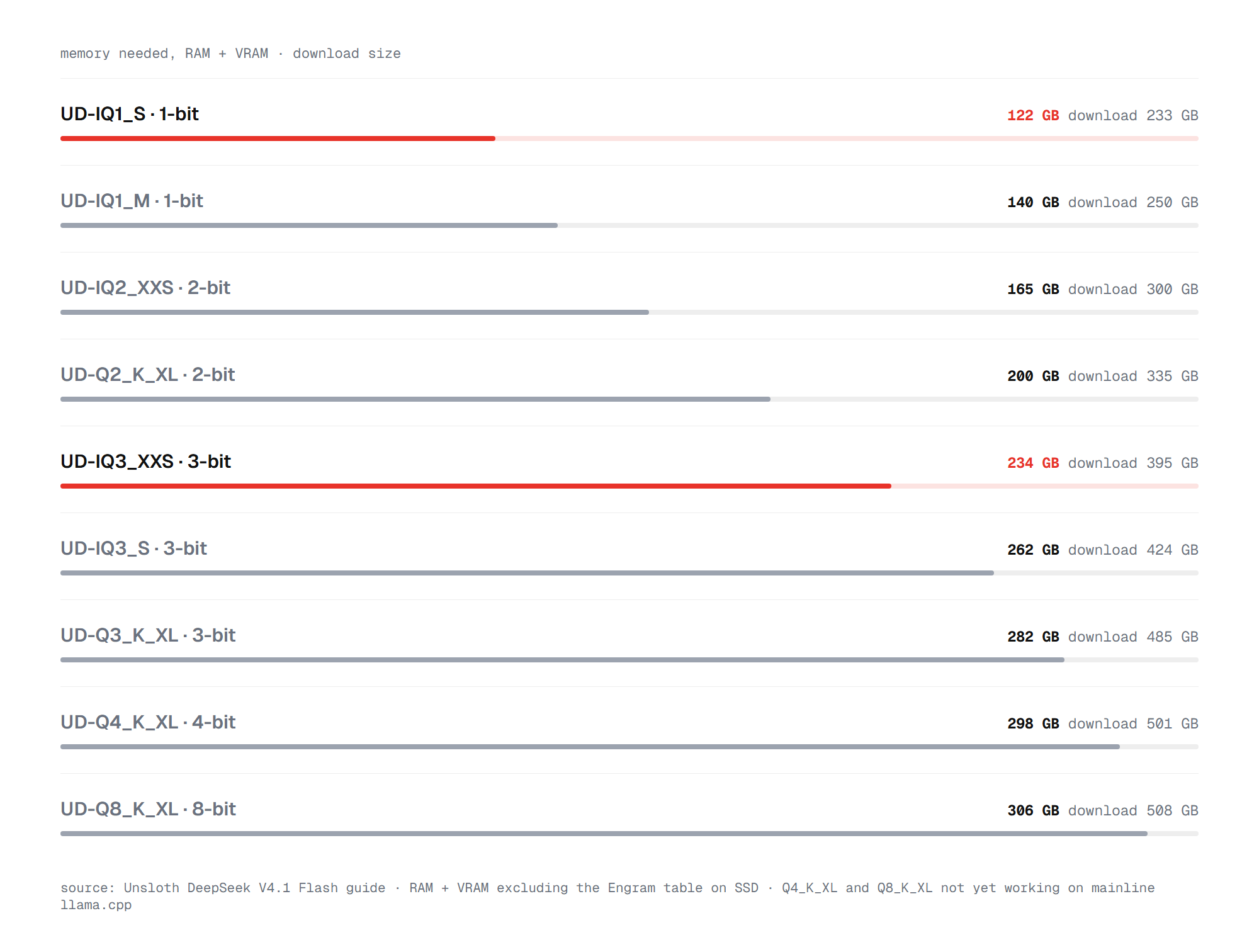
Unsloth says the 1-bit UD-IQ1_S build works on 128 GB machines such as a MacBook or DGX Spark. The 3-bit UD-IQ3_XXS fits a 256 GB Mac Studio. Speed depends heavily on hardware. One user reported about 4.4 tokens per second on the 1-bit build with 64 GB of RAM and a 16 GB GPU. Their own patches and tuning raised it to about 11. Another reported 19 tokens per second on two RTX 5090 cards with 512 GB of system RAM, using a larger MXFP8 build.
The 4-bit and 8-bit builds need 298 to 306 GB of RAM plus VRAM, and their Engram table grows to 203 GB. That puts them out of reach for most workstations. DeepSeek recommends temperature 1.0 and top-p 1.0 for the 1017 weights, with top-k and min-p turned off. Once llama-server is running, it exposes its own OpenAI-compatible endpoint, so the agent setup above works with a changed address. Before choosing a route, it helps to compare what each one costs.
What DeepSeek V4.1 Flash costs: Ollama Cloud, DeepSeek API or local
Ollama Cloud and DeepSeek's own API charge the same per-token prices for this model. A coding session that reads 1 million input tokens and writes 100,000 output tokens costs about $0.42 at peak. The same session costs about $0.21 off-peak, and less when the input hits the cache. Cached input costs $0.006 per million tokens at peak, fifty times less than fresh input.
The two services differ in what comes around the price. Ollama Cloud plugs into the same ollama commands, desktop app and ollama launch integrations as local models. Its Pro plan adds $60 of monthly credits for $20. DeepSeek's API is a separate account with its own key and base URL.
The peak hours also differ. DeepSeek charges peak rates from 01:00 to 04:00 and 06:00 to 10:00 UTC on weekdays. Ollama's peak runs from 12:00 to 18:00 UTC.
Running the model locally has no per-token cost, but the hardware does. A machine with 128 GB of unified memory is the realistic minimum, and a 256 GB Mac Studio is needed for the 3-bit build. At a few tokens per second on consumer hardware, a large job can take hours that the cloud finishes in minutes. Local makes sense when privacy rules out any cloud, not as a way to save money.
Whichever route you take, a few errors come up often.
Common errors and fixes
Most problems with DeepSeek V4.1 Flash in Ollama come from accounts, tags or context settings.
- "Unauthorized" on a cloud tag. Run
ollama signinand check that your plan or credits cover cloud usage. ollama pullfinds nothing to download. Cloud tags are never downloaded. Useollama rundirectly.- "Model not found" after a typo. Type the tag exactly as
deepseek-v4.1-flash:cloud, with a dot in 4.1. The olderdeepseek-v4-flashpage was retired on August 27, 2026, and has no models left to pull. - Garbled text when a system message limits the reply. Ollama issue #19156 tracks this on the cloud model. Loosen the constraint or move it into the user message.
- HTTP 500 with very large images. Issue #18853 reports errors when a prompt longer than about 655K tokens includes an image. Trim the prompt or send the image in a shorter request.
- Short memory with local models. Ollama sets a 4K context by default on machines with under 24 GB of VRAM. Raise it with
OLLAMA_CONTEXT_LENGTHor the app's context slider, and check the context size in theCONTEXTcolumn ofollama ps.
Those fixes cover the common cases. The remaining question is which route fits your setup.
So how should you run DeepSeek V4.1 Flash?
For nearly everyone, the best way to run DeepSeek V4.1 Flash with Ollama is ollama run deepseek-v4.1-flash:cloud. It needs no GPU, takes four commands, and costs the same per token as DeepSeek's own API. It also plugs into Claude Code and other agents through ollama launch.
Run it locally only if your data cannot leave your machine and you have at least 128 GB of memory. In that case, use llama.cpp with Unsloth's UD-IQ1_S or UD-IQ3_XXS build and watch Ollama pull request #19667 for native support.
FAQ
The questions below come up most often about DeepSeek V4.1 Flash and Ollama.
Is DeepSeek V4.1 Flash free on Ollama?
No. Ollama's $0 plan still bills every cloud request, and the model is billed per token at $0.15 to $0.30 per million input tokens. The Pro plan at $20 a month includes $60 in usage credits.
What hardware do I need to run DeepSeek V4.1 Flash locally?
The smallest 1-bit build needs at least 122 GB of combined RAM and VRAM. It also needs about 111 GB of fast SSD space for the Engram table. The 4-bit build needs about 298 GB, plus a 203 GB Engram table. Cloud use needs no special hardware.
What is the difference between the :cloud and :1017-cloud tags?
Today, none. Both tags point to the same model image, which is the October 17 update. The :1017-cloud tag pins that version, while :cloud may move to a newer one later.
Can I use DeepSeek V4.1 Flash in VS Code?
Yes. Point any extension that supports an OpenAI-compatible endpoint at http://localhost:11434/v1 and choose deepseek-v4.1-flash:cloud as the model.
Is DeepSeek V4.1 Flash open source?
The weights are open under the MIT license, which allows commercial use. Ollama Cloud and DeepSeek's API are paid services that host the same model.